PoQStacker is a PC based MP3 and wav file music player with a playlist manager / organizer. If you have a CD or MP3 collection, PoQStacker will assist you in connecting you to your music.
Features:
- Floating Library
- CD Ripper
- WiFi / Network Ready
- Levelling / Normalisation
- Unlimited Playlists
- Resident DJ
Category Archives: PC

MP3val ~ Validate Your mp3s
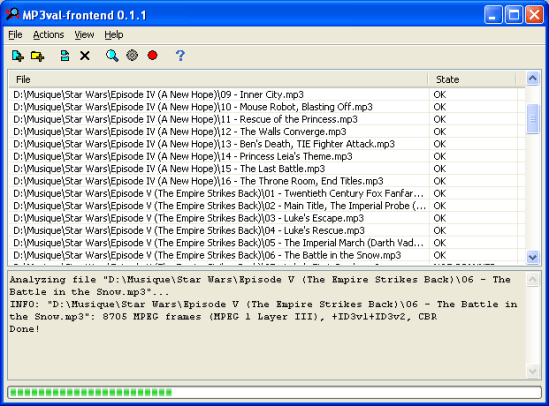
MP3val is a small, high-speed, free software tool for checking MPEG audio files’ integrity. It can be useful for finding corrupted files (e.g. incompletely downloaded, truncated, containing garbage). MP3val is also able to fix most of the problems. Being a multi-platform application, MP3val can be run both under Windows and under Linux (or BSD).
The most common MPEG audio file type is MPEG 1 Layer III (mp3), but MP3val supports also other MPEG versions and layers. The tool is also aware of the most common types of tags (ID3v1, ID3v2, APEv2).
Frontend ~ github.com/cfgnunes/wxmp3val
Share this:

VUPlayer ~ Multi-Featured Windows Player
VUPlayer is a freeware multi-format audio player for Windows
supporting the following formats:
- MOD – Sound / Noise / ProTracker
- MTM – MultiTracker
- S3M – ScreamTracker
- XM – FastTracker
- IT – ImpulseTracker
- MO3 – MO3 Packer
- MP3 – MPEG Audio
- MP4 – QuickTime MPEG-4 (AAC / Apple Lossless)
- MPC – Musepack
- OGG – Ogg Vorbis
- FLAC – Free Lossless Audio Codec
- APE – Monkey’s Audio
- WV – WavPack
- AIFF – Audio Interchange File Format
- WMA – Windows Media Audio
- WAV – Windows PCM / ACM
- MIDI – Musical Instrument Digital Interface
- CD – Audio CD

Share this:

eSpeak ~ Open Source Speech Synthesizer
eSpeak is a compact open source Linux and Windows speech synthesizer for English and other languages. eSpeak uses a “formant synthesis” method. This allows many languages to be provided in a small size. The speech is clear, and can be used at high speeds, but is not as natural or smooth as larger synthesizers which are based on human speech recordings.
eSpeak is available as:
- A command line program (Linux and Windows) to speak text from a file or from stdin.
- A shared library version for use by other programs. (On Windows this is a DLL).
- A SAPI5 version for Windows, so it can be used with screen-readers and other programs that support the Windows SAPI5 interface.
- eSpeak has been ported to other platforms, including Android, Mac OSX and Solaris.
Share this:

Squash ~ Learning Music Player
Squash is a C / Ncurses based Unix music player. It supports mp3, ogg and flac through libraries. Squash uses statistics to determine songs to play automatically. It garners this information through whether or not a song is skipped. Squash also avoids picking the same song twice. Thus Squash is like a radio station that plays the songs you like — and you don’t even have to call in requests!
Share this:

LameXP ~ Multi-Format Audio Encoder Front-end
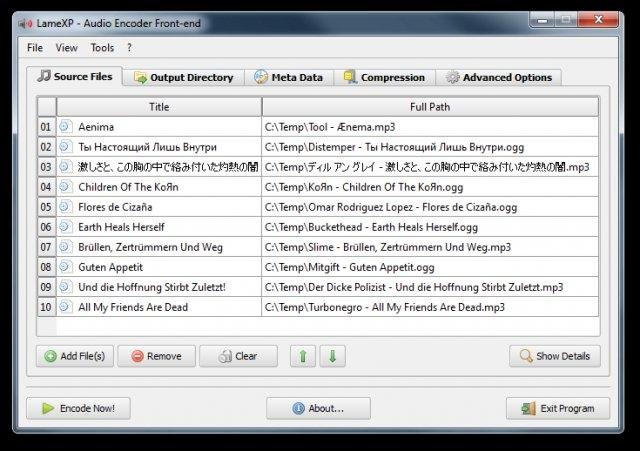
LameXP is a free multi-format audio file converter that supports a variety of output formats, including MP3, AAC/MP4, Ogg Vorbis, Opus, as well as FLAC, and an even higher number of input formats. It also supports batch processing and can utilize multiple processor cores.
Share this:

winLAME ~ Windows Audio Encoder
winLAME is an easy to use encoder for many audio formats, including MP3, Opus, Ogg Vorbis and more. winLAME uses the LAME mp3 encoder.
winLAME lets you read in audio tracks from CDs or encode audio files from your hard drive. The intuitive wizard-style user interface makes it easy to set up encoding settings. Multicore CPUs are used to parallelize encoding tasks.

Share this:

Sweep ~ Unix Audio Editor
Sweep is an audio editor and live playback tool for GNU/Linux, BSD and compatible systems. It supports many music and voice formats including WAV, AIFF, Ogg Vorbis, Speex and mp3, with multichannel editing and LADSPA effects plugins.
www.metadecks.org/software/sweep
Share this:

Levelator ~ Enhance Your Podcast
Levelator® adjusts the audio levels within your podcast or other audio file for variations from one speaker to the next, for example. It’s not a compressor, normalizer or limiter although it contains all three. It’s much more than those tools, and it’s much simpler to use. The UI is dirt-simple: Drag-and-drop any WAV or AIFF file onto The Leveler’s application window, and a few moments later you’ll find a new version which just sounds better.
www.conversationsnetwork.org/levelator
Share this:

bs2b ~ Bauer Stereophonic-To-Binaural Headphone DSP
A typical stereo records are being made to listen by speakers. That is a sound engineer makes the stereo mix to the adaptation of sound for listening of one channel by both ears. Therefore, you will be tired during a long time headphone listening more by a super-stereo effect than by a poor design of headphones. What’s missing in headphones is the sound going from each channel to the opposite ear, arriving a short time later for the extra distance traveled, and with a bit of high frequency roll-off for the shadowing effect of the head. And the time delay to the far ear is somewhat longer at low frequencies than at high frequencies. The Bauer stereophonic-to-binaural DSP (bs2b) is designed to improve headphone listening of stereo audio records…
Share this:

mp3DirectCut ~ Direct mp3 Editor
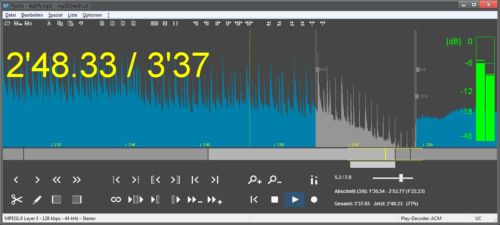
mp3DirectCut is a fast and extensive audio editor and recorder for encoded mp3s. Without re-encoding you can directly cut, crop or split your MP3 and AAC tracks, change the volume on mp3s and much more. Direct editing saves encoding time and preserves the original audio quality of your tracks. The built in recorder creates mp3s on the fly. By using cuesheets, pause detection or autocue you can easily divide long files.
Share this:

Audio Switcher ~ Windows Device Selector
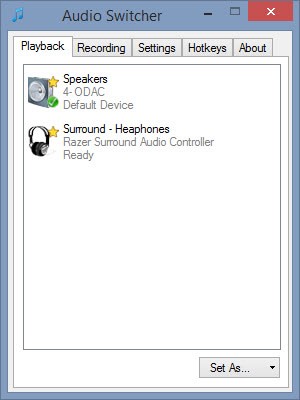
Audio Switcher is a 100% free, Open Source, application for Windows® Vista, 7, and 8.
Audio Switcher makes switching between sound devices trivial. No longer do you have to go into the Control Panel or the Windows® Sound options, instead there is an easy to access icon, or even hotkeys.
The beautiful part of Audio Switcher is it’s simplicity. It doesn’t try to do too much, it does exactly what is needed; nothing more, nothing less.