
OnKey is a free, open-source singing trainer for the Mac. Play a song in Spotify, Apple Music, or YouTube in a browser, and sing along. The first time, you get the lyrics, and OnKey learns the singer’s melody when the song ends. After that, the notes scroll towards you, your pitch is drawn over them, and you get a score with a report on every line.
OnKey doesn’t provide, stream or download music. Your own music app plays it.

foo_audiomd5 ~ Foobar2000 Does MD5 Checksums
Understanding MD5 Modes
foo_audiomd5 is a foobar2000 component that calculates MD5 checksums of audio content using FFmpeg. It offers two modes:
- Compressed-audio MD5 (default): Calculates a checksum from the compressed audio data, excluding metadata. Use this mode to identify matching encoded audio independently of tags and artwork.
- PCM-based MD5: An advanced option that calculates checksums from decoded PCM samples for supported lossless formats. Use this mode to identify matching audio across different lossless encodings, such as FLAC and ALAC.
Unlike format-specific integrity checks, foo_audiomd5 provides a common checksum field for use across supported audio formats. This makes it useful for cross-format audio comparison, library-wide deduplication and verification through foobar2000 queries or external tools. For FLAC files, it complements rather than replaces the format’s built-in integrity checks.
Configuring the Plugin
Open Preferences > Advanced > Tools > Audio MD5.
- FFmpeg bin path: Specify the location of
ffmpeg.exe. Recent versions accept either the containing directory or the full executable path. - PCM checksum: Enable the advanced option to calculate checksums from decoded PCM data for supported lossless formats.
- Quiet mode: Enable this to write tags without prompts during batch processing.
- Checksum tag field: The destination field is configurable. Confirm its name before creating foobar2000 columns or queries.
Running a Scan
- Select the files you want to process in foobar2000.
- Confirm the FFmpeg path and select the appropriate checksum mode.
- Enable quiet mode if desired.
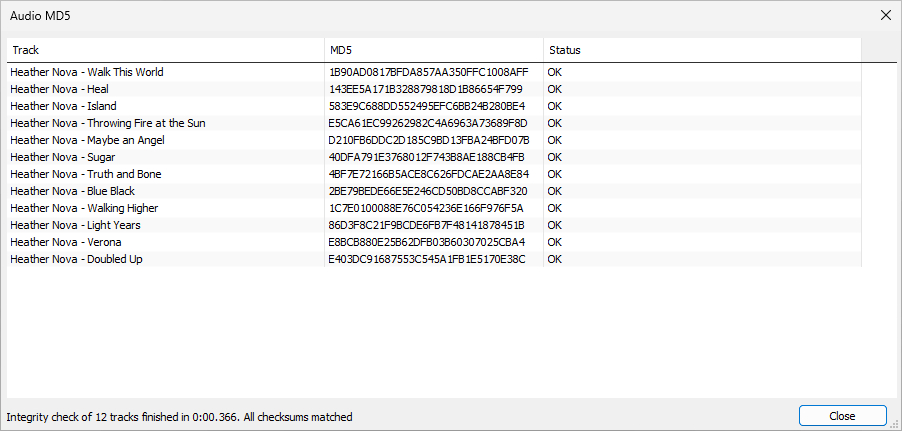
- Start the scan and review the results dialog.
- Check for errors and confirm that the checksum tags have been written.
The results dialog supports sorting and context-menu actions. Version 0.7 also added scan-duration estimates.
Existing checksums: By default, the component skips tracks that already contain the configured checksum tag. To recalculate them, use the separate, hidden-by-default forced-rescan context-menu command. This is important when changing checksum modes.
Best Practices:
- Confirm the correct checksum mode before beginning a library-wide scan.
- When changing modes, force a rescan of files with existing checksums.
- Keep the checksum field consistent across your library and document the method used.
- Use separate file-level checksums when you need to track changes to tags, artwork or other file contents.
Advanced Techniques
Recalculating an existing library: If your library already contains compressed-audio checksums and you want to adopt PCM-based checksums, configure PCM mode and use the forced-rescan command. Otherwise, existing values may be left unchanged because the default scan skips tagged files.
Verifying results across formats: Select equivalent lossless files in different formats, calculate their PCM checksums and compare the resulting tag values. Matching values provide a convenient way to identify identical decoded audio.
Using decoder integrity verification: Version 0.7 added support for decoder integrity verifiers when calculating PCM checksums. Where supported, this lets the component use the decoder’s integrity-verification facilities as part of the process.
Large-library processing: The component supports multithreaded scanning. For very large collections, process manageable batches and review the results before continuing. Multiple foobar2000 instances are not necessary for normal operation.
Component: www.foobar2000.org/components/view/foo_audiomd5
Reference: en.wikipedia.org/wiki/MD5
Share this:

AudioRouter ~ Windows Visual Router
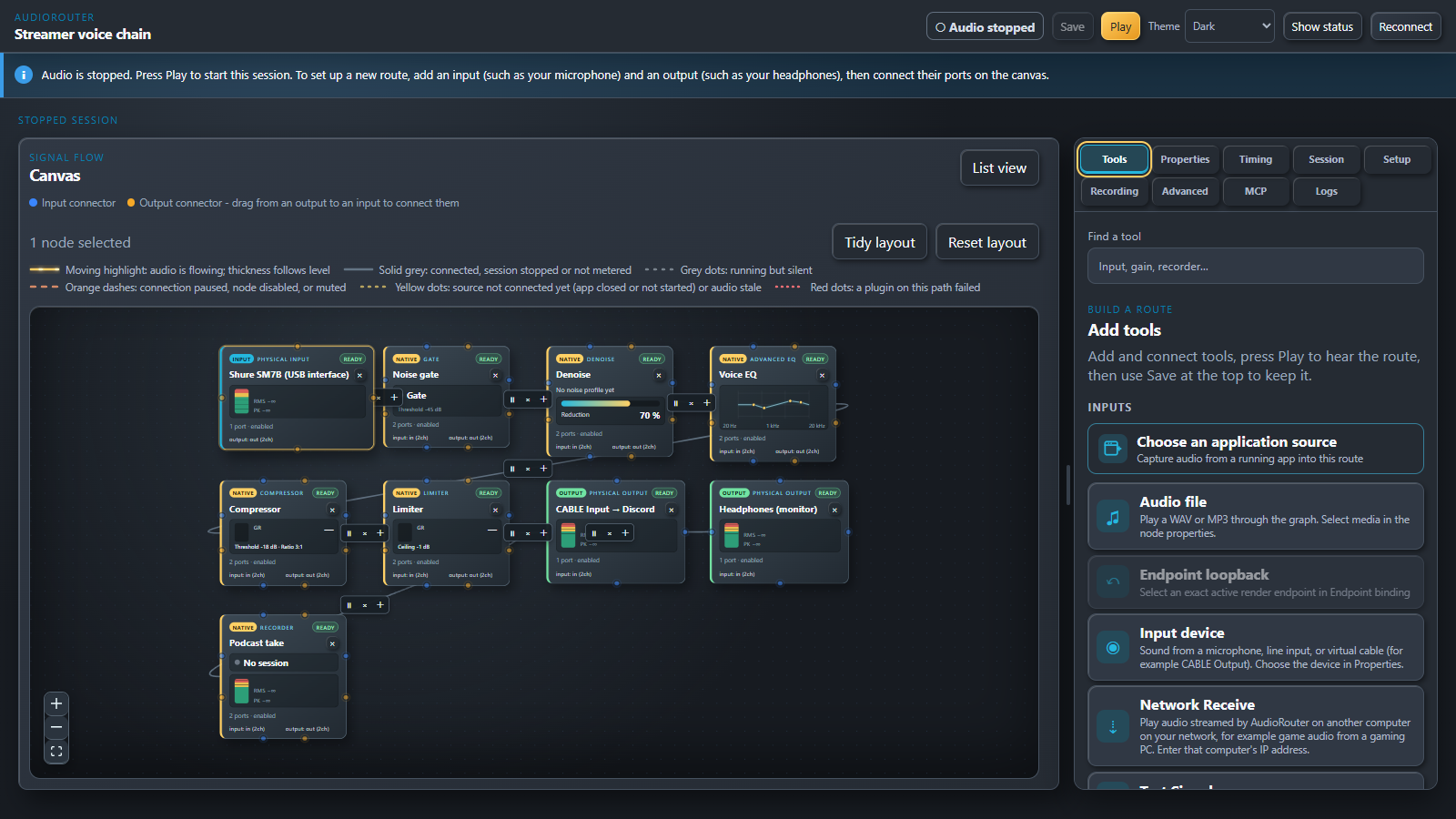
AudioRouter is a visual audio router for Windows 11. Draw your audio on a canvas: plug a microphone into a noise gate, an EQ and a compressor, send the result to Discord, monitor it in your headphones and record it, all at once. Stream game audio from your gaming PC to your streaming PC over your home network. Every route is a picture you can read, and every setting is live.
audiorouter.org
github.com/MrDesjardins/audiorouter
Share this:

Ecoute 2 ~ IOS Audio Player
Listen to iTunes without having to launch it.
ecoute.juliensagot.fr
ecoute.en.uptodown.com/mac
Share this:

Riff ~ FOSS Cross-platform Music App
Riff is an open-source, telemetry-free desktop music app and player for Windows, Linux, and macOS. It unifies playback across YouTube Music, YouTube, SoundCloud, and offline local media into a single high-performance interface without ads, subscriptions, or login constraints. Provides very fancy UI and layout.
Built with Electron, Vanilla JavaScript, and WebGL, Riff provides responsive UI interactions and hardware-accelerated audio visualization without runtime framework overhead. The project is distributed under the MIT license and enforces strict privacy: all configuration, cached streams, and playback history remain strictly on the local machine.
Features:
- High quality streaming with YouTube Music, YouTube, and SoundCloud without third-party advertisements or account requirements
- Offline lossless playback with full local library support for high resolution formats including FLAC, WAV, MP3, OGG, and M4A.
- Easy built-in audio editor, downloading with effects or trimming 10-band & 3-band equalizer, and real-time DSP effects (speed, pitch, reverb, distortion).
- 1-Click multi-platform playlist migration: Direct import and resolution of public playlists from Spotify, Apple Music, YouTube Music, and SoundCloud
- Material Design 3 UI: Dynamic color extraction from album artwork, deep UI theming, responsive layout presets, and an integrated CSS editor
- Hardware-Accelerated Visuals: Canvas and WebGL visualizers including real-time frequency analyzers, an interactive squiggly progress scrubber, and synchronized karaoke lyrics.
- Discord Rich Presence: Real-time playback status reporting track metadata, artist info, and elapsed time to Discord.
- Zero Telemetry: No tracking identifiers, analytics pings, or background data collection.
- Fullscreen mode with fancy lyrics animation.
- Albums – see all of your favorite artist albums.
- Customization – built in theme editor, configure everything, and a CSS editor, with animated backgrounds and interface opacity sliders.
- Plugins – built-in plugin feature where you can add a plugin to edit how Riff works with something or add a new function.
riff.hs.vc
github.com/rootscripts/riff
Share this:

Music ~ Python Extreme Fidelity Synthesis
Extreme-fidelity synthesis of musical elements.
Music generates and manipulates sound in LPCM audio, sample by sample. It implements MASS (Music and Audio in Sample Sequences), a collection of psychophysical descriptions of musical elements expressed as equations and corresponding Python routines.
Music can synthesize musical notes, scales and chords, apply audio filters and effects, create spatial audio, and even sing lyrics to a melody. It is designed for precise sound synthesis, audio processing, and experiments with music and sound.
Share this:

matrixmixer.lv2 ~ Matrix Mixer Plugin
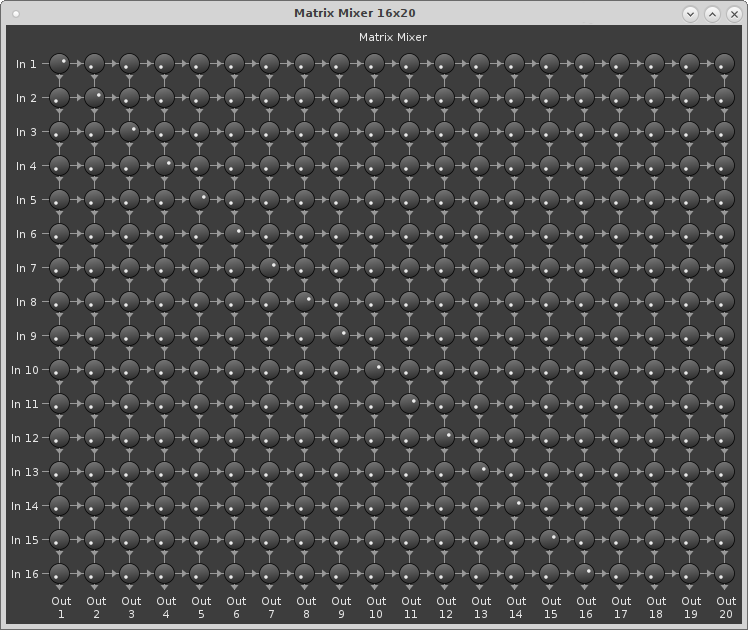
matrixmixer.lv2 is a matrix mixer 🙂
It is available as a LV2 plugin and as a standalone JACK-application. The JACK application can run headless and be remote controlled via OSC.
github.com/x42/matrixmixer.lv2
Share this:

NeoBleeper ~ PC Speaker Music Maker
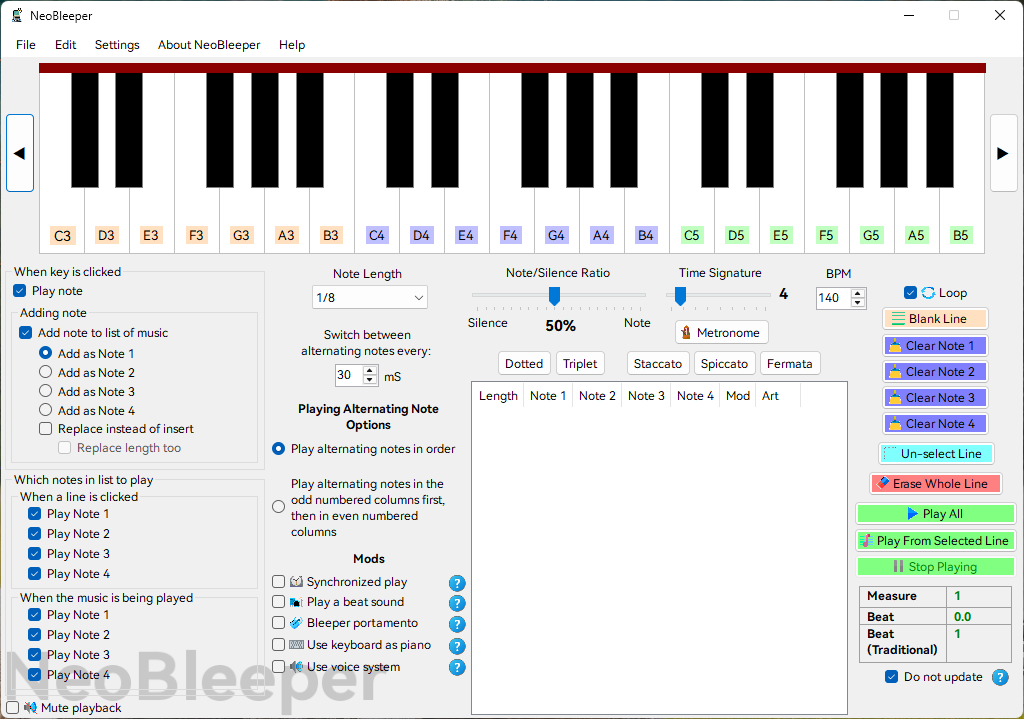
NeoBleeper is the world’s first AI-enabled tune creation software using the system speaker (aka PC Speaker) on the motherboard, inspired by the Bleeper Music Maker software that Robbi-985 (aka SomethingUnreal) developed around late 2007-early 2008 but abandoned in 2011 due to the fact that beeps were directed to the default sound device instead of the system speaker on the motherboard in newer Windows versions. NeoBleeper provides a more stable music making experience by solving the problem of system beeps being directed to the default sound device instead of the system speaker on the motherboard in newer Windows versions by accessing the physical port of the system speaker.
github.com/GeniusPilot2016/NeoBleeper
Share this:

Soundgrain ~ Granular Sound Synthesis
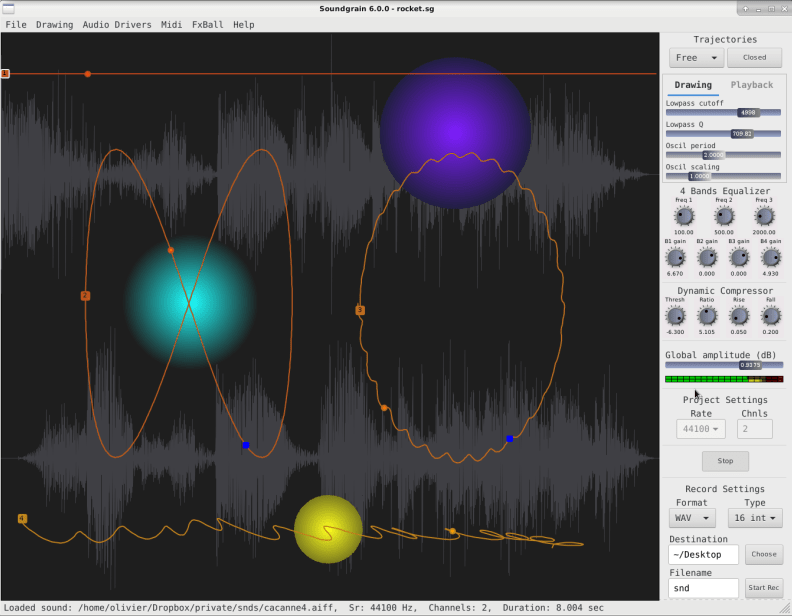
Soundgrain is a graphical interface where users can draw and edit trajectories to control granular sound synthesis. Soundgrain is written with Python/WxPython and uses Pyo as its audio engine.
github.com/belangeo/soundgrain
linuxsynths.com/SoundgrainDemos/soundgrain
Share this:

Subsonic and OpenSubsonic ~ FOSS Ecosystem For Music
Servers, players, APIs and applications for building your own private music service
If you have a large music collection on your own hardware, there is a surprisingly mature open-source ecosystem for turning it into something that behaves a little like your own private Spotify. At the centre of that ecosystem is Subsonic and, increasingly, OpenSubsonic. The important thing about Subsonic is not a particular server or player. It is the fact that the server and the player do not have to come from the same project. Your music can live on one machine, be served by one application, and played through a completely different application on a phone, desktop, web browser or even foobar2000.
The basic idea
The architecture is simple:
YOUR MUSIC FILES │ ▼ MUSIC SERVER │ ▼Subsonic / OpenSubsonic │ ┌───┼────────┐ ▼ ▼ ▼ Web Desktop Mobile
The server maintains the library and provides access to it. The Subsonic/OpenSubsonic API provides the common language. Clients use that API to browse, search, stream and control the collection. OpenSubsonic is an open, collaboratively maintained API built on the original Subsonic API, while maintaining backward compatibility with the existing protocol. That makes it possible to mix and match applications in order to suit everyone’s requirements.
The server
The server is the part that knows where your music is and what makes it available. Several open-source servers participate in the Subsonic/OpenSubsonic ecosystem.
Navidrome
Navidrome is probably the most visible modern example. It is a lightweight, self-hosted music server with its own web interface, transcoding, multi-library support and a large ecosystem of compatible applications. It is GPLv3 software. Navidrome currently supports Subsonic API 1.16.1 with some differences and is continually adding OpenSubsonic extensions. Its important characteristic is that Navidrome is not dependent on its own player. You can use its web interface, or choose from a large collection of third-party clients.
gonic
gonic is another lightweight Subsonic/OpenSubsonic server, written in Go. It is particularly interesting if you want a relatively small server rather than a large media-management application.
Airsonic-Advanced
Airsonic-Advanced continues the Airsonic branch of the Subsonic family. It is useful for people who want to remain closer to the traditional Subsonic/Airsonic lineage while still having a maintained open-source implementation.
Ampache
Ampache takes a different approach. Ampache is a broader web-based media server rather than simply a lightweight Subsonic server, but it can act as a Subsonic/OpenSubsonic server for compatible clients. Its current documentation shows OpenSubsonic becoming the default implementation, with the traditional Subsonic API retained for compatibility.
OpenSubsonic
Subsonic’s original API has become a de facto standard for self-hosted music applications. OpenSubsonic is the community effort to continue developing that API. The goal is not to throw away Subsonic and start again. Instead, OpenSubsonic extends it while maintaining compatibility. The API covers much more than simply “play this file.”
It includes:
- artists
- albums
- songs
- genres
- searching
- playlists
- ratings
- favourites
- playback information
- lyrics
- artwork
- streaming
- downloading
- transcoding
- play queues
- scrobbling/playback reporting
- jukebox control
- podcasts
- internet radio
- user management
- library scanning
It also distinguishes between browsing a collection through its metadata and browsing its underlying file structure. That distinction is particularly important for a serious music library. The API is becoming more capable as OpenSubsonic extensions are added, and servers can advertise which extensions they support.
The Players
This is where the ecosystem becomes interesting. A server does not dictate the application you use to listen to your music. Navidrome’s current application catalogue lists dozens of clients for Android, iOS, Windows, Linux, macOS, web and other platforms.
Among the open-source projects are applications such as:
- Feishin — desktop/web-oriented Subsonic client
- Supersonic — desktop client
- Tempus — Android client
- Airdrome — web/PWA client
- Airsonic Refix — web client
- Radiccio — OpenSubsonic client
- tinysub — lightweight client
The OpenSubsonic project itself maintains lists of participating servers and clients.
There are also proprietary clients, which is an important part of the ecosystem. Subsonic compatibility does not mean that every application is open source. The protocol is the common layer.
foobar2000
For audio-file.org readers, there is another particularly interesting option:
foobar2000 can now act as an OpenSubsonic client.
The foo_opensubsonic component connects foobar2000 to OpenSubsonic-compatible servers such as Navidrome. It can:
- stream tracks directly into foobar2000
- synchronize remote library metadata
- import and synchronize remote playlists
- retrieve and cache artwork
- report playback
It can even expose streamed tracks through subsonic:// paths. The current component supports foobar2000 v2 on Windows, including Windows ARM. That creates an interesting combination:
Music files │ ▼ Navidrome │ ▼OpenSubsonic │ ├──────────► Mobile player │ ├──────────► Web player │ └──────────► foobar2000
In other words, your server becomes a music-library backend, while foobar2000 remains one of your preferred music environments.
And then there is Music Assistant
Subsonic/OpenSubsonic does not have to be the final destination. Music Assistant can use OpenSubsonic-compatible servers as music sources. This creates another layer:
                 ┌── foobar2000
                 │
Music Server ─── OpenSubsonic ─── mobile
                 │
                 └── Music Assistant
The result is closer to a complete home music system than simply a remote music player.
What works with what?
The important thing is the separation of roles.
| Application | Role |
|---|---|
| Navidrome | Music server + web player |
| gonic | Lightweight music server |
| Airsonic-Advanced | Subsonic-family music server |
| Ampache | Full media server + Subsonic/OpenSubsonic server |
| Feishin | Desktop/web client |
| Supersonic | Desktop client |
| Tempus | Android client |
| Airdrome | Web/PWA client |
| foo_opensubsonic | foobar2000 client |
| Music Assistant | Music-system integration layer |
This means you can build several different systems from the same collection.
Simple
Music files ↓Navidrome ↓Navidrome Web UI
Mobile
Music files ↓Navidrome ↓OpenSubsonic ↓Android / iOS client
foobar2000
Music files ↓Navidrome ↓OpenSubsonic ↓foo_opensubsonic ↓foobar2000
Whole-home system
Music files ↓Navidrome ↓OpenSubsonic ↓Music Assistant ↓multiple players / rooms / clients
So which one should you use?
There isn’t one universal answer because the components solve different problems.
- For a modern, general-purpose self-hosted music server, Navidrome is a particularly important project to investigate.
- For a small, lightweight server, gonic is worth looking at.
- For someone interested in the Airsonic/Subsonic lineage, Airsonic-Advanced remains relevant.
- For a broader media-server environment, Ampache provides a different approach.
- For foobar2000,
foo_opensubsonicis the obvious bridge. - For desktop clients, Feishin and Supersonic are examples of the growing client ecosystem.
- For mobile listening, there are numerous Android and iOS choices, both open and proprietary.
- And for whole-home music, OpenSubsonic can become one source within Music Assistant.
The important point is that these choices are not mutually exclusive.
Why this matters
The really interesting part of the Subsonic ecosystem isn’t streaming. It is separation. Your music collection doesn’t have to be tied to one application.
             YOUR MUSIC
                  │
             ┌────▼────┐
             │  SERVER │
             └────┬────┘
                  │
           OpenSubsonic
                  │
       ┌──────────┼──────────┐
       ▼          ▼          ▼
    foobar      mobile      web
       │
       ▼
  your preferred
  music environment
The server can change.
The player can change.
The phone can change.
The user interface can change.
The underlying music collection remains yours.
And because the API includes metadata, playlists, ratings, playback information and other library operations, it provides considerably more than a simple mechanism for delivering audio files.
Where this is going
OpenSubsonic is still developing.
That is particularly significant because newer extensions are beginning to move beyond the original “music streaming server” model. For example, current implementations are adding standardized mechanisms for playback reporting, lyrics, transcoding and other capabilities. There is even work appearing around sonic similarity.
Ampache’s current OpenSubsonic implementation documents a sonicSimilarity extension that can expose audio-analysis-based similar tracks when an appropriate analysis system is installed. That points toward something much more interesting than simply putting your music on a web server. It points toward a common interface between:
music collection → metadata → analysis → recommendation → player
And that is where this ecosystem becomes particularly interesting for anyone trying to build a genuinely intelligent music library.
The bottom line
Subsonic/OpenSubsonic is best thought of as an interoperability layer for personal music systems. You don’t have to choose one monolithic application. You can choose a server for your collection, an API for interoperability, and the players you actually like. For someone building a serious personal music library, that separation is a feature, not a complication.
foo_opensubsonic repositories:
- michioxd/foo_opensubsonic — Canonical upstream. Original project and primary source for releases
- mrf4nta/foo_opensubsonic — Synchronized fork; current source matches upstream.
- sxrcm/foo_opensubsonic — Synchronized fork; current source matches upstream.
- xEska1337/foo_opensubsonic — Older snapshot, one commit behind upstream; README difference only.
- 3to1dash/foo_opensubsonic — Older snapshot, one commit behind upstream; no distinct functional changes identified.
- longman694/foo_opensubsonic — Older source snapshot, ten upstream commits behind; predates subsequent playback-reporting and maintenance changes.
- Jokerxhub/foo_opensubsonic_zh — Chinese-localized derivative, with translated interface and messages plus build/configuration changes; no separate streaming implementation established.
Share this:

SoundCraft ~ Avid Pro Tools Reimplementation
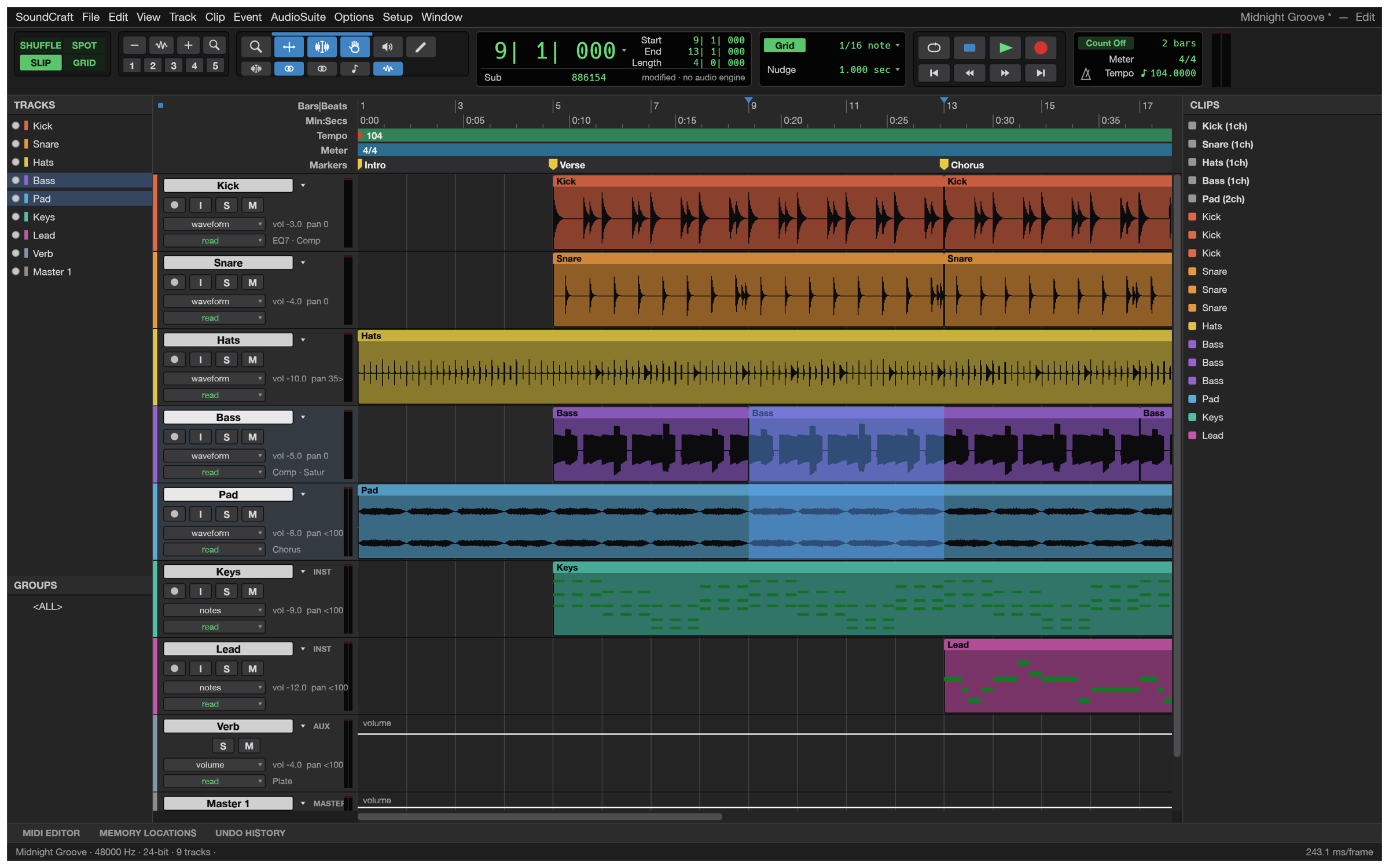
Recording, editing and mixing audio; an open-source, clean-room reimplementation of Avid Pro Tools, rebuilt in pure Rust.
A complete digital audio workstation that runs natively on macOS, Windows, Linux and FreeBSD, and in the browser. Multitrack editing, a full mixer with plugins, sends and automation, MIDI, recording and bouncing, and every action scriptable from the command line or by an AI agent.
github.com/storytold/soundcraft
sourceforge.net/projects/soundcraft.mirror
Share this:

Liquidsoap Record ~ Capture Radio Streams
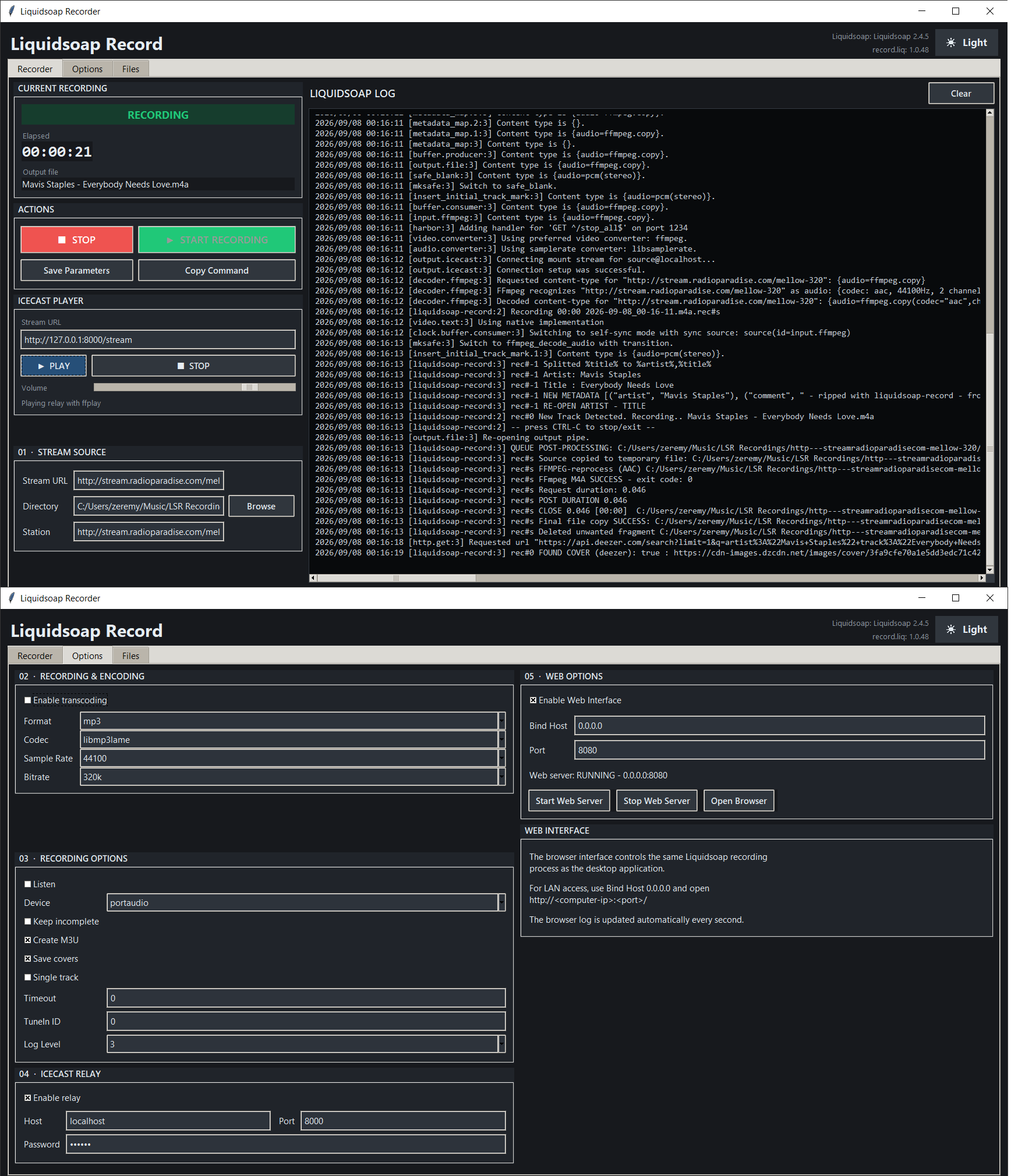
A tool for recording internet radio streams (Shoutcast/Icecast/HTTP streams) to disk with automatic track-splitting, ID3/Vorbis metadata tagging, and cover-art embedding — driven by Liquidsoap and controlled through a desktop GUI (with an optional web interface).
github.com/smoralis/liquidsoap-record
hydrogenaudio.org/index.php/topic,129894.0


