A modern, cool, sleek music player. made with ❤
github.com/realidkroo/Mochy-Music

Play streamed music and your own files in the same app, save tracks for offline listening, and follow synced lyrics. Levyra does not need an account and does not track you.
Features:
- Native playback: Media3 and ExoPlayer on Android, libVLC through direct C bindings on Windows (no web wrappers).
- Gapless & audio tuning: uninterrupted album transitions, crossfade, pitch shifting, custom playback speed, 10-band EQ, and AutoEQ headphone profiles.
- SponsorBlock: automatically skips sponsored segments, intros, outros, and non-music chatter.
- Audio & video modes: one-tap switch between audio-only streaming and full video with subtitle tracks.
- Clean offline downloads: saved directly in device storage as standard M4A files with metadata, artwork, and lyrics.
- Unified library: local files and streamed tracks share the same playlists, favorites, and queues.
- Optional YouTube Music sign-in (Android): connect your account to browse your music and import playlists, liked songs and albums. No account needed if you’d rather keep using Levyra as it is.
- Queue Spaces: keep multiple active listening sessions side by side without losing your current queue.
- Synced lyrics: tap-to-seek, manual timing adjustments, dedicated Bluetooth latency offset, and non-Latin romanization.
- Visuals: motion artwork on the Now Playing screen, falling back to animated album covers.
- Global skins (Android): seven complete looks, each with its own layout and not just a new set of colors. Nocturne 78 brings vintage hi-fi warmth, Prism pairs deep black with raspberry accents, Torque goes for bold graphite shapes and Ivory is a soft, bright look with a dark mode of its own. Spotify Style, Apple Music Style and YouTube Music Style follow the layouts people already know from those apps. Every skin restyles Home, Explore, Library, Settings, the mini player and the full player. You’ll find them under Settings → Design → Skin. Levyra Default stays the default, and your customizations are kept when you switch back and forth.
- Theme Studio: sixteen presets, including Midnight, Aurora, Pure Material, Velvet and Editorial. You can also build your own themes: pick background, surface and accent colors from swatches or a HEX code, choose light or dark, set how round the corners are, then save, rename or duplicate them. Levyra Aura stays the default, and one tap brings it back.
- Mini player studio: five alternative mini player designs (Super Expressive, Floating, Liquid Glass, Ultra Compact and Artwork Focus), each with its own size, shape, progress bar and control options, plus a live preview. The original mini player stays the default, so nothing changes until you pick something else.
- Navigation studio: four extra styles for the bottom bar (Super Expressive, Floating Dock, Minimal and Expressive Compact). Drag the buttons into the order you like, hide Explore or Library, choose when labels show, and pick the indicator, icon size, height and background. Home and Search always stay in the bar.
- System integration: Android Auto, lockscreen media controls, persistent notifications, and Quick Settings tile.
- Device integration (Android): Levyra recognizes the phone it runs on and turns on what that system supports. On HyperOS 3 it shows synced lyrics in the Super Island, on OriginOS it shows the current track in the Atomic Island, and OPPO, OnePlus and realme keep their system lyrics panel. Samsung’s Now Bar and other phones use the standard media controls. Settings → Integrations shows what was detected and links to the right battery page for background playback.
- Song recognition: on-device music identification through the microphone or internal audio, saved in local history.
- Explore: live radio stations, international charts, and genre or mood browsing.
- Levyra Vault: backup and restore playlists, favorites, history, and preferences in a single local file.
- Private stats: on-device play counts and listening hours, with optional Last.fm and ListenBrainz scrobbling.
github.com/LUC4N3X/Levyra-deepsound

A tool for recording internet radio streams (Shoutcast/Icecast/HTTP streams) to disk with automatic track-splitting, ID3/Vorbis metadata tagging, and cover-art embedding — driven by Liquidsoap and controlled through a desktop GUI (with an optional web interface).
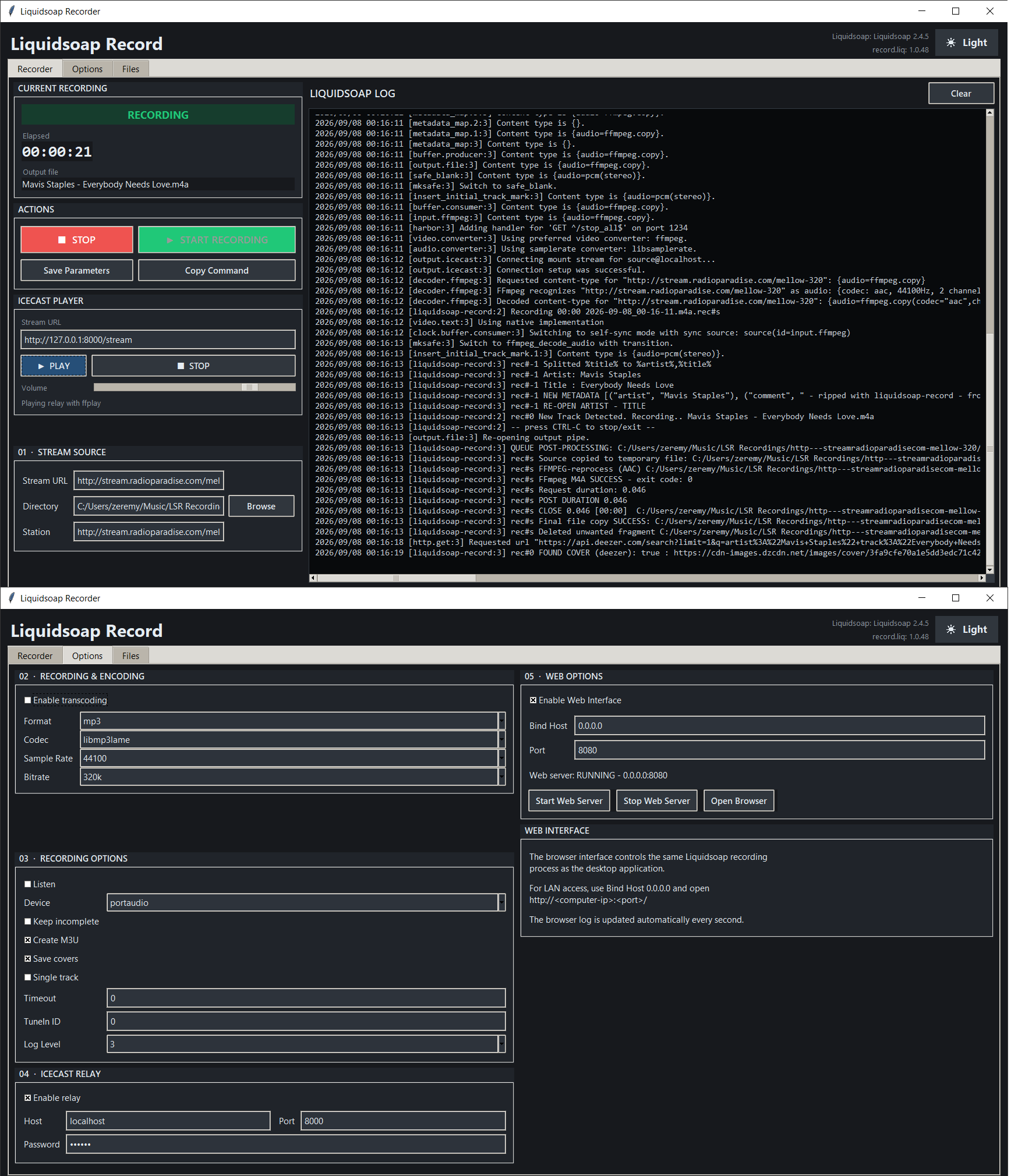
github.com/smoralis/liquidsoap-record
hydrogenaudio.org/index.php/topic,129894.0

foobar2000 v2 x64 component for exposing a configured Google Drive folder as a playlist/feed item, similar to source components such as YouTube Source.
Playback prioritizes stability: the component downloads a selected Drive file to a local cache on first playback, then delegates decoding to foobar2000’s normal input components using the cached local file.
Features:
- Google OAuth desktop flow with system browser, localhost redirect, and PKCE.
- OAuth token saved under the foobar2000 profile and protected with Windows DPAPI when available.
- Preferences page for OAuth client JSON, Drive folder ID/URL, cache directory, cache size limit, and saved token removal.
- Recursive file listing from Google Drive
files.list, limited to downloadable audio-looking blob files.- Playlist insertion using
gdrive://<fileId>/<encoded filename>.- Playlist/feed track support using
gdrive://folder/<folderId>/<encoded name>.- File menu integration under
File > Google Drive Stream, including folder URL/ID loading into a new playlist.- Front cover artwork support from image files in the same Drive folder, preferring names such as
cover,folder,front,album, orartwork.- Artwork inheritance for nested folders,
Album/cover.jpgcan apply to tracks underAlbum/Disc 1.- Context menu expansion of a selected folder feed into its current Drive audio files.
- Context menu refresh that replaces the already-expanded
gdrive://file tracks immediately after the folder feed.- First-play cache download through Drive
files.get?alt=media.
github.com/shirafukayayoi/foo_gdrive_stream

Play a music collection that lives on a computer at home, from anywhere. It can be your computer or a friend’s. No port forwarding, no VPN, no account and no cloud copy of your files.
peerloomllc.com/peartune
github.com/peerloomllc/peartune

This is a community driven effort (like Wikipedia) with the aim of collecting as many Internet radio and TV stations as possible. Any help is appreciated!
- Free for ALL!
- Data license: public domain, software license: GPL, server software: open source
- Open API for usage in own apps
- Everyone is free to use the collected data (station names, tags, links to stream, links to homepages, language, country, state) in their works. I give all the rights I have at the accumulated data to the public domain.

With Audio Sharing you can share your current computer audio playback in the form of an RTSP stream. This stream can then be played back by other devices, for example using VLC.
By sharing the audio as a network stream, you can also use common devices that are not intended to be used as audio sinks (eg. smartphones) to receive it. For example, there are audio accessories that are not compatible with desktop computers (e.g. because the computer does not have a Bluetooth module installed). With the help of this app, the computer audio can be played back on a smartphone, which is then connected to the Bluetooth accessory.
References:
en.wikipedia.org/wiki/Real-Time_Streaming_Protocol

OpenSubsonic / Navidrome client implementation for foobar2000.
subsonic:// pathsgithub.com/michioxd/foo_opensubsonic
Related:

An OBS plugin that allows capture of independent application audio streams on Windows, in a similar fashion to OBS’s game capture and Discord’s application streaming.
obsproject.com/forum/resources/win-capture-audio.1338
github.com/bozbez/win-capture-audio
gigazine.net/gsc_news/en/20211230-obs-win-capture-audio

Lidify is built for music lovers who want the convenience of streaming services without sacrificing ownership of their library. Point it at your music collection, and Lidify handles the rest: artist discovery, personalized playlists, podcast subscriptions, and seamless integration with tools you already use like Lidarr and Audiobookshelf.
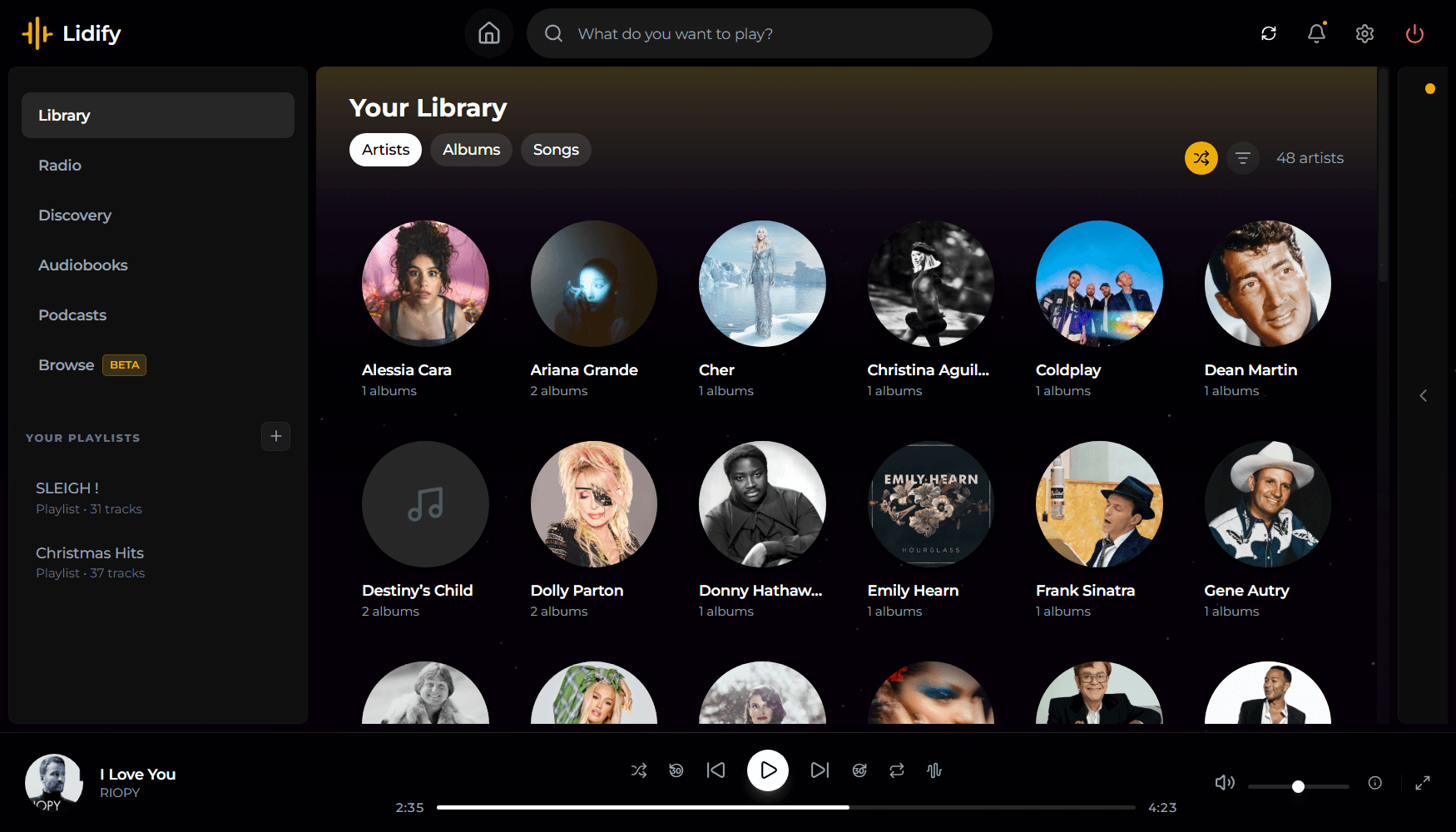
github.com/Chevron7Locked/lidify
github.com/TheWicklowWolf/Lidify

Designed for 24/7 audio playing on discord.
Discord has many unwanted rate limits, especially in the audio area. This package does all the work and ensures that your music never stops playing due to ffmpeg or Discord, with as little effort as possible.
github.com/FrauJulian/Discord-Audio-Stream
www.npmjs.com/package/discord-audio-stream


