Levyra-deepsound ~ FOSS Music Player


Play streamed music and your own files in the same app, save tracks for offline listening, and follow synced lyrics. Levyra does not need an account and does not track you.

Features:

  • Native playback: Media3 and ExoPlayer on Android, libVLC through direct C bindings on Windows (no web wrappers).
  • Gapless & audio tuning: uninterrupted album transitions, crossfade, pitch shifting, custom playback speed, 10-band EQ, and AutoEQ headphone profiles.
  • SponsorBlock: automatically skips sponsored segments, intros, outros, and non-music chatter.
  • Audio & video modes: one-tap switch between audio-only streaming and full video with subtitle tracks.
  • Clean offline downloads: saved directly in device storage as standard M4A files with metadata, artwork, and lyrics.
  • Unified library: local files and streamed tracks share the same playlists, favorites, and queues.
  • Optional YouTube Music sign-in (Android): connect your account to browse your music and import playlists, liked songs and albums. No account needed if you’d rather keep using Levyra as it is.
  • Queue Spaces: keep multiple active listening sessions side by side without losing your current queue.
  • Synced lyrics: tap-to-seek, manual timing adjustments, dedicated Bluetooth latency offset, and non-Latin romanization.
  • Visuals: motion artwork on the Now Playing screen, falling back to animated album covers.
  • Global skins (Android): seven complete looks, each with its own layout and not just a new set of colors. Nocturne 78 brings vintage hi-fi warmth, Prism pairs deep black with raspberry accents, Torque goes for bold graphite shapes and Ivory is a soft, bright look with a dark mode of its own. Spotify Style, Apple Music Style and YouTube Music Style follow the layouts people already know from those apps. Every skin restyles Home, Explore, Library, Settings, the mini player and the full player. You’ll find them under Settings → Design → Skin. Levyra Default stays the default, and your customizations are kept when you switch back and forth.
  • Theme Studio: sixteen presets, including Midnight, Aurora, Pure Material, Velvet and Editorial. You can also build your own themes: pick background, surface and accent colors from swatches or a HEX code, choose light or dark, set how round the corners are, then save, rename or duplicate them. Levyra Aura stays the default, and one tap brings it back.
  • Mini player studio: five alternative mini player designs (Super Expressive, Floating, Liquid Glass, Ultra Compact and Artwork Focus), each with its own size, shape, progress bar and control options, plus a live preview. The original mini player stays the default, so nothing changes until you pick something else.
  • Navigation studio: four extra styles for the bottom bar (Super Expressive, Floating Dock, Minimal and Expressive Compact). Drag the buttons into the order you like, hide Explore or Library, choose when labels show, and pick the indicator, icon size, height and background. Home and Search always stay in the bar.
  • System integration: Android Auto, lockscreen media controls, persistent notifications, and Quick Settings tile.
  • Device integration (Android): Levyra recognizes the phone it runs on and turns on what that system supports. On HyperOS 3 it shows synced lyrics in the Super Island, on OriginOS it shows the current track in the Atomic Island, and OPPO, OnePlus and realme keep their system lyrics panel. Samsung’s Now Bar and other phones use the standard media controls. Settings → Integrations shows what was detected and links to the right battery page for background playback.
  • Song recognition: on-device music identification through the microphone or internal audio, saved in local history.
  • Explore: live radio stations, international charts, and genre or mood browsing.
  • Levyra Vault: backup and restore playlists, favorites, history, and preferences in a single local file.
  • Private stats: on-device play counts and listening hours, with optional Last.fm and ListenBrainz scrobbling.

github.com/LUC4N3X/Levyra-deepsound

Luminous ~ A Home For Music You Own


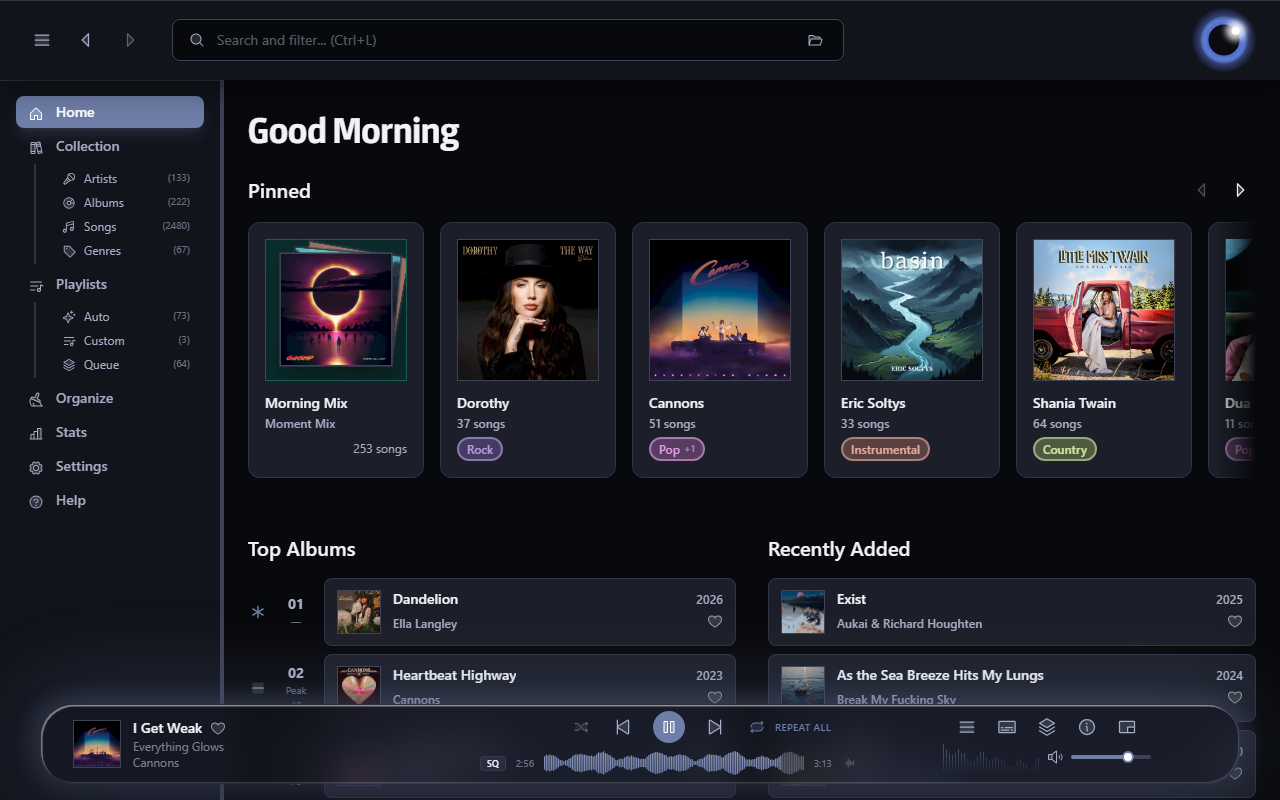
Luminous is a fast, local-first player for your own audio library. Built for anyone who wants the convenience of a modern streaming app without giving up ownership of their music. Turn a folder of files into a library you’ll enjoy browsing and listening to.

esoltys.dev/luminous
github.com/esoltys/luminous

gonic ~ Self-hosted Music Server


music streaming server / free-software subsonic server API implementation

Features:

  • browsing by folder (keeping your full tree intact) see here
  • browsing by tags (using taglib – supports mp3, opus, flac, ape, m4a, wav, etc.)
  • on-the-fly audio transcoding and caching (requires ffmpeg) (thank you spijet)
  • subsonic jukebox mode, for gapless server-side audio playback instead of streaming (thank you lxea)
  • support for podcasts (thank you lxea)
  • pretty fast scanning (with my library of ~50k tracks, initial scan takes about 10m, and about 6s after incrementally)
  • multiple users, each with their own transcoding preferences, playlists, top tracks, top artists, etc.
  • last.fm scrobbling
  • listenbrainz scrobbling (thank you spezifisch, lxea)
  • artist similarities and biographies from the last.fm api
  • support for multi valued tags like albumartists and genres (see more)
  • a web interface for configuration (set up last.fm, manage users, start scans, etc.)
  • support for the album-artist tag, to not clutter your artist list with compilation album appearances
  • written in go, so lightweight and suitable for a raspberry pi, etc. (see ARM images below)
  • newer salt and token auth
  • tested on airsonic-refix, amperfy, symfonium, dsub, jamstash, music-assistant, subsonic.el, sublime music, soundwaves, stmp, termsonic, tempus, strawberry, and ultrasonic

github.com/sentriz/gonic

Bòcan Music ~ macOS Music & Podcast Player


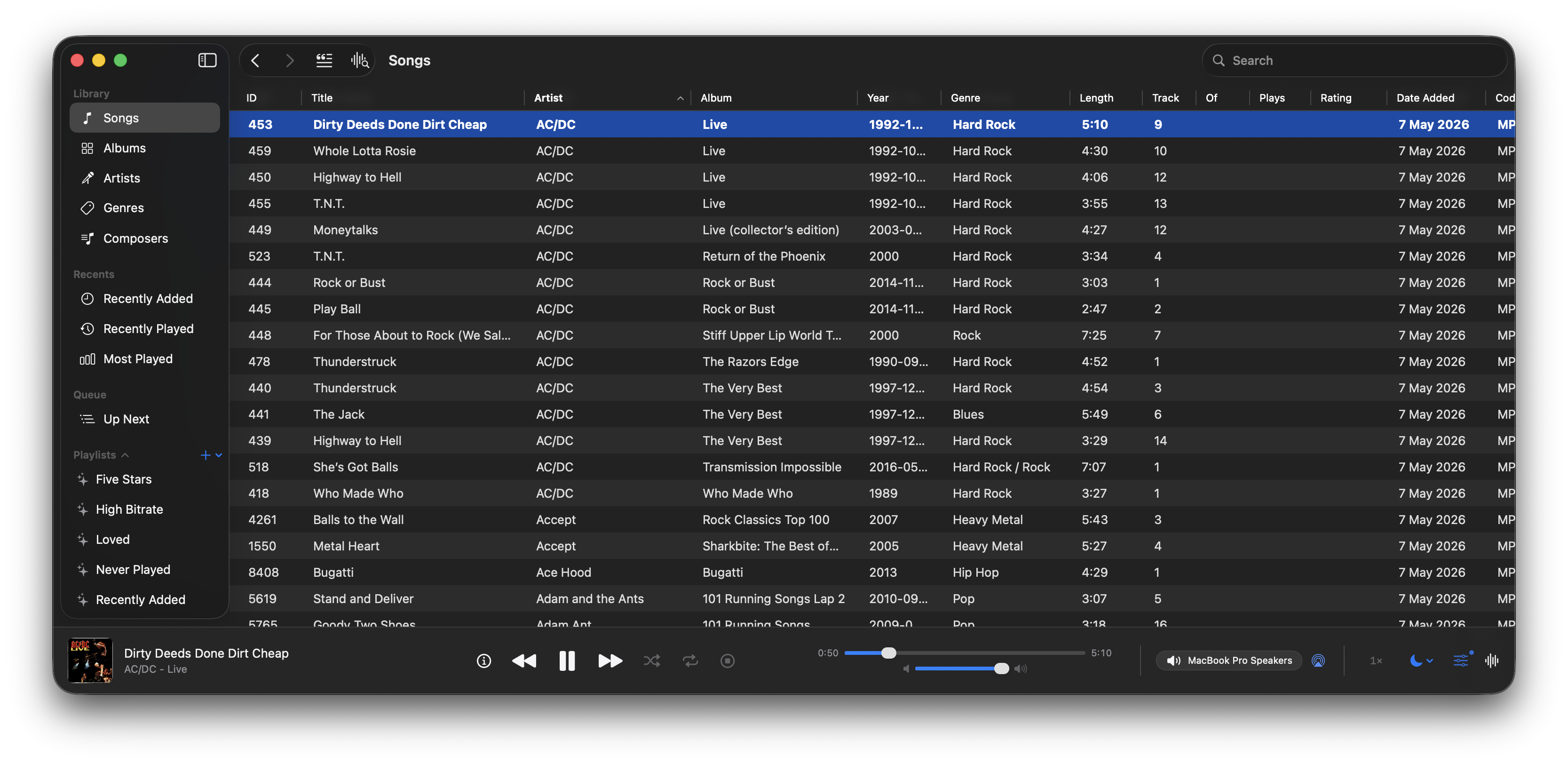
A native macOS music and podcast player and library built with Swift 6 and SwiftUI. Features gapless playback, AcoustID fingerprinting, smart playlists, lyrics, visualizers, scrobbling, and a DSP/EQ engine powered by FFmpeg.

bocan-music interface

github.com/bocan/bocan-music
bocan.app

BrutefirDRC ~ Add DRC/Loudness To LogitechMediaServer (LMS)


A plugin to use BruteFIR software convolution engine with Slim Devices SqueezeCenter clients for Digital Room Correction. Provides transparent automatic switching of filters for different sample rates. Filter creation can be done with DRC, Audiolense, Acourate or other DRC software.

An optional loudness correction using the digital volume control can be applied. The loudness features uses SoX loudness that is based on the ISO 226 curves.

Features:

  • On the fly digital room correction for LogitechMediaServer (formerly SqueezeBoxServer)
  • Automatic selection of filter for samplerate
  • Loudness correction via digial volume control using ISO 226
  • Resampling of filter for samplerate if none exists
  • Gapless playback
  • removal of silence in music
  • Application of ReplayGain with and without loss of bit depth/resolution
sourceforge.net/projects/brutefirdrc

Winyl ~ Lightweight Audio Player


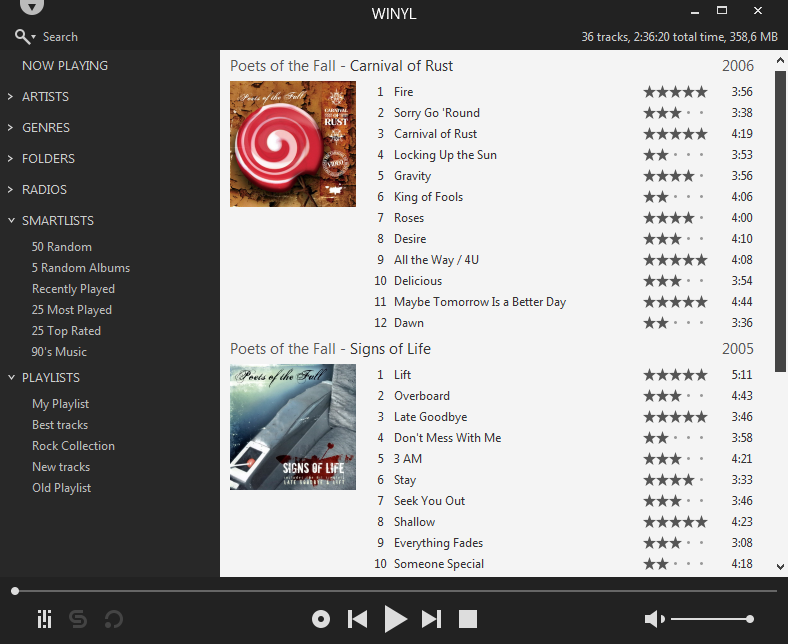
Winyl is a free digital audio player and music library application for organizing and playing audio on Windows.

Winyl offers great new ways to organize and enjoy all your music. Listen to music and radio, rate your favorite tracks, create playlists, browse song lyrics, tag music, all of this is very simple in Winyl.

Winyl uses the least system resources, it starts and working very fast. It’s the best choice for a laptop or netbook.

winyl-player.github.io
github.com/winyl-player/winyl

Fooyin ~ Linux Audio Player


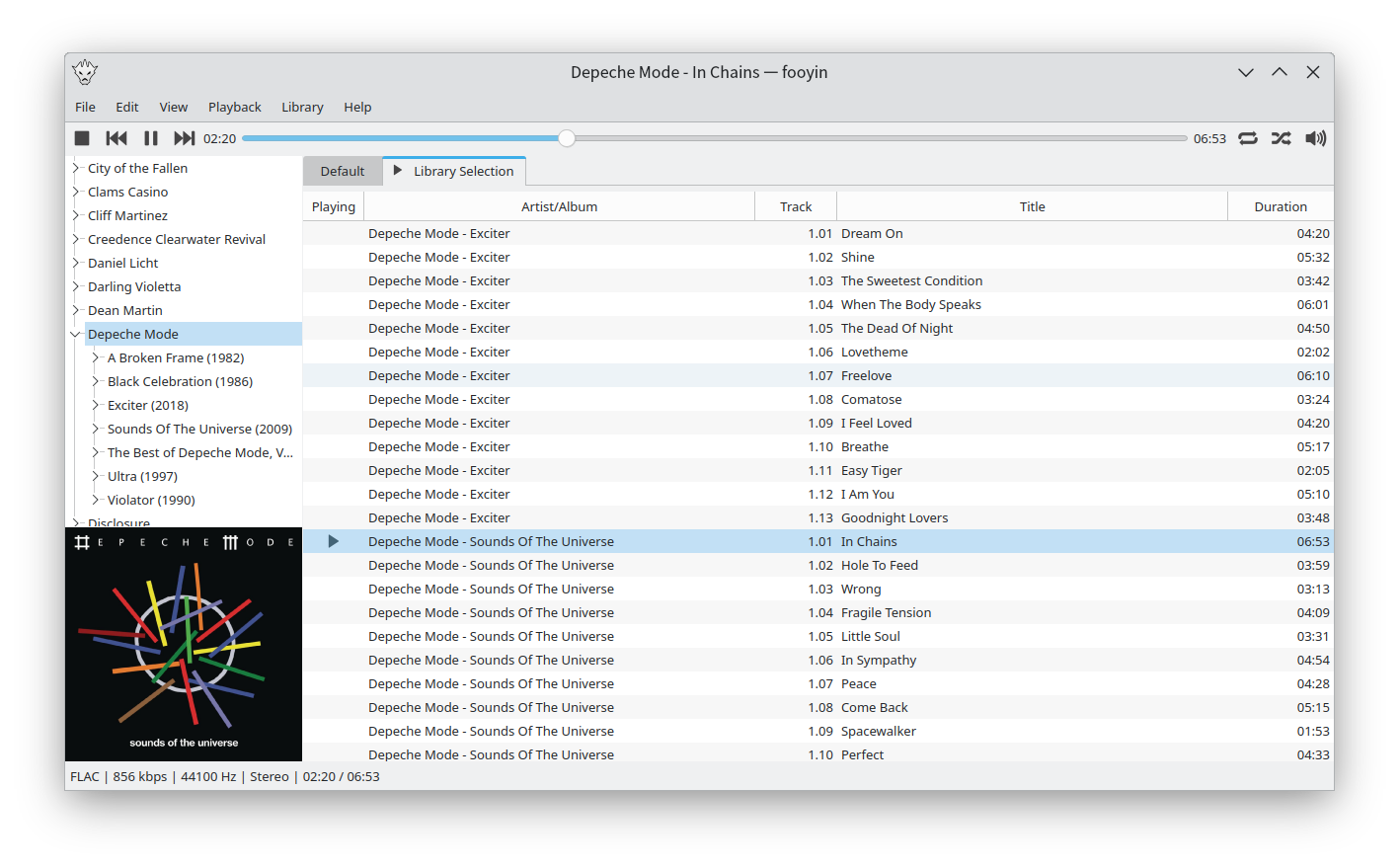
Fooyin is a customisable music player for Linux. Fooyin features a layout editing mode in which the entire user interface can be customised, starting from a blank state or a default layout. FooScript takes this further by extending the customisation to individual widgets themselves.

Features:

  • Playback FLAC, MP3, MP4, Vorbis, Opus, WavPack, WAV, AIFF, Musepack, Monkey’s Audio
  •  Playback popular VGM and tracker module formats
  •  Gapless playback
  •  Add and play files from within compressed archives
  •  Audio output and device configuration
  •  CUE sheet support (including embedded)
  •  Fully customisable layout, starting from a blank window
  •  Customisable keyboard shortcuts
  •  Filter library on any field(s)
  •  Create and manage playlists
  •  Import/export playlists (M3U/M3U8)
  •  Extensible using a plugin system
  •  Tag editing
  •  Library tree, including directory structure view
  •  Directory browser
  •  Waveform seekbar
  •  MPRIS support
  •  ReplayGain support
  •  Scrobbling

www.fooyin.org
github.com/ludouzi/fooyin

foo_dop ~ Foobar2000 iPod Manager


iPod manager allows you to transfer music to Apple iPods from foobar2000.

Features include:

  • artwork support
  • ReplayGain to SoundCheck conversion
  • gapless playback support
  • automatic conversion of unsupported audio formats
  • smart playlist creation

yuo.be/ipod-manager
github.com/reupen/ipod_manager
hydrogenaud.io/index.php/topic,45160.0

OooPlayer ~ Lightweight Windows Audio Player


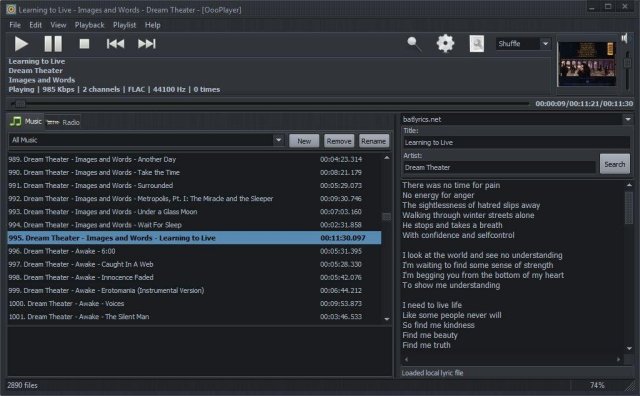
OooPlayer is a free audio player for Microsoft® Windows®. It has a clean, lightweight user interface and it is also friendly with your computer resources. It is one of the best candidates if you’re looking for an alternative to Winamp® or just looking for a simple, easy-to-use music and radio player. It’s written in Delphi and uses Bass library and its plugins from www.un4seen.com

The listed versions are clean, without no bundles/installers and it has support for most popular audio formats (see below in the features section). This player is released under the GNU General Public License version 2.0 and is available in two versions: installer and portable.

Features:

  • user-friendly and with a low impact on resource usage
  • support for most audio formats: MP3, FLAC, OGG, MPC, WMA, AC3, SPX, AAC, ALAC, APE, TTA, OFR, WV, OPUS, TAK etc.
  • support for gapless playback (uninterrupted playback of sequential/consecutive audio tracks)
  • support for M3U and M3U8 playlists
  • integrated lyric downloader (it doesn’t work with certain files such as covers)
  • save your own playlists in M3U, M3U8 or PPF format
  • built-in support for radio stations (huge list available) including details about the current radio
  • multiple options available: shuffle, repeat, search, jump, find etc.
  • available as installer and portable version.

www.fosshub.com/OooPlayer
github.com/ozok/OooPlayer

Pine Player ~ MacOS HQ Up Sampling Max 32bit 768kHz


Pine Player is an exclusive listening digital music player for music lovers who use the OSX operating system. It can play almost all existing digital audio forms such as MP3, FLAC, APE, AAC, M4A, WAV, AIFF, OGG, WMA, DSD, SACD ISO etc. and it also has a strong playing capability for listening to CUE files in the most convenient way.

1.     Maximum 32Bit 768kHz Up Sampling Function

Pine Player supports various kinds of PCM formats, so it can play sound sources from 16 to 32 bit; it can also reproduce clear and abundant sound quality by supporting a maximum of 768kHz.

Pine Player’s unique Over Sampling Filter is a technique that upconverts an ordinary MP3 file into a 32bit, maximum of 768kHz, and high sound quality sound source and sends it to the DAC for it to be played in best performance. Ordinary MP3 files’ sound quality can actually be heard more clearly and plentifully. Obviously, HD audio files such as MQS and DSD can be upconverted to a maximum of 768kHz as well.

2.     Convenient and Strong Playlist & Prevention of Text Cracking

Pine Player has a very convenient playlist because users can save and manage the music they wish to listen to, change the order of the music being played by simply dragging, and express any kind of language or text encoding perfectly because of its flawless decoding function. There is no Korean code cracking.

3.     Cross Fade and Gapless set-up

Cross Fade function, which is a technique that decreases the gap between songs when listening to files on the playlist or overlaps the songs for no gaps at all, can be set into seconds.

4.     Mass Storage of Audio Queue for Real Time Converting

Pine Player prevents damage of sound quality by having a high-powered Audio Queue for processing excessive amount of digital data. Therefore, it takes a considerable amount of memory compared to other music players.

5.     Automatic Isolation of Damaged Sound Sources

Pine Player has an automatic isolation function for damaged sound sources called Vault. If a damaged sound source is detected while playing the music, the music is stopped and taken to the Vault file for isolation. Through this convenient function, users can easily figure out which sound source is damaged and restore it.

Even with all these functions, Pine Player is a free app. Moreover, there are not any marketing or advertising material. Especially, no information including personal ones are sent to the outside or the Internet.

www.digipine.com/index.php?mid=pineplayer