foo_utag ~ Tag Streams With Metadata


utag Input is a foobar2000 input component that lets you add internet radio streams and other remote URLs to the Media Library by representing each stream with a small .utag JSON file. The .utag file stores the stream URL and metadata. foobar2000 can scan and tag the stub like a normal track, while audio is decoded from the original URL.

Features:

Optional favicon download during playback: downloads the favicon image stored in the .utag JSON, saved beside the .utag file and shown as artwork.

Library-friendly scanning: scanning a .utag file does not connect to the stream.

Editable metadata: tag changes are written back to the .utag JSON file.

Stream URL in Properties: the URL is exposed in the information section as @ and can be displayed with %__@%.

Create files from a playlist: use Tagging → Create utag files… in the playlist context menu to create one .utag file for each selected track. Each URL is looked up in Radio Browser first (optional, on by default), so the file gets the station’s details. The new file(s) are added to the “New utags” playlist, which becomes the active playlist.

Tag existing .utag files from Radio Browser: Tagging → Search Radio Browser and tag looks up the @ URL of the selected .utag items in Radio Browser and writes the station details into their tags.

Default folder: Tagging → Set default utag folder… saves an output folder, and Tagging → Create utag files in default folder creates the files there without asking.

Add a station by URL: File → Utag Input → Add internet radio url and create utag asks for a stream URL (and an optional name) and creates the .utag file in the default folder. If no name is entered, it is looked up from the stream. An optional checkbox searches Radio Browser for the URL and uses its station details. The new file is added to the “New utags” playlist, which becomes the active playlist.

Import from Radio Browser: File → Utag Input → Import stations from Radio Browser… downloads stations from the Radio Browser directory and creates one .utag file per station, in a new folder named after the search.

Browse Radio Browser: File → Utag Input → Browse Radio Browser… lists the top stations, or the stations for a tag, country, language or codec you pick, or a name search. Choose the stations you want and import them.

Import from Icecast: File → Utag Input → Import stations from Icecast… lets you filter the directory by station metadata and choose a maximum number of matching stations to import.

Browse Icecast Directory: File → Utag Input → Browse Icecast Directory… downloads the public Icecast Yellow Pages XML export (once per session; Refresh reloads it) and creates .utag files for the stations you select. A search box at the top of the window filters the list as you type (station name, genre, codec, description or current song). The downloaded directory is not saved by the component.

Import from TuneIn: File → Utag Input → Import stations from TuneIn… searches TuneIn by station name, artist or song and creates one .utag file per station found.

Browse TuneIn: File → Utag Input → Browse TuneIn… walks TuneIn’s categories, genres, locations and languages, your presets, searches and recommendations (for a list of artists, or for the playing station). Choose the stations you want and import them.

Playlists for the browse windows: the three browse windows (Radio Browser, TuneIn, Icecast) append the stations you import to one playlist per service, RadioBrowser, Tunein and Icecast by default (names are set in the preferences). The playlist is created when missing and becomes the active one, and the first appended item gets the focus. The Import stations from… commands instead create a new playlist named like the search folder (search term and date).

Country flag: whenever a .utag is created or tagged and it has a countrycode field (for example GR), a countryflag field with the matching flag emoji (for example 🇬🇷) is added. The flag is also refreshed whenever the tags are saved (for example after editing countrycode in Properties), so it always follows the code; an invalid or empty code leaves the flag as it is. When a file is created, an existing non-empty countryflag is kept. This applies to Radio Browser and Icecast imports, TuneIn imports, Add internet radio url and create utag, Create utag files and Search Radio Browser and tag.

Results window: every created or skipped entry lists the stream URL (@) and the output path; errors list the source URL and the reason. The window can be switched off in the preferences (errors are still shown).

Preferences page: Preferences → Tools → Utag Input has the stream handoff, favicon download, default folder, console message, results window, Radio Browser lookup, TuneIn details and browse-window playlist options.

Optional stream handoff: reuses the running decoder when the playing item is reopened after retagging, helping avoid a reconnect and audible pause.

Station logos: assign a logo by hand (Tagging → Set station logo…), by dropping an image file or image URL on the logo window, or with the optional favicon download. All of them are the same sidecar image beside the .utag file, shown as artwork. See Station logos.

github.com/smoralis/foo_utag
hydrogenaudio.org/index.php/topic,130078.0

Liquidsoap Record ~ Capture Radio Streams


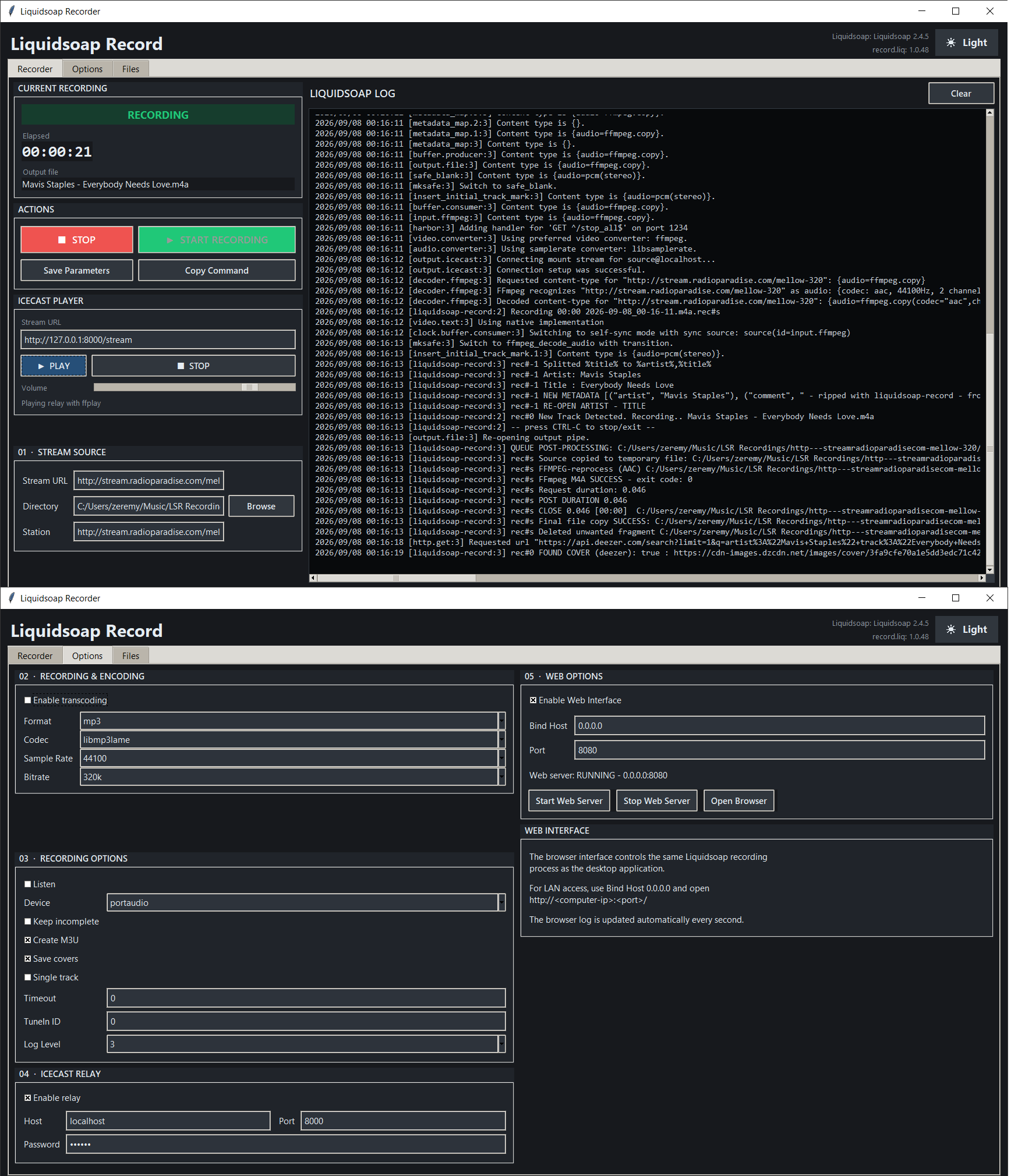
A tool for recording internet radio streams (Shoutcast/Icecast/HTTP streams) to disk with automatic track-splitting, ID3/Vorbis metadata tagging, and cover-art embedding — driven by Liquidsoap and controlled through a desktop GUI (with an optional web interface).

liquidsoap-record desktop interface

github.com/smoralis/liquidsoap-record
hydrogenaudio.org/index.php/topic,129894.0

gonic ~ Self-hosted Music Server


music streaming server / free-software subsonic server API implementation

Features:

  • browsing by folder (keeping your full tree intact) see here
  • browsing by tags (using taglib – supports mp3, opus, flac, ape, m4a, wav, etc.)
  • on-the-fly audio transcoding and caching (requires ffmpeg) (thank you spijet)
  • subsonic jukebox mode, for gapless server-side audio playback instead of streaming (thank you lxea)
  • support for podcasts (thank you lxea)
  • pretty fast scanning (with my library of ~50k tracks, initial scan takes about 10m, and about 6s after incrementally)
  • multiple users, each with their own transcoding preferences, playlists, top tracks, top artists, etc.
  • last.fm scrobbling
  • listenbrainz scrobbling (thank you spezifisch, lxea)
  • artist similarities and biographies from the last.fm api
  • support for multi valued tags like albumartists and genres (see more)
  • a web interface for configuration (set up last.fm, manage users, start scans, etc.)
  • support for the album-artist tag, to not clutter your artist list with compilation album appearances
  • written in go, so lightweight and suitable for a raspberry pi, etc. (see ARM images below)
  • newer salt and token auth
  • tested on airsonic-refix, amperfy, symfonium, dsub, jamstash, music-assistant, subsonic.el, sublime music, soundwaves, stmp, termsonic, tempus, strawberry, and ultrasonic

github.com/sentriz/gonic

spotatui ~ Standalone Terminal Player


spotatui plays Spotify natively and streams YouTube, your local files, Subsonic or Navidrome and 30,000+ internet radio stations from a single keyboard-driven player. Spotify is optional. So is the AI DJ.

Features:

  • Multiple sources — Spotify optional. Play from Spotify, Local Files, a Subsonic/Navidrome server, Internet Radio, YouTube, or Qobuz. The free sources need no Spotify account; press d to switch between them at any time.
  • Native streaming. Play Spotify audio directly, no official app or spotifyd required — spotatui appears as its own Spotify Connect device (Premium required).
  • Synced lyrics. Line-by-line lyrics that follow playback.
  • Real-time audio visualizer. A system-wide FFT visualizer (press v) that reacts to whatever is playing.
  • Cross-source play queue. Press z on any track to queue it — the queue plays across every source before your current context resumes.
  • Lua plugins. Extend spotatui with event hooks, commands, keybindings, popups, and theming.
  • Listening history & recap. spotatui keeps a local play history and can generate a shareable HTML recap (spotatui history recap).
  • Full CLI. Most of what the UI does is scriptable — playback, search, playlists, shell completions. Run spotatui --help.
  • Lightweight. ~78 MB RAM while streaming, versus a full Electron client. See Performance.

spotatui.com
github.com/LargeModGames/spotatui

Subsonic player ~ Modern Subsonic Player


Subsonic player is a responsive, modern web-based client designed for Subsonic music servers.

Built with Nuxt 4, a modern Vue 3 framework, this open-source application provides a seamless and enjoyable music listening experience across all devices.

Compatible Servers:

Features:

  1. Fully Responsive UI (Further design improvements are ongoing.)
    • Optimized for desktop and mobile devices.
    • Adaptive design.
  2. Comprehensive Library Browsing
    • Browse by album, artist, genre, and folder/files.
    • Explore podcasts and favourites.
    • Access internet radio stations.
  3. Advanced Functionality
    • Bookmarking podcast episode to keep track of the listening position across multiple sessions.
    • MediaSession Integration.
    • Advanced Search capabilities.
    • Dark/Light Mode support.
    • Keyboard shortcut (Press h to see menu).
    • Context menu access via right-click (desktop) or long press (mobile) for quick actions on tracks, albums, playlists, and more.
    • Easily drag and drop your favorite tracks, albums, and podcast episodes right into the queue or your playlist in the sidebar (available only on desktop).
  4. Progressive Web App (PWA) Feature
    • Seamlessly download the app icon to the home screen, providing the convenience of launching the app just like a traditional native application.
    • Benefit from a web-based app that reduces storage space on devices compared to traditional downloadable applications, while still providing robust functionality.
  5. Settings
    • The app includes settings for theme, layout, crossfade, replaygain, scrobbling, and more. See the environment variables section for which can be pre-configured across all devices.

github.com/VD39/subsonic-player

RadioBrowser ~ Radio & TV Search


This is a community driven effort (like Wikipedia) with the aim of collecting as many Internet radio and TV stations as possible. Any help is appreciated!

  • Free for ALL!
  • Data license: public domain, software license: GPL, server software: open source
  • Open API for usage in own apps
  • Everyone is free to use the collected data (station names, tags, links to stream, links to homepages, language, country, state) in their works. I give all the rights I have at the accumulated data to the public domain.

www.radio-browser.info

Shortwave ~ Gnome Radio Player


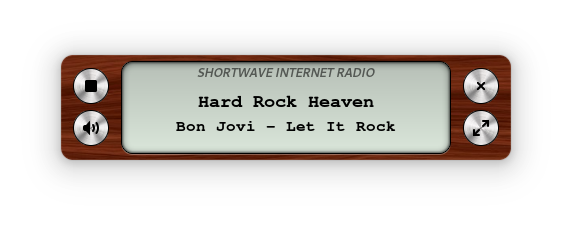
Listen to internet radio. Gnome style.

apps.gnome.org/Shortwave
gitlab.gnome.org/World/Shortwave

24seven.fm Covers ~ Radio Cover Art


Cover-art for the 24seven.fm family of internet radio stations — Streaming Soundtracks, 1980s.FM, Adagio.FM, Death.FM, and Entranced.FM. A shared, host-agnostic C++ engine drives three Windows front-ends plus a cross-platform core library:

ComponentDirectoryOutputBuild system
Desktop viewerdesktop/24sevenfm_covers.exe
(x64, self-contained)
MSBuild (.vcxproj / .sln)
Winamp pluginwinamp/gen_24sevenfm_covers.dll
(x86 / 32-bit)
CMake
foobar2000 componentfoobar2000/foo_24sevenfm_covers/foo_24sevenfm_covers.dll
(x64)
MSBuild
(.vcxproj)
Core librarylib/coverfetch static lib (cross-platform)CMake

All three front-ends share the same Direct2D renderer (shared/d2d_*.cpp), the cover engine (shared/cover_engine.* — cover preload, crossfade/flip transitions, remaining-time countdown), the options page (shared/options_*), and the networking/parse library (lib/). The library alone (lib/) is portable C++11 and already cross-compiles for Android/iOS.

github.com/pke/24sevenfm_covers

Audiomora ~ Radio Player & Recorder


A professional, high-performance radio player and recorder for Windows. Access the world of music with a single click.

Features:

  • Global Access: Over 30,000 radio stations via Radio-Browser API.
  • High-Quality Recording: Capture streams in MP3 (320kbps) or WAV format.
  • Smart Timer: Schedule your recordings to never miss a show.
  • Visual Experience: Integrated real-time audio visualizer.
  • Portable: No installation required. Everything (VLC/FFmpeg) is included in one EXE.

github.com/BugHunter2026/Audiomora-Radio-Player

OA Player ~ Glassmorphic Music Player


Transform your PC into a premium analog audio experience with the latest version of OA Player. This audiophile-grade, hi-fi integrated media player combines cutting-edge digital technology with the warm, rich character of classic analog sound.

Features:

  • Real-Time Analog Sound Emulation
  • Custom Sound Profiles
  • 10/16/32-Band Equalizer + Integrated Bass Boost
  • Stereo Widener
  • Tube Preamp Emulation
  • Natural Dynamics
  • High Exciter
  • Discrete Reverb
  • Automatic Gain Control
  • Digital to Reel
  • Limiter
  • Pitch Convert
  • All-in-One Audio Hub
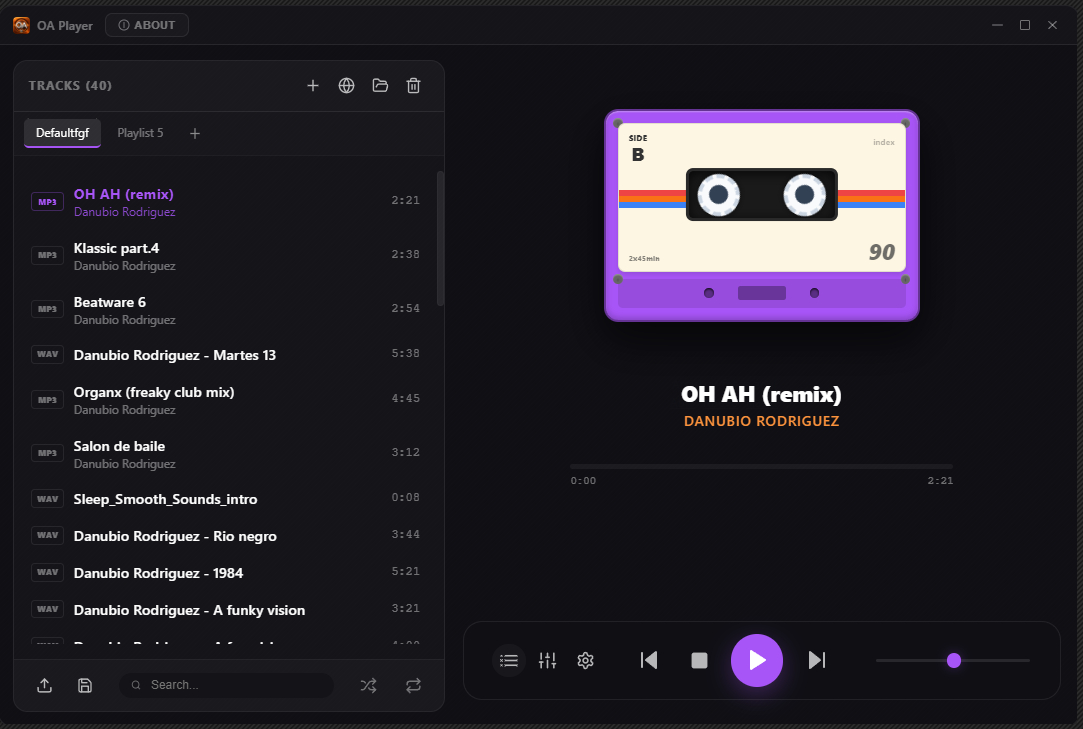
OA Player Interface

sourceforge.net/projects/oa-player

Gnome ~ Internet Radio Extension


Listen to an Internet Radio Stream

extensions.gnome.org/extension/836/internet-radio

GNU Radio ~ Software Radio Ecosystem


GNU Radio is a free & open-source software development toolkit that provides signal processing blocks to implement software radios. It can be used with readily-available low-cost external RF hardware to create software-defined radios, or without hardware in a simulation-like environment. It is widely used in research, industry, academia, government, and hobbyist environments to support both wireless communications research and real-world radio systems.

wiki.gnuradio.org/index.php?title=What_Is_GNU_Radio

GNU Radio is a free software development toolkit that provides signal processing blocks to implement software-defined radios and signal processing systems. It can be used with external radio frequency (RF) hardware to create software-defined radios, or without hardware in a simulation-like environment. It is widely used in hobbyist, academic, and commercial environments to support both wireless communications research and real-world radio systems.

en.wikipedia.org/wiki/GNU_Radio