tinytag is a Python library for reading audio file metadata.
Features:
- Read tags, images and properties of audio files
- Supported formats:
- ID3 v1, v1.1, v2.2, v2.3, v2.4
- MP3 / MP2 / MP1
- MP4 (MPEG-4 Audio / AAC / ALAC)
- WAVE / WAV
- OGG (FLAC / Opus / Speex / Vorbis)
- FLAC
- ASF (WMA)
- AIFF / AIFF-C
- Same API for all formats
- Small, portable library
- High code coverage
- Pure Python, no dependencies
- Supports Python 3.7 or higher
Tag Archives: python

mp3-packer ~ Bitrate Reduction Script
I have more music than would fit onto the memory card of my phone. This is largely due to the 256 kBit/s versions that are sold now. On the phone, I do not really hear the difference between 256 kBit/s and 128 kBit/s, but I can clearly see the difference in size.
This script creates a whole copy of your music library, just with a smaller bitrate. It uses either ffmpeg or lame to convert the tracks.
github.com/martin-ueding/mp3-packer
Share this:

acidcat ~ Audio File Forensics
A pure-Python inspector, editor, and forensic tool for audio files and synth/DAW presets: read the metadata, decode the format structure byte by byte, flag anomalies, repair broken containers, and identify how a file was made.
Reads BPM, key, duration, tags, and format info from WAV, AIFF, MP3, FLAC, OGG, Opus, M4A, MIDI, and Serum presets. Also structurally decodes Bitwig (.bwpreset/.bwclip), Native Instruments (Massive/Absynth/Kontakt/NKS/KORE), Vital, NCW, SoundFont (SF2/SF3), tracker modules (MOD/XM/IT), MP4, VST FXP, ReCycle RX2, and RMID containers via
inspect. Beyond reading:repairandvalidatefix and check container structure (stale sizes, offset tables, counts, pad bytes) without touching a byte of audio, andauditgives a forensic verdict (structure, integrity, hidden data, and the writing tool). One pure-Python dependency (mutagen); the nativeinspectwalkers need nothing. Optional librosa analysis for BPM/key detection and ML feature extraction.Also ships per-library SQLite indexes (
acidcat index) tracked in a small global registry, plus an MCP server (acidcat-mcp) so an LLM can query your whole collection across libraries by bpm, key, tags, or full-text.
github.com/hed0rah/acidcat
github.com/hed0rah/acidcat-playground
www.databurn.org
Share this:

SPPAS ~ Speech Annotation & Analysis
SPPAS is a scientific computer software package written and maintained by Brigitte Bigi of the Laboratoire Parole et Langage, in Aix-en-Provence, France. Available for free, with open source code, there is simply no other package for linguists to simple use in the automatic annotations of speech, the analyses of any kind of annotated data and the conversion of annotated files.
SPPAS is able to produce automatically speech annotations from a recorded speech sound and its orthographic transcription. SPPAS is helpful for the analysis of any annotated data: estimate statistical distributions, make requests, manage files, visualize annotations. SPPAS offers a file converter from & to a wide range of formats: xra, TextGrid, eaf, trs …
sppas.org
sourceforge.net/projects/sppas
Share this:

Drum Machine ~ Create & Play Drum Beats
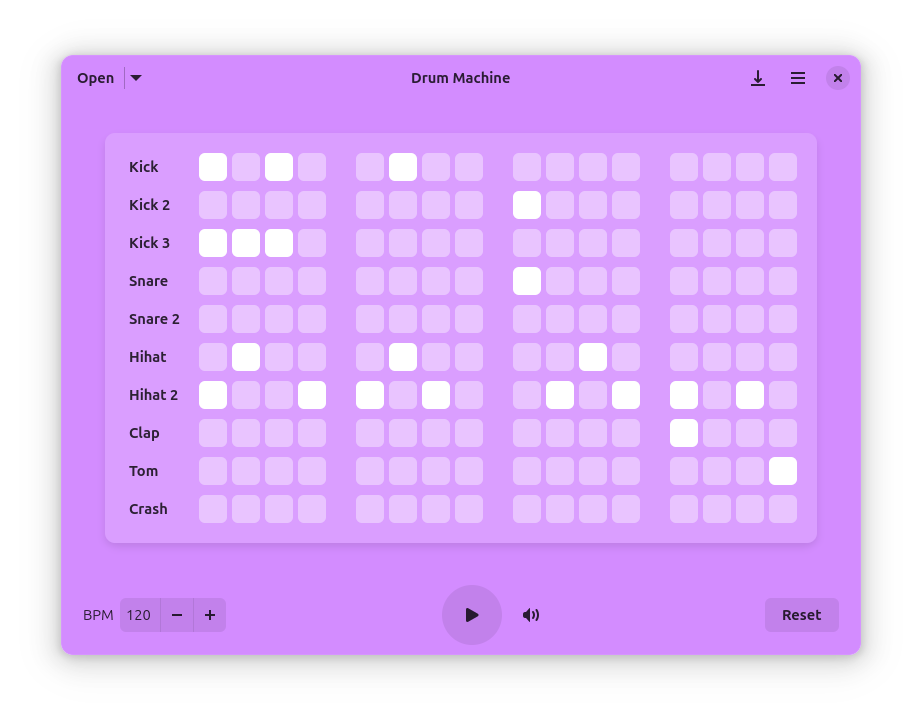
Drum Machine is a modern and intuitive application for creating, playing, and managing drum patterns. Perfect for musicians, producers, and anyone interested in rhythm creation, this application provides a simple interface for drum pattern programming. Have fun!
Features:
- Intuitive grid-based pattern editor with infinite pages
- Custom samples: Add your own drum sounds with MIDI note mapping
- Adjustable BPM control
- Volume control for overall mix
- Save and load patterns
- Multiple drum sounds including kick, snare, hi-hat, and more
- Audio and MIDI export with support for WAV, FLAC, Ogg, MP3, and MIDI formats
- Metadata support for embedding artist name, song title, and cover art
- Keyboard shortcuts for quick access to all functions
apps.gnome.org/DrumMachine
github.com/revisto/drum-machine
Share this:

pyEQ ~ Python Mono Parametric Equalizer
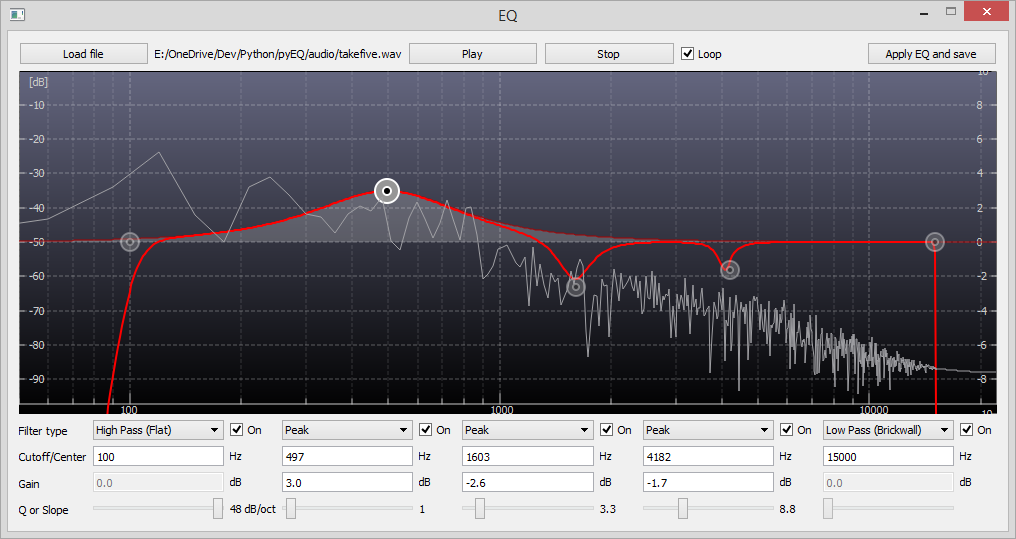
A simple parametric equalizer with 5 IIR filters. Written in python 3.4 for no other purpose than self-learning and fun. Currently supports only mono wave files.
Uses scipy, numpy, pyaudio for audio processing and pyside for GUI.
Share this:

SonicDive ~ 8D Music Player
✨ Features
🎵 Audio Visual Spectrums
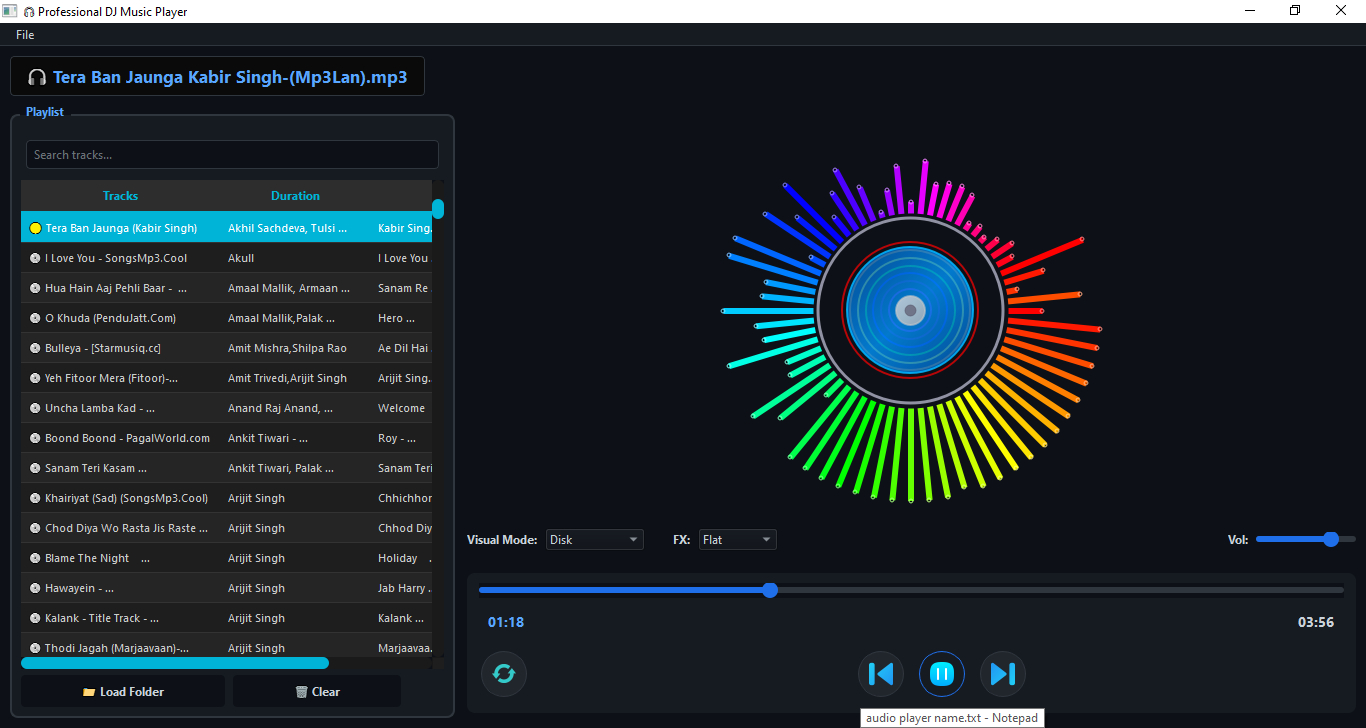
SonicDive supports multiple real-time audio visualizations:
💿 Disk Spectrum
📊 Bars Spectrum
🌊 Wave Spectrum
🖼️ Thumbnail Spectrum
⭕ Circle Spectrum
Each spectrum reacts dynamically to the music’s frequency and intensity.
🎚️ Audio Effects & Modes
Choose from a variety of sound profiles to match your mood:
🔊 Flat
🎧 3D Audio
🎧 8D Audio
🎤 Hip-Hop
🎻 Classic
🎸 Rock
🎥 Dolby Effect
Features:
- 8d music
- dolby sound
- 3d music
- spectrums
- opensource
- pyqt5
- python
sourceforge.net/projects/sonicdive-8d-music-player
Share this:

Foobar2000 ~ ctrfoobar2000 script
Control Foobar2000 with python + Command line
usage: control.py [-h] [-p] [-t PLAY_TRACK] [-s] [-P] [-n] [-r] [-R] [-V VOLUME] [-m] [-i] [-f [ADDFOLDER [ADDFOLDER ...]]] [-fi [ADDFILES [ADDFILES ...]]] [-F [ADDFOLDERPLAY [ADDFOLDERPLAY ...]]] [-Fi [ADDFILESPLAY [ADDFILESPLAY ...]]] [-c] [-d [DEL_TRACK [DEL_TRACK ...]]] [-l] [-b] [-S TYPE_CONTROLLER] [-H HOST] [-O PORT] [-?] [-g] [-x [CHANGE_CONFIG [CHANGE_CONFIG ...]]] [-T SECTION] [-E OPTION OPTION] [-a DIR_ALIAS] [-v] [-L LEVEL_ALIAS] [-z REPEAT] [--repeat-off] [--repeat-playlist] [--repeat-track] [--repeat-random] [--shuffle-track] [--shuffle-album] [--shuffle-folder] [--seek SEEK] [--root ROOT]optional arguments: -h, --help show this help message and exit -p, --play Play Playback -t PLAY_TRACK, --play-track PLAY_TRACK Play Playback Track No -s, --stop Stop Playback -P, --pause Pause Playback -n, --next Next Play -r, --previous Previous Play -R, --random Play Random -V VOLUME, --volume VOLUME Set Volume, range is -100 <= value <= 0 -m, --mute Mute Volume -i, --info Get info current Playing -f [ADDFOLDER [ADDFOLDER ...]], --addfolder [ADDFOLDER [ADDFOLDER ...]] Add Remote Folder Queue [HTTP] -fi [ADDFILES [ADDFILES ...]], --addfiles [ADDFILES [ADDFILES ...]] Add Remote Files Queue [HTTP] -F [ADDFOLDERPLAY [ADDFOLDERPLAY ...]], --addfolderplay [ADDFOLDERPLAY [ADDFOLDERPLAY ...]] Add Remote Folder Queue & Play it [HTTP] -Fi [ADDFILESPLAY [ADDFILESPLAY ...]], --addfilesplay [ADDFILESPLAY [ADDFILESPLAY ...]] Add Remote Folder Queue & Play it [HTTP] -c, --clear-playlist Clear Current Playlist [HTTP] -d [DEL_TRACK [DEL_TRACK ...]], --del-track [DEL_TRACK [DEL_TRACK ...]] Delete Playlist [HTTP], example: foobar -d 1 2 3 -l, --list List Playlist -b, --browser Browser Library -S TYPE_CONTROLLER, --type-controller TYPE_CONTROLLER Set Type Of Controller [com,http] -H HOST, --host HOST Remote Host control Address [HTTP] -O PORT, --port PORT Remote Port control Address [HTTP] -?, --usage Print All Help -g, --read-config Read config file -x [CHANGE_CONFIG [CHANGE_CONFIG ...]], --change-config [CHANGE_CONFIG [CHANGE_CONFIG ...]] Set Change config. format: section#option#value -T SECTION, --section SECTION Set Section Config -E OPTION OPTION, --option OPTION OPTION Set Option Config -a DIR_ALIAS, --dir-alias DIR_ALIAS Root of Directory Alias On Server -v, --version -v = show version | -vv = verbosity process -L LEVEL_ALIAS, --level-alias LEVEL_ALIAS Level Root of Directory Alias On Server -z REPEAT, --repeat REPEAT Repeat 0 = Default (repeat off) | 1 = Repeat Playlist | 2 = Repeat Track | 3 = Random Play | 4 = Shuffle Track | 5 = Shuffle Album | 6 = Shuffle Folders --repeat-off Repeat Off --repeat-playlist Repeat Playlist --repeat-track Repeat Track --repeat-random Random Play --shuffle-track Shuffle Track --shuffle-album Shuffle Album --shuffle-folder Shuffle by Folder --seek SEEK Seek for a second --root ROOT Root path / Directory Containt Music files, this is for One Folder Files Selected
github.com/cumulus13/ctrfoobar2000
Share this:

Lattice ~ CLI Toolkit For Music Collectors
A high-performance CLI toolkit for music collectors who manage their own libraries. Lattice provides a suite of tools for library visualization, integrity verification, cover art extraction, and metadata auditing — all from a single, zero-dependency script.
Why this exists
Modern music players often hide your library behind proprietary databases. Lattice is built for collectors who treat the filesystem as the source of truth. It reads tags directly via mutagen, ensuring your library is portable and player-agnostic.
Features:
| Mode | Flag | Description |
|---|---|---|
| Library Tree | --library | Generate a formatted ASCII/Unicode tree of your entire collection. |
| AI Library | --ai-library | Token-efficient export designed for LLM recommendation prompts. |
| Genre Wings | --all-wings | Generate separate library catalogs segmented by genre. |
| Integrity Checks | --testFLAC | Parallel verification of FLAC/MP3/Opus/WAV integrity via FFmpeg. |
| Art Extraction | --extractArt | Extract embedded covers with format-priority ranking (FLAC > Opus). |
| Tag Audit | --auditTags | Identify and report files with missing or inconsistent metadata. |
github.com/VirInvictus/Lattice
Share this:

discogs-cli ~ Discogs Terminal Access
discogs-cli bring the Discogs.com database to your terminal. Perform the following actions from your terminal:
- Search artists, releases, labels
- View artist information and their releases
- View label details and its associated releases
- View a release in detail
github.com/jesseward/discogs-cli
Share this:

lowhum ~ Deep Brown Noise For Focus
Deep brown noise for focus, for the macOS menu bar.
Single-purpose menu bar app that generates deep brown noise locally and plays it on loop. Install it, click play, forget about it. Cumulative-sum brown noise through a Butterworth bandpass (1 to 500 Hz, 20 Hz sub-bass highpass), RMS-normalized per chunk, crossfaded at boundaries. Everything is stored in
~/.lowhum/. Playback streams through PortAudio via memory-mapped files, so the full WAV never sits in RAM. The app polls audio devices every 2 seconds and stops instantly if headphones disconnect or a Bluetooth device drops.Menu bar controls
The menu bar icon is a template image, so macOS handles dark/light mode automatically. Further, use it for:
- Play / Stop from the menu bar
- Pick any connected audio device from the Output Device submenu
- Noise color selection (brown, pink, white)
- Auto-stops when headphones connect or disconnect
Requires macOS and Python 3.12+.
lmarkmann.github.io/lowhum
github.com/lmarkmann/lowhum
References:
en.wikipedia.org/wiki/Brownian_noise
Share this:

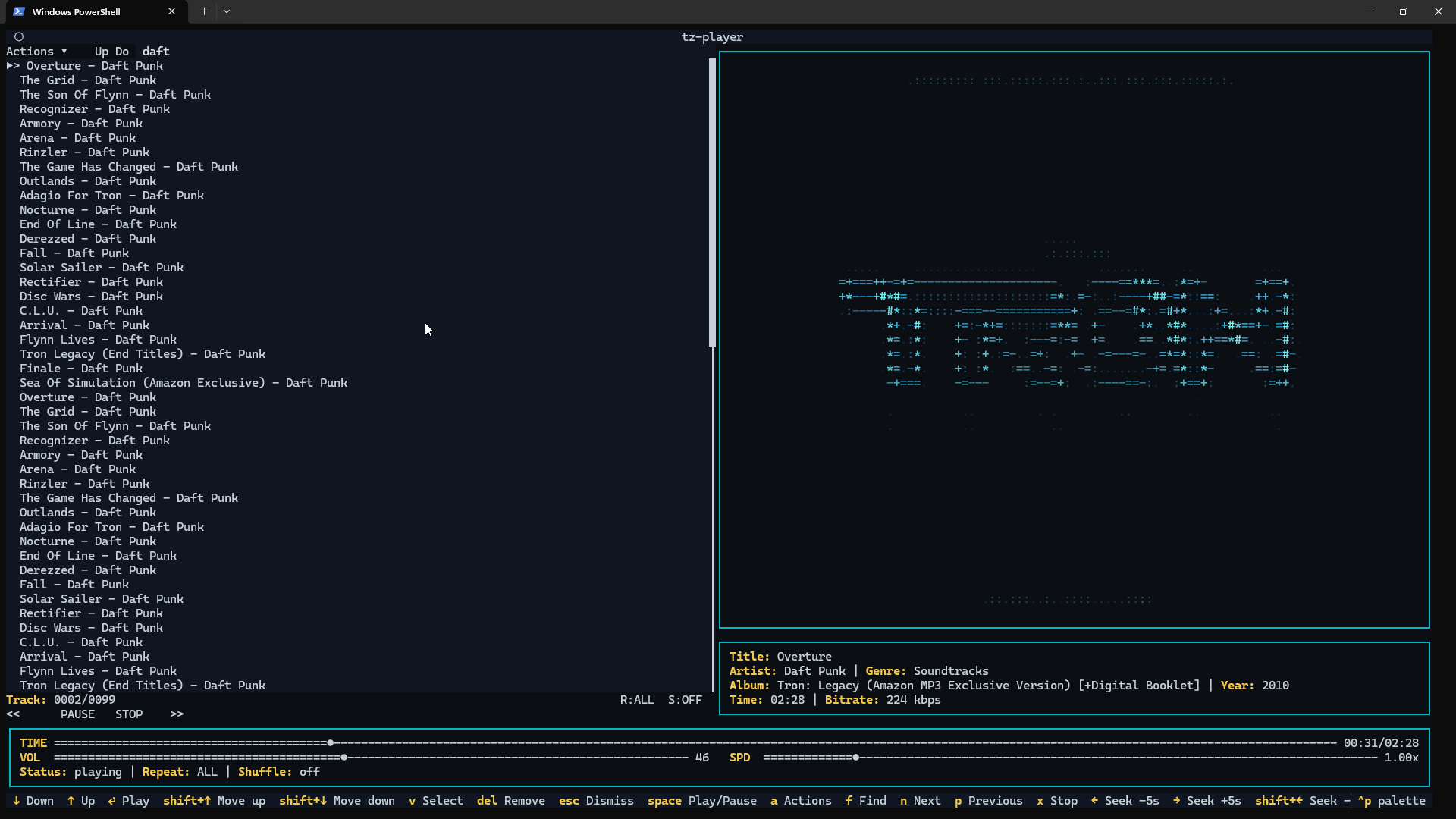
tz-player ~ Command Line Music Player
A clean, keyboard-driven music player for the terminal.
tz-playeris a simple TUI music player built with Python and powered by VLC. If VLC can play it,tz-playercan play it.No streaming. No accounts. No background services. Just your music, in your terminal.