foobar2000 ~ foo_uie_jsplitter


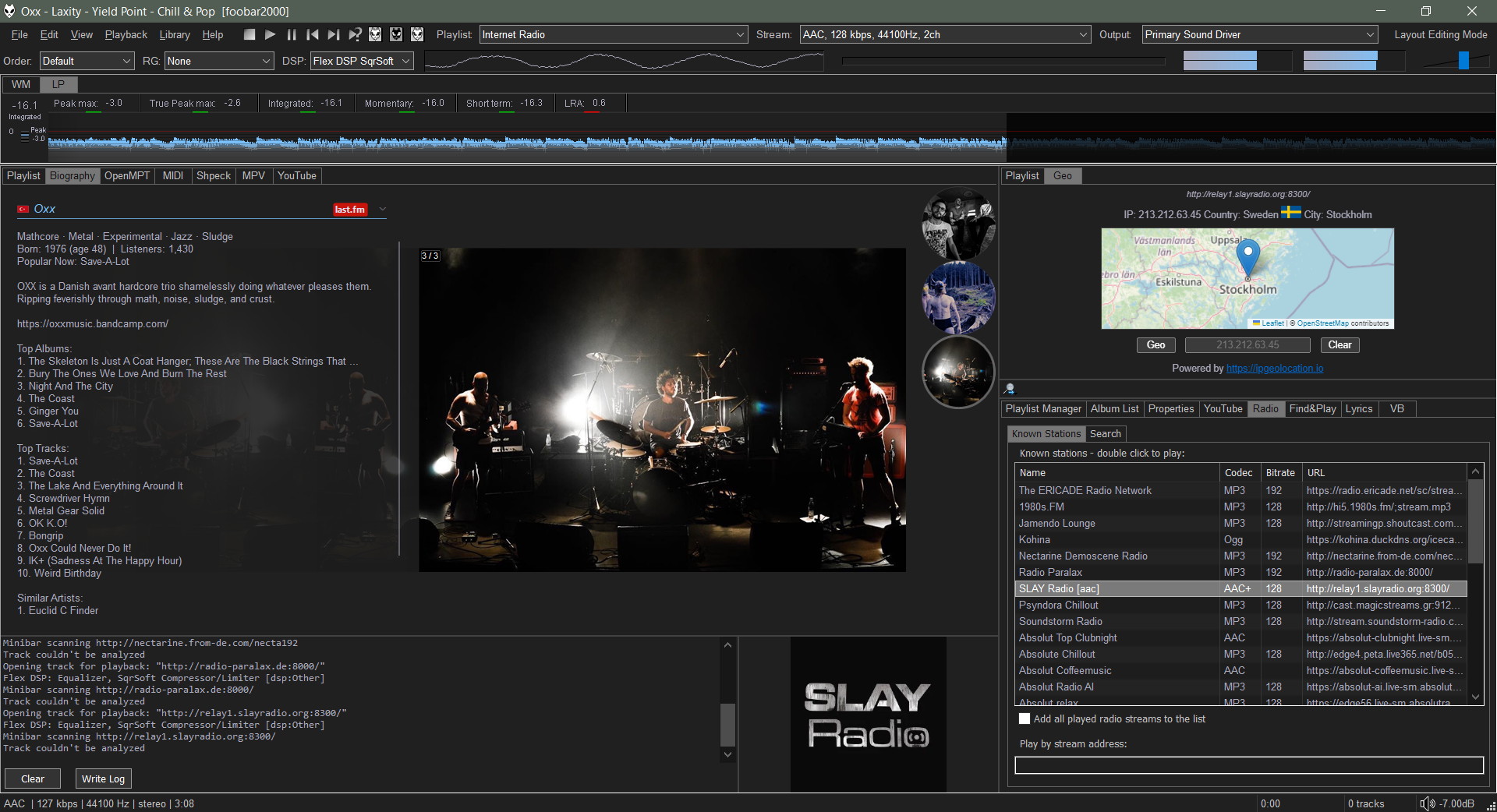
JSplitter (component name: foo_uie_jsplitter) is a JavaScript-based user interface component for foobar2000 that allows users to create highly customized panels, layouts, browsers, playlists, artwork displays, VU meters, and other interface elements using JavaScript. It originated as a successor to older scripting components such as Panel Stack Splitter and has become popular among theme developers.

What JSplitter provides:

  • JavaScript scripting for custom UI panels
  • Dynamic layouts and splitters
  • Custom playlist viewers
  • Album art browsers
  • Biography and review panels
  • VU meters and visualizations
  • Integration with foobar2000 playlists, library, playback state, and metadata
  • Support for importing complex themes and panel collections developed by other users

github.com/dima-lur/jsplitter
hydrogenaudio.org/index.php/topic,126743.0

Foobar2000 ~ ctrfoobar2000 script


Control Foobar2000 with python + Command line

usage: control.py [-h] [-p] [-t PLAY_TRACK] [-s] [-P] [-n] [-r] [-R]
[-V VOLUME] [-m] [-i] [-f [ADDFOLDER [ADDFOLDER ...]]]
[-fi [ADDFILES [ADDFILES ...]]]
[-F [ADDFOLDERPLAY [ADDFOLDERPLAY ...]]]
[-Fi [ADDFILESPLAY [ADDFILESPLAY ...]]] [-c]
[-d [DEL_TRACK [DEL_TRACK ...]]] [-l] [-b]
[-S TYPE_CONTROLLER] [-H HOST] [-O PORT] [-?] [-g]
[-x [CHANGE_CONFIG [CHANGE_CONFIG ...]]] [-T SECTION]
[-E OPTION OPTION] [-a DIR_ALIAS] [-v] [-L LEVEL_ALIAS]
[-z REPEAT] [--repeat-off] [--repeat-playlist]
[--repeat-track] [--repeat-random] [--shuffle-track]
[--shuffle-album] [--shuffle-folder] [--seek SEEK]
[--root ROOT]
optional arguments:
-h, --help show this help message and exit
-p, --play Play Playback
-t PLAY_TRACK, --play-track PLAY_TRACK
Play Playback Track No
-s, --stop Stop Playback
-P, --pause Pause Playback
-n, --next Next Play
-r, --previous Previous Play
-R, --random Play Random
-V VOLUME, --volume VOLUME
Set Volume, range is -100 <= value <= 0
-m, --mute Mute Volume
-i, --info Get info current Playing
-f [ADDFOLDER [ADDFOLDER ...]], --addfolder [ADDFOLDER [ADDFOLDER ...]]
Add Remote Folder Queue [HTTP]
-fi [ADDFILES [ADDFILES ...]], --addfiles [ADDFILES [ADDFILES ...]]
Add Remote Files Queue [HTTP]
-F [ADDFOLDERPLAY [ADDFOLDERPLAY ...]], --addfolderplay [ADDFOLDERPLAY [ADDFOLDERPLAY ...]]
Add Remote Folder Queue & Play it [HTTP]
-Fi [ADDFILESPLAY [ADDFILESPLAY ...]], --addfilesplay [ADDFILESPLAY [ADDFILESPLAY ...]]
Add Remote Folder Queue & Play it [HTTP]
-c, --clear-playlist Clear Current Playlist [HTTP]
-d [DEL_TRACK [DEL_TRACK ...]], --del-track [DEL_TRACK [DEL_TRACK ...]]
Delete Playlist [HTTP], example: foobar -d 1 2 3
-l, --list List Playlist
-b, --browser Browser Library
-S TYPE_CONTROLLER, --type-controller TYPE_CONTROLLER
Set Type Of Controller [com,http]
-H HOST, --host HOST Remote Host control Address [HTTP]
-O PORT, --port PORT Remote Port control Address [HTTP]
-?, --usage Print All Help
-g, --read-config Read config file
-x [CHANGE_CONFIG [CHANGE_CONFIG ...]], --change-config [CHANGE_CONFIG [CHANGE_CONFIG ...]]
Set Change config. format: section#option#value
-T SECTION, --section SECTION
Set Section Config
-E OPTION OPTION, --option OPTION OPTION
Set Option Config
-a DIR_ALIAS, --dir-alias DIR_ALIAS
Root of Directory Alias On Server
-v, --version -v = show version | -vv = verbosity process
-L LEVEL_ALIAS, --level-alias LEVEL_ALIAS
Level Root of Directory Alias On Server
-z REPEAT, --repeat REPEAT
Repeat 0 = Default (repeat off) | 1 = Repeat Playlist
| 2 = Repeat Track | 3 = Random Play | 4 = Shuffle
Track | 5 = Shuffle Album | 6 = Shuffle Folders
--repeat-off Repeat Off
--repeat-playlist Repeat Playlist
--repeat-track Repeat Track
--repeat-random Random Play
--shuffle-track Shuffle Track
--shuffle-album Shuffle Album
--shuffle-folder Shuffle by Folder
--seek SEEK Seek for a second
--root ROOT Root path / Directory Containt Music files, this is
for One Folder Files Selected

github.com/cumulus13/ctrfoobar2000

Foobar2000 ~ Autometa Playlists


Autometa is a minimalist, customizable JScript Panel script designed to quickly create autoplaylists based on the current track’s tags with a single click (similar to the quick search function).

github.com/Zhiro90/foobar2000-autometa

foo_opensubsonic ~ Streaming Client


OpenSubsonic / Navidrome client implementation for foobar2000

Features:

  • Connect to OpenSubsonic-compatible servers such as Navidrome
  • Stream tracks directly in foobar2000 through subsonic:// paths
  • Sync remote library metadata into a local foobar2000 playlist
  • Import and sync remote playlists
  • Load and cache album artwork with fallback support for streamed items

github.com/michioxd/foo_opensubsonic

Related:

foobar2000-catbox ~ Foobar, Discord, Catbox & Images


This is a helper application that uploads images to Catbox, and is meant to be invoked by the foo_discord_rich plugin. With a fork of the Discord Rich Presence Integration component, uploads cover art to catbox.moe and prints the URL.

github.com/realoksi/foobar2000-catbox

foo_timesleep ~ Foobar2000 Sleep Timer


foo_timesleep is a sleep timer component for foobar2000. It provides both:

  • Sleep timer commands under Playback > Sleep Timer
  • An always-visible Sleep Timer toolbar item for Columns UI (Toolbars)

Features:

  • Start a sleep timer in minutes (preset values)
  • Stop playback when the timer reaches zero
  • Show remaining time
  • Cancel an active timer

github.com/shirafukayayoi/foo_timesleep

foobar2000 ~ node_foobar_controller


This is a small web app for controlling a Foobar2000 instance. It calls the REST interface provided by foo_beefweb but provides an alternative web interface.

codeberg.org/schrock/node_foobar_controller

Album Art Minimal ~ foobar2000 HTTP Control Template


A clean, minimalist web interface for foobar2000 that displays full-screen album art with elegant hover controls.

github.com/jame25/albumart_minimal

foo_uie_webview ~ Foobar2000 Webapps


foo_uie_webview is a foobar2000 component that exposes the Microsoft WebView2 control as UI panel. The component started as foo_vis_text.

It takes an HTML file that receives playback notifications from foobar2000. The panel can react to those notifications and adjust its output using JavaScript code.

Features:

  • Supports the Default User Interface (DUI) and the Columns User Interface (CUI).
  • Supports dark mode.
  • Supports foobar2000 2.0 and later (32-bit and 64-bit version).

github.com/stuerp/foo_uie_webview
Topic: foo_uie_webview
Topic: Made with foo_uie_webview

Gallery

foo_resume ~ Foobar Remembers Playback Positions


A lightweight foobar2000 component that automatically remembers and resumes the playback position for every track.

Features:

  • Remembers the last playback position for every unique track in your library.
  • Easily enabled or disabled via the advanced settings menu.
  • Stores data in a simple text file within your foobar2000 profile folder.

github.com/reda777/foo_resume

Foobar2000 ~ EAC Log Viewer Script


SMP EAC Log Viewer for Foobar2000

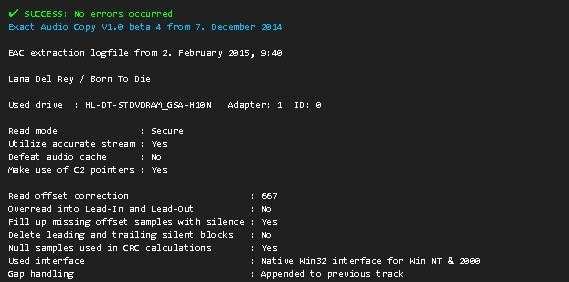
The SMP EAC Log Viewer is a Spider Monkey Panel (SMP) script for Foobar2000 designed to display Exact Audio Copy (EAC) log files in a DUI panel. It preserves the alignment of log columns, color-codes the conclusion lines for quick success/error identification, and prepends a summary line so it scrolls with the rest of the log.

Features:

  • DUI panel
  • Monospace font: Preserves column alignment in all EAC logs.
  • Color-coded conclusions:
    • Green = successful rip
    • Red = errors found
  • Summary line: Displays overall pass/fail and scrolls with the log.
  • Automatic log detection: Checks multiple common naming conventions:
    • %album%.log
    • %artist% - %album%.log
    • EAC.log

Installation:

  1. Download the script
    Get the latest version of the SMP script from the GitHub repository:
    github.com/tom2tec/foobar2000_smp_eac_log_viewer/releases
  2. Copy the script
    Copy and paste the eac_log_viewer_panel.js script into your preferred scripts folder. Typical choices:
    • C:\Users\<YourName>\Documents\Foobar\scripts
    • Or any folder you already use for SMP scripts.
  3. Add a Spider Monkey Panel
    • Open Foobar2000 and switch to your DUI layout.
    • Right-click → Add New UI Element → Spider Monkey Panel
    • Open the Edit Panel Script… pane and paste the contents of eac_log_viewer_panel.js. or point to the script’s location in Panel Properties → Script File → File.
  4. Adjust panel settings
    • Set the font to match your DUI theme (monospace).
    • Resize the panel to comfortably display the full log width.

Usage:

  • The panel automatically updates when:
    • You play a new track.
    • You change focus in the playlist.
  • Scroll through the log using your mouse wheel.
  • The summary line shows the overall rip status and scrolls with the text.
  • Color-coded lines highlight conclusions: green for success, red for errors.

Notes:

  • The script is optimized for one log per album, but will attempt all three naming conventions for flexibility.
  • Unusually named logs may require manual renaming in order to conform or add an input condition to the script.
  • DUI theming preserves font and panel appearance but maintains column alignment.

License

This project is licensed under the MIT License. See the included LICENSE file or the GitHub repository for details.

Download and Support

foo_monthly_stats ~ Foobar Visualizes Music Stats


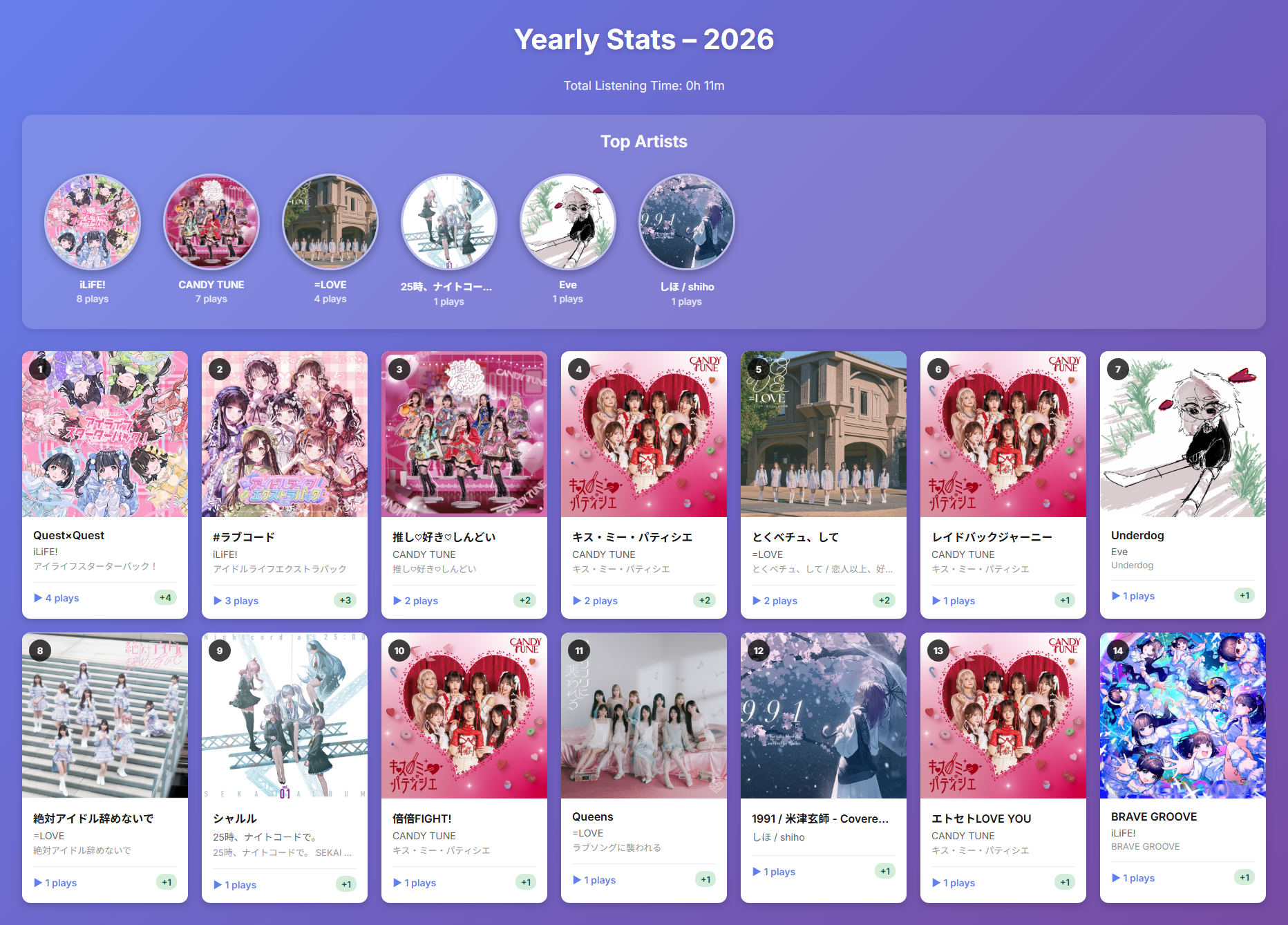
A foobar2000 component that tracks and visualizes your music listening statistics on a monthly and yearly basis.

Features:

  • 📊 Monthly & Yearly Statistics: View your listening history organized by month or year
  • 🎵 Track Play Counts: Records the number of times each track is played with accurate playback time tracking
  • 📈 Month-over-Month Comparison: See how your listening habits change with delta indicators
  • 🎨 Beautiful HTML Reports: Export visually appealing reports with album artwork
  • 🏆 Top Artists Ranking: Highlights your most-played artists with circular album art
  • ⏱️ Total Listening Time: Calculates and displays your total listening time
  • 🗄️ SQLite Database: Efficient local storage of listening history
  • 🖼️ Album Art Integration: Displays album artwork in reports using embedded thumbnails
foo_monthly_stats panel

github.com/shirafukayayoi/foo_monthly_stats