spotatui ~ Standalone Terminal Player


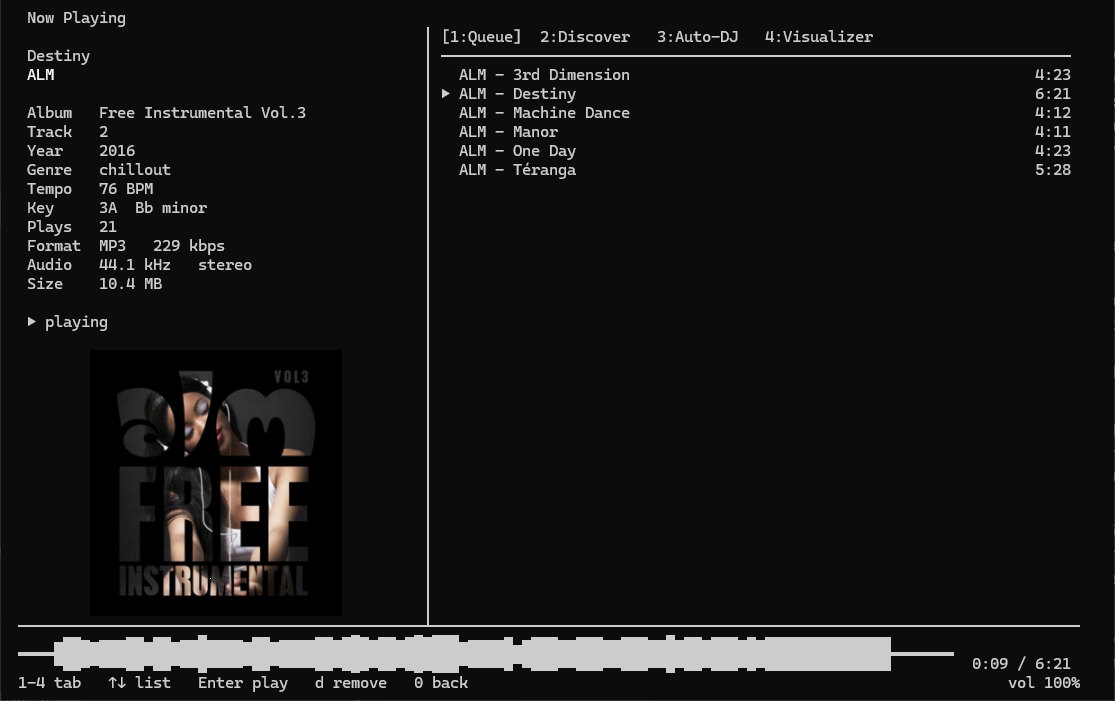
spotatui plays Spotify natively and streams YouTube, your local files, Subsonic or Navidrome and 30,000+ internet radio stations from a single keyboard-driven player. Spotify is optional. So is the AI DJ.

Features:

  • Multiple sources — Spotify optional. Play from Spotify, Local Files, a Subsonic/Navidrome server, Internet Radio, YouTube, or Qobuz. The free sources need no Spotify account; press d to switch between them at any time.
  • Native streaming. Play Spotify audio directly, no official app or spotifyd required — spotatui appears as its own Spotify Connect device (Premium required).
  • Synced lyrics. Line-by-line lyrics that follow playback.
  • Real-time audio visualizer. A system-wide FFT visualizer (press v) that reacts to whatever is playing.
  • Cross-source play queue. Press z on any track to queue it — the queue plays across every source before your current context resumes.
  • Lua plugins. Extend spotatui with event hooks, commands, keybindings, popups, and theming.
  • Listening history & recap. spotatui keeps a local play history and can generate a shareable HTML recap (spotatui history recap).
  • Full CLI. Most of what the UI does is scriptable — playback, search, playlists, shell completions. Run spotatui --help.
  • Lightweight. ~78 MB RAM while streaming, versus a full Electron client. See Performance.

spotatui.com
github.com/LargeModGames/spotatui

foo_localize ~ foobar2000 Multilingual Support


foo_localize adds multilingual support to foobar2000 using external JSON language packs. It allows the foobar2000 interface to be translated without modifying the player itself.

github.com/hehelp/foo_localize

Why Use It?

foobar2000 has traditionally been an English-language application. foo_localize removes that limitation by translating much of the user interface, including:

  • Main and context menus
  • Preferences and dialogs
  • Window titles
  • Playlist and library columns
  • Windows static resources

It also provides support for JScript and Spider Monkey Panel scripts and an API for component developers. The component currently includes language packs for:

  • Chinese (Traditional & Simplified)
  • French
  • German
  • Japanese
  • Russian
  • Spanish

An English template is included for creating additional languages.

Requirements:

  • foobar2000 2.0 or later
  • Windows 10/11 or macOS 11+
  • Windows 32 or 64-bit
  • foobar2000 1.x is not supported.

Installation:

Download the appropriate version from the project’s Releases page and install it as a normal foobar2000 component.

Download foo_localize

Using foo_localize

  • View → Dynamic Multilingual Engine
  • Enable the engine and select a language.

Additional options are available under:

File → Preferences → Display → Dynamic Multilingual Engine

Menus, dialogs and playlist/library localization can be enabled separately. Windows users can also enable Static Resource Translation. Language changes take effect without restarting foobar2000.

foo_localize only translates the interface. Track titles, artist names, album names, filenames, paths and other user data are not changed.

A More Accessible foobar2000

Localization has been a long-standing gap in foobar2000. foo_localize provides a practical solution without requiring separate localized versions of the player.

For users who prefer to work in another language, it makes foobar2000 considerably more accessible, and for the foobar2000 ecosystem, it provides a common foundation for multilingual components and scripts.

SimpMusic ~ Cross-platform Music App


A FOSS YouTube Music client for Android and Desktop with many features from
Spotify, SponsorBlock, ReturnYouTubeDislike using Compose Multiplatform to develop.

Features:

  • Play music from YouTube Music or YouTube for free, without ads and in the background
  • Three Now Playing styles: Classic, Material 3 Expressive and Apple Music (NEW)
  • Ten-band equalizer with presets and AutoEq headphone profiles (NEW)
  • SimpMusic Wrapped: your year in music, plus monthly recap playlists (NEW)
  • On-device listening analytics: charts, period history, listening clock (NEW)
  • Word-by-word Apple Music-style lyrics, romanization for 12 languages, share lyrics as an image (NEW)
  • Home screen widgets: turntable, playlists and listening insights (NEW)
  • High quality up-to 256kbps stream (Opus or AAC) for YouTube Music Premium users
  • Browsing Home, Charts, Podcast, Moods & Genre with YouTube Music data at high speed
  • Search everything on YouTube
  • Spotify Canvas supported
  • Power your experience with SimpMusic Chart (chart.simpmusic.org)
  • Play 1080p video option with subtitle
  • AI song suggestions
  • Import playlists converted from Spotify and other apps
  • Customize your playlist, synced with YouTube Music
  • Notifications from followed artists
  • Caching and offline playback support
  • Crossfade with DJ-style like Apple Music
  • Customizing THEME (Light, Dark, Color, etc)
  • Synced lyrics from SimpMusic Lyrics, LRCLIB, Spotify (require login) and YouTube Transcript – AI lyrics translation (BETA) (*)
  • Personalize data (**) and multi-YouTube-account support
  • Last.fm scrobbling (Full version)
  • Supports SponsorBlock and Return YouTube Dislike
  • Sleep Timer
  • Android Auto with online content, feature rich UI/UX
  • Discord Rich Presence support
  • Listen Together: shared rooms that play in sync with friends, compatible with Metrolist (NEW)
  • And many more!

(*) Use your OpenAI or Gemini API key
(**) For users who chose “Send back to Google” feature

www.simpmusic.org
github.com/maxrave-dev/SimpMusic

Lidarr ~ Usenet & BitTorrent Music Manager


Lidarr is a music collection manager for Usenet and BitTorrent users. It can monitor multiple RSS feeds for new tracks from your favorite artists and will grab, sort and rename them. It can also be configured to automatically upgrade the quality of files already downloaded when a better quality format becomes available.

Major Features Include:

  • Support for major platforms: Windows, Linux, macOS, Raspberry Pi, etc.
  • Automatically detects new tracks.
  • Can scan your existing library and download any missing tracks.
  • Can watch for better quality of the tracks you already have and do an automatic upgrade.
  • Automatic failed download handling will try another release if one fails
  • Manual search so you can pick any release or to see why a release was not downloaded automatically
  • Fully configurable track renaming
  • Full integration with SABnzbd and NZBGet
  • Full integration with Kodi, Plex (notification, library update, metadata)
  • Full support for specials and multi-album releases
  • And a beautiful UI
lidarr user interface

lidarr.audio
github.com/Lidarr/Lidarr

mstream ~ Self-hosted Music Server


mStream is a self-hosted music server. Self-hosting means you run the server software on a computer you own. mStream is lightweight and can be run on old hardware and boards like the Raspberry Pi.

Why host your own?

  • Own your music. No ads, and nothing gets removed from your library.
  • Quality. Stream FLAC and lossless files uncompressed.
  • Privacy. Streaming services log your listening habits. Your server never snitches on you.
  • Good for artists. Buy music directly and the money goes to them.
mstream interface

mstream.io
github.com/IrosTheBeggar/mStream

Bandcamp Desktop ~ FOSS Bandcamp Desktop App


Bandcamp Desktop is a crossplatform desktop application which allows you to use bandcamp.com in an easy and quick way.

Note that Bandcamp Desktop is not affiliated with Bandcamp, it is only a fan-made, free and Open-Source project.

Features:

  • Simple as the website
  • Header menu
  • Mini Player
  • Directly download Music from Bandcamp

Mini Player

Keep listening to the music while you explore the website! That’s the killer feature of this web application.

It’s very simple to use: just go to the album (or song, ep…) and click File > Mini Player (or press Ctrl + Space).

Directly download Music from Bandcamp

Bandcamp Desktop is able to directly download music from Bandcamp. Your albums and songs will be automatically unzipped and stored in the bandcamp-desktop folder which is located in your default download folder (Library Folder can be changed from App Preferences).

github.com/themagiulio/bandcamp-desktop

References:

en.wikipedia.org/wiki/Bandcamp

DXD-e ~ Experimental DXD Audio Format


This is a library that implements a proposed digital audio intermediary format, called DXD-e, that allows audio player and workstation applications to handle DSD (Direct Stream Digital) audio with only minor modifications to their input and output plugins. This is accomplished by embedding the original 1-bit DSD audio stream, along with a digital pilot signal, into a conventional decimated 24-bit PCM version of the DSD stream (which is known otherwise as DXD). This embedding consumes the 9 LSBs of each 24-bit sample (8 for the DSD and 1 for the pilot) while noise-shaping filters are employed to completely bury the resulting noise underneath the existing high-frequency DSD quantization noise always found in a DXD stream. In short, the DXD stream is made to hold a lossless copy of the original DSD stream without any degradation.

github.com/dbry/DXD-e
hydrogenaudio.org/index.php/topic,129787.0

SimpleWavSplitter ~ Split WAV Channels


Split multi-channel WAV files into single channel WAV files.

github.com/wieslawsoltes/SimpleWavSplitter

foobar2000 ~ foo_bookbar


Bookbar is a DSP component for foobar2000 (32-bit and 64-bit), designed for listening to audiobooks, podcasts and spoken-word recordings. It lets you smoothly change playback tempo, pitch and “tape speed”, and optionally enhances the sound (loudness leveling and speech intelligibility). The configuration window is fully accessible to screen readers (NVDA, JAWS).

Bookbar is a port of the Winamp plugin Bookamp to foobar2000.

github.com/michaldziwisz/bookbar
hydrogenaudio.org/index.php/topic,129790.0

Chord Cadenza ~ MIDI Chord Player


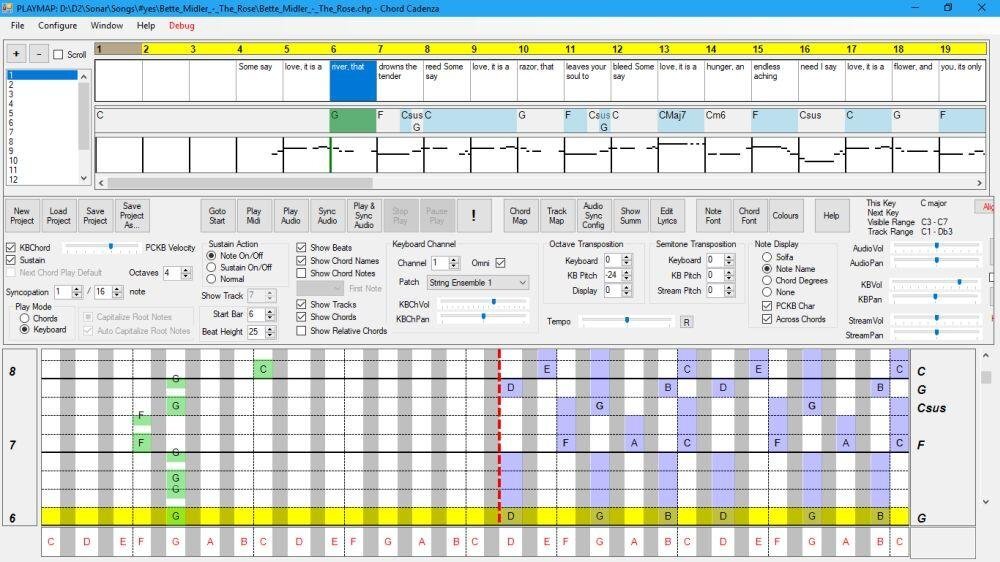
This app helps you to play and improvise chords whilst a MIDI file or audio source is being played. It does this by updating a rolling display to map the chord notes to a piano keyboard. It can also dynamically assign notes or chords to keys on a MIDI or PC keyboard.

Synchronisation is achieved automatically from a MIDI file. An audio file (e.g. MP3) can be synchronised and saved using the program.

Chords and major/minor keys can be extracted from the MIDI file using a configurable tool that analyses the MIDI file. Chords, keys, and time signatures can also be created or updated manually – this allows you to play along with an audio source without requiring a MIDI file.

The program contains a sequencer-style display that can be used to control the volume, panning, muting, solo’ing and patching of the tracks of the MIDI file.

Audio can be rendered with the program’s builtin synthesizer (using SoundFonts), or an external synthesizer.

Features:

  • Extract keys and chords from a MIDI file.
  • MIDI sequencer with track display and control.
  • Output to built-in synthesizer or MIDI out port.
  • ASIO and non-ASIO sound cards supported.
  • Play with MIDI or PC keyboard.
  • Display chords on a piano roll to facilitate playing and improvisation.
chord cadence interface

chordcadenza.org
sourceforge.net/projects/chord-cadenza

lrcget ~ Lyrics Download Utility


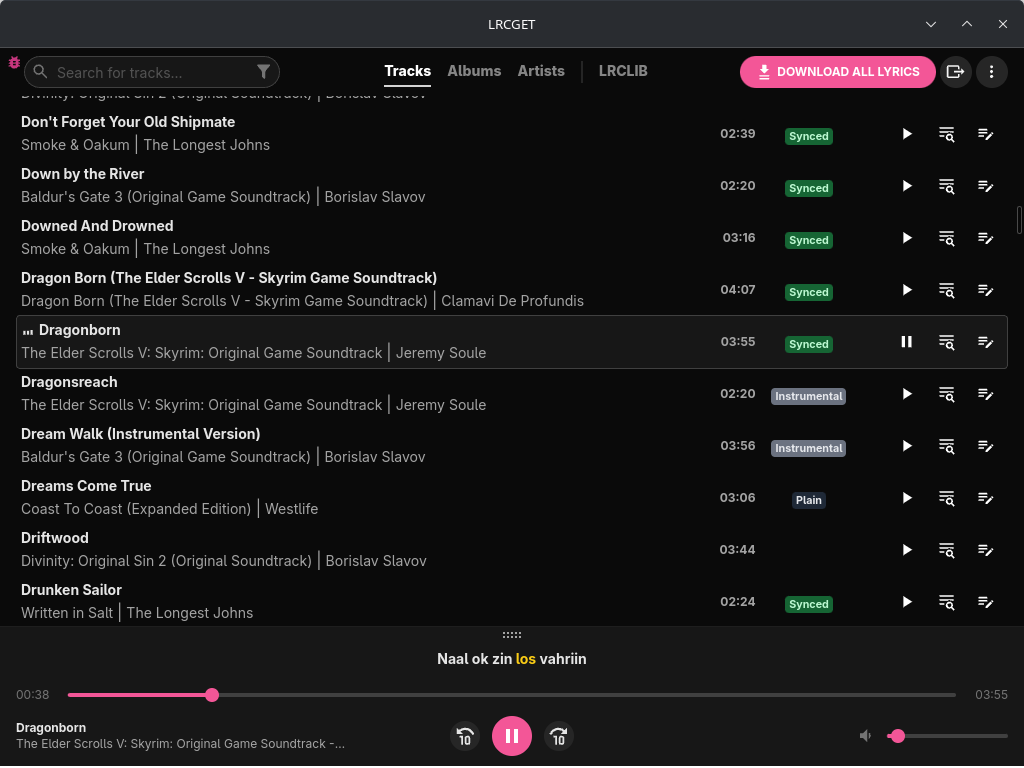
Utility for mass-downloading LRC synced lyrics for your offline music library.

LRCGET will scan every files in your chosen directory for music files, then and try to download lyrics to a LRC files having the same name and save them to the same directory as your music files.

LRCGET is the official client of LRCLIB service.

github.com/tranxuanthang/lrcget
flathub.org/en/apps/net.lrclib.lrcget

Resources:

lrclib.net
en.wikipedia.org/wiki/LRC_(file_format)

foobar2000 ~ foo_uie_playlist_tree


foo_uie_playlist_tree is a foobar2000 component to organize playlists in a tree view.

It attempts to recreate the functionality of foo_plorg.

* Supports the Default User Interface (DUI) and the Columns User Interface (CUI).
* Supports dark mode.
* Supports foobar2000 2.0 and later (Intel 32-bit/64-bit version).
* Title formatting variables
* %node_name%: the name of the node, either a playlist or a folder.
* %node_is_folder%: boolean value for use in $if( …) expressions and is true when the node is a folder.
* %node_item_count%: the number of playlists in a folder or number of items in a playlist.
* %playlist_duration%: the duration of the playlist (in seconds).
* %playlist_size%: the size of the playlist (in bytes).
* %fb2k_path%: the directory path of the foobar2000 installation.
* %fb2k_component_path%: the directory path of the component.
* %fb2k_profile_path%: the directory path of the foobar2000 profile.
* Any Windows environment variable.
* User defined tree images
* Supports drag & drop from foobar2000, Explorer and other applications.
* Supports the foobar2000 playlist recycle bin.

www.foobar2000.org/components/view/foo_uie_playlist_tree