foo_localize ~ foobar2000 Multilingual Support


foo_localize adds multilingual support to foobar2000 using external JSON language packs. It allows the foobar2000 interface to be translated without modifying the player itself.

github.com/hehelp/foo_localize

Why Use It?

foobar2000 has traditionally been an English-language application. foo_localize removes that limitation by translating much of the user interface, including:

  • Main and context menus
  • Preferences and dialogs
  • Window titles
  • Playlist and library columns
  • Windows static resources

It also provides support for JScript and Spider Monkey Panel scripts and an API for component developers. The component currently includes language packs for:

  • Chinese (Traditional & Simplified)
  • French
  • German
  • Japanese
  • Russian
  • Spanish

An English template is included for creating additional languages.

Requirements:

  • foobar2000 2.0 or later
  • Windows 10/11 or macOS 11+
  • Windows 32 or 64-bit
  • foobar2000 1.x is not supported.

Installation:

Download the appropriate version from the project’s Releases page and install it as a normal foobar2000 component.

Download foo_localize

Using foo_localize

  • View → Dynamic Multilingual Engine
  • Enable the engine and select a language.

Additional options are available under:

File → Preferences → Display → Dynamic Multilingual Engine

Menus, dialogs and playlist/library localization can be enabled separately. Windows users can also enable Static Resource Translation. Language changes take effect without restarting foobar2000.

foo_localize only translates the interface. Track titles, artist names, album names, filenames, paths and other user data are not changed.

A More Accessible foobar2000

Localization has been a long-standing gap in foobar2000. foo_localize provides a practical solution without requiring separate localized versions of the player.

For users who prefer to work in another language, it makes foobar2000 considerably more accessible, and for the foobar2000 ecosystem, it provides a common foundation for multilingual components and scripts.

WhatChord ~ Realtime Chord Identification


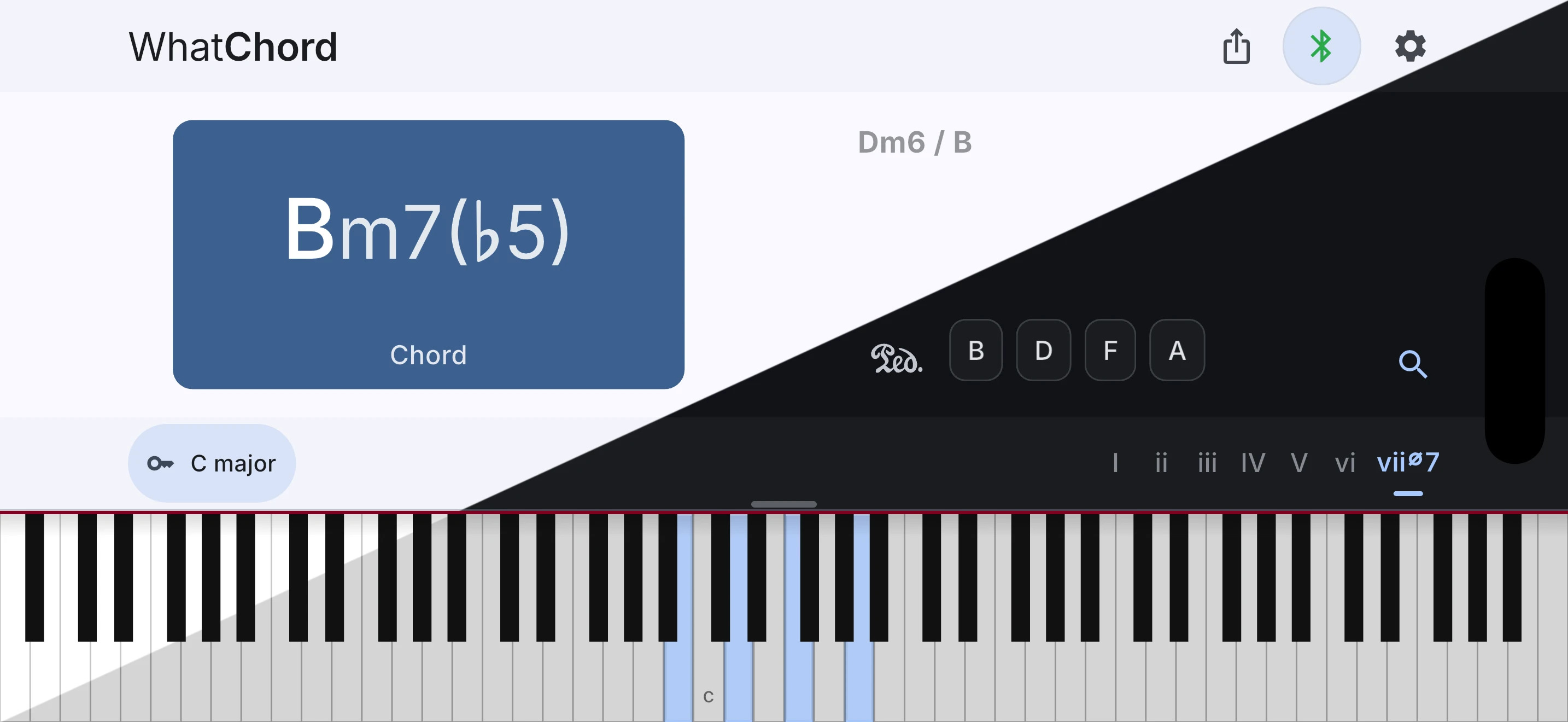
WhatChord is an interactive chord identification, key detection, and harmony exploration app. Identify voicings from live Bluetooth or USB MIDI input or manual note entry, follow the key as you play, then explore chords, scales, keyboard patterns, and harmonic context. It is optimized for speed, accuracy, and musician-expected naming, favoring stable, conventional interpretations over simple note-matching.

WhatChord User Interface

whatchord.earthmanmuons.com
github.com/EarthmanMuons/whatchord

foo_podcast ~ Foobar Podcasts Panel


A native foobar2000 input plugin providing a podcast subscription library.

Features:

  • A dockable “Podcasts” panel (View > Podcasts) listing every subscribed channel as a tree, with episodes nested underneath each channel.
  • Add a single podcast by its RSS/Atom feed URL.
  • Import subscriptions from an OPML file, and export the current subscription list to OPML.
  • Play any episode directly (double-click, or right-click > Play) — episodes stream straight from their original URL through foobar2000’s built-in HTTP input, no extra tools required.
  • Mark episodes as listened / unlistened; unlistened counts show next to each channel.
  • Sort episodes within each channel by newest first, oldest first, or by name.
  • Refresh a single podcast or all subscriptions at once.

github.com/zetmar-collab/foo_podcast

Hyphon ~ Web Based Sequencer


A 32-step sequencer with dual synths, drums, sampler, and TTS voice synthesis powered by Web Audio + Pyodide.

Features:

  • Dual synthesizers (Lead & Bass) with ADSR, filters, and waveform selection
  • Drum machine (Kick, Snare, Hi-Hats)
  • Sampler with Supertonic TTS integration – Generate speech from text
  • Voice Designer – Real-time voice parameter editing with GPU-accelerated DSP
  • 32-step pattern sequencer with 8 pattern slots per track
  • Song mode for arranging patterns
  • Hardware-style interface with knobs and LED feedback
  • XM module export

go.1ink.us/hyphon
github.com/ford442/web_sequencer

Music Assistant ~ Media Library Manager


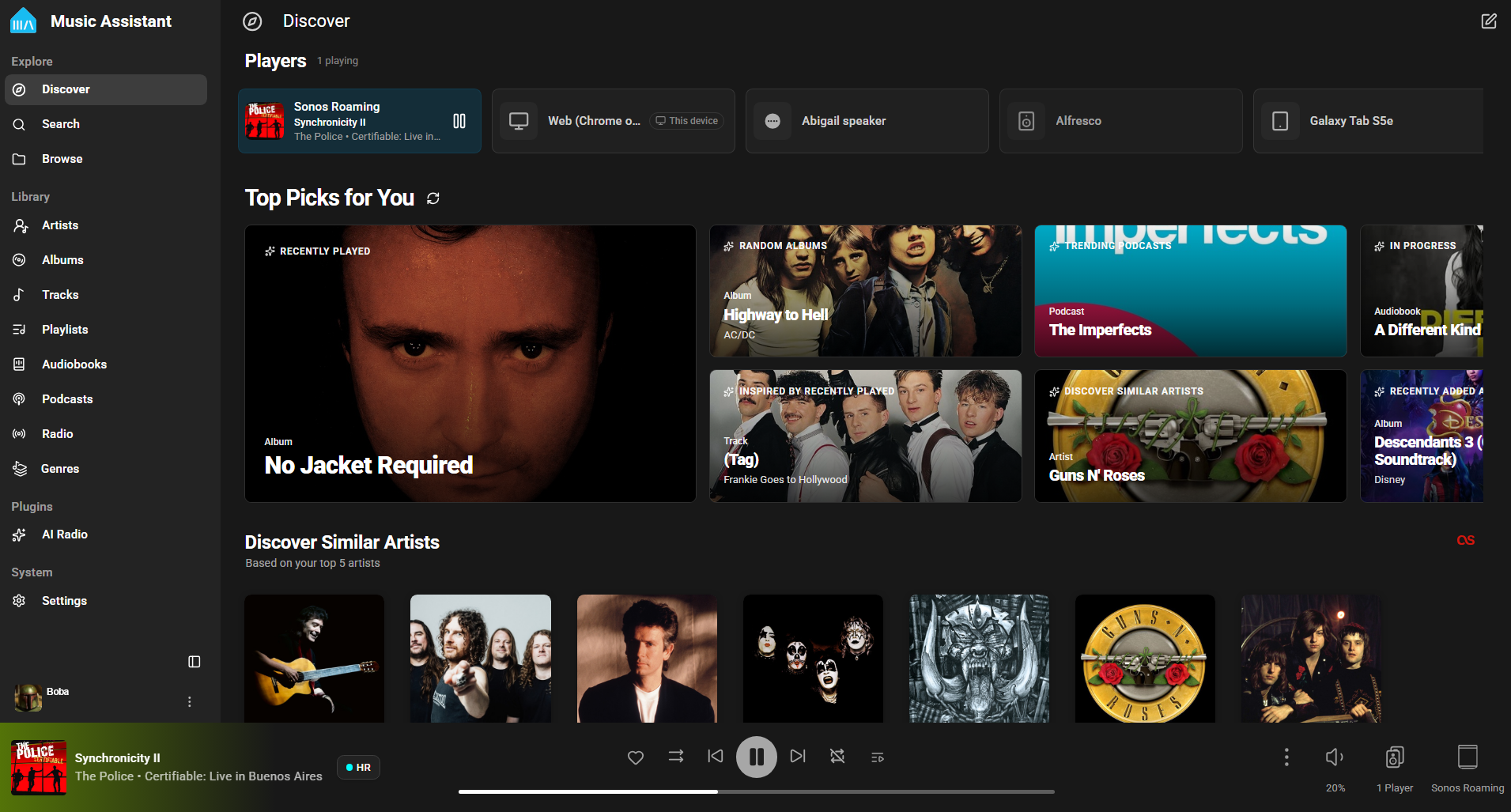
Music Assistant is a free, opensource media library manager that connects to your streaming services and a wide range of connected speakers. The server is the beating heart, the core of Music Assistant and must run on an always-on device like a Raspberry Pi, a NAS or an Intel NUC or alike.

home assistant user interface

www.music-assistant.io
github.com/music-assistant
github.com/music-assistant/server

Gigboy ~ Songbook & Gig-prep App


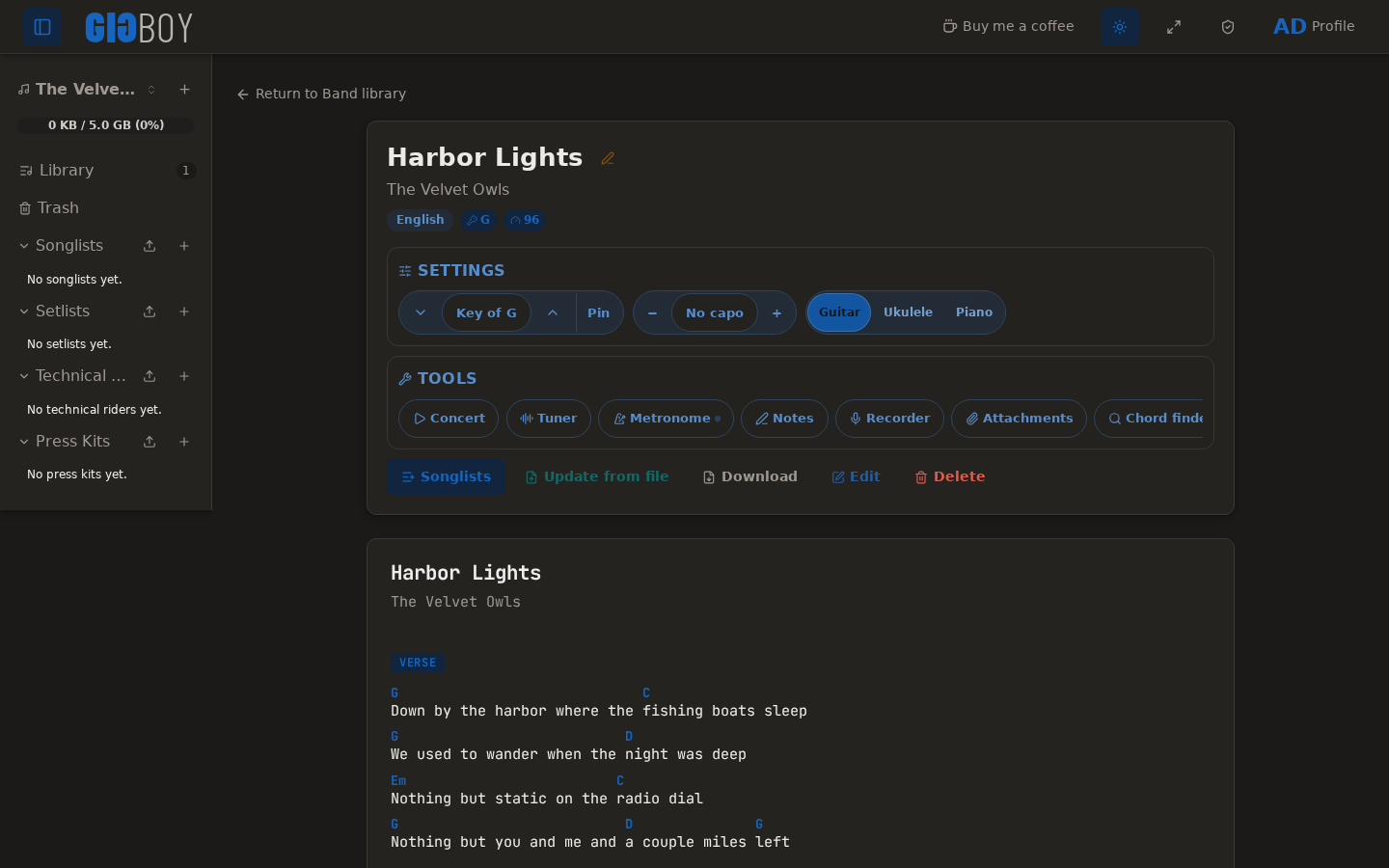
Gigboy is a web app for musicians and bands to write, organize, and rehearse songs from — built on the open ChordPro format, so nothing you write is ever locked into a proprietary format or someone else’s server. It’s self-hosted only: you run it on your own machine, NAS, or VPS with one Docker Compose command, and your band’s setlists, recordings, and press kit live in your own database, not a startup’s.

No subscriptions, no per-seat pricing, no feature paywalls — every account gets full access.

Gigboy web interface

blindpassasjer.github.io/gigboy
github.com/blindpassasjer/gigboy

Pitch Playground ~ Intonation, Pitch, Rhythm & Tuning Training


Pitch Playground is a free, ad-free collection of simple tools for musical tuning, rhythm, pitch, and intonation ear training.

Tuning and reference pitches

Use the tuner to check the pitch of a note with your microphone, or play reference tones to practice matching and tuning by ear. The reference pitch is adjustable, so you are not limited to A440.

Pitch and intonation ear training

Practice hearing small differences in pitch and recognizing whether a note is sharp or flat. The exercises are intended to develop pitch discrimination and a more accurate sense of intonation without requiring perfect pitch.

Metronome and rhythm practice

Use the metronome for a steady beat while practicing, choose from common simple, compound, and odd meters, or tap a tempo to set the BPM by feel.

Simple by design

Pitch Playground is designed to be a small, straightforward set of music practice tools: open it, choose a tab, and start practicing. Works well on desktop and mobile.

Free forever

Pitch Playground will always remain free, ad-free, and without in-app purchases. To run this site locally, download and unzip the latest release, which can be hosted on a webserver like nginx or by directly opening index.html.

p.jeltz.org
github.com/qwell/pitch-playground

SimpMusic ~ Cross-platform Music App


A FOSS YouTube Music client for Android and Desktop with many features from
Spotify, SponsorBlock, ReturnYouTubeDislike using Compose Multiplatform to develop.

Features:

  • Play music from YouTube Music or YouTube for free, without ads and in the background
  • Three Now Playing styles: Classic, Material 3 Expressive and Apple Music (NEW)
  • Ten-band equalizer with presets and AutoEq headphone profiles (NEW)
  • SimpMusic Wrapped: your year in music, plus monthly recap playlists (NEW)
  • On-device listening analytics: charts, period history, listening clock (NEW)
  • Word-by-word Apple Music-style lyrics, romanization for 12 languages, share lyrics as an image (NEW)
  • Home screen widgets: turntable, playlists and listening insights (NEW)
  • High quality up-to 256kbps stream (Opus or AAC) for YouTube Music Premium users
  • Browsing Home, Charts, Podcast, Moods & Genre with YouTube Music data at high speed
  • Search everything on YouTube
  • Spotify Canvas supported
  • Power your experience with SimpMusic Chart (chart.simpmusic.org)
  • Play 1080p video option with subtitle
  • AI song suggestions
  • Import playlists converted from Spotify and other apps
  • Customize your playlist, synced with YouTube Music
  • Notifications from followed artists
  • Caching and offline playback support
  • Crossfade with DJ-style like Apple Music
  • Customizing THEME (Light, Dark, Color, etc)
  • Synced lyrics from SimpMusic Lyrics, LRCLIB, Spotify (require login) and YouTube Transcript – AI lyrics translation (BETA) (*)
  • Personalize data (**) and multi-YouTube-account support
  • Last.fm scrobbling (Full version)
  • Supports SponsorBlock and Return YouTube Dislike
  • Sleep Timer
  • Android Auto with online content, feature rich UI/UX
  • Discord Rich Presence support
  • Listen Together: shared rooms that play in sync with friends, compatible with Metrolist (NEW)
  • And many more!

(*) Use your OpenAI or Gemini API key
(**) For users who chose “Send back to Google” feature

www.simpmusic.org
github.com/maxrave-dev/SimpMusic
sourceforge.net/projects/simpmusic.mirror

Tonbandfetzen ~ Audio From Plain Text


Tonbandfetzen is a collection of command-line tools that allow you to compose music based on audio fragments generated from plain text input. It contains:

  • tz mel – generate sound fragments from plain text
  • tz guitar – read guitar tablature
  • tz stick – concatenate audio data
  • tz stack – superimpose audio data
  • tz stretch – rescale audio data
  • tz repeat – loop audio data
  • tz trim – strip leading and trailing silence
  • tz mono – unzip audio channels
  • tz harmonics – show spectra of wave samples
  • tz inspect – show information on audio file
  • tz riff2aiff – convert .wav(e) into .aif(f) files
  • tz aiff2riff – convert .aif(f) into .wav(e) files
  • tz tag – add ID3v2 metadata to .wav(e) files
  • tz play – generate and play sound fragments

github.com/janberges/Tonbandfetzen

Lidarr ~ Usenet & BitTorrent Music Manager


Lidarr is a music collection manager for Usenet and BitTorrent users. It can monitor multiple RSS feeds for new tracks from your favorite artists and will grab, sort and rename them. It can also be configured to automatically upgrade the quality of files already downloaded when a better quality format becomes available.

Major Features Include:

  • Support for major platforms: Windows, Linux, macOS, Raspberry Pi, etc.
  • Automatically detects new tracks.
  • Can scan your existing library and download any missing tracks.
  • Can watch for better quality of the tracks you already have and do an automatic upgrade.
  • Automatic failed download handling will try another release if one fails
  • Manual search so you can pick any release or to see why a release was not downloaded automatically
  • Fully configurable track renaming
  • Full integration with SABnzbd and NZBGet
  • Full integration with Kodi, Plex (notification, library update, metadata)
  • Full support for specials and multi-album releases
  • And a beautiful UI
lidarr user interface

lidarr.audio
github.com/Lidarr/Lidarr

mstream ~ Self-hosted Music Server


mStream is a self-hosted music server. Self-hosting means you run the server software on a computer you own. mStream is lightweight and can be run on old hardware and boards like the Raspberry Pi.

Why host your own?

  • Own your music. No ads, and nothing gets removed from your library.
  • Quality. Stream FLAC and lossless files uncompressed.
  • Privacy. Streaming services log your listening habits. Your server never snitches on you.
  • Good for artists. Buy music directly and the money goes to them.
mstream interface

mstream.io
github.com/IrosTheBeggar/mStream

Bandcamp Desktop ~ FOSS Bandcamp Desktop App


Bandcamp Desktop is a crossplatform desktop application which allows you to use bandcamp.com in an easy and quick way.

Note that Bandcamp Desktop is not affiliated with Bandcamp, it is only a fan-made, free and Open-Source project.

Features:

  • Simple as the website
  • Header menu
  • Mini Player
  • Directly download Music from Bandcamp

Mini Player

Keep listening to the music while you explore the website! That’s the killer feature of this web application.

It’s very simple to use: just go to the album (or song, ep…) and click File > Mini Player (or press Ctrl + Space).

Directly download Music from Bandcamp

Bandcamp Desktop is able to directly download music from Bandcamp. Your albums and songs will be automatically unzipped and stored in the bandcamp-desktop folder which is located in your default download folder (Library Folder can be changed from App Preferences).

github.com/themagiulio/bandcamp-desktop

References:

en.wikipedia.org/wiki/Bandcamp