Soft Playlists ~ Foobar & Last.fm


Can create different Last.fm related playlists:

  • loved tracks of a single user, multiple users, friends or neighbours.
  • recent tracks of a single user, multiple users, friends or neighbours.
  • top tracks of a single user, multiple users, friends or neighbours over different periods.
  • top tracks of an artist.
  • top tracks of artists similar to an artist.
  • top tracks with certain tag.
  • tracks similar to a track.

Can also…

  • love, unlove, ban and unban a track on your Last.fm account.
  • add a track to a custom playlist on your Last.fm account.
  • save and load XSPF playlists (make playlists without hard paths). This makes it possible to easily share playlists with other people. Also when you restructure your library (change location of your music files), these playlists will continue to work.

www.foobar2000.org/components/view/foo_softplaylists
hydrogenaud.io/index.php?topic=76133.0

Integrating Last.fm with Foobar2000 Using Soft Playlists

Step 1: Install Soft Playlists
Begin by downloading the foo_softplaylists component from the foobar2000 website. Once downloaded, open foobar2000 and navigate to File → Preferences → Components → Install…, then select the downloaded .fb2k-component file. Restart foobar2000 to activate the plugin. This component enables you to generate dynamic playlists directly from your Last.fm data.

Step 2: Connect Your Last.fm Account
After installation, go to Preferences → Tools → Soft Playlists → Last.fm. Enter your Last.fm username and password to authorize the connection. Once you are logged in, the plugin can fetch your loved tracks, recent plays, top tracks, and tag-based data.

Step 3: Creating Loved Tracks Playlists
Soft Playlists can generate playlists of tracks in your library that are marked as loved on Last.fm. Simply create a new playlist, Open the Library Menu and choose the “Loved Tracks” option, and the plugin will match these tracks with your local files and create a new playlist. You can now play or sort these loved tracks directly from foobar2000.

Step 4: Generating Top Tracks Playlists
You can also create playlists based on top tracks from your Last.fm account, your friends, or neighbors. Select the “Top Tracks” option and filter by user, artist, or tag. This allows you to automatically build playlists of your most-played tracks, popular tracks by similar artists, or tracks labeled with specific moods or genres.

Step 5: Recent Tracks Playlists
Soft Playlists supports recent tracks queries from Last.fm. You can generate playlists of your most recently played tracks or recent tracks from other users. This is ideal for keeping up to date with current listening trends.

Additional Features:
Soft Playlists allows you to save sharable playlists in XSPF format, which keeps them portable and resilient to file location changes. The plugin also lets you love or unlove tracks directly from foobar2000, updating your Last.fm account automatically. This integration creates a seamless workflow between your local library and Last.fm.

Adding a toolbar button to love a track:

  1. Right click the Foobar2000 toolbar and select “Customize Buttons...“
  2. In the Available Commands Panel, open “Context Menu” and then “Last.fm”
  3. Select "Last.fm Love Track” and click the “Add” button then click “Ok”
  4. Change the button icon to a Last.fm icon (.ico file)

Tips and Considerations
Soft Playlists is an older 32bit component. The plugin works best if most of your Last.fm scrobbled tracks are present in your local library. For more advanced integration, consider combining Soft Playlists with Spider Monkey Panel scripts to pull additional data, such as playcounts, tags, or charts.

2BusControl ~ Crossplatform Balance Plugin


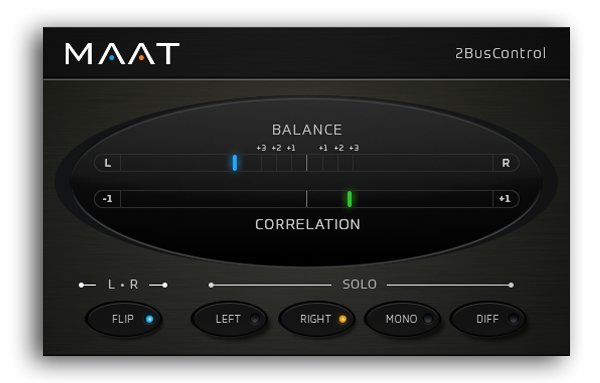
A universal L/R plus MONO/DIFF monitor control and Balance / Correlation metering plug-in for stereo bus masters.

2BusControl

www.maat.digital/2buscontrol

Jalv ~ Jack LV2 Host


Jalv is a simple but fully featured LV2 host for Jack. It runs LV2 plugins and exposes their ports as Jack ports, essentially making any LV2 plugin function as a Jack application.

drobilla.net/software/jalv

Triceratops ~ Polyphonic Synthesizer LV2 Plugin


Triceratops is an analogue style polyphonic subtractive synthesizer plugin, for use with the LV2 plugin architecture, at this time there is no standalone version. An up to date version of the LV2 library is required along with a suitable host (e.g. Qtractor, Jalv, Ardour).

www.thunderox.com/triceratops
sourceforge.net/projects/triceratops

Protoplug ~ Scriptable Audio Plugins


Create audio plugins on-the-fly with LuaJIT.

Protoplug is a VST/AU plugin that lets you load and edit Lua scripts as audio effects and instruments. The scripts can process audio and MIDI, display their own interface, and use external libraries. Transform any music software into a live coding environment!

Cross-platform: builds for Windows, Mac OS X and Linux. This means that all protoplug scripts are compatible with these platforms and can be loaded into a huge amount of audio software (glory to JUCE).

Fast: Use the speed of LuaJIT, and perform DSP tasks as efficiently as old school C implementations.

Free and open source: Want a new feature? Add it yourself. The source is MIT-licensed and available on Github.

protoplug_example_5-6

www.osar.fr/protoplug
github.com/pac-dev/protoplug

CAPS ~ C* Audio Plugin Suite


CAPS is a collection of audio plugins comprising basic virtual guitar amplification and a small range of classic effects, signal processors and generators of mostly elementary and occasionally exotic nature.

The plugins aim to combine the highest sound quality with computational efficiency and zero latency*.

quitte.de/dsp/caps

INFAMOUS Plugins ~ Linux LV2 Audio Plugins


These are audio plugins in the LV2 format, developed for Linux. Most are suitable for live use (exceptions are noted in the description).

  1. Cellular Automaton Synth
  2. Envelope Follower
  3. Hip2B
  4. Cheap Distortion
  5. Stuck

github.com/ssj71/infamousPlugins
ssj71.github.io/infamousPlugins/plugs

FreqAnalyst ~ Spectrum Analyzer VST


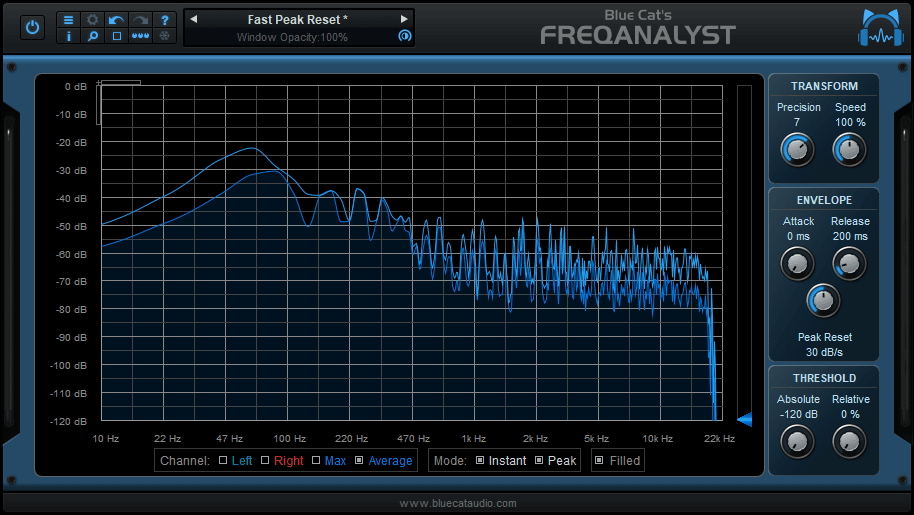
Blue Cat’s FreqAnalyst is a free spectrum analyzer plug-in that lets you monitor the spectral content of your audio signal in real time.

This plug-in has been designed to provide extreme smoothness and high resolution for both time and frequency: unlike most spectrum analyzers, Blue Cat’s FreqAnalyst is able to display continuous variations even with a very high frequency resolution, thanks to its unique smooth interpolation algorithms.

Most aspects of the audio to frequency display conversion can be managed, which lets you total control over the monitoring. A special thresholding system has been developed to help you see the important parts of the spectrum easily. In case you need extra precision in a particular frequency range, you can zoom the display and check the part of the graph you are interested in.

freqanalyst

www.bluecataudio.com/Products/Product_FreqAnalyst

References:

en.wikipedia.org/wiki/Spectrum_analyzer

Tune It! ~ Tune Your Instruments


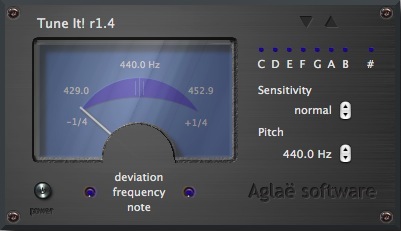
Tune It! is a piece of software that helps musicians to tune their instrument. It can also be used to monitor the pitch during live performance.

Tune It! is based on a original and very accurate pitch detection algorithm. It can tune a wide range of instruments such as guitar, bass, piano, flute, violin, saxophone, etc…

Tune It! is available for both Windows and Macintosh platforms. It can be ran as a standalone application or as a plugin within a VST or AU host.

Features:

  • Automatic note recognition from A-1 up to A6.
  • Programmable A440 reference from 400 to 480Hz (step of 1Hz or 0,1Hz).
  • Programmable Precision
  • The highest precision, the finest tuning.
  • The lower precision, the lower latency (suited for tuning control during live performance)
tuneit

tuneit.free.fr

Dynamic Audio Normalizer ~ Advanced Normalization


Dynamic Audio Normalizer is a library for advanced audio normalization purposes. It applies a certain amount of gain to the input audio in order to bring its peak magnitude to a target level (e.g. 0 dBFS). However, in contrast to more “simple” normalization algorithms, the Dynamic Audio Normalizer dynamically re-adjusts the gain factor to the input audio. This allows for applying extra gain to the “quiet” sections of the audio while avoiding distortions or clipping the “loud” sections. In other words: The Dynamic Audio Normalizer will “even out” the volume of quiet and loud sections, in the sense that the volume of each section is brought to the same target level. Note, however, that the Dynamic Audio Normalizer achieves this goal without applying “dynamic range compression”. It will retain 100% of the dynamic range within each “local” region of the audio file.

The Dynamic Audio Normalizer is available as a small standalone command-line utility and also as an effect in the SoX audio processor as well as in the FFmpeg audio/video converter. Furthermore, it can be integrated into your favourite DAW (digital audio workstation), as a VST plug-in, or into your favourite media player, as a Winamp plug-in. Last but not least, the “core” library can be integrated into custom applications easily, thanks to a straightforward API (application programming interface). The “native” API is written in C++, but language bindings for C99 Microsoft.NET,  Java,  Python and Pascal are provided.

muldersoft.com/#dyauno
github.com/lordmulder/DynamicAudioNormalizer

Audio Utility ~ VST Utility Plugin


Audio Utility is a free, lightweight, universal general purpose all in one digital channel strip VST plugin offering precise controls over various aspects of an audio signal, from mid/side processing to soft clipping.

Features include:

  • input routing with separate pans for the left and right channels, or alternatively a pre mono balance control to decide how the left and right channels are blended for conversion into mono
  • gain, and individual left and right channel gains, mutes
  • pan and phase inversion of either channel
  • width control, along with separate mid and side gain sliders and mutes
  • maximally flat minimal phase high and low pass 12db/octave filtering
  • optional hard and soft clipping at 0db
  • everything is fully automatable with sensible parameter ranges/scaling

www.vennaudio.com/utility

KVR Audio ~ Plugin Community Database


KVR Audio is a community and news site for popular Audio Plug-in formats and related subjects, such as sample libraries and mobile apps. Our mission is to supply up to date news to VST, AU, RTAS, DX and DSSI/LADSPA plug-in and iOS and Android App users in a friendly, up-front and timely manner.

www.kvraudio.com
Search For Plugins
List Of Plugins