A universal L/R plus MONO/DIFF monitor control and Balance / Correlation metering plug-in for stereo bus masters.
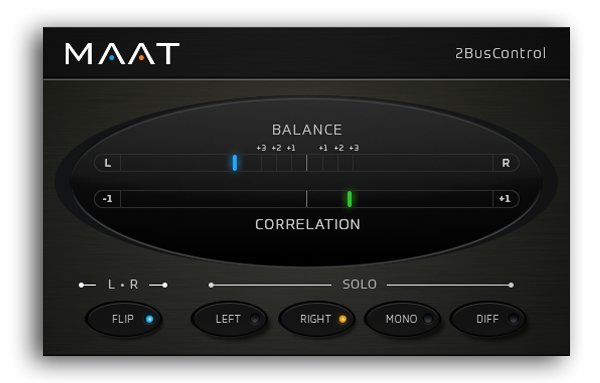

A universal L/R plus MONO/DIFF monitor control and Balance / Correlation metering plug-in for stereo bus masters.

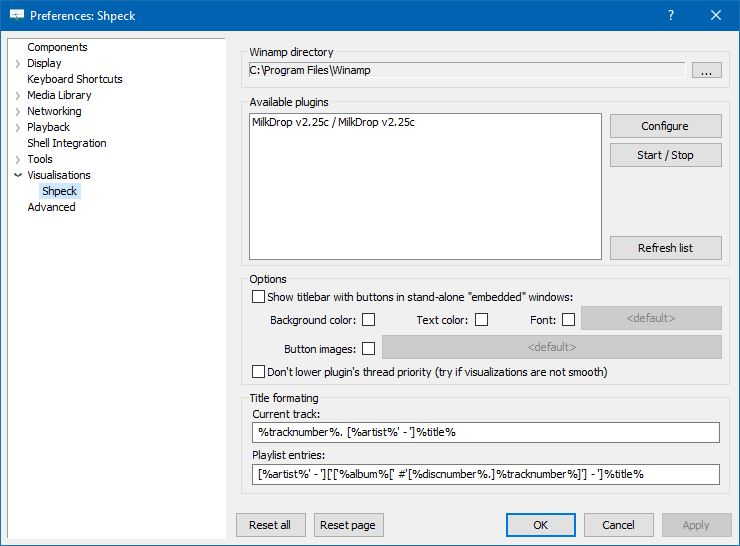
The foo_vis_shpeck component runs Winamp visualization plugins in a stand-alone window, a Columns UI panel or Default UI element.
Documentation
Download
Hydrogen Audio Topic
Download Winamp
Shpeck enables Foobar2000 to display dynamic graphics that react to the beat. It’s possible to toggle between fullscreen and windowed modes.
Install the foo_vis_shpeck plugin, combined with Winamp’s MilkDrop visualizations.
Resources:
www.foobar2000.org/components/view/foo_vis_shpeck
www.winamparchive.org
archive.org/details/tucows_193563_Winamp
www.mediafire.com/download/8hxarja92q9q99c/foobar2000-milkdrop-2.25c.7z
forums.winamp.com/forum/winamp/winamp-discussion/4615655-winamp-5-9-2-released
Guides:
Milkdrop in Foobar on Windows 8 ~ vault-tec.info/post/51743506694/milkdrop-in-foobar2000-on-windows-8
Additional Presets:
sourceforge.net/projects/mdpresetpack/
www.thefreewindows.com/21777/download-free-milkdrop2-50000-presets-megapack/
archive.org/details/Milkdrop252kPresetCollection.7z
… some archives from this milkdrop contest thread on Winamp forum and put everything into a single archive. Some of the presets are nice and quite original, but most of them are variations. The ones that seemed nice to me I copied and added exclamation mark to their names. ~ hydrogenaud.io/index.php/topic,59388.msg914054.html#msg914054

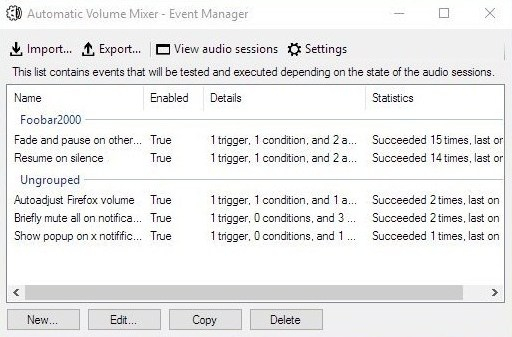
Automatic Volume Mixer is a tool that allows automatization of Windows Volume Mixer based on user rules. You can open the Volume Mixer by right-clicking on the speaker icon in the system tray and selecting Open Volume Mixer. This application is an automatic version of that applet.
Common usage examples:
- Pausing your audio player (e.g. foobar2000) whenever any other application makes a noise, and resuming playback once the noise is gone. This enables you to keep your audio player running in the background at all times.
- Briefly muting all applications while a notification is playing.
- Forcing application’s volume to a set level.
- Automatically lowering volume during night.
- Launching processes / popups when some application makes noise.
Features:
- Detect volume levels of applications and act on that information.
- Fully configurable rules for detection, filtering, and executing actions.
- Ability to automatically adjust audio levels of applications.
github.com/Klocman/Automatic-Volume-Mixer
sourceforge.net/projects/automatic-volume-mixer

XMPlay is an audio player, supporting the OGG / MP3 / MP2 / MP1 / WMA / AAC / MP4 / WAV / AIFF / CDA / MO3 / IT / XM / S3M / MTM / MOD / UMX audio formats, PLS / M3U / ASX / WAX / CUE playlists, and ZIP archives. A load more audio and archive file formats are also supported via plugins.
When XMPlay was first released in 1998, only the XM file format was supported, hence the name “XMPlay”.
www.xmplay.com
support.xmplay.com
ssz.bitbucket.io (Input & Archive plugins)

Jalv is a simple but fully featured LV2 host for Jack. It runs LV2 plugins and exposes their ports as Jack ports, essentially making any LV2 plugin function as a Jack application.
drobilla.net/software/jalv

Triceratops is an analogue style polyphonic subtractive synthesizer plugin, for use with the LV2 plugin architecture, at this time there is no standalone version. An up to date version of the LV2 library is required along with a suitable host (e.g. Qtractor, Jalv, Ardour).
www.thunderox.com/triceratops
sourceforge.net/projects/triceratops

Title formatting in foobar2000 is a system that allows you to control how information about your music is displayed in the interface. It doesn’t modify the audio files themselves or change tags — it only affects how metadata and other information is shown in playlists, status bar, or window title.
Think of it like a template language: you define a pattern for text, and foobar2000 fills in the fields with actual track information. For example, you can make the playlist display tracks as:
Artist - Track Title (Album)
Music files contain metadata such as:
Different users want to display this information differently. Title formatting lets you:
For example, you might want to show the album only if it exists. Title formatting makes that possible.
You typically use title formatting in three main places:
There are three core concepts that beginners must understand:
%artist%, %title%).Any normal text you type is displayed exactly as written. This is useful for labels, punctuation, or separators:
Now Playing:
You can combine plain text with fields to make output more readable:
Now Playing: %artist% - %title%
This will display something like:
Now Playing: Radiohead - Paranoid Android
Fields are placeholders that pull metadata from your music files. They are written inside percent signs:
%artist%
Some common fields include:
| Field | Meaning |
|---|---|
| %artist% | Track artist |
| %album% | Album name |
| %title% | Track title |
| %tracknumber% | Track number |
| %date% | Year or release date |
| %length% | Track duration |
Example combining fields:
%artist% - %title%
Output:
Radiohead - Paranoid Android
You can mix plain text with fields to create more structured output. For example:
%artist% – %title% (%album%)
Output:
Radiohead – Paranoid Android (OK Computer)
If a field does not exist in the file, foobar2000 simply displays nothing. For example, if %composer% is missing:
%composer%
The output will be blank. To prevent blank parentheses or awkward spacing, you can use conditional logic.
The $if() function allows you to display text only when a field has a value:
$if(condition,then,else)
Example:
%artist% - %title%$if(%album%, (%album%),)
This will display the album in parentheses only if %album% exists. Otherwise, it leaves that part empty.
Playlist Column
%artist% - %title%
Status Bar
Now Playing: %artist% – %title%
Window Title
%artist% – %title% | foobar2000
These fields are always available and do not require files to be tagged:
| Field | Meaning |
|---|---|
| %filename% | File name |
| %path% | Full file path |
| %codec% | Audio codec |
| %bitrate% | Bitrate |
| %samplerate% | Sample rate |
For someone just installing foobar2000, start with these basic formats:
%artist% - %title%
Now Playing: %artist% – %title%$if(%album%, (%album%),)
%artist% – %title%
%field% is the most important concept$if() handles missing or optional data elegantlyA good place to start is by installing foo_tfsandbox, this component allows you to experiment with title formatting expressions and fields before you implement them.
$info(referenced_offset) ~ shows time in format mm:ss:ff where ff are CD frames. For the first track it will show nothing instead of 00:00:00
hydrogenaud.io/index.php?topic=118733.msg979344
$if($or($stricmp(%codec%,DTS),$stricmp($cut(%codec%,3),DCA)),$if($info(bitspersample),$ifequal(%samplerate%,96000,$ifgreater(%bitrate%,1537,DTS-HD,DTS 96/$info(bitspersample)),DTS-HD),DTS),%codec% [%codec_profile%])
Release Date (earliest):
hydrogenaud.io/index.php/topic,125532.0
$max(%DATE%,$min($year(%DATE%),$year(%DISCOGS_RELEASED%),$year(%DISCOG_MASTER_RELEASE_DATE%)))
Title_Formatting_Introduction
Title Formatting Reference
Titleformat Examples
Titleformat_Album_List

Customizable windows – taskbar deskband control
www.foobar2000.org/components/view/foo_deskband_controls
hydrogenaud.io/index.php?topic=78234.0

This is Windows or Linux program, designed for playing music for AY-3-8912 sound chip (or its analogs are AY-3-8910 and YM2149F). Emulator emulates these sound chips and does not require real ones. Additionally emulator can play CD’s audio tracks and MIDI-files. Optional BASS by Ian Luck can be used for playing MP3 and MOD music.
bulba.untergrund.net/emulator_e

Plays audio files from many systems including the ZX Spectrum, Acorn, Amstrad, Amiga, Atari, Commodore 64, GameBoy, MSX, Nes, PC, Phillips, SNES, Sam Coupe, Sega, TurboGrafX, etc.
zxtune.bitbucket.io
github.com/vitamin-caig/zxtune

This Foobar2000 component decodes dozens of streamed ADPCM or other compressed format files extracted from various console and PC games.
www.foobar2000.org/components/view/foo_input_vgmstream
Supported codec types:
Quick list of codecs vgmstream supports, including many obscure ones that are used in few games.
PCM 16-bit
PCM 8-bit (signed/unsigned)
PCM 4-bit (signed/unsigned)
PCM 32-bit float
u-Law/a-LAW
CRI ADX (standard, fixed, exponential, encrypted)
Nintendo DSP ADPCM a.k.a GC ADPCM
Nintendo DTK ADPCM
Nintendo AFC ADPCM
ITU-T G.721
CD-ROM XA ADPCM
Sony PSX ADPCM a.k.a VAG (standard, badflags, configurable, Pivotal)
Sony HEVAG
Electronic Arts EA-XA (stereo, mono, Maxis)
Electronic Arts EA-XAS (v0, v1)
DVI/IMA ADPCM (stereo/mono + high/low nibble, 3DS, Omikron, SNDS, etc)
Microsoft MS IMA ADPCM (standard, Xbox, NDS, Radical, Wwise, FSB, WV6, etc)
Microsoft MS ADPCM (standard, Cricket Audio)
Westwood VBR ADPCM
Yamaha ADPCM (AICA, Aska)
Procyon Studio ADPCM
Level-5 0x555 ADPCM
lsf ADPCM
Konami MTAF ADPCM
Konami MTA2 ADPCM
Paradigm MC3 ADPCM
FMOD FADPCM 4-bit ADPCM
Konami XMD 4-bit ADPCM
Platinum 4-bit ADPCM
Argonaut ASF 4-bit ADPCM
Ocean DSA 4-bit ADPCM
Circus XPCM ADPCM
OKI 4-bit ADPCM (16-bit output, 4-shift, PC-FX)
Ubisoft 4/6-bit ADPCM
SDX2 2:1 Squareroot-Delta-Exact compression DPCM
CBD2 2:1 Cuberoot-Delta-Exact compression DPCM
Activision EXAKT SASSC DPCM
Xilam DERF DPCM
InterPlay ACM
VisualArt’s NWA
Electronic Arts MicroTalk a.k.a. UTK or UMT
CRI HCA
Xiph Vorbis (Ogg, FSB5, Wwise, OGL, Silicon Knights)
MPEG MP1/2/3 (standard, AHX, XVAG, FSB, AWC, P3D, etc)
ITU-T G.722.1 annex C (Polycom Siren 14)
ITU G.719 annex B (Polycom Siren 22)
Electronic Arts EALayer3
Electronic Arts EA-XMA
Sony ATRAC3, ATRAC3plus
Sony ATRAC9
Microsoft XMA1/2
Microsoft WMA v1, WMA v2, WMAPro
AAC
Bink
AC3/SPDIF
Xiph Opus (Ogg, Switch, EA, UE4, Exient)
Xiph CELT (FSB)
Musepack
FLAC
Others

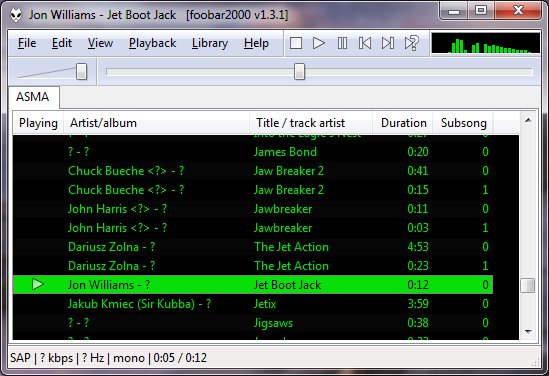
ASAP (Another Slight Atari Player) plays and converts 8-bit Atari music (*.sap, *.cmc, *.mpt, *.rmt, *.tmc, …) on modern computers and mobile devices.
asap.sourceforge.net
sourceforge.net/projects/asap
asap.sourceforge.net/web
github.com/epi/asap

 The Audio File