
The Facebook 360 Spatial Workstation is a software suite for designing spatial audio for 360 video and cinematic VR. It includes plugins for popular audio workstations, a time synchronized 360 video player and utilities to help design and publish spatial audio in a variety of formats. Audio produced with the tools can be experienced on Facebook News Feed on Android and iOS devices, Chrome for desktop and the Samsung Gear VR headset through headphones.
Category Archives: Mac

AirSonic ~ Community Driven Media Server
A Free and Open Source community driven media server, providing ubiquitous access to your music.
Share this:

SonicBirth ~ Create Powerful Audio Plugins
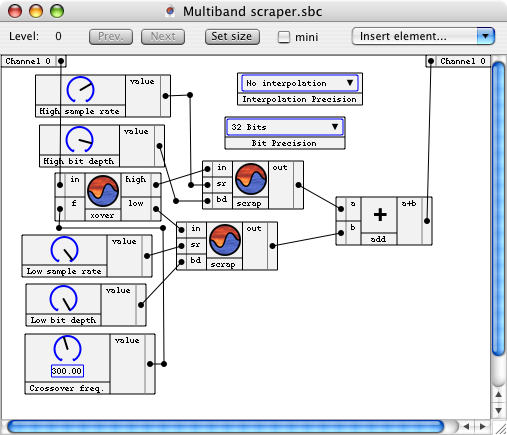
SonicBirth is an AudioUnit designing MacOS application. The first in its category, it allows users to build their own AudioUnit plugins, either by working with existing circuits or by creating circuits completely from scratch. SonicBirth is also a free AudioUnits package, as it comes bundled with a set of plugins designed for standalone use as plugins as well as pre-constructed circuits to modify or build upon for creating new plugins. Whether you’re looking for traditional eqs, compressors, and reverbs, or softsynths, distortion, and filters, etc., SonicBirth allows you unprecedented freedom and creativity over your sound.
Share this:

FixTag ~ Repair Inconsistent mp3 Meta-data
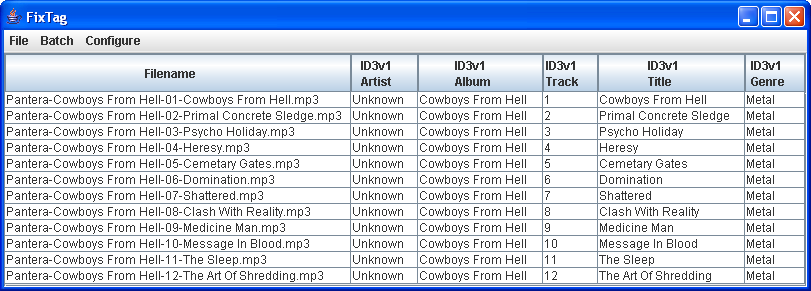
FixTag is a Java/Swing application that lets you edit the fields within MP3 ID3 tags.
Share this:

Soundboard ~ Create Sound Cues Easily
Soundboard makes building / executing sound cues for theatrical performance a snap. With a mix of sound, fade, stop, pause, and resume cues, you can create elegant designs, and execute them with the simple push of a button.
- Create elegant designs using a combination of simple cue types.
- Supports popular audio formats, such as wav, mp3, and Ogg
- Written in Java for true cross-platform compatibility
- Simple to use, so you’ll have a novice operator running the show perfectly in no time.
Share this:

Nighthawk ~ Stealthy Unobtrusive Player
A stealthy, simple, unobtrusive open source multi-platform music player that stays out of your way in your Menubar / Taskbar.
github.com/quantumkv/nighthawk
Share this:

Krut ~ Audio / Video Recorder
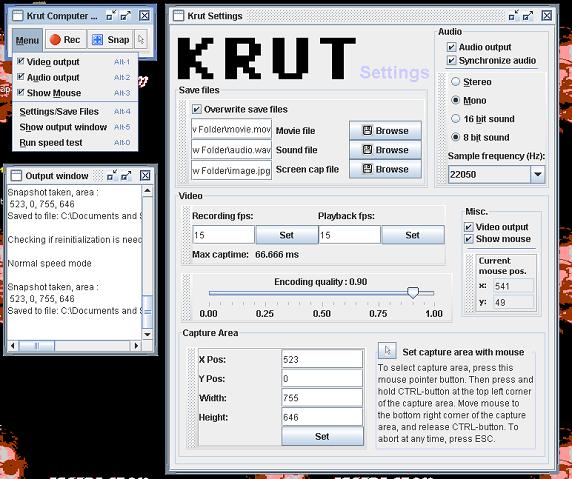
Krut Computer Recorder is an open source, cross platform, screencast tool to record audio and video from your computer screen into .mov-files and .wav-files. It can be used to make video tutorials or record games. It can also be used to record from streaming video and audio.
Share this:

MuseScore ~ Open Source Music Notation
Create, play and print beautiful sheet music.

musescore.org
en.wikipedia.org/wiki/MuseScore
Share this:

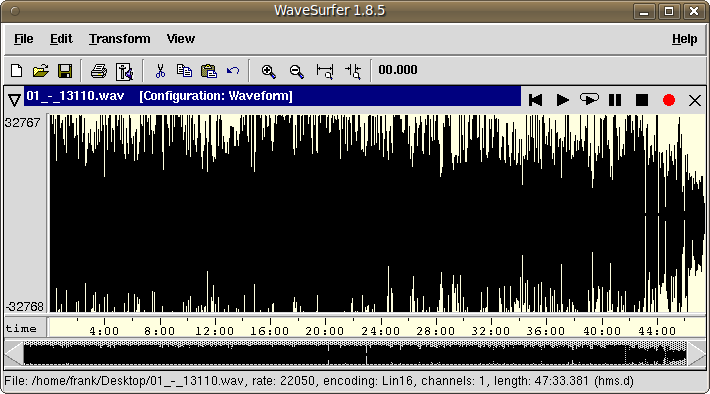
WaveSurfer ~ Visualize & Manipulate Sound
WaveSurfer is an open source tool for sound visualization and manipulation. Typical applications are speech / sound analysis and sound annotation / transcription. WaveSurfer may be extended by plug-ins as well as embedded in other applications.
Features:
- Customizable – users can create their own configurations. Localization support.
- Extensible – new functionality can be added through a plugin architecture.
- Embeddable – WaveSurfer can be used as a widget in custom applications.
- Transcription file formats – reads, and writes HTK (and MLF), TIMIT, ESPS/Waves+, and Phondat. Support for encodings and Unicode.
- Multi-platform – Linux, OSX & Windows.
sourceforge.net/projects/wavesurfer
en.wikipedia.org/wiki/WaveSurfer
Share this:

eSpeak ~ Open Source Speech Synthesizer
eSpeak is a compact open source Linux and Windows speech synthesizer for English and other languages. eSpeak uses a “formant synthesis” method. This allows many languages to be provided in a small size. The speech is clear, and can be used at high speeds, but is not as natural or smooth as larger synthesizers which are based on human speech recordings.
eSpeak is available as:
- A command line program (Linux and Windows) to speak text from a file or from stdin.
- A shared library version for use by other programs. (On Windows this is a DLL).
- A SAPI5 version for Windows, so it can be used with screen-readers and other programs that support the Windows SAPI5 interface.
- eSpeak has been ported to other platforms, including Android, Mac OSX and Solaris.
Share this:

Levelator ~ Enhance Your Podcast
Levelator® adjusts the audio levels within your podcast or other audio file for variations from one speaker to the next, for example. It’s not a compressor, normalizer or limiter although it contains all three. It’s much more than those tools, and it’s much simpler to use. The UI is dirt-simple: Drag-and-drop any WAV or AIFF file onto The Leveler’s application window, and a few moments later you’ll find a new version which just sounds better.
www.conversationsnetwork.org/levelator
Share this:

bs2b ~ Bauer Stereophonic-To-Binaural Headphone DSP
A typical stereo records are being made to listen by speakers. That is a sound engineer makes the stereo mix to the adaptation of sound for listening of one channel by both ears. Therefore, you will be tired during a long time headphone listening more by a super-stereo effect than by a poor design of headphones. What’s missing in headphones is the sound going from each channel to the opposite ear, arriving a short time later for the extra distance traveled, and with a bit of high frequency roll-off for the shadowing effect of the head. And the time delay to the far ear is somewhat longer at low frequencies than at high frequencies. The Bauer stereophonic-to-binaural DSP (bs2b) is designed to improve headphone listening of stereo audio records…


