
Brainzmash is a community Musicbrainz and Lidarr metadata endpoint backed by a community server pool.
For Lidarr, it’s the MusicBrainz metadata you know and love but it solves some issues experienced with the official Lidarr metadata with shorter lived cache and easy manual cache refresh to capture fresh MusicBrainz data.
The MusicBrainz endpoint is an alternitive to the Musicbrainz rate limited API or setting up a Musicbrainz server to serve various projects.
The data on each server is verified as correct and checked regularly to ensure it matches the other servers in the pool by way of running hashed data quorum checks against various endpoints, checking replication freshness and ensuring images are present where possible.
Tag Archives: MusicBrainz

Luminous ~ A Home For Music You Own
Luminous is a fast, local-first player for your own audio library. Built for anyone who wants the convenience of a modern streaming app without giving up ownership of their music. Turn a folder of files into a library you’ll enjoy browsing and listening to.
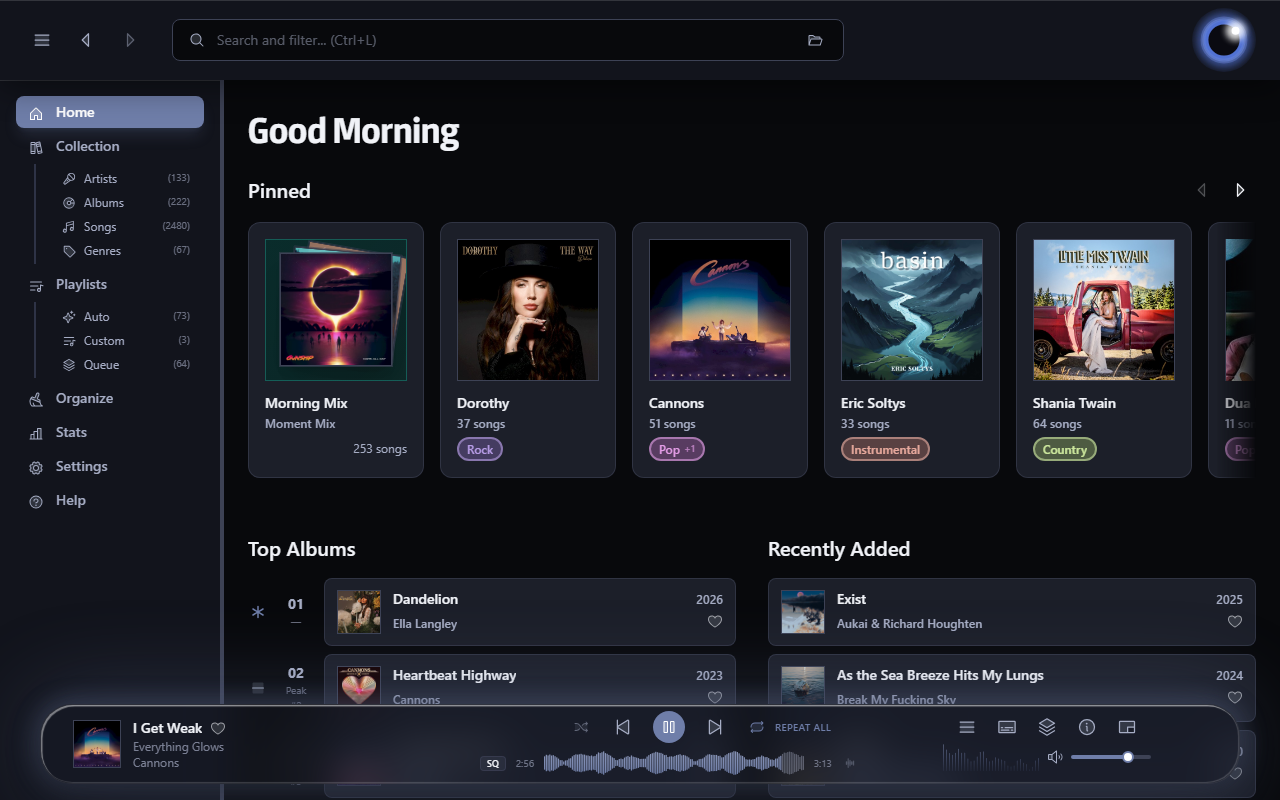
esoltys.dev/luminous
github.com/esoltys/luminous
Share this:

gonic ~ Self-hosted Music Server
music streaming server / free-software subsonic server API implementation
Features:
- browsing by folder (keeping your full tree intact) see here
- browsing by tags (using taglib – supports mp3, opus, flac, ape, m4a, wav, etc.)
- on-the-fly audio transcoding and caching (requires ffmpeg) (thank you spijet)
- subsonic jukebox mode, for gapless server-side audio playback instead of streaming (thank you lxea)
- support for podcasts (thank you lxea)
- pretty fast scanning (with my library of ~50k tracks, initial scan takes about 10m, and about 6s after incrementally)
- multiple users, each with their own transcoding preferences, playlists, top tracks, top artists, etc.
- last.fm scrobbling
- listenbrainz scrobbling (thank you spezifisch, lxea)
- artist similarities and biographies from the last.fm api
- support for multi valued tags like albumartists and genres (see more)
- a web interface for configuration (set up last.fm, manage users, start scans, etc.)
- support for the album-artist tag, to not clutter your artist list with compilation album appearances
- written in go, so lightweight and suitable for a raspberry pi, etc. (see ARM images below)
- newer salt and token auth
- tested on airsonic-refix, amperfy, symfonium, dsub, jamstash, music-assistant, subsonic.el, sublime music, soundwaves, stmp, termsonic, tempus, strawberry, and ultrasonic
Share this:

PixelPlayerOSS ~ Android Music Player
Free and open-source edition of PixelPlayer – a modern offline music player for Android built with Jetpack Compose, Media3 & Material 3. Available on F-Droid.
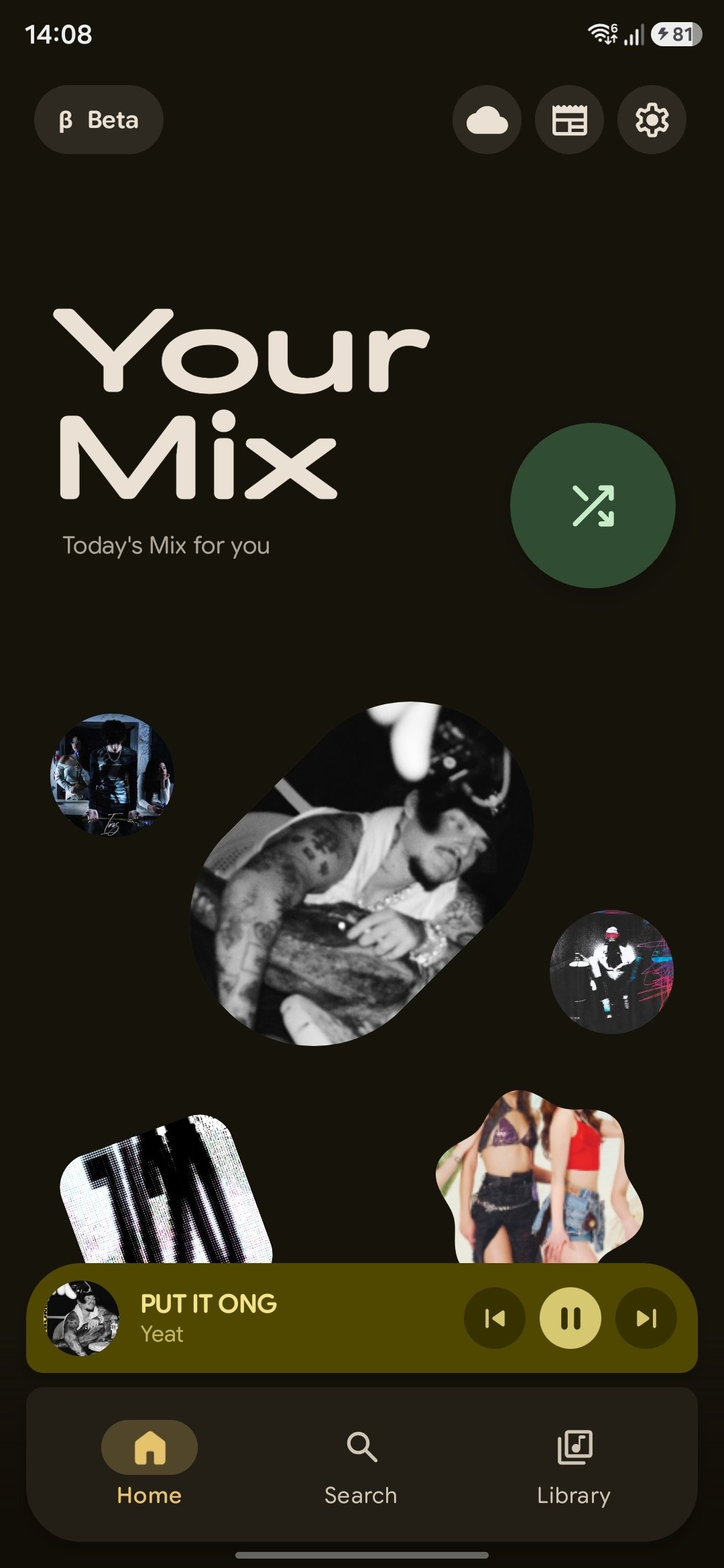
github.com/PixelPlayerHQ/PixelPlayerOSS
Share this:

Carat ~ Concise Atmos Ripping Automation Tool
Carat is a lightweight, automated GUI utility designed to accept Dolby Atmos music releases in practically any format, locate the primary title in the release, retrieve metadata and cover art from the internet, and incorporate the release directly into your digital music library in a single click.
From the moment a new Blu-ray arrives in your mailbox, Carat handles the entire pipeline—extraction, processing, metadata acquisition, and cover art—with zero friction. If your source files are already on your SSD, Carat will process an entire release in a minute or two (depending on the speed of your computer). If you are starting from a physical disc, the time is limited by the read speed of your optical drive (expect five to ten minutes).
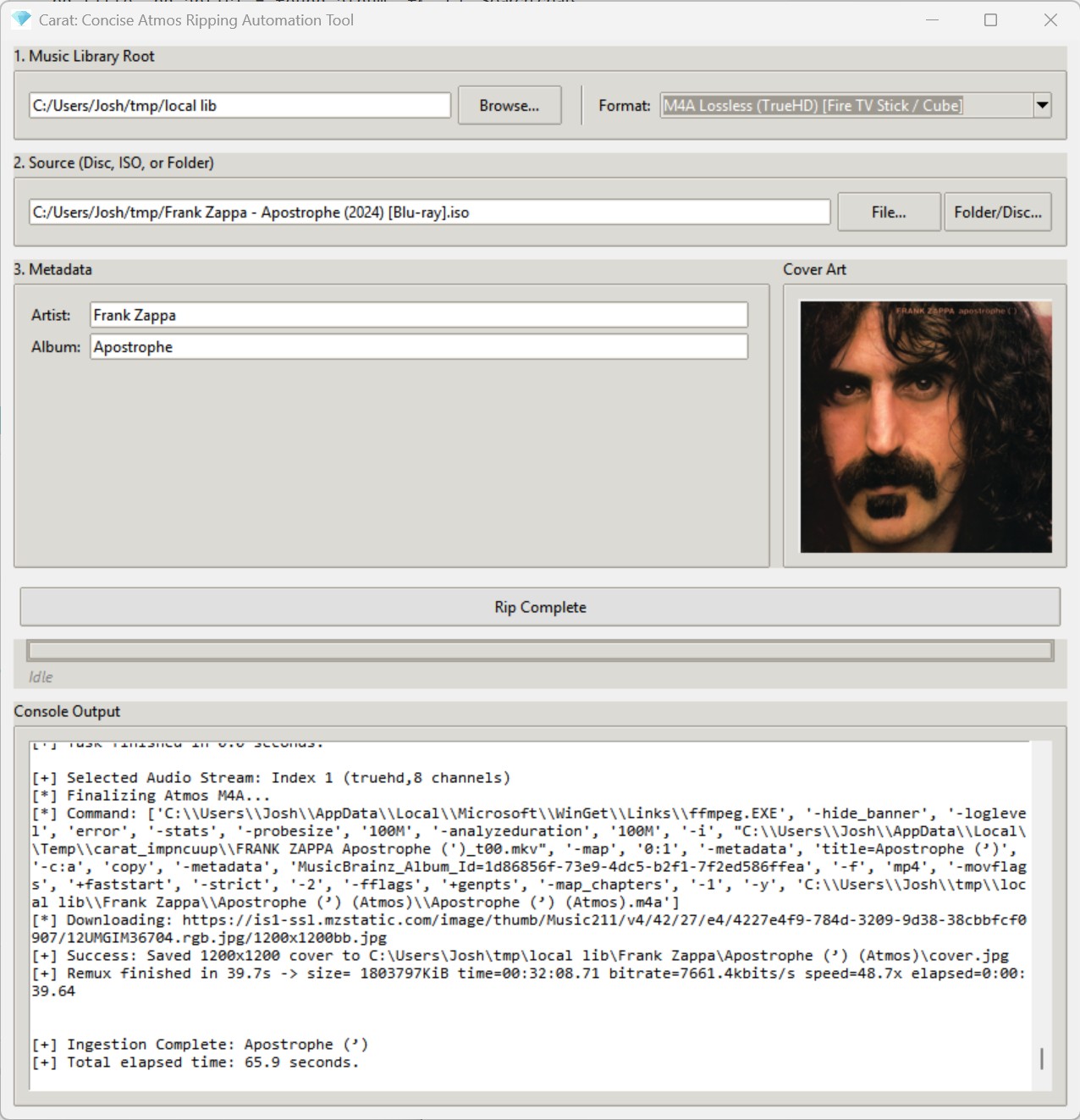
github.com/jbloch/carat
quadraphonicquad.com/threads/announcing-carat-beta-one-click-atmos-ripping-for-gapless-playback
References:
en.wikipedia.org/wiki/Dolby_Atmos
Share this:

Audex ~ KDE CD Ripper
Audex is a CD ripper application. It lets you extract the audio from your CDs to let you listen to them on your computer and your other devices. It includes CDDB and MusicBrainz integrations to fetch the metadata and covers for your CDs if available.
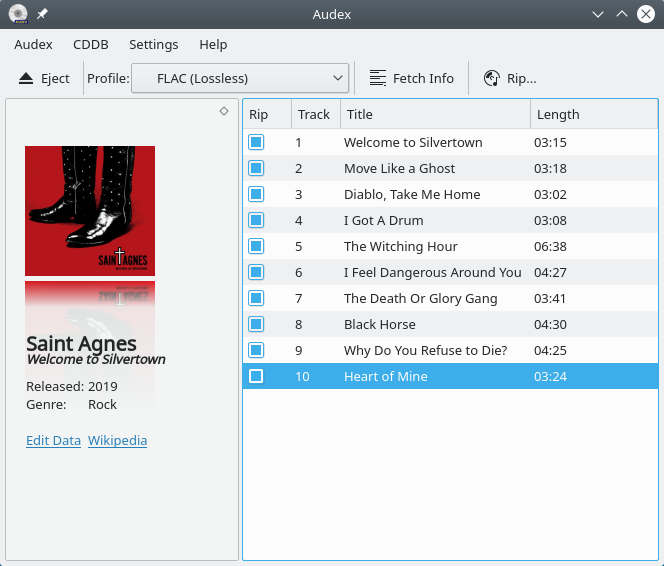
apps.kde.org/audex
github.com/KDE/audex
invent.kde.org/multimedia/audex
userbase.kde.org/Audex
en.wikipedia.org/wiki/KDE_Gear#Playback
Share this:

VUPlayer ~ Freeware Windows Player
VUPlayer is an open-source multi-format audio player for Windows 7 SP1 or later.
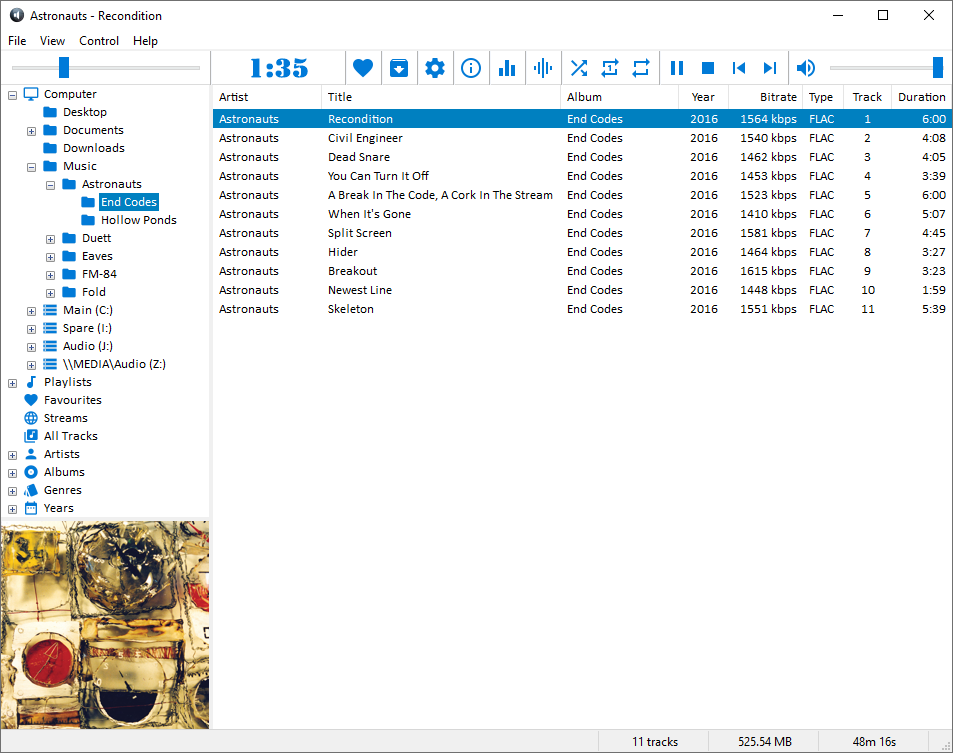
www.vuplayer.com/vuplayer
github.com/jfchapman/VUPlayer
Share this:

GrooveKraft ~ Mac Music Collection Viewer
GrooveKraft is a fast, lightweight music collection manager that uses Discogs and MusicBrainz to enrich your collection with detailed metadata and artwork.
Features:
- Import your Discogs collection into a local database
- View and filter your Discogs collection locally, with artwork
- Matches releases with MusicBrainz automatically to get release dates
- “On this day” function shows anniversaries in your collection
- Randomizer to help you pick something to listen to
- Missing or incorrect release dates can be manually entered
- Match quality shown with traffic-light icons (Red, Amber, Yellow, Green)
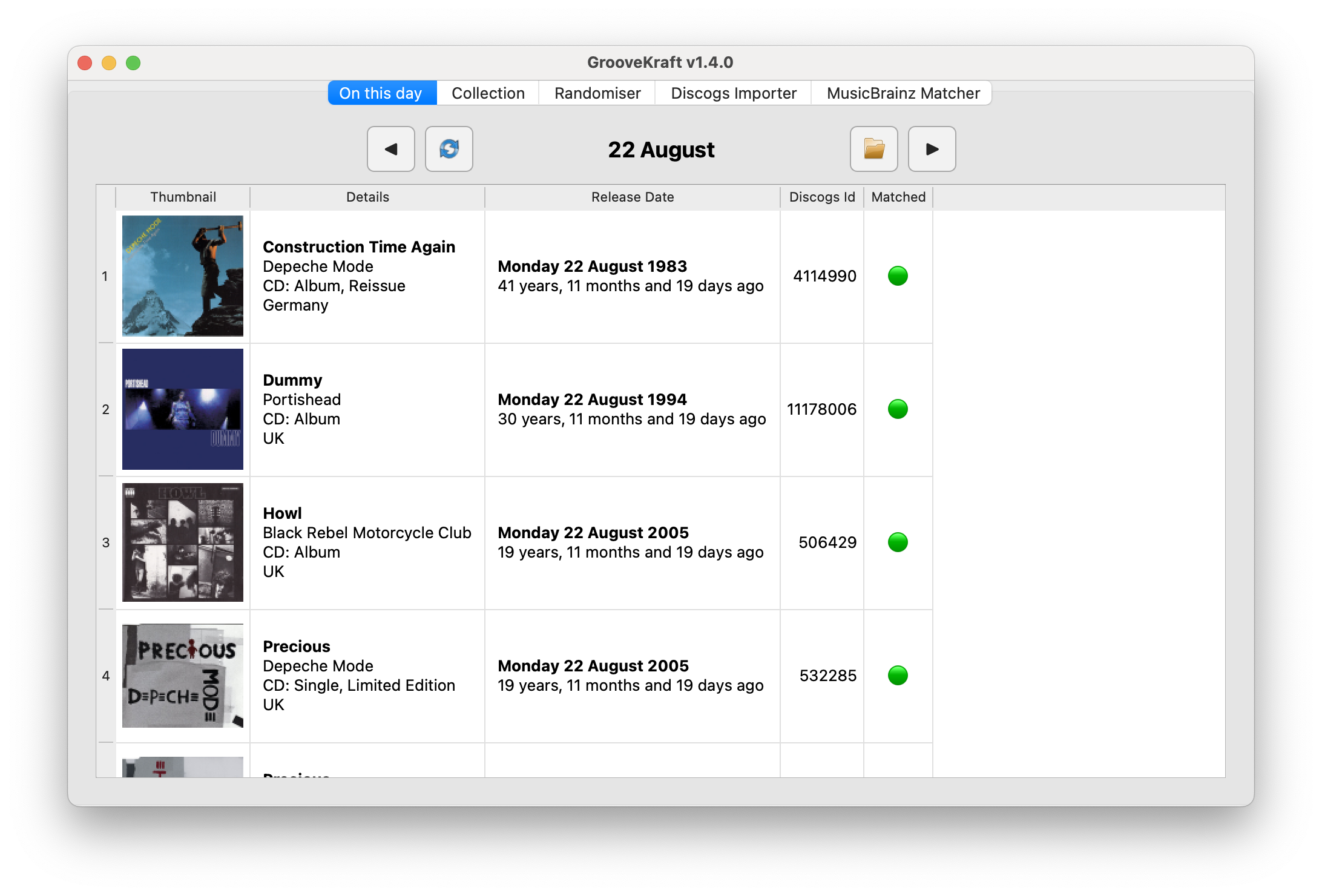
github.com/v8oholic/groovekraft
Share this:

Bitfake2 ~ Audio Tool Handler & Manipulator
Bitfake was originally created to detect fake
.FLACfiles through spectral analysis. It has since grown into a multipurpose CLI tool for handling music more easily and efficiently.One common problem was that getting a track’s metadata required long
ffprobecommands with messy output. Converting music withffmpegwas also repetitive. The command itself is easy to remember, but writing scripts to convert entire directories felt inefficient and slow. This project now performs metadata and conversion tasks directly through linked libraries (TagLib/libsndfile/libav*).
Features:
- Get metadata
- Get ReplayGain info (useful for music players)
- Spectral analysis on 44.1 kHz
.FLACfiles (higher sample rates may be misrepresented, so be careful) - Lossy diagnosis (banding score)
- File Conversion + VBR Support (Works for outputs like
.wav,.flac,.ogg,.mp3,.aac,.opus) - Tagging metadata (Works for single files, but not directories yet)
- Calculating ReplayGain and applying it to files (Works for track replay gain iterating through directories, album replay gain is a bit funky?)
- Directory Conversion (works for all previously mentioned formats!)
- CoverArt+ (Brings along cover art among all conversions!)
- Organizing Files by album! (Give a dir of random music, and bitfake will organize it – ty to uncognic)
- Directory Tagging (YAY!)
- Album folder renaming from tags (Artist – Album (Year))
- Spectrogram generation (in .png)
- Version info (WOW! BEST YET!)
- MusicBrainz Syncing data.
github.com/Ray17x/bitfake2
gpo.zugaina.org/app-misc/bitfake2
repology.org/maintainer/ray%40atl.tools/feed-for-repo/gentoo_ovl_guru
Share this:

Splitting A Single Album File Into Tracks
Convert an album from a single media file with a .cue file to individual tracks instead.
Option 1: foobar2000 (easy, very reliable)
If you already use foobar2000, this is usually the best choice.
Steps
- Open foobar2000
- Drag either the
.cuefile or the.flacfile into foobar- If the CUE is correct, you’ll see the album broken into tracks.
- Select all the tracks
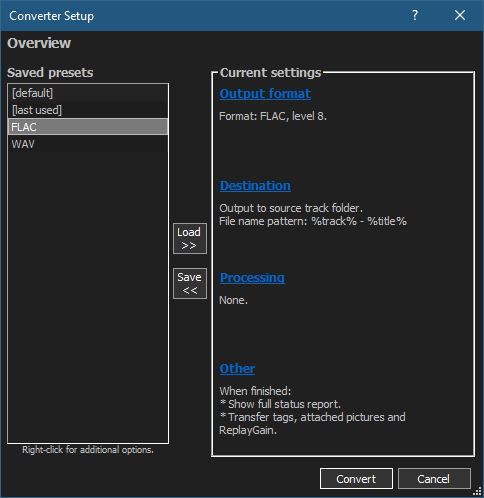
- Right-click → Convert → …
- Choose:
- Output format: FLAC
- Processing: none needed
- Click Destination
- Output path: your album folder
- File name pattern (example):
%tracknumber% - %title%
- Convert
Result
- Individual FLAC tracks
- No quality loss (bit-perfect split)
- Metadata pulled from the CUE
💡 Note: If the cue has gaps or pre-emphasis flags, foobar2000 handles them correctly.
Option 2: CUETools (best for archival accuracy)
If you care about log verification, AccurateRip, or preserving exact offsets, this is the gold standard.
Steps
- Download CUETools
- Open it and load the
.cuefile - Set:
- Action: Encode
- Audio Output: FLAC
- Mode: Tracks
- Start
Result
- Sample-accurate track splits
- Excellent for archival rips
- Strong metadata handling
This is especially good if the album originated from a CD rip.
Option 3: FLAC + shntool (command line, Linux-friendly)
If you’re on Linux, shntool works well.
Example
shnsplit -f album.cue -o flac album.flac
Then tag the files:
cuetag album.cue *.flac
Result
- Clean, lossless splits
- Metadata from CUE applied
- More manual, but very transparent
Option 4: MusicBrainz Picard (semi-automatic)
Useful if:
- The CUE has weak or missing metadata
- You want MusicBrainz tags
Workflow:
- Load the CUE
- Let Picard identify the release
- Use Tools → Split files
Not as precise as foobar or CUETools for offsets, but fine for most albums.
Share this:

Picard Barcode Scanner ~ Android App
Picard Barcode Scanner helps you to tag your physical releases with MusicBrainz Picard. It allows you to scan the barcode of e.g. a CD and have the corresponding metadata from MusicBrainz automatically loaded into Picard on your desktop.
This is especially useful if you have your physical music collection already digitalized and want to tag the files using the correct album.
github.com/phw/PicardBarcodeScanner


