Picard Barcode Scanner ~ Scan Your Collection


Picard Barcode Scanner helps you to tag your physical releases with MusicBrainz Picard. It allows you to scan the barcode of e.g. a CD and have the corresponding metadata from MusicBrainz automatically loaded into Picard on your desktop.

This is especially useful if you have your physical music collection already digitized and want to tag the files using the correct album.

github.com/phw/PicardBarcodeScanner

CritiqueBrainz ~ Open Music & Book Reviews


CritiqueBrainz is a repository for Creative Commons licensed music and book reviews. Here you can read what other people have written about an album or event and write your own review!

CritiqueBrainz is based on data from MusicBrainz (open music encyclopedia) and BookBrainz (open book encyclopedia). Everyone, including you, can participate and contribute.

foo_musicbrainz ~ Foobar2000 MusicBrainz Tagger


Allows tagging files using data from MusicBrainz.

Features:

  • Fetches data by automatically calculated MusicBrainz Disc ID, existing Artist/Album or MusicBrainz Album ID tags
  • Uses the latest version of MusicBrainz web service, which corresponds to the NGS data model
  • Supports many different tags, including artist, album, date, tracknumber/totaltracks, discnumber/totaldiscs, label, catalog number, barcode etc.
  • Supports MusicBrainz-specific tags: Artist ID, Album ID, Release Group ID, Disc ID, Track ID, album type, album status
  • Missing TOCs can be submitted to MusicBrainz from the context menu.
www.foobar2000.org/components/view/foo_musicbrainz

foo_listenbrainz2 ~ Foobar2000 & ListenBrainz


ListenBrainz 2

A foobar2000 component to submit the music you listened to to ListenBrainz or another ListenBrainz compatible scrobble server (for example Maloja).

This component was originally written by marc2k3. This repository is an attempt to preserve the source code of this excellent component and hopefully to revive the development.

github.com/phw/foo_listenbrainz2

What is ListenBrainz? ListenBrainz keeps track of music you listen to and provides you with insights into your listening habits. For details see:

listenbrainz.org

References:

en.wikipedia.org/wiki/ListenBrainz

Muine ~ Gnome Music Player


Muine is an innovative music player, featuring a simple, intuitive interface. It is designed to allow users to easily construct a playlist from albums and/or single songs. Its goal is to be simply a music player, not to become a robust music management application. This doesn’t mean Muine has no features! Some feature highlights:

  • Ogg/Vorbis, FLAC, AAC and MP3 music playback support
  • Automatic album cover fetching via MusicBrainz and Amazon
  • Support for embedded album images in ID3v2 tags
  • ReplayGain support
  • Support for multiple artist and performer tags per song
  • Plugin support
  • Translations into many languages

Muine is targeted at the GNOME desktop and uses GTK+ for the interface. Most of the code is written in C#, with some additions/bindings/glue in plain C. Muine was originally written by Jorn Baayen, but now maintained mostly by others.

github.com/mickeyr/Muine
gitlab.gnome.org/Archive/muine
en.wikipedia.org/wiki/Muine
manpages.org/muine

Albunack ~ Discogs / MusicBrainz Integration & Metasearch


Albunack provides artist discographies by combining two of the largest music information databases MusicBrainz and Discogs.

Albunack shows you MusicBrainz releases and if they are already linked to a Discogs release; suggests potential new links and lists additional Discogs releases. As well as providing comprehensive discographies for artists, Albunack makes it easy for you to contribute to the MusicBrainz database yourself by using the Link, Custom Link and Import features.

www.albunack.net

Cover Art Archive ~ Online Artwork Library


The Cover Art Archive is a joint project between the Internet Archive and MusicBrainz, whose goal is to make cover art images available to everyone on the Internet in an organised and convenient way.

Images in the archive are curated by the MusicBrainz community and go through a peer review process to ensure that they are correct, free of spam and of the best quality. If you would like to contribute cover art, create a MusicBrainz account and follow the guide. To see what has been added to the archive recently, please see the Cover Art Archive page at the Internet Archive.

MusicBrainz also provides API documentation for retrieving cover art via a release MBID. A C based client library libcoverart is available as well as the Java coverartarchive-api library.

https://coverartarchive.org/

https://archive.org/details/coverartarchive?tab=about

CloudTunes ~ Web Player For The Cloud


CloudTunes provides a unified interface for music stored in the cloud (YouTube, Dropbox, etc.) and integrates with Last.fm, Facebook, and Musicbrainz for metadata, discovery, and social experience. It is similar to services like Spotify, except instead of local tracks and the fixed Spotify catalog, CloudTunes uses your files stored in Dropbox and music videos on YouTube.

https://github.com/jakubroztocil/cloudtunes

cyanrip ~ Accurate & Secure Ripper


Fully featured CD ripping program able to take out most of the tedium. Fully accurate, has advanced features most rippers don’t, yet has no bloat and is cross-platform.

Features:

github.com/cyanreg/cyanrip

Tagscanner ~ Tag Editor & Utility


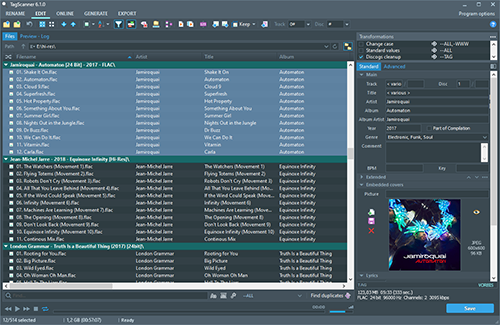
TagScanner is a powerful tool for organizing and managing your music collection. It can edit tags of most modern audio formats, supports ID3v1/v2, Vorbis comments, APEv2, WMA and MP4(iTunes) tags. You can rename files according to information from the tags, import tag information from filenames or other sources, perform any text replacement and transformations in tags and filenames. Also you may get album info and download covers via online databases like freedb, Discogs or MusicBrainz. You can create playlists in one click and export your collection to HTML, Excel or any user-defined format. Program has easy-to-use multilingual interface and built-in audio player.
Features:

  • Rename files based on the tag and file information
  • Powerful multiple files tag editor
  • Import album information and covers from online databases like Discogs or MusicBrainz
  • Generate tag information from file/foldernames
  • Tag fields formatting and rearrangement
  • Words replacement and case conversion from tags and filenames
  • Supports MP3, OGG, FLAC, WMA, MPEG-4, Opus, Musepack, Monkey’s Audio, AAC, OptimFROG, SPEEX, WavPack, TrueAudio, WAV, AIFF, Direct Stream Digital files
  • Supports ID3 1.0/1.1/2.2/2.3/2.4 tags, APE v1 and v2 tags, Vorbis Comments, WMA tags and MP4(iTunes) metadata
  • Supports for embedded lyrics and cover art
  • Resize cover art for portable devices on the fly
  • TAGs versions conversions
  • Quick playlists creation
  • Export information to HTML, XML CSV or any user-defined format
  • Full support for Unicode
  • Multi-language interface
  • Built-in audio player
tagscanner

www.xdlab.ru