Lplex ~ Create Lossless Audio DVDs


Lplex is a console application meant to provide a free, quick, and hopefully painless way to:

  • Create lossless “audio-only” dvd-video discs from wav or flac audio files, featuring:
    1. gapless playback.
    2. md5 verification of audio data.
    3. archival (dvd-rom) content.
  • Losslessly extract unencrypted lpcm audio streams from dvd-video to wav or flac format.

You’re already fully equipped for hi-res audio (up to 24-bit/96khz) if you have a typical dvd-player and digital amp, and lplex is a way to take advantage of this.

audioplex.sourceforge.net

Pulseaudio ~ Linux Crossover Rack


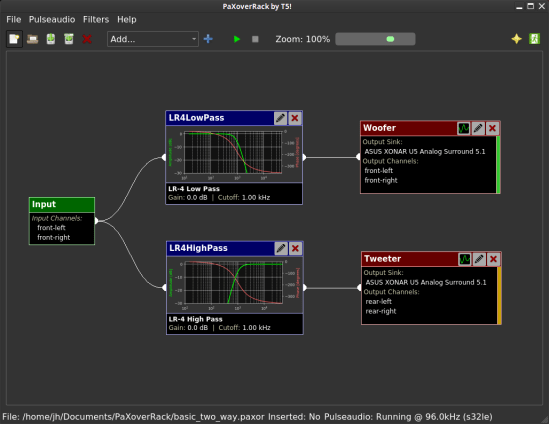
Pulseaudio Crossover Rack is a program to design and implement multi-way speaker crossovers using any linux powered computer with a multi-channel sound card and a running desktop environment which uses Pulseaudio as it’s sound backend. It also uses a set of LADSPA plugins, namely ladspa-t5-plugins for the heavy lifting of DSP/audio processing. It’s written in python3 and uses QT as the windowing toolkit.

Pulseaudio Crossover Rack

Website

DRC Designer ~ Optimize Audio Rooms


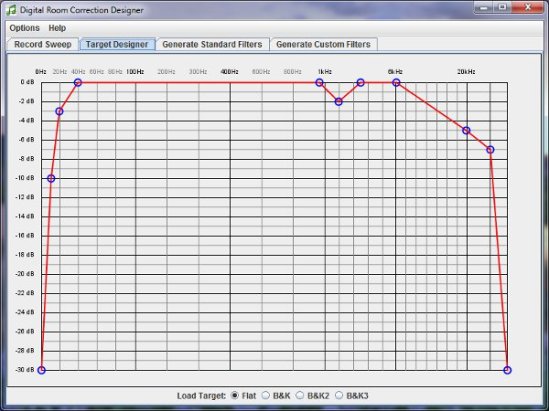
Digital Room Correction Designer was created to ease the process of creating and loading room correction filters for use with two channel stereo systems. DRC Designer includes Denis Sbragion’s DRC for creating room correction filters, John Pavel’s Convolver VST for playing music through the filters, and Simple Automated IR Measuring Tool by Denis Sbragion and Edward Wildgoose for creating the impulse response files needed by DRC.

TargetDesigner

www.alanjordan.org/DRCDesigner
Foobar2000 Setup

foo_dsp_dolbyhp ~ Foobar Virtual 5.1 Headphones


Dolby Headphone technology gives you the sound of a 5.1 surround system through any pair of headphones.

It accurately models the surround sound listening experience of a properly set up and calibrated 5.1-channel speaker system, making it ideal for personal and portable surround listening.

This component wraps the functionality of a Dolby Headphone engine DLL (typically DOLBYHPH.DLL bundled with some software DVD players) to be used under Foobar2000. After installation you must configure the plugin pointing out the location of that DLL in your system and restart foobar2000. Amplification is provided by the Dolby Headphone engine itself.

foo_dsp_dolbyhp

Additional resources:
ww.head-fi.org/threads/5-1-headphone-experience-foobar-configuration-for-all-stereo-music-files.447089/

www.head-fi.org/threads/foobar2000-dolby-headphone-config-comment-discuss.555263/

www.dlldownloader.com/dolbyhph-dll/

Audio Check ~ Test Your Equipment, Online


AudioCheck gives you access to an extensive collection of sound tests, playable online and downloadable in high-quality for patrons. The audio material provided here will help you assess the audio equipment connected to your computer. Using this website, you will be able to:

  • Test your hearing, speakers, headphones, digital-to-analog converters… and more!
  • Design your own sound tests using our high quality waveform generators.
  • Download our sound files to your favorite audio player, and use your player as a portable audio test device.

Web Service

bs2b ~ Bauer Stereophonic-To-Binaural Headphone DSP


A typical stereo records are being made to listen by speakers. That is a sound engineer makes the stereo mix to the adaptation of sound for listening of one channel by both ears. Therefore, you will be tired during a long time headphone listening more by a super-stereo effect than by a poor design of headphones. What’s missing in headphones is the sound going from each channel to the opposite ear, arriving a short time later for the extra distance traveled, and with a bit of high frequency roll-off for the shadowing effect of the head. And the time delay to the far ear is somewhat longer at low frequencies than at high frequencies. The Bauer stereophonic-to-binaural DSP (bs2b) is designed to improve headphone listening of stereo audio records…

bs2b.sourceforge.net

Audio Switcher ~ Windows Device Selector


Audio Switcher is a 100% free, Open Source, application for Windows® Vista, 7, and 8.

Audio Switcher makes switching between sound devices trivial. No longer do you have to go into the Control Panel or the Windows® Sound options, instead there is an easy to access icon, or even hotkeys.

The beautiful part of Audio Switcher is it’s simplicity. It doesn’t try to do too much, it does exactly what is needed; nothing more, nothing less.

Audio Switcher

audioswit.ch

freeDSP ~ DIY Audio DSP Project


The freeDSP is an open-source digital signal processor family for the do-it-yourself community. The applications range from active loudspeaker concepts (digital crossovers, bass enhancement, …) and room equalization over advanced musical effect processors to car audio signal processing.

freeDSP_1_0_side_small

www.freedsp.cc

foo_input_sacd ~ Foobar2000 & SACDs


DIY-AUDIO-HEAVEN: Playing SACDs with Foobar2000

Foobar2000 for Dummies (Part 1) – General Setup
Foobar2000 for Dummies (Part 2) – Playing DSD – New SACD plugin (0.9.x & 1.x.x)
Foobar 2000 for Dummies (Part 3) – Playing DSD – Old SACD plugin (0.7.x & 0.8.x)

Peppy Players ~ DIY Audio Players


Peppy Players

Hardware, software and woodware do-it-yourself audio players

Peppy Players ~ GitHub

Foobar2000 ~ Playing CDs With Pre-emphasis


Pre-emphasis & CDs

Although rarely used, there exists the capability for standardized emphasis in Red Book CD mastering. As CDs were intended to work on 14-bit audio, a specification for ‘pre-emphasis’ was included to compensate for quantization noise. After production spec was set at 16 bits, quantization noise became less of a concern, but emphasis remained an option through standards revisions. The pre-emphasis is described as a first-order filter with a gain of 10 dB (at 20 dB/decade) and time constants 50 μs and 15 μs ~ http://en.wikipedia.org/wiki/Emphasis_(telecommunications)#Red_Book_Audio

Emphasis came about because of early converter design. The entire sampling process was new, and A to D converters exhibited low level noise because of bad linearity in the conversion process. This process added some high frequency broadband noise to the digital signal. Manufacturers overcame this byproduct by boosting (emphasis) the high frequencies during the conversion from analog to digital, and then rolling off (de-emphasis) the high frequencies by the same amount after the conversion back from digital to analog. This process was optional and there was a switch to select emphasis on each track during record. A flag was set in the digital bit-stream, which automatically activated de-emphasis during playback. All CD players, DVD players, and DAT machines detect this flag and turn on a high frequency roll-off in the analog domain during playback. If the digital signal contains emphasis and the flag is missing or turned off, then the roll-off does not occur and the audio will be brighter than normal.

This emphasis feature was the biggest reason why different CD players sounded different when playing back the same CD, or DAT machines differed playing back the same DAT tape. The digital part and the conversion to analog were basically the same in all of the machines. The de-emphasis circuit was implemented in the analog domain using the least expensive circuit to perform the operation. There was high-end EQ on the output of every digital playback device, and there was no standard or calibration for how it was performed. If you played back a CD without emphasis, then all of the CD players sounded pretty much the same. If you played a CD with emphasis, then each playback device sounded very different from every other player.

Producers and engineers started turning off the emphasis switches. Converters were getting better so there was less converter noise, and the use of de-emphasis circuits was eliminated. ~ Roger Nicolls

As I understand it, the Redbook CD standard calls for decoding of pre-emphasis flags. So any player bearing the CD format logo should handle pre-emphasis discs properly. ~ http://forums.stevehoffman.tv/threads/whats-pre-emphasis.49396/#post-971902

Working with CDs with pre-emphasis

Foobar plugins to de-emphasis pre-emphasized CDs:

  • Postprocessing (foo_deemph): works only with lossless sources; always active during playback and ReplayGain scan.
  • * DSP plugin (foo_dsp_deemph): works with any source

Download ~ http://wiki.hydrogenaud.io/index.php?title=Pre-emphasis

Use post-processing if you want to add correct ReplayGain tags to your files.
Use DSP if you have lossy files that you want to de-emphasize.
Otherwise, there’s no difference. ~ http://hydrogenaud.io/index.php/topic,99394.50.html

Lists of CD’s with pre-emphasis:

http://www.studio-nibble.com/cd/index.php?title=Pre-emphasis_(release_list)
http://www.discogs.com/lists/CDs-with-pre-emphasis-my-collection-only/243100
http://www.discogs.com/lists/CDs-suspected-to-have-pre-emphasis/308012

Balanced Versus Unbalanced Audio Interconnects


Clearly, the available literature prescribes balanced interconnection as the absolute best way to interconnect audio equipment. The use of entirely balanced interconnection with both ends of the shield connected to chassis ground at the point of entry provides the best available performance.

Source: Grounding and Shielding Audio Devices