foo-RT – A PGGB-RT foobar2000 (Windows) component up samples or down samples your audio tracks in near real-time fashion using insanely long linear filters. We are able to do this by using hardware acceleration PGGB-RT SDK. We say ‘near real-time’ because remastering using insanely long filters require a finite time. Depending on the length of your track and the filter length (in millions of taps) you choose, the very first track will take anywhere from a few seconds to a few ten seconds to start. The subsequent tracks would play in a gap-less fashion
An open-source lyrics plugin for foobar2000 that includes its own UI panel for displaying and sources for downloading lyrics that are not available locally. It is intended to be a replacement for LyricShowPanel3 so it is fully-featured and supports lyric searching, saving and editing directly from within foobar2000.
Features:
Buttery-smooth lyric scrolling (either horizontally or vertically)
Supports retrieving lyrics from local files, ID3 tags or the internet
Customise the font and colours to perfectly suite your layout and theme
Easily edit lyrics directly inside foobar2000 with built-in support for timestamps
Check the saved lyrics of any track in your library (whether it is currently playing or not)
Apply common edits (such as removing blank lines) in just two clicks
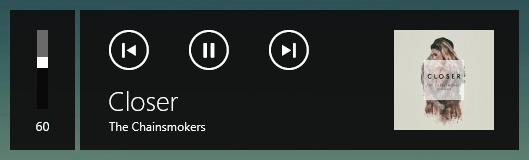
A web application that allows the user to send basic foobar2000 playback commands and adjust application volume level. Information about the track that is currently playing is also displayed and automatically updated when the track or playback status changes.
A foobar user interface element providing a seekbar that displays the waveform of the playing song, compatible with both the Default and the Columns interface components.
Play a track and allow the waveform to generate; it may take a few seconds on first playback
Options:
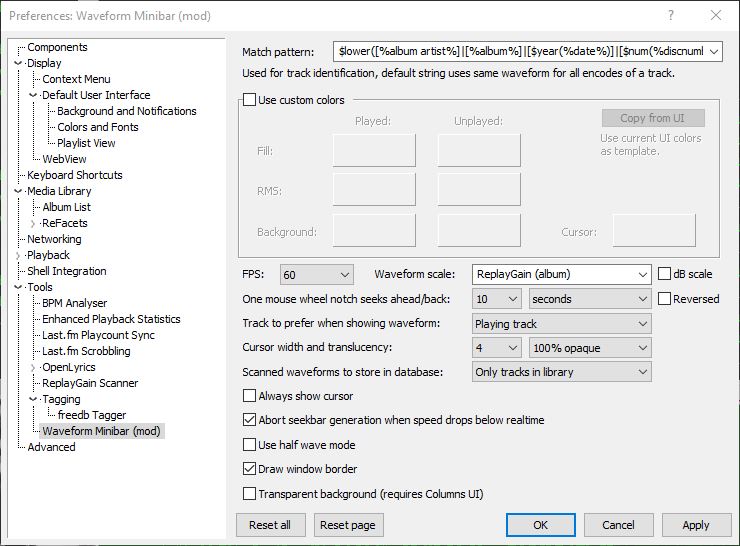
Match pattern Title-formatting pattern used to identify tracks when storing and reusing generated waveforms.
Use custom colors Enables manual color selection for the waveform instead of using the active UI theme colors.
FPS Sets the frame rate for waveform rendering. Higher values produce smoother movement but increase CPU usage.
Waveform scale Controls vertical scaling of the waveform. Original preserves natural peak levels, while Normalize scales all tracks to fill the available height.
dB scale Switches between linear amplitude scaling and logarithmic decibel scaling.
One mouse wheel notch seeks ahead/back Defines how far playback jumps when using the mouse wheel over the waveform. A value of 0 disables wheel seeking.
Reversed Reverses the mouse wheel seek direction.
Track to prefer when showing waveform Determines which track’s waveform is displayed: the playing track, the selected track, or the playing track with fallback to selected when stopped.
Cursor width Adjusts the thickness of the playback position indicator.
Do not revert to rendering the active track on player start Prevents the waveform from automatically rendering on startup until playback begins.
Always show cursor Keeps the playback position marker visible even when playback is stopped.
Abort seekbar generation when speed drops below real time Stops waveform generation if decoding becomes too slow, preventing playback or UI performance issues.
Half wave mode Displays only one polarity of the waveform (typically the positive half) instead of mirroring the signal above and below the center line. This creates a flatter, denser display that works well in very short or narrow panels and improves readability when vertical space is limited.
Draw window border Enables or disables a border around the waveform panel.
Transparent background Removes the panel’s background fill so the waveform blends with the surrounding UI or theme. This is useful when embedding the minibar into tab stacks, splitters, or custom layouts where a solid background would look out of place.
This component is highly configurable, making it suitable both as a simple compact seekbar replacement and as a detailed visual waveform display in more complex foobar2000 layouts.
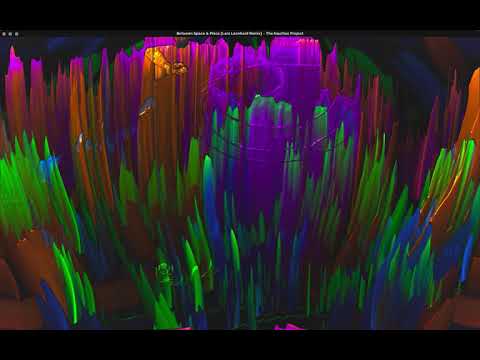
projectM is an open-source, cross-platform reimplementation of Winamp MilkDrop, the music visualizer created by Ryan Geiss. What began as a way to bring MilkDrop-style graphics to more platforms has grown into an ecosystem of visualization libraries, desktop frontends, audio plug-ins, media-player integrations and large community preset collections.
The projectM engine
The central project is libprojectM, a reusable C++ library rather than a complete desktop application. It accepts audio samples (PCM), analyses the signal using FFT and beat detection, interprets MilkDrop-style preset equations and shaders, and renders the resulting animation with OpenGL. It can render into an OpenGL context or a texture so that another application can display the output.
This separation matters: the library does not provide a complete audio player or desktop audio-capture interface. A frontend or host application supplies audio, provides the user interface and graphics context, and makes presets and textures available. The core library is licensed under LGPL-2.1; individual frontends, plug-ins and integrations may use different licenses.
These projects provide a desktop interface around the visualization engine:
projectMSDL (SDL/C++) — the official cross-platform standalone frontend. It captures desktop audio and displays projectM visualizations on platforms supported by SDL and libprojectM. The current 2.0 application is a development preview; the project documentation cautions that it is not yet feature-complete and may contain bugs.
Qt frontend — a Linux desktop application supporting PulseAudio, PipeWire and JACK. It adds a preset playlist editor, saved preset ratings and a graphical settings dialog.
SDL/Rust frontend — a Rust and SDL3 standalone application under development.
Audio plug-ins and player integrations
One of projectM’s strengths is that it can be embedded in other audio software instead of running as a separate visualizer window.
DISTRHO ProM — an audio plug-in implementation of projectM using the DISTRHO Plugin Framework. It provides CLAP, LV2, VST2 and VST3 formats, allowing a compatible DAW or plug-in host to display MilkDrop-style visualizations. ProM is a separate downstream project, not an official projectM frontend.
foobar2000: foo_vis_projectM — a Windows visualization component by djdron. Its source is at GitHub. It bundles the Cream of the Crop presets and textures. The component repository lists version 0.0.5, released in August 2022, for 32-bit and 64-bit Windows and foobar2000 1.5 or newer.
foo_uie_vis_projectM — an older foobar2000 visualization-panel component. This is a separate, historical implementation; do not confuse it with foo_vis_projectM.
Apple Music plug-in — an official projectM front-end plug-in for Apple Music on macOS. The project documentation currently describes it as a development preview.
libvisual plug-in — exposes projectM visualizations to applications that support the libvisual plug-in interface.
Media players and processing pipelines
Kodi visualization.projectm — a Kodi visualization add-on with its own source repository. Build branches need to match the Kodi version being used.
gst-projectm — a GStreamer plug-in that inserts projectM visualization into an audio/video pipeline. It can be used for offline rendering and audio-to-video conversion as well as pipeline-based playback.
pmstream — an unusual Linux implementation that renders projectM frames as ASCII or Sixel graphics in a terminal. It can work with the kew terminal music player.
The projectM developers also document integrations in Kodi, VLC and Silverjuke.
Presets and textures
MilkDrop-style presets are the creative heart of projectM. A preset describes a visualization through equations, parameters and shaders.
Cream of the Crop — a curated collection of approximately 9,795 MilkDrop presets assembled by Jason Fletcher. It became the default preset pack for projectM releases beginning in 2022.
MilkDrop texture pack — the original MilkDrop textures plus additional images used by many presets. The texture pack is recommended alongside preset collections.
The main projectM repository has hundreds of GitHub forks, but most are ordinary copies or development branches:
Project-M by ford442 — a fork of the official C++ projectM library that adds a browser/WebAssembly host and related web functionality. It is an independent extension of the engine, not the official desktop frontend.
foo_vis_projectM — a downstream foobar2000 implementation using a modified projectM source tree, including support for reading preset resources from ZIP archives.
projectm-frontend-sdl-py — a Python/SDL2 frontend that wraps projectM and routes captured audio to the engine.
Lactea belongs in the wider MilkDrop-compatible ecosystem, but it is not a projectM fork or a frontend using libprojectM. It is an independent Rust implementation supporting MilkDrop 2/3 and projectM-compatible presets, with its own standalone application, library, Kodi add-on and web demo.
Other distributions
projectM Music Visualizer on Steam provides an end-user distribution of the visualizer. The official project documentation currently identifies the modern desktop version as a development preview. The Android projectM app is maintained by an independent app author; the projectM developers explicitly state that they do not develop or support the Android apps.
Project status and links checked November 2026. projectM is an evolving ecosystem: the core library, frontends and third-party integrations have separate release schedules, licenses and support arrangements.
The Default User Interface from early foobar2000 versions is back! This component serves no particular useful purpose; it is provided for the nostalgia value only. It is missing various functionality considered to be essential in current foobar2000 series, such as persistently visible volume control. There are no plans to add any new functionality into the Classic User Interface.
Warning: product may contain Finnish profanity.
Changes since the original version:
Modified to run side by side with the current Default UI. Please do not remove the Default UI DLL.
Fixed the infamous seekbar repaint bug on Windows themes other than “classic”.
Replaced popup volume slider with the latest Default UI code.
Restored original “Preferences: Title Formatting” page from old foobar2000 versions