hypercyclic ~ LFO-driven, MIDI-mangling Arpeggiator


What is hypercyclic?

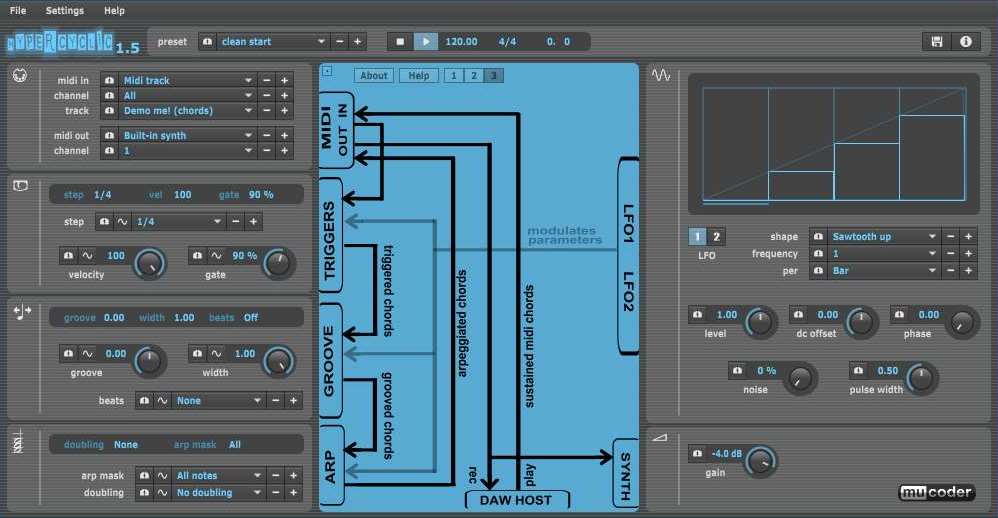
  • an LFO-driven MIDI arpeggiator, gate effect and step sequencer
  • for mangling sustained MIDI input chords
  • the output of which can then drive other MIDI instruments
  • acts either as a VST or Audio Unit plugin for your DAW, or as a standalone application
  • the original hypercyclic won 2nd place in the KVRAudio.com Developer Challenge ‘07
  • the sweet spot for hypercyclic is the narrow border between chaos and regularity. Or, in other words, how to induce a certain pleasant randomness and syncopation, yet forcing everything to align again on the bar or beat boundaries

How do you use it?

  • the main use for hypercyclic is to generate midi that can be recorded and/or sent to other plugins. However it also features a simple built-in synth for testing purposes
  • you can use two tempo-synced LFOs to modulate various parameters for creating interesting rhythmic effects and chord variations
  • a unique feature is the possibility to modulate the sequencer step size itself, which is useful for creating glitchy stuttering effects
  • another thing you can use is a groove function for playing slightly off the beat. The groove parameters can also be modulated over time by the LFOs, adding to the rhythmic variation
hypercyclic

www.mucoder.net/en/hypercyclic

OpenMPT ~ Discover The Music Inside…


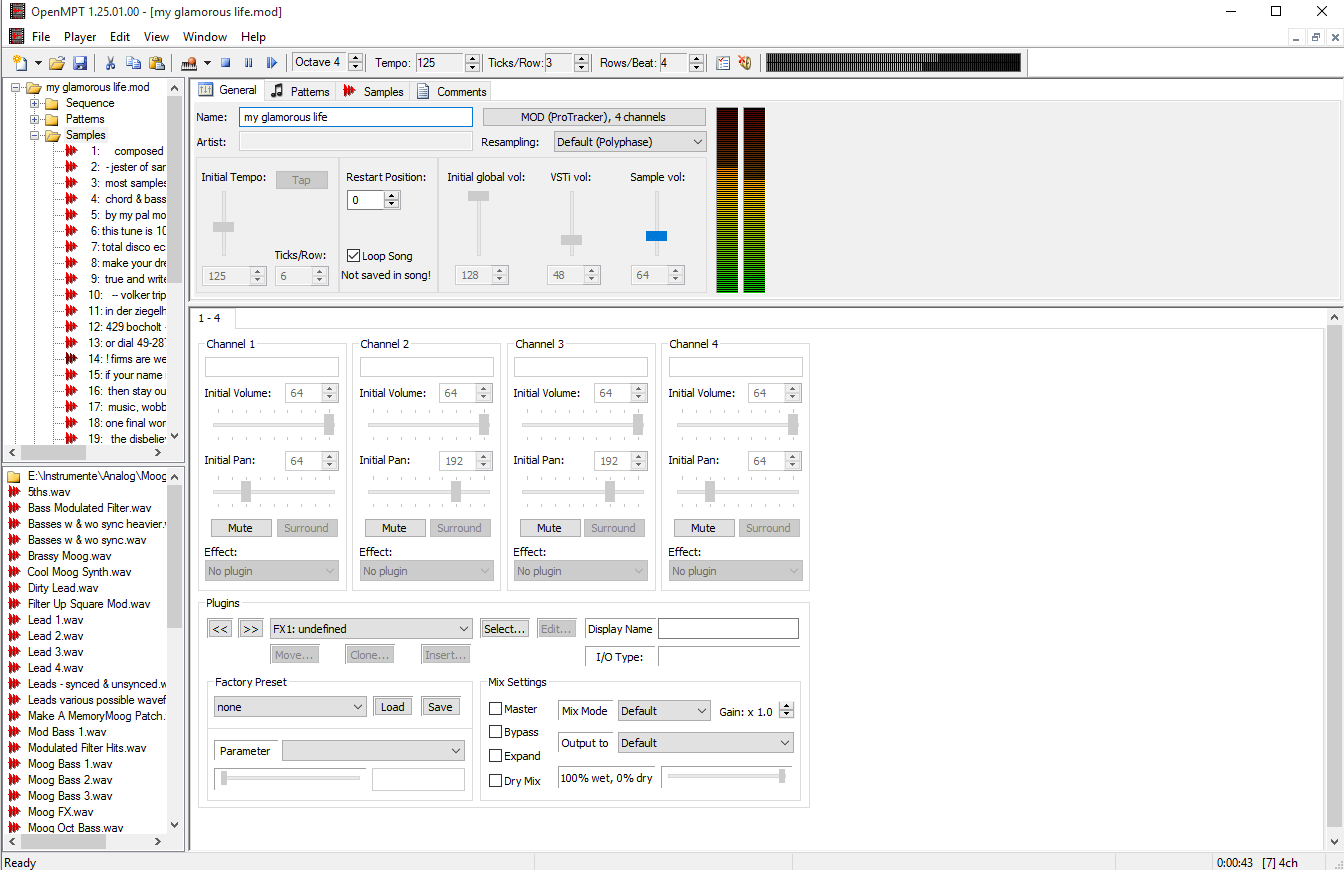
OpenMPT is well known tracker software for Windows.

OpenMPT (shorthand for Open ModPlug Tracker) is completely free and allows you to create and play back some great music on your computer. Based on the original ModPlug Tracker written by Olivier Lapicque, OpenMPT is free software, can import a wide variety of module formats and offers an intuitive, native GUI as well as advanced features such as VST plugins and ASIO output.

In addition to its own song format, OpenMPT can natively edit Impulse Tracker, FastTracker, Scream Tracker and ProTracker module files.

openmpt

openmpt.org
source.openmpt.org
github.com/OpenMPT/openmpt
en.wikipedia.org/wiki/OpenMPT

OpenMPT based module player library and libopenmpt based command-line player:

  • libopenmpt is a cross-platform C++ and C library to decode tracked music files (modules) [wikipedia] into a raw PCM audio stream.
  • openmpt123 is a cross-platform command-line or terminal based module file player.

libopenmpt is based on the player code of the OpenMPT project (Open ModPlug Tracker). In order to avoid code base fragmentation, libopenmpt is developed in the same source code repository as OpenMPT.

libopenmpt ships with plugins for 3 popular Windows audio players already included:

  • xmp-openmpt is a plugin based on libopenmpt for XMPlay.
  • in_openmpt is an input plugin based on libopenmpt for WinAMP 2.x or later compatible players.
  • foo_openmpt is a component based on libopenmpt for foobar2000.

lib.openmpt.org/libopenmpt

Soft Playlists ~ Foobar & Last.fm


Can create different Last.fm related playlists:

  • loved tracks of a single user, multiple users, friends or neighbours.
  • recent tracks of a single user, multiple users, friends or neighbours.
  • top tracks of a single user, multiple users, friends or neighbours over different periods.
  • top tracks of an artist.
  • top tracks of artists similar to an artist.
  • top tracks with certain tag.
  • tracks similar to a track.

Can also…

  • love, unlove, ban and unban a track on your Last.fm account.
  • add a track to a custom playlist on your Last.fm account.
  • save and load XSPF playlists (make playlists without hard paths). This makes it possible to easily share playlists with other people. Also when you restructure your library (change location of your music files), these playlists will continue to work.

www.foobar2000.org/components/view/foo_softplaylists
hydrogenaud.io/index.php?topic=76133.0

Integrating Last.fm with Foobar2000 Using Soft Playlists

Step 1: Install Soft Playlists
Begin by downloading the foo_softplaylists component from the foobar2000 website. Once downloaded, open foobar2000 and navigate to File → Preferences → Components → Install…, then select the downloaded .fb2k-component file. Restart foobar2000 to activate the plugin. This component enables you to generate dynamic playlists directly from your Last.fm data.

Step 2: Connect Your Last.fm Account
After installation, go to Preferences → Tools → Soft Playlists → Last.fm. Enter your Last.fm username and password to authorize the connection. Once you are logged in, the plugin can fetch your loved tracks, recent plays, top tracks, and tag-based data.

Step 3: Creating Loved Tracks Playlists
Soft Playlists can generate playlists of tracks in your library that are marked as loved on Last.fm. Simply create a new playlist, Open the Library Menu and choose the “Loved Tracks” option, and the plugin will match these tracks with your local files and create a new playlist. You can now play or sort these loved tracks directly from foobar2000.

Step 4: Generating Top Tracks Playlists
You can also create playlists based on top tracks from your Last.fm account, your friends, or neighbors. Select the “Top Tracks” option and filter by user, artist, or tag. This allows you to automatically build playlists of your most-played tracks, popular tracks by similar artists, or tracks labeled with specific moods or genres.

Step 5: Recent Tracks Playlists
Soft Playlists supports recent tracks queries from Last.fm. You can generate playlists of your most recently played tracks or recent tracks from other users. This is ideal for keeping up to date with current listening trends.

Additional Features:
Soft Playlists allows you to save sharable playlists in XSPF format, which keeps them portable and resilient to file location changes. The plugin also lets you love or unlove tracks directly from foobar2000, updating your Last.fm account automatically. This integration creates a seamless workflow between your local library and Last.fm.

Adding a toolbar button to love a track:

  1. Right click the Foobar2000 toolbar and select “Customize Buttons...
  2. In the Available Commands Panel, open “Context Menu” and then “Last.fm”
  3. Select "Last.fm Love Track” and click the “Add” button then click “Ok”
  4. Change the button icon to a Last.fm icon (.ico file)

Tips and Considerations
Soft Playlists is an older 32bit component. The plugin works best if most of your Last.fm scrobbled tracks are present in your local library. For more advanced integration, consider combining Soft Playlists with Spider Monkey Panel scripts to pull additional data, such as playcounts, tags, or charts.

Aural Probe ~ Sample Library Tool


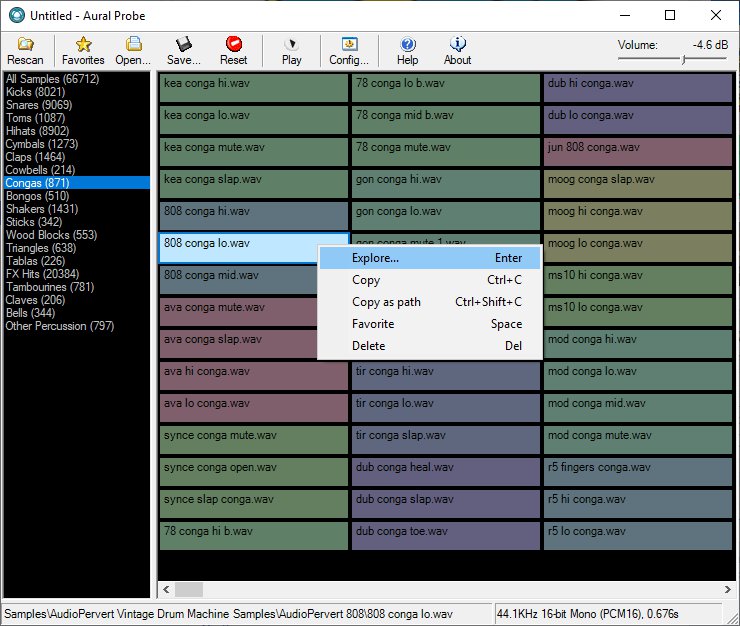
Aural Probe is a sample librarian tool for computer musicians / audio engineers. Automatically and non-destructively index your disorganised sample collection from a list of folders into categories (kick, snare, hihats etc.) based on folder/filename wildcard matches. Easily audition samples, load/save favourites, and drag-and-drop straight into your sequencer.

Features:

  • Categorize your huge sample collections (20GB+) without moving a single file
    Create categories based on file/folder keyword matches (eg. Kick category = “bd”, “kick”, “bassdrum”) or regular expressions
  • Quickly audition through samples with arrow keys or mouse
  • Filter samples by file type (WAV, AIFF, FLAC, MP3, WMA, OGG)
  • Full drag-and-drop support (simply drag a sample from Aural Probe into your sequencer/sampler, just like Windows Explorer)
  • Mark favorites, filter by favorites, load/save favorite lists
  • Automatic rescan and categorization of samples on changed categories or sample folder layout
  • See details about highlighted sample in status bar
  • ‘Always on top’ mode to make frequent dragging of samples into other windows easier
  • Right-click a sample for frequently used shortcuts (Explore, Copy, Copy Shortcut, Favorite, Delete)
  • 100% read-only – does not move/modify your samples, just indexes them
    Minimize to system tray

Aural Probe

sourceforge.net/projects/auralprobe

Cheeze Machine 2 ~ Virtual String Instrument


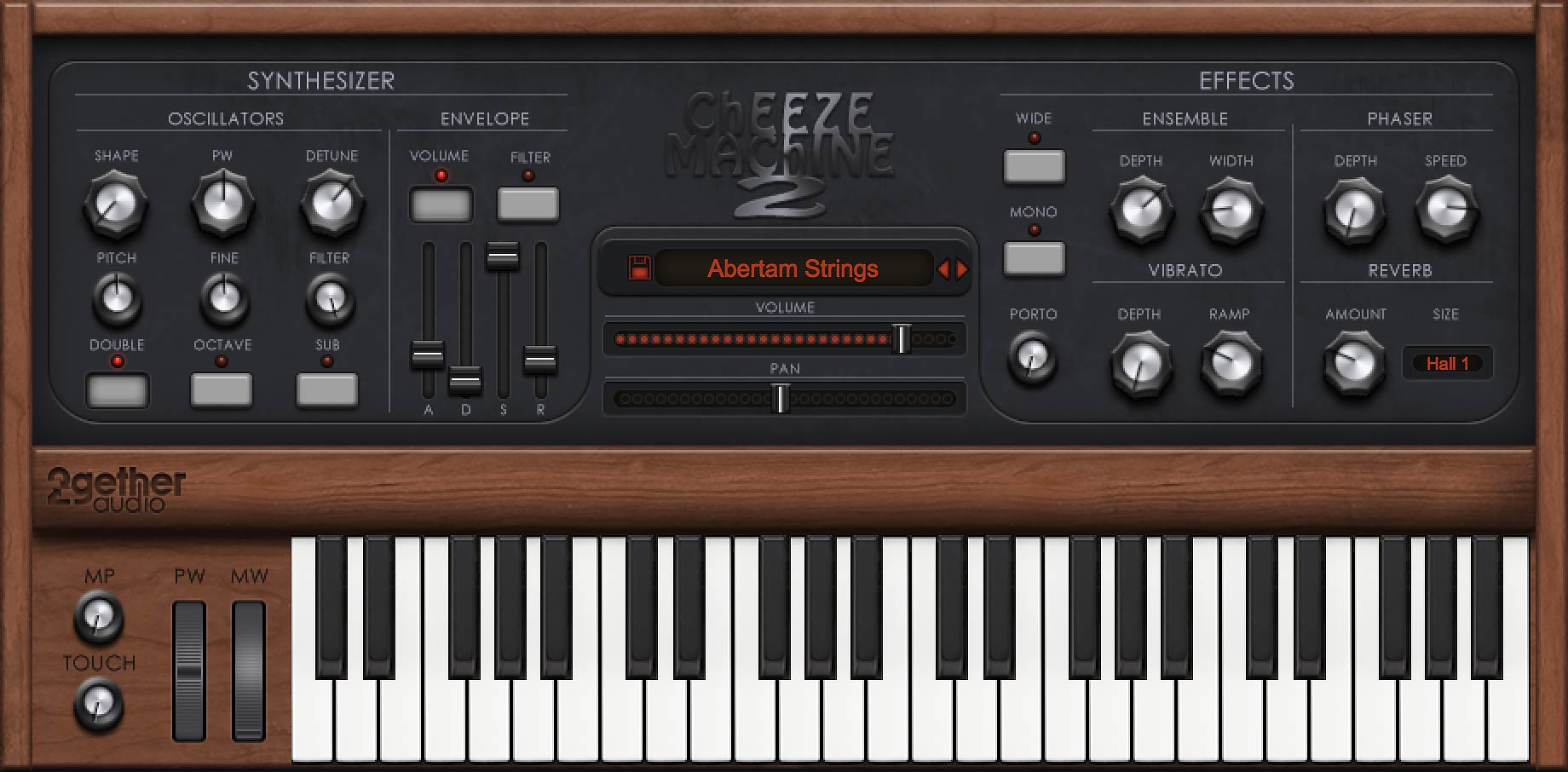
Back by popular demand comes a remastered version of the extremely popular Cheeze Machine virtual instrument by Big Tick Audio. An extra cheesy, extra saucy string box in the style of the original vintage string machines. Cheeze Machine 2 includes an expanded oscillator section, convolution reverb, a vintage ensemble chorus, and 64 bit compatibility for VST, AU, AAX and standalone applications.

CheeseMachine2

www.2getheraudio.com/instruments/cheeze-machine-2

Window Media Player ~ ASIO Plugin


ASIOWmpPlg is a Windows Media Player plugin that plays incoming audio through a user-selectable ASIO device. The Windows Media Center application is also supported.

sourceforge.net/projects/asiowmpplg

foo_AdvancedControls ~ Foobar2000 Advanced Controls


Control all the playback functions of Foobar2000 from icons on the Taskbar Notification Area. Using an area only two tray icons wide, you have the playback functions, and the volume or the seek bar, as well as a context menu.

A popup balloon (which can be disabled) appears each time a new song begins, to provide fully customizable information about the song that is playing.

The Delete Current File function deletes the file that is currently playing. It always asks for confirmation and puts the file into the recycle bin if possible, so you won’t delete files without intending to.

The extra functions introduced by this component can also be mapped to a shortcut key.

www.niversoft.com/products/fac
www.foobar2000.org/components/view/foo_advancedcontrols
Wiki

Skywave Linux ~ Global Online Listening


Skywave Linux is a 64 bit live system providing installed and configured software for accessing software defined radio servers locally and on the internet. With this operating system, a person may tune shortwave broadcasts, amateur radio, aeronautical, maritime, or other signals received at remote servers around the world.

SDR software is configured for popular devices, such as the RTL-SDR dongles, Softrocks, Hermes, and other radios.

Skywave Linux is a 64 bit system built over Ubuntu Linux, and may be installed on a bootable USB stick, SD card, DVD, or hard drive.

Features:

  • WebSDR, OpenWebRX radio servers accessible via internet browser.
  • HPSDR servers accessible via QtRadio
  • HPSDR hardware also via cudaSDR
  • RTL-SDR plug-and-play functionality via CubicSDR, Gqrx, and QtRadio
  • RTL-SDR ADS-B tracking and mapping via Dump1090
  • RTL-SDR RDS decoding via Gqrx and Redsea
  • SDRPlay, Airspy radio hardware is supported.
  • LADSPA audio plugins for EQ/Compression/Limiting
  • WSJT -X / WSPR-X weak signal digimode software
  • Weather Satellite Decoding via WXtoImg
  • Satellite tracking with Gpredict
  • Trunked Radio System Reception with SDRTrunk
  • Radio firmware & data management with CHIRP
  • Kodi Media Center for conventional internet streaming

skywavelinux-007

skywavelinux.com
sourceforge.net/projects/skywavelinux

2BusControl ~ Crossplatform Balance Plugin


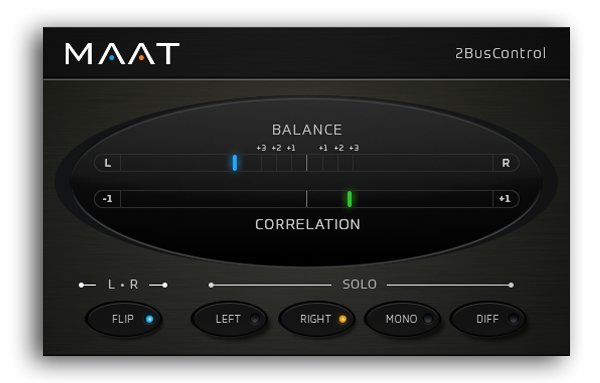
A universal L/R plus MONO/DIFF monitor control and Balance / Correlation metering plug-in for stereo bus masters.

2BusControl

www.maat.digital/2buscontrol

foo_logitech_lcd ~ Foobar2000 & Logitech LCDs


A component to display visualisations and track information on a variety of Logitech LCD screens.

Features:

  • Support for monochrome LCDs (G13, G15, G510 & Z-10)
  • Support for colour LCDs (G19)
  • 11 different visualisations (4 spectrum analysers, 4 oscilloscopes, 3 VU meters)
  • Track info display
  • Massively customisable

www.foobar2000.org/components/view/foo_logitech_lcd

RYM ~ Rate Your Music


RYM is a community-built music and film database where you can rate, review, catalog and discover new music and films as well as participate in contributing to the database itself.

rateyourmusic.com
rateyourmusic.com/lists