I have more music than would fit onto the memory card of my phone. This is largely due to the 256 kBit/s versions that are sold now. On the phone, I do not really hear the difference between 256 kBit/s and 128 kBit/s, but I can clearly see the difference in size.
This script creates a whole copy of your music library, just with a smaller bitrate. It uses either ffmpeg or lame to convert the tracks.
Tag Archives: script
getID3() ~ File Parsing PHP Script
getID3() is a PHP script that extracts useful information from MP3s & other multimedia file formats.
www.getid3.org
github.com/JamesHeinrich/getID3
sourceforge.net/projects/getid3
Resources:
www.drupal.org/project/getid3
github.com/Owen-oj/laravel-getid3
github.com/plutuss/getid3
packages.debian.org/sid/php-getid3
Tonbandfetzen ~ Audio From Plain Text
Tonbandfetzen is a collection of command-line tools that allow you to compose music based on audio fragments generated from plain text input. It contains:
tz mel– generate sound fragments from plain texttz guitar– read guitar tablaturetz stick– concatenate audio datatz stack– superimpose audio datatz stretch– rescale audio datatz repeat– loop audio datatz trim– strip leading and trailing silencetz mono– unzip audio channelstz harmonics– show spectra of wave samplestz inspect– show information on audio filetz riff2aiff– convert .wav(e) into .aif(f) filestz aiff2riff– convert .aif(f) into .wav(e) filestz tag– add ID3v2 metadata to .wav(e) filestz play– generate and play sound fragments
jamailmar ~ Multi-threaded Ogg Vorbis Decoder
Foobar2000 ~ ctrfoobar2000 script
Control Foobar2000 with python + Command line
usage: control.py [-h] [-p] [-t PLAY_TRACK] [-s] [-P] [-n] [-r] [-R] [-V VOLUME] [-m] [-i] [-f [ADDFOLDER [ADDFOLDER ...]]] [-fi [ADDFILES [ADDFILES ...]]] [-F [ADDFOLDERPLAY [ADDFOLDERPLAY ...]]] [-Fi [ADDFILESPLAY [ADDFILESPLAY ...]]] [-c] [-d [DEL_TRACK [DEL_TRACK ...]]] [-l] [-b] [-S TYPE_CONTROLLER] [-H HOST] [-O PORT] [-?] [-g] [-x [CHANGE_CONFIG [CHANGE_CONFIG ...]]] [-T SECTION] [-E OPTION OPTION] [-a DIR_ALIAS] [-v] [-L LEVEL_ALIAS] [-z REPEAT] [--repeat-off] [--repeat-playlist] [--repeat-track] [--repeat-random] [--shuffle-track] [--shuffle-album] [--shuffle-folder] [--seek SEEK] [--root ROOT]optional arguments: -h, --help show this help message and exit -p, --play Play Playback -t PLAY_TRACK, --play-track PLAY_TRACK Play Playback Track No -s, --stop Stop Playback -P, --pause Pause Playback -n, --next Next Play -r, --previous Previous Play -R, --random Play Random -V VOLUME, --volume VOLUME Set Volume, range is -100 <= value <= 0 -m, --mute Mute Volume -i, --info Get info current Playing -f [ADDFOLDER [ADDFOLDER ...]], --addfolder [ADDFOLDER [ADDFOLDER ...]] Add Remote Folder Queue [HTTP] -fi [ADDFILES [ADDFILES ...]], --addfiles [ADDFILES [ADDFILES ...]] Add Remote Files Queue [HTTP] -F [ADDFOLDERPLAY [ADDFOLDERPLAY ...]], --addfolderplay [ADDFOLDERPLAY [ADDFOLDERPLAY ...]] Add Remote Folder Queue & Play it [HTTP] -Fi [ADDFILESPLAY [ADDFILESPLAY ...]], --addfilesplay [ADDFILESPLAY [ADDFILESPLAY ...]] Add Remote Folder Queue & Play it [HTTP] -c, --clear-playlist Clear Current Playlist [HTTP] -d [DEL_TRACK [DEL_TRACK ...]], --del-track [DEL_TRACK [DEL_TRACK ...]] Delete Playlist [HTTP], example: foobar -d 1 2 3 -l, --list List Playlist -b, --browser Browser Library -S TYPE_CONTROLLER, --type-controller TYPE_CONTROLLER Set Type Of Controller [com,http] -H HOST, --host HOST Remote Host control Address [HTTP] -O PORT, --port PORT Remote Port control Address [HTTP] -?, --usage Print All Help -g, --read-config Read config file -x [CHANGE_CONFIG [CHANGE_CONFIG ...]], --change-config [CHANGE_CONFIG [CHANGE_CONFIG ...]] Set Change config. format: section#option#value -T SECTION, --section SECTION Set Section Config -E OPTION OPTION, --option OPTION OPTION Set Option Config -a DIR_ALIAS, --dir-alias DIR_ALIAS Root of Directory Alias On Server -v, --version -v = show version | -vv = verbosity process -L LEVEL_ALIAS, --level-alias LEVEL_ALIAS Level Root of Directory Alias On Server -z REPEAT, --repeat REPEAT Repeat 0 = Default (repeat off) | 1 = Repeat Playlist | 2 = Repeat Track | 3 = Random Play | 4 = Shuffle Track | 5 = Shuffle Album | 6 = Shuffle Folders --repeat-off Repeat Off --repeat-playlist Repeat Playlist --repeat-track Repeat Track --repeat-random Random Play --shuffle-track Shuffle Track --shuffle-album Shuffle Album --shuffle-folder Shuffle by Folder --seek SEEK Seek for a second --root ROOT Root path / Directory Containt Music files, this is for One Folder Files Selected
Foobar2000 ~ Autometa Playlists
Autometa is a minimalist, customizable JScript Panel script designed to quickly create autoplaylists based on the current track’s tags with a single click (similar to the quick search function).
itunesfm ~ iTunes & last.fm Integration
A small script to sync your play counts from last.fm back to iTunes. Supports both Windows and Mac OS X without any native dependencies. (Requires Music.app on OS X.)
Useful if you scrobble to last.fm from iTunes on multiple computers / devices and want to keep your local play counts consistent.
Foobar2000 ~ EAC Log Viewer Script
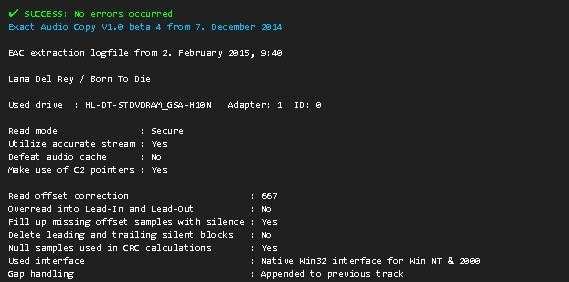
SMP EAC Log Viewer for Foobar2000
The SMP EAC Log Viewer is a Spider Monkey Panel (SMP) script for Foobar2000 designed to display Exact Audio Copy (EAC) log files in a DUI panel. It preserves the alignment of log columns, color-codes the conclusion lines for quick success/error identification, and prepends a summary line so it scrolls with the rest of the log.
Features:
- DUI panel
- Monospace font: Preserves column alignment in all EAC logs.
- Color-coded conclusions:
- Green = successful rip
- Red = errors found
- Summary line: Displays overall pass/fail and scrolls with the log.
- Automatic log detection: Checks multiple common naming conventions:
%album%.log%artist% - %album%.logEAC.log

Installation:
- Download the script
Get the latest version of the SMP script from the GitHub repository:
github.com/tom2tec/foobar2000_smp_eac_log_viewer/releases - Copy the script
Copy and paste theeac_log_viewer_panel.jsscript into your preferred scripts folder. Typical choices:C:\Users\<YourName>\Documents\Foobar\scripts- Or any folder you already use for SMP scripts.
- Add a Spider Monkey Panel
- Open Foobar2000 and switch to your DUI layout.
- Right-click → Add New UI Element → Spider Monkey Panel
- Open the Edit Panel Script… pane and paste the contents of
eac_log_viewer_panel.js. or point to the script’s location in Panel Properties… → Script File → File.
- Adjust panel settings
- Set the font to match your DUI theme (monospace).
- Resize the panel to comfortably display the full log width.
Usage:
- The panel automatically updates when:
- You play a new track.
- You change focus in the playlist.
- Scroll through the log using your mouse wheel.
- The summary line shows the overall rip status and scrolls with the text.
- Color-coded lines highlight conclusions: green for success, red for errors.
Notes:
- The script is optimized for one log per album, but will attempt all three naming conventions for flexibility.
- Unusually named logs may require manual renaming in order to conform or add an input condition to the script.
- DUI theming preserves font and panel appearance but maintains column alignment.
License
This project is licensed under the MIT License. See the included LICENSE file or the GitHub repository for details.
Download and Support
- GitHub repository: https://github.com/tom2tec/foobar2000_smp_eac_log_viewer
- For bug reports or feature requests, submit an issue on GitHub.
flacopyus ~ FLAC To Opus Library Transcription
Flacopyus is a CLI tool that mirrors your lossless FLAC library to a portable Opus collection. It performs rsync-like batch mirroring with incremental encoding/copying to save time. It preserves metadata and is idempotent, so repeated runs safely keep the destination in sync.
pypi.org/project/flacopyus/
github.com/curegit/flacopyus
DiscoDOS ~ Discogs Command Line
Roon Command Line Project ~ Roon Automation & Control
The Roon Command Line project provides Bash and Python scripts to enable command line control of the Roon audio system over a local network.
Note: No modifications are made to the Roon Core. The RoonCommandLine package resides entirely on other systems within your local area network.
MusicSync ~ Synchronize Music Libraries
MusicSync is a cross-platform tool that synchronizes your music library between devices and drives with advanced settings.
You can use it through CLI, that makes easy to sync you library with only a click using a script, or through GUI, that is more user-friendly. Here there are two examples:
python musicsync D:/Music sdcard/Music --adb --min-rating 4.5 --output-format opus --output-bitrate 128k python musicsync D:/Music sdcard/Music --adb --min-rating 3 --min-year 2020 --output-format opus --output-bitrate

github.com/serpest/MusicSync
hydrogenaud.io/index.php?topic=121169.0