
GVolWheel is a Linux application which lets you control the volume easily through a tray icon you can scroll on. Easily integrate with minimal desktops (Openbox,IceWM,XFCE etc).
github.com/Junker/gvolwheel
Tag Archives: Volume

Volume²~ Advanced Windows Volume Control
Volume² is an freeware app which is an advanced Windows volume control, a complete replacement for the default Volume Control on Windows. This application lets you easily change the sound volume just by rotating the mouse wheel or by using keyboard hot keys or just mouse move on screen border. The app comes with customization themes and interface and also other options like setting hotkey for changing volume.
irzyxa.blogspot.com
github.com/irzyxa/Volume2
Share this:

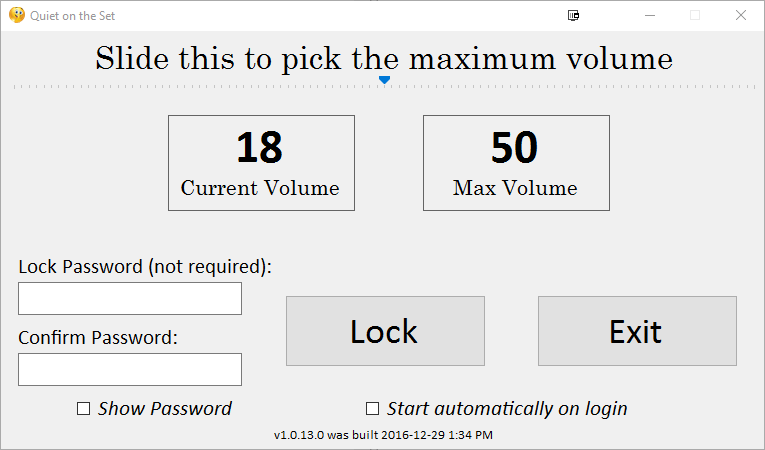
Quiet on the Set ~ Windows Volume Limiter
Prevent someone from turning up the volume on a Windows machine beyond a maximum volume.
This is a very simple Windows Forms application that lets you set a maximum value on for your volume, and then lock the setting so that a user cannot change the volume.
Disclaimer: This app is primarily geared toward young/special needs children. The “lock” provides a basic level of control, but it could be easily bypassed by someone with technical knowledge.
Share this:

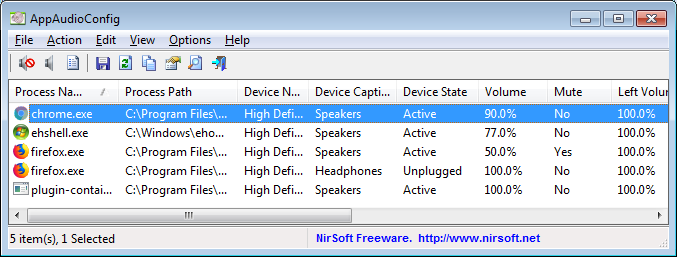
AppAudioConfig ~ Audio App Registry Editor
Starting from Windows Vista, you are allowed to change the sound volume of every application separately, and after you exit from the application, the last settings are saved in the Registry under:
HKEY_CURRENT_USER\Software\Microsoft\InternetExplorer\LowRegistry\Audio\PolicyConfig\PropertyStore
So the next time you run the application, your last settings are used. This tool displays your current audio settings of every application on your system, and allows you to easily change the setting of multiple applications at once. You can change the mute/unmute status, the sound volume level, and the right/left audio balance of the application.
Share this:

MicMute ~ Windows Microphone Level Utility
MicMute is a small program that will enable you to easily manage the level of a connected microphone. The application also supports push-to-talk thanks to the built-in ‘Transmitter Mode’. While it runs minimized in the system tray, MicMute can be controlled through keyboard shortcuts you choose. The software uses tray notification balloons and it also has a sound signal option you can activate.
sourceforge.net/projects/micmute
Share this:

Free Clip ~ Transparently Boost Volume
Free Clip is an intuitive multi algorithm soft clipper / wave shaper plugin, available as a Windows VST or Mac Audio Unit. The plugin allows you to choose between a range of wave shapes or ‘sigmoid functions’, from the most transparent but harshest hard clip, to the ‘softest’ but most saturated arctangent shape. You can then intuitively set the ceiling level using the slider that perfectly matches the level meter next to it. Oversampling is also available to remove high frequency aliasing; when oversampling is on this does introduce peaks slightly over the ceiling level however, so if you intend to use this plugin with oversampling as the final plugin on the master chain, ensure the ceiling level is set appropriately and/or the post-oversampling clip setting is set.
This plugin is a great way to conveniently transparently boost volume without clipping your DAW, whether it be an individual stem or sound effect, or an entire track that you made. It is recommended that the hardclip, quantic or cubic shape be used for mastering, as these introduce no or minimal saturation.
The plugin can be also used as a more traditional saturation / distortion plugin by setting a ‘softer’ wave shape, such as algebraic or arctangent – simply lower the ceiling level to provide more saturation to the signal – just remember to boost the output afterwards. Alternatively you can boost the input gain into the clipper for the same effect. In this case, increasing the oversampling value is helpful if you’re hearing high frequency aliasing! Be warned that high oversampling values such as 16 or 32 times can be very heavy on the CPU.
Share this:

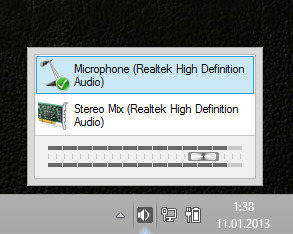
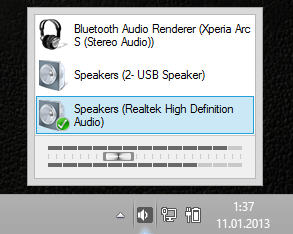
AudioSwitch ~ Taskbar Volume & I/O Switch
Switch between default audio input or output + change volume.
github.com/sirWest/AudioSwitch
www.facebook.com/AudioSwitchSoftware
Share this:

Volume Limiter ~ Lock MS Windows Volume Control
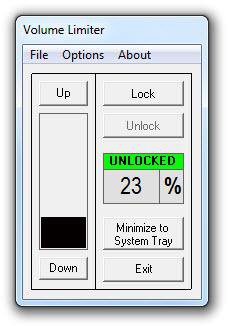
Volume Limiter is a small application that allows you to set a maximum volume limit on your windows PC. This is designed to protect children from turning the volume up to a level that would damage their hearing.
The application can be password protected to prevent children from changing your defined limit. The application runs in the background and minimizes to the system tray. Volume settings, the lock or unlocked status, and password information are stored in the windows registry. If the application is set to start up upon login (by placing it in the startup group) it will load the previous settings.
This application is compatible with Windows Vista, 7 and 8 and will run on 32 bit or 64 bit systems.
Features:
- Can be password protected
- Volume level and lock status auto-saved to registry
- Minimizes to system tray rather than task bar
- Lightweight (Uses 2MB of system RAM when running)
https://sourceforge.net/projects/volumelimiter/
Share this:

Flutterbird ~ Simple Pitch & Volume Fluctuation
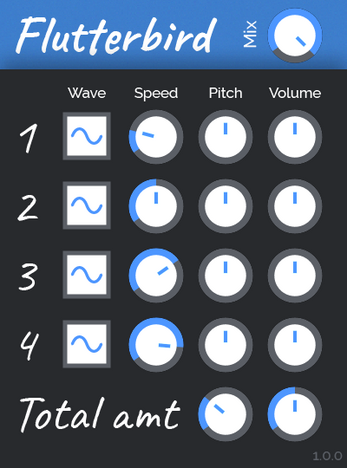
Flutterbird is a free, open-source effect plugin for adding pitch and volume fluctuation to incoming audio. It can be used for traditional wow/flutter effects as well as more chaotic, extreme modulation. Flutterbird has four separate oscillators with adjustable speeds that can be mapped to either pitch or volume.
tesselode.itch.io/flutterbird
github.com/tesselode/flutterbird
Share this:

SoundVolumeView ~ Windows Volumes Viewer
SoundVolumeView is a simple tool for Windows Vista/7/8/2008/10/11 that displays general information and current volume level for all active sound components on your system, and allows you to mute and unmute them instantly. SoundVolumeView also allows you to save a sound profile into a file, containing the current volume level and the mute / unmute state of all sound components, as well as the default sound devices, and then later, load the same file to restore exactly the same volume levels and settings. There is also extensive command-line support, which allows you to save/load profiles, change current volume of every sound component, and mute / unmute every sound component, without displaying any user interface.

Share this:

Advanced Volume Control ~ Windows 10 Remote Via Android
Connect your smartphone via this program and control the volume of all your applications with your Android device.
Features:
- Advanced Windows 10 volume control
- Control the volume from your smartphone
sourceforge.net/projects/windows10volumecontrol
play.google.com/store/apps/details?id=com.m1smr.avc
Share this:

Automatic Volume Mixer ~ Windows Utility
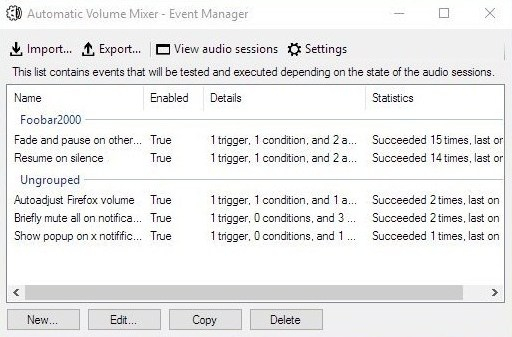
Automatic Volume Mixer is a tool that allows automatization of Windows Volume Mixer based on user rules. You can open the Volume Mixer by right-clicking on the speaker icon in the system tray and selecting Open Volume Mixer. This application is an automatic version of that applet.
Common usage examples:
- Pausing your audio player (e.g. foobar2000) whenever any other application makes a noise, and resuming playback once the noise is gone. This enables you to keep your audio player running in the background at all times.
- Briefly muting all applications while a notification is playing.
- Forcing application’s volume to a set level.
- Automatically lowering volume during night.
- Launching processes / popups when some application makes noise.
Features:
- Detect volume levels of applications and act on that information.
- Fully configurable rules for detection, filtering, and executing actions.
- Ability to automatically adjust audio levels of applications.
github.com/Klocman/Automatic-Volume-Mixer
sourceforge.net/projects/automatic-volume-mixer


