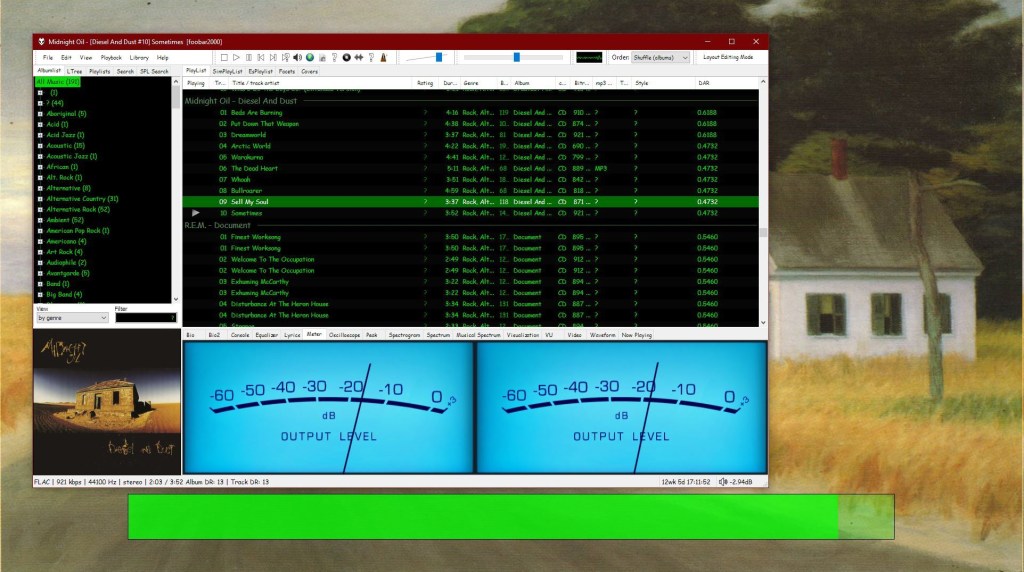
The Default User Interface from early foobar2000 versions is back! This component serves no particular useful purpose; it is provided for the nostalgia value only. It is missing various functionality considered to be essential in current foobar2000 series, such as persistently visible volume control. There are no plans to add any new functionality into the Classic User Interface.
Warning: product may contain Finnish profanity.
Changes since the original version:
- Modified to run side by side with the current Default UI. Please do not remove the Default UI DLL.
- Fixed the infamous seekbar repaint bug on Windows themes other than “classic”.
- Replaced popup volume slider with the latest Default UI code.
- Restored original “Preferences: Title Formatting” page from old foobar2000 versions
- Various cosmetic changes.
Category Archives: Visual
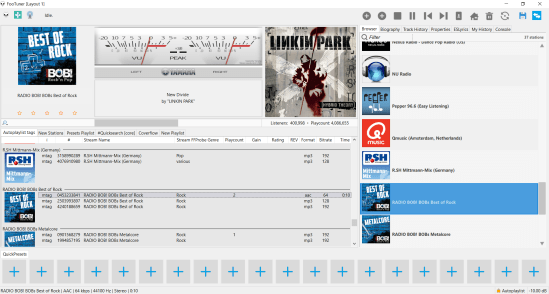
footuner ~ Foobar2000 Stream Theme
A foobar2000 skin / theme designed for internet streams. Search and import streams from tunein.com and Community Radio Browser

github.com/smoralis/footuner
hydrogenaud.io/index.php?topic=119049.0
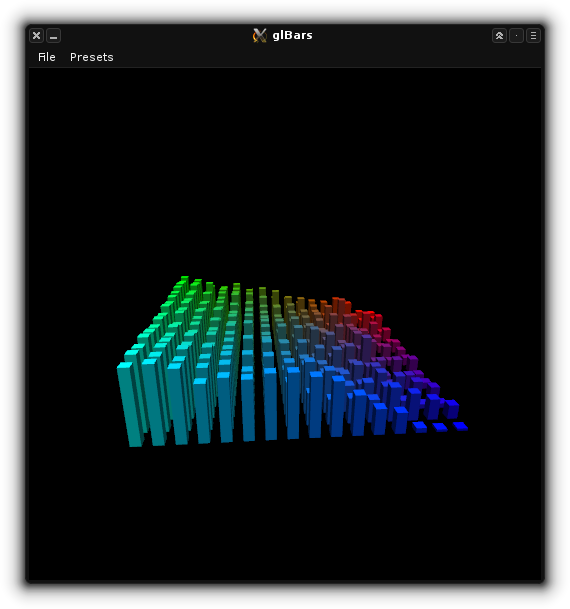
glBars ~ OpenGL Visualisation Plugin
This is an OpenGL bars visualization plugin (as seen in XMMS and XBMC/Kodi). It’s adapted from the jack_glbars project by Nedko Arnaudov. glBars works as a JACK standalone and audio plugin (LV2 or VST).

github.com/DISTRHO/glBars
distrho.sourceforge.io/plugins
github.com/DISTRHO/DPF-Plugins
Foobar2000 ~ Wallpapers
Wallpapers:
- www.deviantart.com/electrolex/art/Foobar2000-v3-0-Plus-8K-Wallpaper
- www.deviantart.com/iprad/art/25-563925233
- www.deviantart.com/kalca/art/Foobar2000
- www.deviantart.com/seshasgaming/art/Gold-w11-959399171
- www.deviantart.com/sgt-meddle/art/foobar2000-Light-Dark-Minimalist-Wallpapers
- www.deviantart.com/tablesaltz/art/Foobar2000-Wallpaper
- www.reddit.com/r/wallpapers/comments/1jntcq/7_spectrogram_wallpapers_made_with_foobar2000
Dynamic Wallpaper:
www.reddit.com/r/foobar2000/comments/hf83m9/foobar_wallpaper_engine
Related Resources:
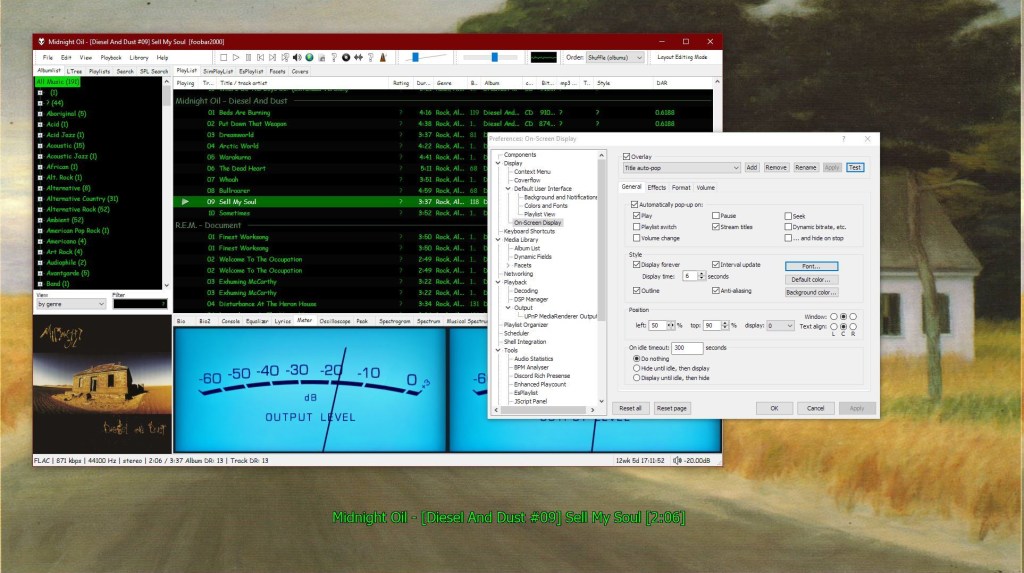
foo_osd ~ Foobar2000 On Screen Display
This component provides configurable screen overlays which may be opened with hotkeys, or appear on specific events. Each overlay is configured separately, and has its own set of events.


www.foobar2000.org/components/view/foo_osd
hydrogenaud.io/index.php/topic,43044.0
foobar_osd (On-Screen Display) is a foobar2000 component that shows track information as a floating overlay on your desktop during playback events.
Instead of opening the player window to see what’s playing, foobar_osd displays relevant information directly on your screen.
Typical uses include:
- Seeing track information when the player is minimized
- Monitoring playback on multi-monitor setups
- Getting quick visual feedback without interrupting workflow
- Displaying detailed metadata beyond basic notifications
Unlike standard operating system notifications, foobar_osd is fully customizable using foobar2000’s powerful title formatting system.
Core Features
When triggered, foobar_osd can display:
- Artist and title
- Album name
- Track position and duration
- Album artwork
- Custom metadata fields
- Technical playback information
The display appears briefly and then fades away automatically.
Event-Based Display
You control when the OSD appears. Common trigger events include:
- Track change
- Play or pause
- Stop playback
- Manual trigger via hotkey
Careful selection of events is important to avoid excessive on-screen interruptions.
Fully Customizable Text Formatting
One of the strongest features of foobar_osd is that it supports full foobar2000 title formatting.
This means you can display virtually any tag or metadata field stored in your files.
Example format:
[%artist% - ]%title%%album%$if(%album_avg_bpm%,Album BPM: %album_avg_bpm%)
Conditional formatting allows the display to remain clean by only showing information when available.
Installation and Access
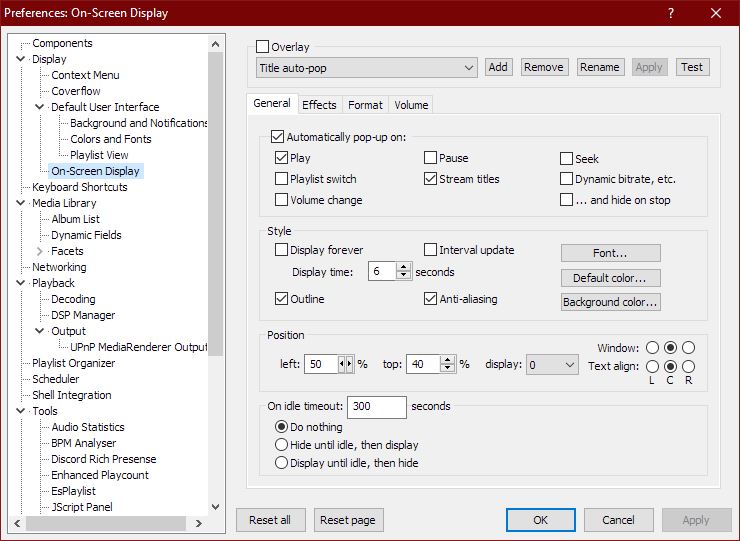
After installing the component:
- Restart foobar2000.
- Open:
Preferences → Tools → On-Screen Display
All configuration options are available in this section.
Appearance and Layout Options
foobar_osd allows extensive visual customization:
- Background transparency
- Font selection
- Fade animations and display duration
- Monitor Selection
- Shadow effects
- Screen position
- Text size and color
Using foobar_osd Effectively
Many users install foobar_osd but never use its full potential. The following strategies significantly improve usability.
Display Meaningful Metadata
If your library uses structured tagging, include useful fields.
Example:
[%artist% - ]%title%%album%$if(%album_avg_bpm%,Album Tempo: %album_avg_bpm% BPM)$if(%genre%,Genre: %genre%)
This transforms the overlay into a quick contextual information panel.
Create Minimal or Informational Layouts
Depending on your workflow, consider:
- Minimal layout — artist and title only
- Informational layout — album, metadata, technical details
- Radio/stream layout — include station information or bitrate
Use a Manual Hotkey
Setting a hotkey to manually trigger the OSD is extremely useful.
Advantages include:
- Quick track info lookup without switching windows
- Clean desktop experience without persistent UI elements
Use Conditional Formatting
Conditional statements prevent empty lines or clutter:
$if(%album_avg_bpm%,Album BPM: %album_avg_bpm%)
Only displays when the tag exists.
Time Functions:
Elapsed / Percent / Duration / Remaining
$puts(Elapsed,$if(%isplaying%,$pad_right(%_time_elapsed%,5,0),00:00))
$puts(Duration,$pad_right(%length%,5,0))
$puts(P,$muldiv(%_time_elapsed_seconds%,100,%_time_total_seconds%))
$puts(Percent,$if(%isplaying%,$if($greater($get(P),99),99,$pad_right($get(P),2,0)),00)'%')
$puts(Remaining,$if(%isplaying%,$pad_right(%playback_time_remaining%,5,0),$get(Duration)))
$get(Elapsed) | $get(Percent) | $get(Duration) | $get(Remaining)
AnSpec ~ Analog-style Spectrum Analyzer
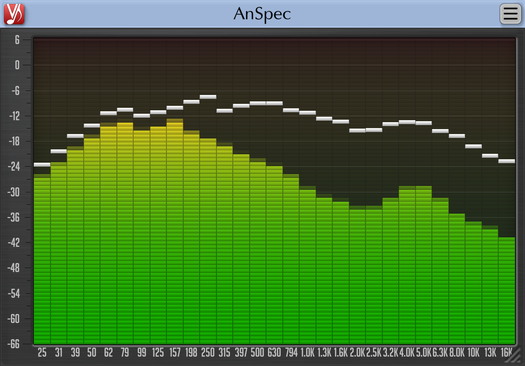
AnSpec is an analog-style one/third-octave spectrum analyzer AAX, AudioUnit and VST plugin for professional sound and music production applications. It was designed to be a handy visual feedback tool for those who like visual smoothness and easiness of use of analog analyzers. AnSpec also provides peak level indication.
While there are no adjustable parameters available in this plugin, you can still change level meter ballistics and resize plugin’s window.
Features:
- 1/3 octave analog-style spectrum analyzer
- Peak level indication
- User interface window resizing
- Stereo and mono analysis
- All sample rates support
- Zero processing latency
- User interface color schemes
- Resizable user interface
- Retina and High DPI support

www.voxengo.com/product/anspec
References:
VU Meter ~ Standalone Windows App
A volume unit (VU) meter or standard volume indicator (SVI) is a device displaying a representation of the signal level in audio equipment.
Application is developed on WinForms with .Net 4.8. (Windows 11 compatible).
New version 1.1.0.0 is not developed on XNA.

Foobar2000 ~ Icons & Icon Packs
Icon Packs (Sets):
- www.deviantart.com/a0x/art/Classic-foobar2000-main-icon-with-new-logo
- www.deviantart.com/activethoughts/art/Foobar2000-icons-bv2
- www.deviantart.com/activethoughts/art/Foobar2000-Icon-File-Types
- www.deviantart.com/activethoughts/art/Foobar2000-icons-and-logo
- www.deviantart.com/canuckken/art/Foobar2000-Icons
- www.deviantart.com/cliffflip/art/Kotak-2-foobar2000-icon-pack
- www.deviantart.com/danilorosari/art/Foobar2000-Icon-Pack
- www.deviantart.com/dantenopolis/art/Faenza-Foobar-Icons
- www.deviantart.com/dexxaboy/art/Foobar2000-Icons
- www.deviantart.com/electrolex/art/Foobar2000-v3-0-Plus-Win-Mac-Png-Icons-Pack
- www.deviantart.com/feraljim/art/Devil-Foobar
- www.deviantart.com/graywz/art/xpAlto-foobar2000-icons
- www.deviantart.com/justval02/art/Cooly-foobar2000-icon-pack
- www.deviantart.com/justval02/art/Simple-Disks-foobar2000-icon-pack
- www.deviantart.com/jyrik/art/foobar2000-brushed-icons
- www.deviantart.com/mahm0udwally/art/Flataps-VOL02
- www.deviantart.com/sgt-meddle/art/foobar2000-File-Types-Icons-Pack-v1
- www.deviantart.com/sgt-meddle/art/foobar2000-File-Types-Icons-Pack-v2
- www.deviantart.com/sgt-meddle/art/foobar2000-File-Types-Icons-Pack-v3-Light
- www.deviantart.com/sgt-meddle/art/foobar2000-File-Types-Icons-Pack-v3-Dark
- www.deviantart.com/sgt-meddle/art/foobar2000-File-Types-Icons-Pack-v4
- www.deviantart.com/sgt-meddle/art/foobar2000-Logo-Plain-Colors-Icons-Pack
- www.deviantart.com/sgt-meddle/art/foobar2000-Logo-Glossy-Icons-Pack-v1
- www.deviantart.com/sgt-meddle/art/foobar2000-Logo-Glossy-Icons-Pack-v2
- www.deviantart.com/sgt-meddle/art/foobar2000-Logo-Gradient-Icons-Pack
- www.deviantart.com/vangarell/art/foobar2000-Icons
- www.deviantart.com/celroid/art/foobar-quicksearch-icon-for-fooayian-1-1-by-Ayian
Save the original icons and replace them in C:\Program Files (x86)\foobar2000\icons
Dock Icons:
- www.deviantart.com/2707kevin/art/Media-Player-Foobar-2000-icon
- www.deviantart.com/alexandreph/art/Foobar2000-icon
- www.deviantart.com/alexandreph/art/Foobar-2000-icon-2
- www.deviantart.com/borwer/art/foobar2000-icon-v2
- www.deviantart.com/czokalapik/art/Foobar-2k
- www.deviantart.com/emrat/art/DockIcons-foobar2000
- www.deviantart.com/hemingway81/art/Foobar2000-s-Colored-Pack
- www.deviantart.com/intagliographics/art/Foobar-Dock-Icon
- www.deviantart.com/sgt-meddle/art/foobar2000-Logo-Hi-Res-Audio-Icon
- www.deviantart.com/tjsidhu/art/Foobar2000-Token-Theme-TJSidhu
- www.deviantart.com/tinylab/art/iTunes-Icon
- www.deviantart.com/weboso/art/Foobar2000-Icons
- findicons.com/icon/70110/foobar2000
- vsthemes.org/en/icon/icopng/26639-mb-foobar
File > Preferences > Display > Default User Interface > Background and Notifications > System Tray Icon
Resources:
foo_logitech_lcd ~ Foobar2000 & Logitech LCDs
A component to display visualisations and track information on a variety of Logitech LCD screens.
Features:
- Support for monochrome LCDs (G13, G15, G510 & Z-10)
- Support for colour LCDs (G19)
- 11 different visualisations (4 spectrum analysers, 4 oscilloscopes, 3 VU meters)
- Track info display
- Massively customisable
foo_vis_shpeck ~ Foobar MilkDrop Visualizations
The foo_vis_shpeck component runs Winamp visualization plugins in a stand-alone window, a Columns UI panel or Default UI element.
Documentation
Download
Hydrogen Audio Topic
Download Winamp
Shpeck enables Foobar2000 to display dynamic graphics that react to the beat. It’s possible to toggle between fullscreen and windowed modes.
Install the foo_vis_shpeck plugin, combined with Winamp’s MilkDrop visualizations.
- Download and install Winamp (or at least the folder structure for the plugins)
- Download and install foo_vis_shpeck
- Download some visualizations
- Uncompress visualizations and copy to System > Program Files > Winamp > Plugins
- Create a new foobar DUI panel or tab and add the new UI element Playback Visualisation > Shpeck
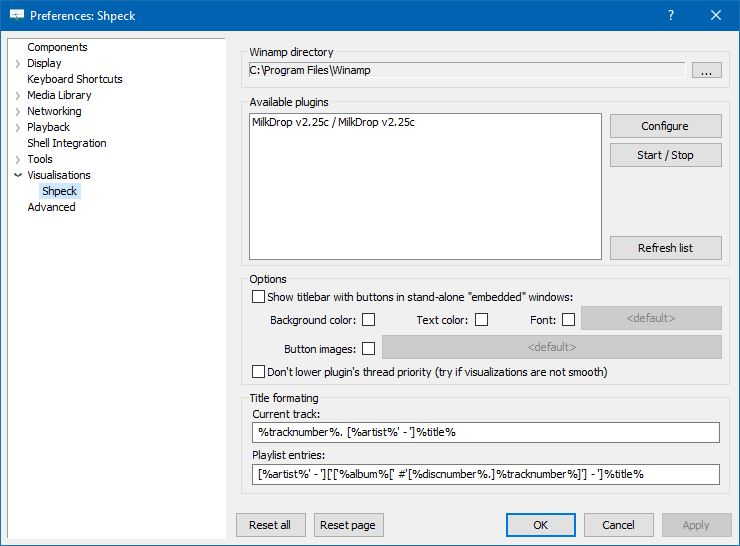
- Configure the plugin at Preferences > Visualisations > Shpeck
- Configure visualizations

Resources:
www.foobar2000.org/components/view/foo_vis_shpeck
www.winamparchive.org
archive.org/details/tucows_193563_Winamp
www.mediafire.com/download/8hxarja92q9q99c/foobar2000-milkdrop-2.25c.7z
forums.winamp.com/forum/winamp/winamp-discussion/4615655-winamp-5-9-2-released
Guides:
Milkdrop in Foobar on Windows 8 ~ vault-tec.info/post/51743506694/milkdrop-in-foobar2000-on-windows-8
Additional Presets:
sourceforge.net/projects/mdpresetpack/
www.thefreewindows.com/21777/download-free-milkdrop2-50000-presets-megapack/
archive.org/details/Milkdrop252kPresetCollection.7z
… some archives from this milkdrop contest thread on Winamp forum and put everything into a single archive. Some of the presets are nice and quite original, but most of them are variations. The ones that seemed nice to me I copied and added exclamation mark to their names. ~ hydrogenaud.io/index.php/topic,59388.msg914054.html#msg914054
XMPlay ~ Extensible Windows Player
XMPlay is an audio player, supporting the OGG / MP3 / MP2 / MP1 / WMA / AAC / MP4 / WAV / AIFF / CDA / MO3 / IT / XM / S3M / MTM / MOD / UMX audio formats, PLS / M3U / ASX / WAX / CUE playlists, and ZIP archives. A load more audio and archive file formats are also supported via plugins.
When XMPlay was first released in 1998, only the XM file format was supported, hence the name “XMPlay”.
www.xmplay.com
support.xmplay.com
ssz.bitbucket.io (Input & Archive plugins)
Foobar2000 ~ Title Formatting Guide
Table of Contents
- Introduction: What Title Formatting Is
- Why Title Formatting Exists
- Where You Use Title Formatting
- Core Concepts You Need to Know
- Plain Text in Title Formatting
- Fields (Metadata Tags)
- Combining Plain Text and Fields
- Handling Missing Information
- Using Conditional Logic with $if()
- Practical Examples
- Useful Built-In Fields
- Things Beginners Can Ignore
- Starter Setup for New Users
- Final Notes
Introduction: What Title Formatting Is
Title formatting in foobar2000 is a system that allows you to control how information about your music is displayed in the interface. It doesn’t modify the audio files themselves or change tags — it only affects how metadata and other information is shown in playlists, status bar, or window title.
Think of it like a template language: you define a pattern for text, and foobar2000 fills in the fields with actual track information. For example, you can make the playlist display tracks as:
Artist - Track Title (Album)
Why Title Formatting Exists
Music files contain metadata such as:
- Artist
- Album
- Track title
- Track number
- Year
- Duration
Different users want to display this information differently. Title formatting lets you:
- Decide which information to display
- Choose the order of information
- Add separators, labels, or punctuation
- Optionally display certain information only when it exists
For example, you might want to show the album only if it exists. Title formatting makes that possible.
Where To Use Title Formatting
You typically use title formatting in three main places:
- Playlist columns — to customize how each column displays track info.
- Status bar — to show the “Now Playing” track in a readable format.
- Window title — to display the currently playing track in the foobar2000 window or taskbar.
Core Concepts You Need to Know
There are three core concepts that beginners must understand:
- Plain Text: Text you type exactly as it should appear.
- Fields: Metadata values from the audio files (e.g.,
%artist%,%title%). - Conditional Logic: Optional logic to handle missing fields or customize output dynamically.
Plain Text in Title Formatting
Any normal text you type is displayed exactly as written. This is useful for labels, punctuation, or separators:
Now Playing:
You can combine plain text with fields to make output more readable:
Now Playing: %artist% - %title%
This will display something like:
Now Playing: Radiohead - Paranoid Android
Fields (Metadata Tags)
Fields are placeholders that pull metadata from your music files. They are written inside percent signs:
%artist%
Some common fields include:
| Field | Meaning |
|---|---|
| %artist% | Track artist |
| %album% | Album name |
| %title% | Track title |
| %tracknumber% | Track number |
| %date% | Year or release date |
| %length% | Track duration |
Example combining fields:
%artist% - %title%
Output:
Radiohead - Paranoid Android
Combining Plain Text and Fields
You can mix plain text with fields to create more structured output. For example:
%artist% – %title% (%album%)
Output:
Radiohead – Paranoid Android (OK Computer)
Handling Missing Information
If a field does not exist in the file, foobar2000 simply displays nothing. For example, if %composer% is missing:
%composer%
The output will be blank. To prevent blank parentheses or awkward spacing, you can use conditional logic.
Using Conditional Logic with $if()
The $if() function allows you to display text only when a field has a value:
$if(condition,then,else)
Example:
%artist% - %title%$if(%album%, (%album%),)
This will display the album in parentheses only if %album% exists. Otherwise, it leaves that part empty.
Practical Examples
Playlist Column
%artist% - %title%
Status Bar
Now Playing: %artist% – %title%
Window Title
%artist% – %title% | foobar2000
Useful Built-In Fields
These fields are always available and do not require files to be tagged:
| Field | Meaning |
|---|---|
| %filename% | File name |
| %path% | Full file path |
| %codec% | Audio codec |
| %bitrate% | Bitrate |
| %samplerate% | Sample rate |
Things Beginners Can Ignore
- Nested functions
- Math expressions
- String replacement logic
- Legacy syntax
- Advanced grouping
Starter Setup for New Users
For someone just installing foobar2000, start with these basic formats:
%artist% - %title%
Now Playing: %artist% – %title%$if(%album%, (%album%),)
%artist% – %title%
Final Notes
%field%is the most important concept$if()handles missing or optional data elegantly- Some data and fields depend upon components being installed
foo_tfsandbox
A good place to start is by installing foo_tfsandbox, this component allows you to experiment with title formatting expressions and fields before you implement them.
Title Formatting Fields:
$info(referenced_offset) ~ shows time in format mm:ss:ff where ff are CD frames. For the first track it will show nothing instead of 00:00:00
hydrogenaud.io/index.php?topic=118733.msg979344
Title Formatting Examples:
Name | Pattern | Alignment
Display Dynamic Range:
Album DR: $if2(%album dynamic range%,–) | Track DR: $if2(%dynamic range%,–)
Bits (bit depth) | $ifequal([%__bitspersample%],0,16,%__bitspersample%) | Left
$if($or($stricmp(%codec%,DTS),$stricmp($cut(%codec%,3),DCA)),$if($info(bitspersample),$ifequal(%samplerate%,96000,$ifgreater(%bitrate%,1537,DTS-HD,DTS 96/$info(bitspersample)),DTS-HD),DTS),%codec% [%codec_profile%])
Release Date (earliest):
hydrogenaud.io/index.php/topic,125532.0
$max(%DATE%,$min($year(%DATE%),$year(%DISCOGS_RELEASED%),$year(%DISCOG_MASTER_RELEASE_DATE%)))
References:
Title_Formatting_Introduction
Title Formatting Reference
Titleformat Examples
Titleformat_Album_List