AutoEQ is a project for equalizing headphone frequency responses automatically and it achieves this by parsing frequency response measurements and producing a equalization settings which correct the headphone to a neutral sound. This project currently has almost 2000 headphones covered in the results folder. See Usage for instructions how to use the results with different equalizer softwares and Results section for details about parameters and how the results were obtained.
AutoEQ is not just a collection of automatically produced headphone equalization settings but also a tool for equalizing headphones for yourself. frequency_response.py provides methods for reading data, equalizing it to a given target response and saving the results for usage with EqualizerAPO. It’s possible to use different compensation (target) curves, apply tilt for making the headphones brighter/darker and adding a bass boost. It’s even possible to make one headphone sound (roughly) like another headphone.
Third major contribution of this project is the measurement data and compensation curves all in a numerical format except for Crinacle’s raw data. Everything is stored as CSV files so they are easy to process with any programming language or even Microsoft Excel.
Category Archives: Mac
VocalZap ~ Remove Vocals From Songs
With this free iPhone app and effect plug-in for PC and Mac you can easily remove vocals from songs! Vocalzap is a free iPhone™ / iPod™ app, and VST plugin, that can effortlessly remove the vocals from any song. If you want to sing along, click the “Lyrics” button. Toggle between the original singer or no vocals with the click of a button.
Features:
- Remove vocals from most songs
- Look up lyrics to most songs (iPhone only)
- Toggle between vocals and no vocals to compare
- Use it for Karaoke parties with your own tunes!
foo_dsp_xgeq ~ Advanced Foobar2000 Equalization
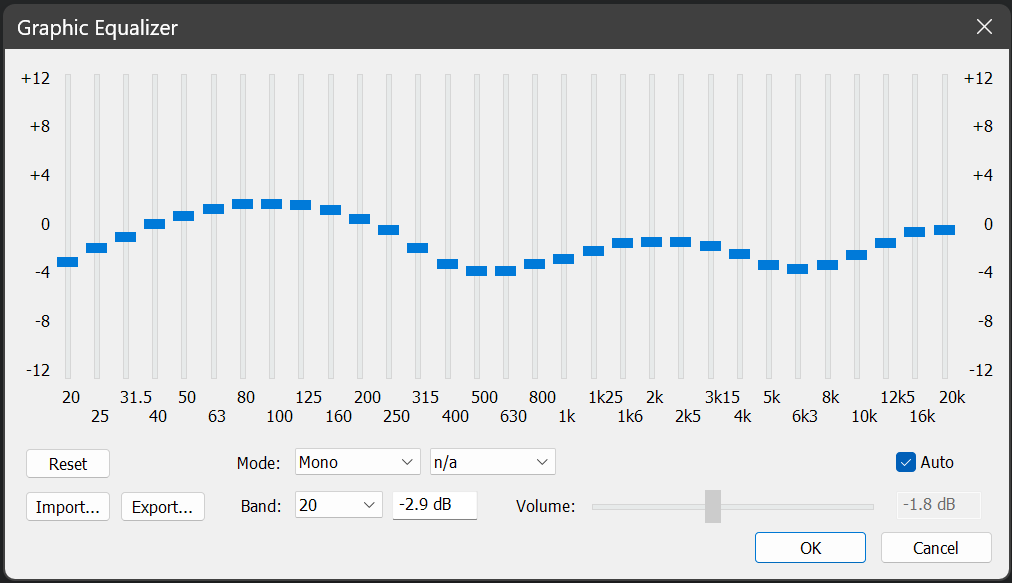
Foobar DSP based graphic equalizer.
Features:
- 31 bands (1/3rd octave width)
- boost / cut range of +-12 dB in 0.1 dB steps
- master gain (can be set manually or automatically => prevents clipping for the most part)
- minimum phase (=> no pre-echo)
- approximates a smooth frequency response (=> no ‘steps’ between the bands)
- import / export presets
- mono and stereo mode

www.foobar2000.org/components/view/foo_dsp_xgeq
EQ preset generation ~ github.com/jaakkopasanen/AutoEq
TDR VOS SlickEQ ~ Equalizer Plugin
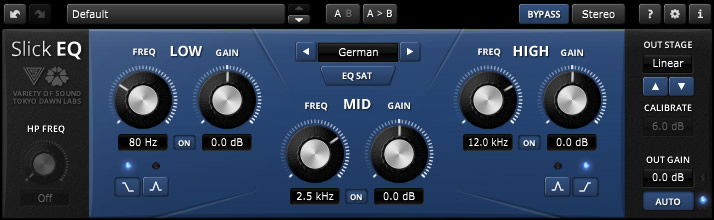
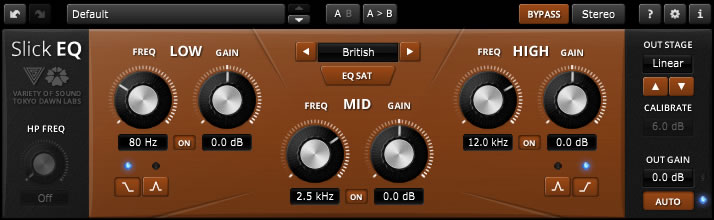
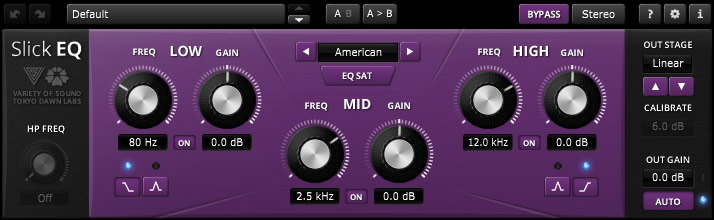
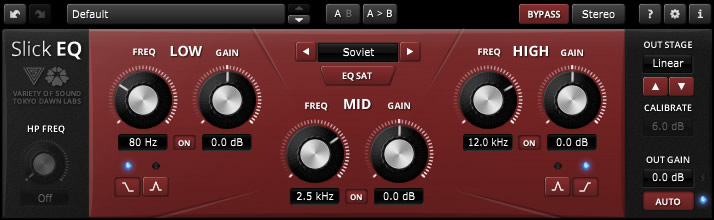
TDR VOS SlickEQ is a mixing / mastering equalizer designed for ease of use, musical flexibility and impeccable sound.
Three (and a half) filter-bands arranged in a classic Low/Mid/High semi-parametric layout offer fast and intuitive access to four distinct EQ modes, each representing a set of distinct EQ curves and behaviors. An elaborate auto gain option automatically compensates for changes of perceived loudness during EQ operation. Optionally, SlickEQ allows to exclusively process either the stereo sum or stereo difference (i.e. “stereo width”) without additional sum/difference encoding.
In order to warm up the material with additional harmonic content, SlickEQ offers a switchable EQ non-linearity and an output stage with 4 different saturation models. These options are meant to offer subtle and interesting textures, rather than obvious distortion. The effect is made to add the typical “mojo” often associated with classy audio gear.
An advanced 64bit multirate processing structure practically eliminates typical problems of digital EQ implementations such as frequency warping, quantization distortion and aliasing.
Beside the primary controls, the plug-in comes with an array of additional helpers: Advanced preset management, undo/redo, quick A/B comparison, copy & paste, an online help, editable labels, mouse-wheel support and much more.
Key specs and features:
- Intuitive, yet flexible semi parametric EQ layout
- Modern user interface with outstanding usability and ergonomics
- Carefully designed 64bit “delta” multi-rate structure
- Three EQ bands with additional 18dB/Oct high-pass filter
- Four distinct EQ models: “American”, “British”, “German” and “Soviet” with optional non-linearity
- Five output stages: “Linear”, “Silky”, “Mellow”, “Deep” and “Toasted”
- Advanced saturation algorithms by VoS (“Stateful saturation”)
- Highly effective and musically pleasing loudness compensated auto gain control
- Stereo and sum/difference processing options
- Toolbar with undo/redo, A/B, advanced preset management and more


foo_sid ~ Foobar2000 Plays Commodore 64 Audio
Adds decoding support for Commodore 64 SID sound files (.SID, .MUS). Based on resid-fp.
www.foobar2000.org/components/view/foo_sid
The High Voltage SID Collection (HVSC) is a freeware hobby project which organises Commodore 64 music (also known as SID music) into an archive for both musicians and fans alike. The work on the collection is done completely in the Team and contributors’ spare time and is proudly one of the largest and most accurate computer music collections known.
Universal Media Server ~ DLNA-compliant UPnP Media Server
Universal Media Server is a media server capable of serving videos, audio and images to any DLNA-capable device. It is free, regularly updated and has more features than any other media server, including paid media servers.
It streams to many devices including Sony PlayStation 3 (PS3) and PlayStation 4 (PS4), Microsoft Xbox One and 360, many TVs (Samsung, Panasonic, Sony, Vizio, LG, Philips, Sharp), smart phones (iPhone, Android, etc.), Blu-ray players, and more. Universal Media Server supports all major operating systems, with versions for Windows, Linux and Mac OS X.
The program streams or transcodes many different media formats with little or no configuration. UMS is powered by MEncoder, FFmpeg, tsMuxeR, AviSynth, MediaInfo and more, which combine to offer support for a wide range of media formats.
www.universalmediaserver.com
sourceforge.net/projects/unimediaserver
SoundTouch ~ Audio Processing Library
SoundTouch is an open-source audio processing library for changing the Tempo, Pitch and Playback Rates of audio streams or audio files. The library additionally supports estimating stable beats-per-minute rates for audio tracks.
- Tempo (time stretch): Changes the sound to play at faster or slower tempo than originally without affecting the sound pitch.
- Pitch (key) : Changes the sound pitch or key while keeping the original tempo (speed).
- Playback Rate : Changes both tempo and pitch together as if a vinyl disc was played at different RPM rate.
The SoundTouch library is intended for application developers writing sound processing tools that require tempo/pitch control functionality, or just for playing around with the sound effects.
The SoundTouch library source kit includes also an example utility SoundStretch for processing .wav audio files from command-line interface.
Access the source codes in gitlab or download the compiled executables.
ScoreDate ~ Music Reading & Ear Training
ScoreDate is your date with the music! It is open source software written in Java that helps musicians learn to read music; it also helps with ear training. It is suitable for any skill level, from beginner to professional; from slow training to first sight reading.
Features:
- Notes in line exercise
- Rhythms exercise
- Score reading exercise
- Ear training exercise with 4 levels of difficulty
- Exercises – creation, edit, save and playback
- Statistics with monthly and daily view
- Support of four clefs: Violin, Bass, Alto, Tenor, with a maximum of two at the same time
- Support of notes: Whole, half, dotted half, quarter, dotted quarter, eighth, triplets, pauses
- Selection of the notes range for each clef. Maximum of 4 additional lines above and below the staff
- Virtual piano, to exercise without having external devices
- Chords, intervals and accidentals exercise
- Learning mode, that shows the name of the note or the chord displayed on the staff
- Realtime playback supporting ASIO, WDMKS, DirectSound, Jack, ALSA, OSS
- Translated in to 15 languages
VirtualDJ ~ Standalone DJ Mixer
VirtualDJ delivers more features than any other software. The latest groundbreaking technology is always available in VirtualDJ first! With VirtualDJ you’re guaranteed to be ahead of the curve with the latest high-tech and innovative features
Although VirtualDJ is packed with features, it is still easy to learn. You can start with the basics and advance as you learn more. VirtualDJ is well suited for both the amateur starter, or the seasoned professional DJ and comes with all the features you’ll ever need. With VirtualDJ you can turn any event into a total success! Whether it’s scratch performance and video mixing, or from bedroom broadcast to upscale wedding events.
VirtualDJ lets you do more! Unleash your creative potential…
Free For Home Use

sc68 ~ Cross-platform Atari ST & Amiga Audio Player
The sc68 is a Atari-ST and Amiga music player. It comes as a command line music player as well as libraries for developers and various plugins for well know programs.
hypercyclic ~ LFO-driven, MIDI-mangling Arpeggiator
What is hypercyclic?
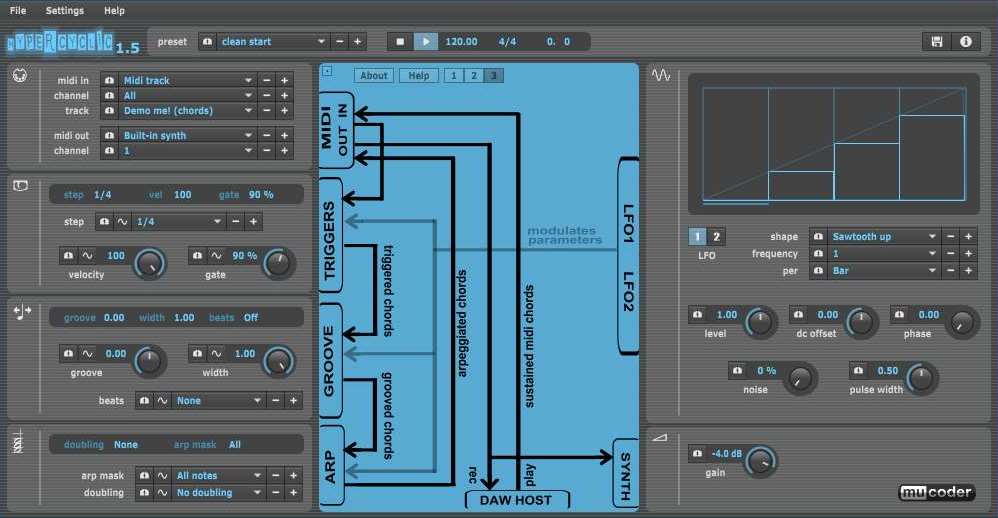
- an LFO-driven MIDI arpeggiator, gate effect and step sequencer
- for mangling sustained MIDI input chords
- the output of which can then drive other MIDI instruments
- acts either as a VST or Audio Unit plugin for your DAW, or as a standalone application
- the original hypercyclic won 2nd place in the KVRAudio.com Developer Challenge ‘07
- the sweet spot for hypercyclic is the narrow border between chaos and regularity. Or, in other words, how to induce a certain pleasant randomness and syncopation, yet forcing everything to align again on the bar or beat boundaries
How do you use it?
- the main use for hypercyclic is to generate midi that can be recorded and/or sent to other plugins. However it also features a simple built-in synth for testing purposes
- you can use two tempo-synced LFOs to modulate various parameters for creating interesting rhythmic effects and chord variations
- a unique feature is the possibility to modulate the sequencer step size itself, which is useful for creating glitchy stuttering effects
- another thing you can use is a groove function for playing slightly off the beat. The groove parameters can also be modulated over time by the LFOs, adding to the rhythmic variation

Soft Playlists ~ Foobar & Last.fm
Can create different Last.fm related playlists:
- loved tracks of a single user, multiple users, friends or neighbours.
- recent tracks of a single user, multiple users, friends or neighbours.
- top tracks of a single user, multiple users, friends or neighbours over different periods.
- top tracks of an artist.
- top tracks of artists similar to an artist.
- top tracks with certain tag.
- tracks similar to a track.
Can also…
- love, unlove, ban and unban a track on your Last.fm account.
- add a track to a custom playlist on your Last.fm account.
- save and load XSPF playlists (make playlists without hard paths). This makes it possible to easily share playlists with other people. Also when you restructure your library (change location of your music files), these playlists will continue to work.
www.foobar2000.org/components/view/foo_softplaylists
hydrogenaud.io/index.php?topic=76133.0
Integrating Last.fm with Foobar2000 Using Soft Playlists
Step 1: Install Soft Playlists
Begin by downloading the foo_softplaylists component from the foobar2000 website. Once downloaded, open foobar2000 and navigate to File → Preferences → Components → Install…, then select the downloaded .fb2k-component file. Restart foobar2000 to activate the plugin. This component enables you to generate dynamic playlists directly from your Last.fm data.
Step 2: Connect Your Last.fm Account
After installation, go to Preferences → Tools → Soft Playlists → Last.fm. Enter your Last.fm username and password to authorize the connection. Once you are logged in, the plugin can fetch your loved tracks, recent plays, top tracks, and tag-based data.
Step 3: Creating Loved Tracks Playlists
Soft Playlists can generate playlists of tracks in your library that are marked as loved on Last.fm. Simply create a new playlist, Open the Library Menu and choose the “Loved Tracks” option, and the plugin will match these tracks with your local files and create a new playlist. You can now play or sort these loved tracks directly from foobar2000.
Step 4: Generating Top Tracks Playlists
You can also create playlists based on top tracks from your Last.fm account, your friends, or neighbors. Select the “Top Tracks” option and filter by user, artist, or tag. This allows you to automatically build playlists of your most-played tracks, popular tracks by similar artists, or tracks labeled with specific moods or genres.
Step 5: Recent Tracks Playlists
Soft Playlists supports recent tracks queries from Last.fm. You can generate playlists of your most recently played tracks or recent tracks from other users. This is ideal for keeping up to date with current listening trends.
Additional Features:
Soft Playlists allows you to save sharable playlists in XSPF format, which keeps them portable and resilient to file location changes. The plugin also lets you love or unlove tracks directly from foobar2000, updating your Last.fm account automatically. This integration creates a seamless workflow between your local library and Last.fm.
Adding a toolbar button to love a track:
- Right click the Foobar2000 toolbar and select “
Customize Buttons...“ - In the
Available Commands Panel, open “Context Menu” and then “Last.fm” - Select
"Last.fm Love Track” and click the “Add” button then click “Ok” - Change the button icon to a Last.fm icon (.ico file)
Tips and Considerations
Soft Playlists is an older 32bit component. The plugin works best if most of your Last.fm scrobbled tracks are present in your local library. For more advanced integration, consider combining Soft Playlists with Spider Monkey Panel scripts to pull additional data, such as playcounts, tags, or charts.