foo_cuefixer ~ Foobar2000 Cue Sheet Filter


Simple component for foobar2000 to fix CUE/FLAC problems

Made in Ukraine
  • Removes duplicate song entries that appear when adding adirectory containing a .cue file that links to timestamps in a base .flac/.wav/.ape file.
  • Removes such duplicates also when adding tracks from media library.
  • Removes broken .cue files that point to missing files (.flac/.wav/.ape etc).

* Remove “*.CUE” from preferences>shell integration>exclude file types

github.com/RevenantX/foo_cuefixer

hydrogenaud.io/index.php/topic,117167.0
hydrogenaud.io/index.php?topic=118978.msg981682#msg981682

Foobar2000 & Lyrics Display Components


Lyrics Display Components for foobar2000

foobar2000 displays lyrics through third-party components. Over the years, many different lyrics panels have been developed, but only some are still relevant. This post outlines the main lyrics display components, explains their current status, and identifies which ones are actively maintained and most commonly used.


OpenLyrics (foo_openlyrics)

Status: Actively maintained
Current relevance: Most recommended and most actively developed lyrics component

OpenLyrics is the most modern and fully featured lyrics display component available for foobar2000. It provides an embeddable lyrics panel that works with both Default UI and Columns UI and supports downloading, displaying, editing, and saving lyrics locally.

Key features include support for both timed and untimed lyrics, multiple online lyrics sources, automatic saving of lyrics to files, and a built-in lyrics editor. Lyrics can be scrolled, synchronized, and reused across future playback sessions once saved.

OpenLyrics is currently the most actively developed lyrics component for foobar2000, with regular updates and ongoing maintenance. As of early 2025, it remains the most reliable option in terms of source availability, stability, and long-term usability.

www.foobar2000.org/components/view/foo_openlyrics


Lyric Show Panel 3 (foo_uie_lyrics3)

Status: Maintained, but less actively
Current relevance: Widely used, especially in older layouts and themes

Lyric Show Panel 3 is one of the longest-standing lyrics display components for foobar2000. It provides a configurable lyrics panel that supports both timed and untimed lyrics and can download lyrics from multiple sources.

It works with both Default UI and Columns UI and is still included in many legacy layouts and skins. However, development activity has slowed compared to OpenLyrics, and some built-in lyrics sources have historically required additional configuration or external source scripts to remain functional.

While still usable and supported, Lyric Show Panel 3 has largely been superseded by OpenLyrics in modern setups, particularly for users who want reliable automatic lyrics retrieval and active development.

www.foobar2000.org/components/view/foo_uie_lyrics3


ESLyric (foo_uie_eslyric)

Status: Partially maintained by the community
Current relevance: Niche and script-dependent

ESLyric is another lyrics display panel component that relies heavily on user-configured search scripts to retrieve lyrics from online sources. It is more flexible than older components but requires significantly more manual setup.

Its functionality depends on third-party scripts, and long-term reliability varies depending on script maintenance. As a result, ESLyric is not commonly recommended for general users and is primarily used by advanced users who are comfortable maintaining their own lyrics source scripts.

http://www.foobar2000.org/components/view/foo_uie_eslyric


foo_lddc

A desktop lyrics plugin for foobar2000 that acts as a client for the LDDC main program (requires LDDC to be used together).

github.com/chenmozhijin/foo_lddc


Older and Deprecated Lyrics Components

Several older lyrics-related components exist but are no longer recommended due to lack of maintenance or compatibility issues with modern foobar2000 versions. These include:

  • foo_uie_lyrics (predecessor to Lyric Show Panel 3)
  • foo_gasazip
  • MiniLyrics viewer components

These components are either unmaintained, unreliable, or incompatible with current versions of foobar2000 and should generally be avoided.


Which Lyrics Component Is Most Used Today?

In current foobar2000 installations:

  • OpenLyrics is the most recommended and actively maintained lyrics display component.
  • Lyric Show Panel 3 remains widely installed, particularly in older configurations and existing layouts, but sees less active development.
  • ESLyric is used by a smaller, more technical audience and is not considered mainstream.

For new installations or users rebuilding their layouts, OpenLyrics is the clear choice for long-term reliability and functionality.

References:

old.reddit.com/r/foobar2000/comments/l0t88d/how_i_scrape_lyrics_with_foobar2000/gjvseft/

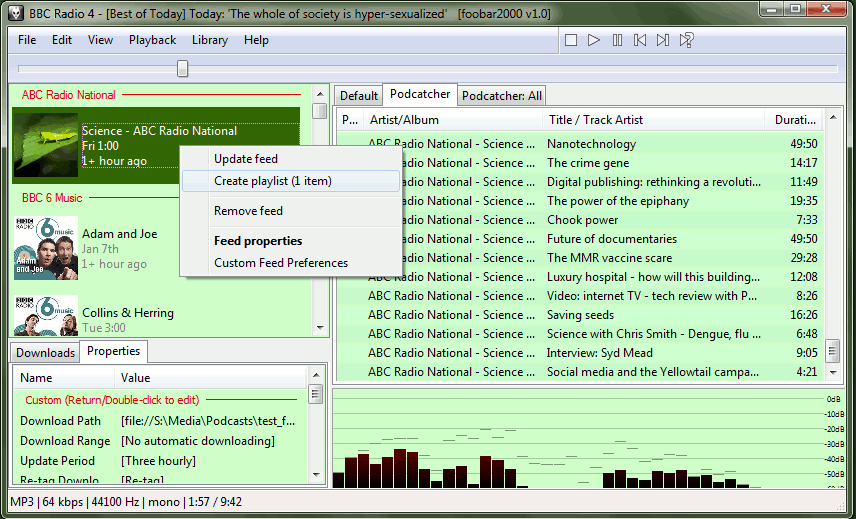
foo_podcatcher ~ Foobar2000 Plays Podcasts


A podcatcher component for subscribing to, downloading, and playing RSS and Atom podcast feeds in foobar2000

foo podcatcher playing view

www.foobar2000.org/components/view/foo_podcatcher
web.archive.org/web/20140802073852/http://www.unkempt.co.uk/fb2k/bin/foo_podcatcher.zip
hydrogenaud.io/index.php?topic=69053.0
How to use foobar2000 to subscribe to podcasts

Podcast resources:
podcasts.google.com

www.podsearch.com
www.wired.com/story/podcasts-beginners-guide
en.wikipedia.org/wiki/Podcast

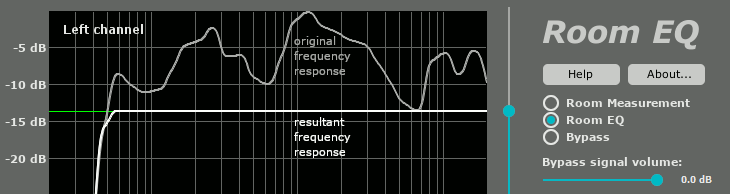
Foobar2000 & MathAudio Room EQ


The frequency response of your room is very different in every point of the room. “Good” equalization in one point can worsen the sound in the neighboring point. Single-point equalization is not reliable and cannot be used in a professional room correction system. On the other hand, multipoint equalization is not simple; both the volume and the phase of the testing signal are very different in different points of the room. Simple averaging is not applicable. MathAudio Room EQ applies a state-of-the-art multipoint correction algorithm which ensures the best possible improvement in every point of the listening area.

  • Corrects deficiencies of room acoustics (multipoint compensation).
  • Corrects acoustic imperfections of speakers.
  • Avoids the pre-echo (pre-ringing) problem of conventional convolver-based room correction systems. The absence of pre-echo ensures the neutrality of the sound.
  • Works in rooms, halls and outdoor venues of any size.
  • Works with zero latency. Perfect for live performances and studio monitoring.
  • Doesn’t delay the audio track when playing video.
  • Corrects both amplitude and phase components of frequency response.
  • Quells resonance peaks of frequency response while leaving the deep notches.
  • Avoids the overcompensation which happens in conventional linearizing room correction systems.
  • Manually adjustable level of compensation allows one to reach the maximum transparency of the sound.
  • Supports full range of sample rates from 44,056 kHz up to 384 kHz. All sample rates are supported without resampling to avoid any possible loss in quality.
  • Includes a custom target curve feature.
  • Applies 64-bit signal path throughout.
  • Works with USB measurement microphones (e.g. MiniDSP UMIK-1 or Dayton Audio UMM-6) or standard measurement microphones (e.g. NADY CM100 or Dayton Audio EMM-6).
    Supports microphone calibration files.
  • Applies a patented method of frequency response correction.
  • Freeware Foobar2000 Component

mathaudio-room-eq

mathaudio.com/room-eq

foo_dsp_xgeq ~ Advanced Foobar2000 Equalization


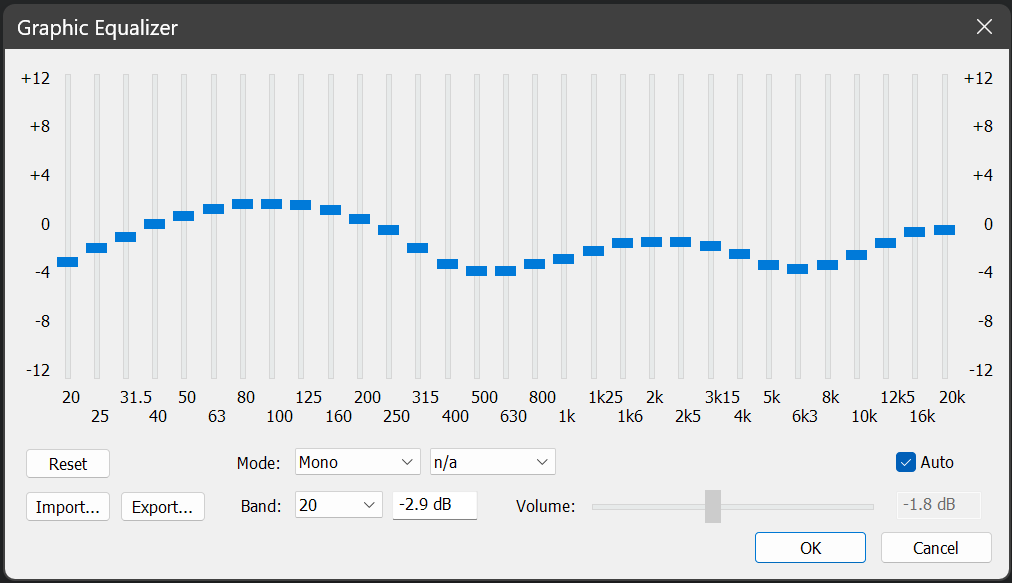
Foobar DSP based graphic equalizer.

Features:

  • 31 bands (1/3rd octave width)
  • boost / cut range of +-12 dB in 0.1 dB steps
  • master gain (can be set manually or automatically => prevents clipping for the most part)
  • minimum phase (=> no pre-echo)
  • approximates a smooth frequency response (=> no ‘steps’ between the bands)
  • import / export presets
  • mono and stereo mode

www.foobar2000.org/components/view/foo_dsp_xgeq

EQ preset generation ~ github.com/jaakkopasanen/AutoEq

foo_dsp_vstwrap ~ Foobar2000 VST Wrapper


This is a Foobar2000 player wrapper plugin, which allows using VST plugins within the player. This component is depreciated and was developed for 0.9x versions of Foobar2000

www.yohng.com/software/foobarvst

foo_sid ~ Foobar2000 Plays Commodore 64 Audio


Adds decoding support for Commodore 64 SID sound files (.SID, .MUS). Based on resid-fp.

www.foobar2000.org/components/view/foo_sid

The High Voltage SID Collection (HVSC) is a freeware hobby project which organises Commodore 64 music (also known as SID music) into an archive for both musicians and fans alike. The work on the collection is done completely in the Team and contributors’ spare time and is proudly one of the largest and most accurate computer music collections known.

~ hvsc.c64.org

en.wikipedia.org/wiki/Commodore_64

OpenMPT ~ Discover The Music Inside…


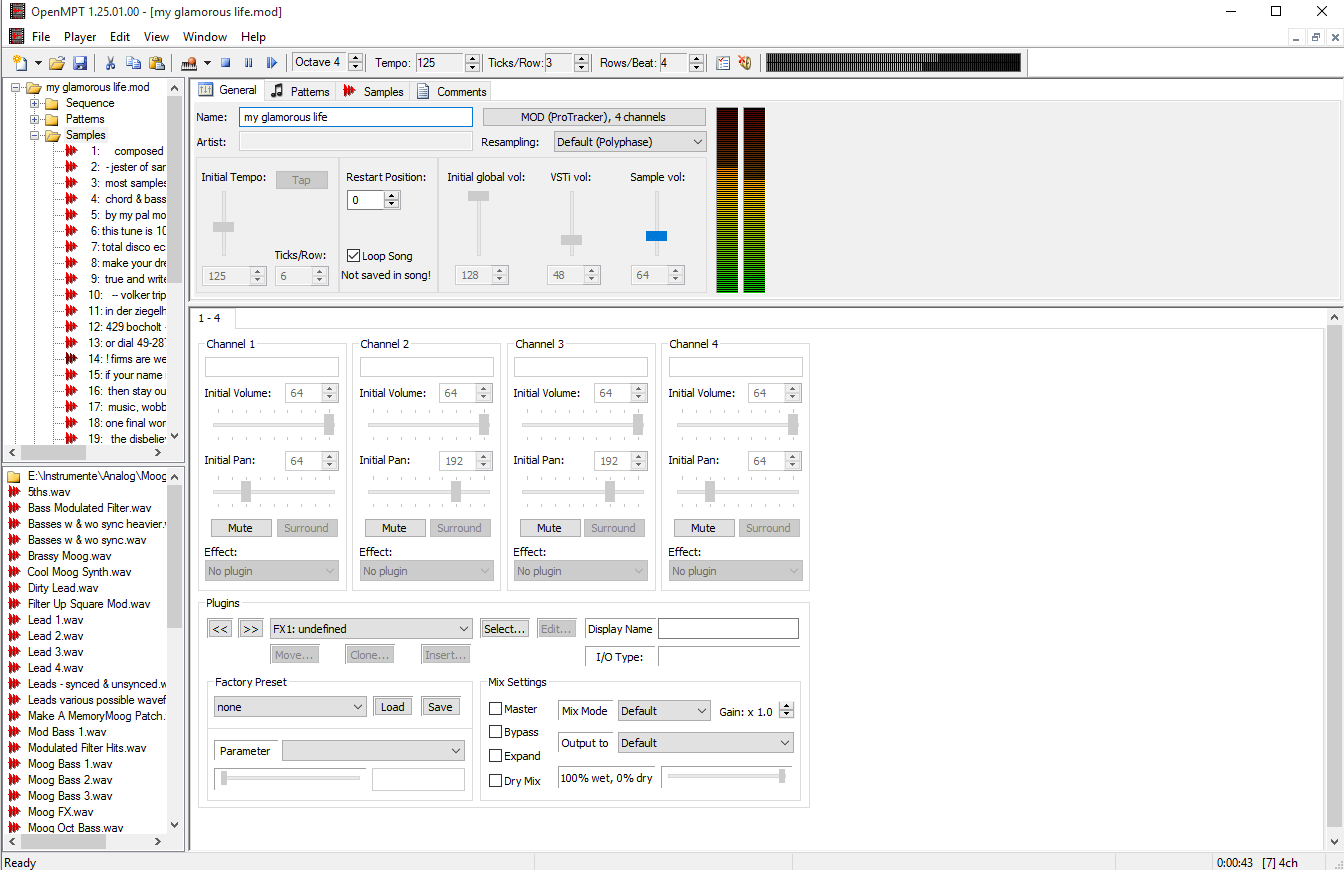
OpenMPT is well known tracker software for Windows.

OpenMPT (shorthand for Open ModPlug Tracker) is completely free and allows you to create and play back some great music on your computer. Based on the original ModPlug Tracker written by Olivier Lapicque, OpenMPT is free software, can import a wide variety of module formats and offers an intuitive, native GUI as well as advanced features such as VST plugins and ASIO output.

In addition to its own song format, OpenMPT can natively edit Impulse Tracker, FastTracker, Scream Tracker and ProTracker module files.

openmpt

openmpt.org
source.openmpt.org
github.com/OpenMPT/openmpt
en.wikipedia.org/wiki/OpenMPT

OpenMPT based module player library and libopenmpt based command-line player:

  • libopenmpt is a cross-platform C++ and C library to decode tracked music files (modules) [wikipedia] into a raw PCM audio stream.
  • openmpt123 is a cross-platform command-line or terminal based module file player.

libopenmpt is based on the player code of the OpenMPT project (Open ModPlug Tracker). In order to avoid code base fragmentation, libopenmpt is developed in the same source code repository as OpenMPT.

libopenmpt ships with plugins for 3 popular Windows audio players already included:

  • xmp-openmpt is a plugin based on libopenmpt for XMPlay.
  • in_openmpt is an input plugin based on libopenmpt for WinAMP 2.x or later compatible players.
  • foo_openmpt is a component based on libopenmpt for foobar2000.

lib.openmpt.org/libopenmpt

Soft Playlists ~ Foobar & Last.fm


Can create different Last.fm related playlists:

  • loved tracks of a single user, multiple users, friends or neighbours.
  • recent tracks of a single user, multiple users, friends or neighbours.
  • top tracks of a single user, multiple users, friends or neighbours over different periods.
  • top tracks of an artist.
  • top tracks of artists similar to an artist.
  • top tracks with certain tag.
  • tracks similar to a track.

Can also…

  • love, unlove, ban and unban a track on your Last.fm account.
  • add a track to a custom playlist on your Last.fm account.
  • save and load XSPF playlists (make playlists without hard paths). This makes it possible to easily share playlists with other people. Also when you restructure your library (change location of your music files), these playlists will continue to work.

www.foobar2000.org/components/view/foo_softplaylists
hydrogenaud.io/index.php?topic=76133.0

Integrating Last.fm with Foobar2000 Using Soft Playlists

Step 1: Install Soft Playlists
Begin by downloading the foo_softplaylists component from the foobar2000 website. Once downloaded, open foobar2000 and navigate to File → Preferences → Components → Install…, then select the downloaded .fb2k-component file. Restart foobar2000 to activate the plugin. This component enables you to generate dynamic playlists directly from your Last.fm data.

Step 2: Connect Your Last.fm Account
After installation, go to Preferences → Tools → Soft Playlists → Last.fm. Enter your Last.fm username and password to authorize the connection. Once you are logged in, the plugin can fetch your loved tracks, recent plays, top tracks, and tag-based data.

Step 3: Creating Loved Tracks Playlists
Soft Playlists can generate playlists of tracks in your library that are marked as loved on Last.fm. Simply create a new playlist, Open the Library Menu and choose the “Loved Tracks” option, and the plugin will match these tracks with your local files and create a new playlist. You can now play or sort these loved tracks directly from foobar2000.

Step 4: Generating Top Tracks Playlists
You can also create playlists based on top tracks from your Last.fm account, your friends, or neighbors. Select the “Top Tracks” option and filter by user, artist, or tag. This allows you to automatically build playlists of your most-played tracks, popular tracks by similar artists, or tracks labeled with specific moods or genres.

Step 5: Recent Tracks Playlists
Soft Playlists supports recent tracks queries from Last.fm. You can generate playlists of your most recently played tracks or recent tracks from other users. This is ideal for keeping up to date with current listening trends.

Additional Features:
Soft Playlists allows you to save sharable playlists in XSPF format, which keeps them portable and resilient to file location changes. The plugin also lets you love or unlove tracks directly from foobar2000, updating your Last.fm account automatically. This integration creates a seamless workflow between your local library and Last.fm.

Adding a toolbar button to love a track:

  1. Right click the Foobar2000 toolbar and select “Customize Buttons...
  2. In the Available Commands Panel, open “Context Menu” and then “Last.fm”
  3. Select "Last.fm Love Track” and click the “Add” button then click “Ok”
  4. Change the button icon to a Last.fm icon (.ico file)

Tips and Considerations
Soft Playlists is an older 32bit component. The plugin works best if most of your Last.fm scrobbled tracks are present in your local library. For more advanced integration, consider combining Soft Playlists with Spider Monkey Panel scripts to pull additional data, such as playcounts, tags, or charts.

foo_AdvancedControls ~ Foobar2000 Advanced Controls


Control all the playback functions of Foobar2000 from icons on the Taskbar Notification Area. Using an area only two tray icons wide, you have the playback functions, and the volume or the seek bar, as well as a context menu.

A popup balloon (which can be disabled) appears each time a new song begins, to provide fully customizable information about the song that is playing.

The Delete Current File function deletes the file that is currently playing. It always asks for confirmation and puts the file into the recycle bin if possible, so you won’t delete files without intending to.

The extra functions introduced by this component can also be mapped to a shortcut key.

www.niversoft.com/products/fac
www.foobar2000.org/components/view/foo_advancedcontrols
Wiki

foo_logitech_lcd ~ Foobar2000 & Logitech LCDs


A component to display visualisations and track information on a variety of Logitech LCD screens.

Features:

  • Support for monochrome LCDs (G13, G15, G510 & Z-10)
  • Support for colour LCDs (G19)
  • 11 different visualisations (4 spectrum analysers, 4 oscilloscopes, 3 VU meters)
  • Track info display
  • Massively customisable

www.foobar2000.org/components/view/foo_logitech_lcd