Split multi-channel WAV files into single channel WAV files.
github.com/wieslawsoltes/SimpleWavSplitter

Split multi-channel WAV files into single channel WAV files.
github.com/wieslawsoltes/SimpleWavSplitter

Real-time spatial / object-based audio rendering engine (VBAP + binaural) for multichannel and 3D audio — speakers or headphones.
Omniphony decodes object-based audio, works out where every sound should come from, and drives your real speakers with VBAP — live, with a 3D scene showing each object move and everything streamed over OSC. Nothing’s a black box: formats load as runtime bridges, and the part that decides which speaker gets what is a backend you can rewrite in a single file.
- Write your own panner in one file — it shows up in the UI on its own.
- No formats baked in — decoders load at runtime as bridges.
- PipeWire on Linux, ASIO on Windows, or raw float straight to a file or pipe.
omniphony.mgth.fr
github.com/mgth/Omniphony
mpv with the ad_orender Spatial decoder — Spatial object rendering via liborender (Omniphony)
References:
Resources:
aur.archlinux.org/packages/orender
github.com/harletty/harletty-bridge/tree/main

The Fraunhofer MPEG-H decoder (mpeghdec) is a C/C++ implementation of the MPEG-H Audio standard as defined in ISO/IEC 23008-3:2022. MPEG-H Audio is the Next Generation Audio (NGA) codec for personalized and immersive sound. Please visit www.mpegh.com to learn more about MPEG-H Audio.
github.com/Fraunhofer-IIS/mpeghdec
en.wikipedia.org/wiki/MPEG-H
en.wikipedia.org/wiki/MPEG-H_3D_Audio

An application for testing the audio channels of home theater systems and calibrating the gain of each speaker.
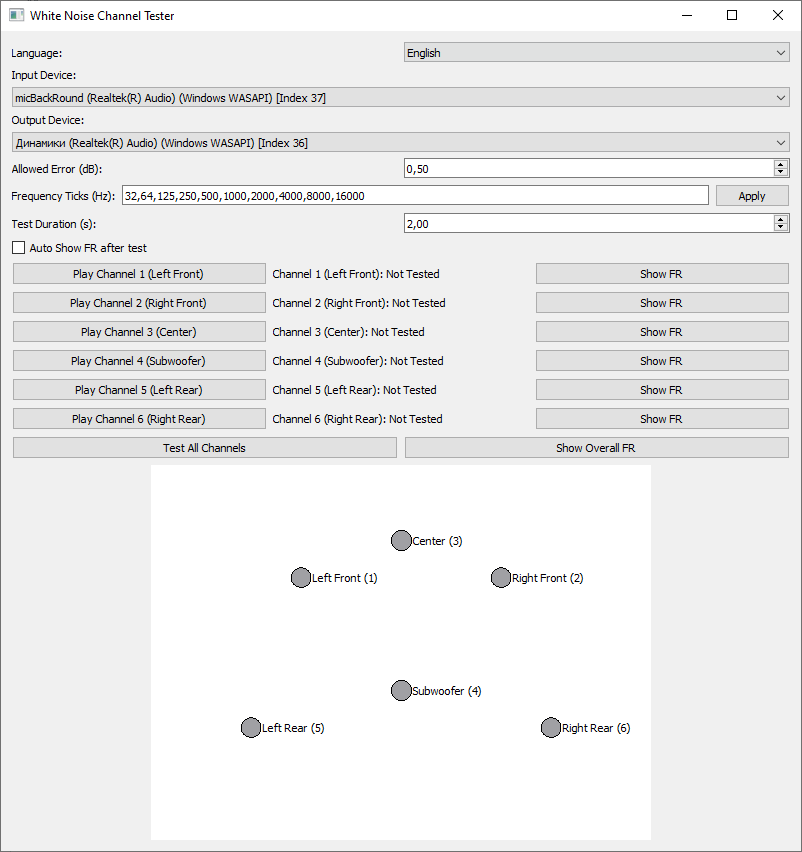
github.com/goha500503/White-Noise-Channel-Tester-Calibration

Overtone GEQ is a free 7-band harmonic (overtone) graphic equalizer AudioUnit, AAX, and VST plugin with multi-channel operation support (supporting up to 8 input/output channels, audio host application-dependent). Overtone GEQ offers extensive internal channel routing capabilities, and supports mid/side channel processing.
Beside equalizing, Overtone GEQ applies harmonic enhancement: it uses 7 harmonic enhancement modules, one for each EQ band. This generates a complex harmonic coloration you will probably like a lot.
Overtone GEQ was designed to allow audio engineers to apply quick EQ shape adjustments together with adding a bit of harmonic richness to the audio material (mainly mixes and sub-mixes due to a comparably high load this EQ puts on a CPU).
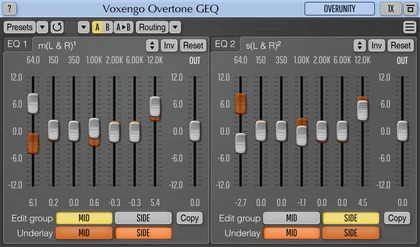
www.voxengo.com/product/overtonegeq

Reliably play midi music files from a folder or “.m3u” playlist. Adjust playback speed, volume and output device on the fly during playback. A large playback progress bar makes jumping forward and backward in time a breeze with just a single click or tap. Supports “.mid”, “.midi” and “.rmi” files in format 0 (single track) and format 1 (multi-track). Comes complete with 24 sample midis ready to play.
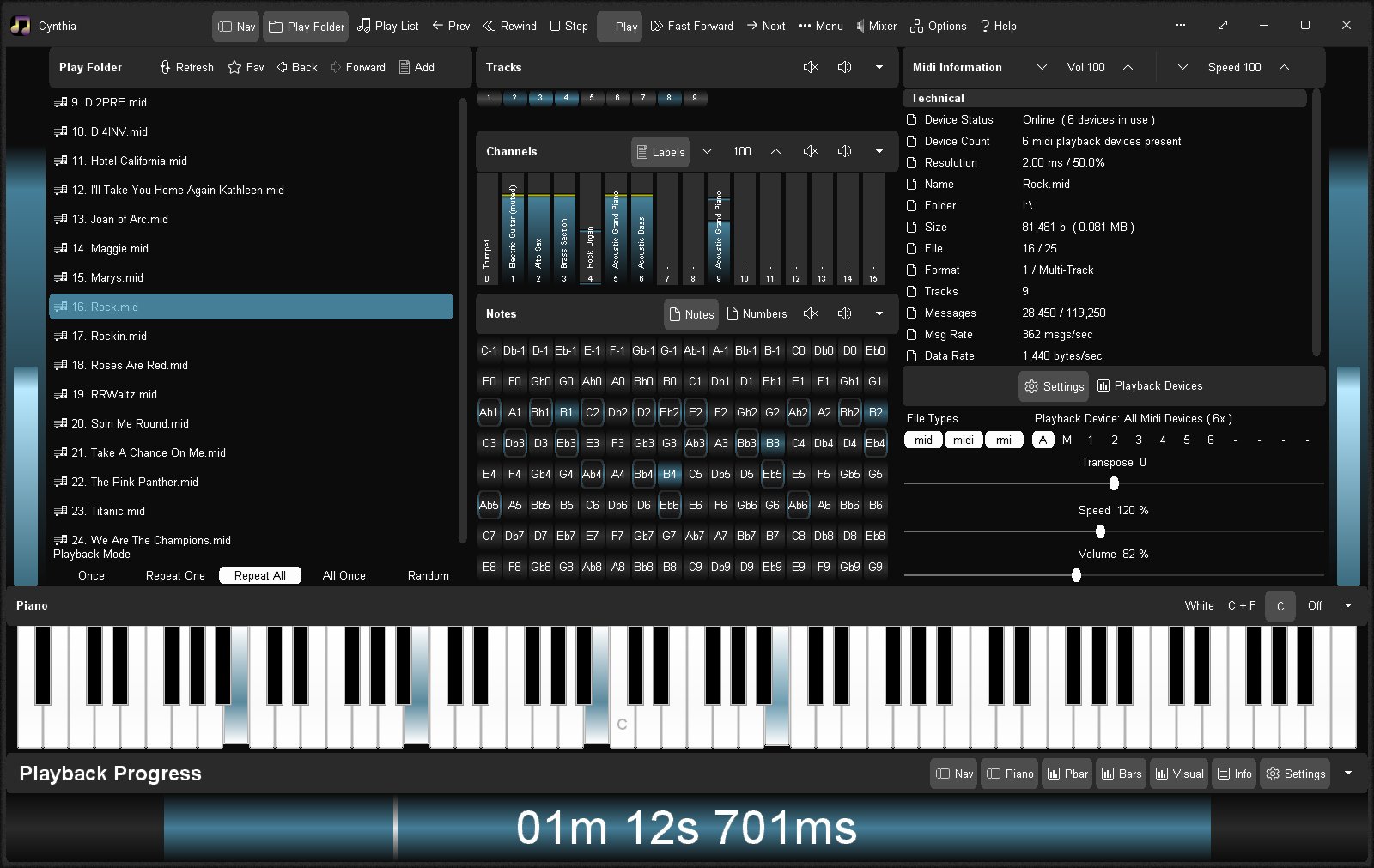
sourceforge.net/projects/cynthia1
www.blaizenterprises.com/cynthia

Seekbar for foobar2000, using Spider Monkey and ffmpeg or audiowaveform. It’s based on RMS or peak levels, instead of the actual waveform.
Features:
- Uses audiowaveform by default (included).
- ffprobe can be used if desired. Download it and copy ffprobe.exe into ‘helpers-external\ffprobe’.
- Visualizer mode to simply show an animation which changes according to BPM (if tag exists).
- VU Meter mode by RMS or peak levels.
- Fully configurable using the R. Click menu:
- Colors
- Waveform modes
- Analysis modes
- VU Meter
- Animations
- Multi-channel display
- Refresh rate (not recommended anything below 100 ms except on really modern CPUs)
github.com/regorxxx/Not-A-Waveform-Seekbar-SMP

Partiels is an audio analysis application that allows you to explore the content and characteristics of sounds.
Partiels allows analysis of one or several audio files using Vamp plug-ins loading data files, visualizing, editing, organizing, and exporting the results as images or text files that can be used in other applications such as Max, Pure Data, Open Music, etc.
Alongside Partiels, a wide range of analyses based on audio engines developed at IRCAM and outside are ported to Vamp plug-ins. These plug-ins allow you to perform FFT, LPC, transient, fundamental, formant, tempo, TTS and many other analyses. You can also find a large number of analysis plug-ins on the Vamp plug-ins website.
github.com/Ircam-Partiels
www.vamp-plugins.org

Display a 7.1 channel VU meter on your desktop via Rainmeter.
www.deviantart.com/hitbit-pa/art/Digital-VU-Meter-7-1-channels
www.rainmeter.net

BruteFIR is a software convolution engine, a program for applying long FIR filters to multi-channel digital audio, either offline or in real-time. Its basic operation is specified through a configuration file, and filters, attenuation and delay can be changed in runtime through a simple command line interface. The FIR filter algorithm used is an optimized frequency domain algorithm, partly implemented in hand-coded assembler, thus throughput is extremely high. In real-time, a standard computer can typically run more than 10 channels with more than 60000 filter taps each.
Through its highly modular design, things like adaptive filtering, signal generators and sample I/O are easily added, extended and modified, without the need to alter the program itself.
torger.se/anders/brutefir

Marvel GEQ is a free linear-phase 16-band graphic equalizer AudioUnit, AAX, and VST plugin with multi-channel operation support (supporting up to 8 input/output channels, audio host application-dependent) for professional music production applications. Marvel GEQ offers extensive internal channel routing capabilities, and supports mid/side channel processing.
www.voxengo.com/product/marvelgeq


