foo_playcount ~ Foobar2000 Playback Stats


You can extend Foobar2000 functionality by increasing the information the player maintains. Installing the foo_playcount component allows Foobar to both keep track of additional data, and adds the following user available fields:

  • Date and time a track was first played ~ %first_played%
  • Date and time a track was last played ~ %last_played%
  • The number of times a track has been played ~ %play_count%
  • Date and time a track was first added to the Media Library ~ %added%
  • Song rating ~ %rating%

Song Rating Playlist Display

The songs rating can now be displayed in a playlist viewer in two ways:

  • On a 1 to 5 scale with %rating%
  • Displayed as up to five stars, “★★★”, with %rating_stars%
  • Displayed as five stars, “★★★☆☆”, with %rating_stars_fixed%

Note: This component should be installed at the same time as Foobar2000, if your goal is to have a complete play count history.

Discussion
Download
Documentation
Display (Title) Formattingplaylist viewer

foo_playcount_2003

This component uses the same database backend that foo_playcount utilises for logging plays but has many more advanced features and fewer limitations.

  • Playcounts and dates can edited for any context menu selection.
  • Data can be imported from file tags or fields provided by other components.
  • Ratings up to 10 are supported.
  • You can customise how long you have to listen before a play count is incremented.
  • The current time is available via title formatting as a full date time string or Unix timestamp.
  • First played, last played and added are all available as Unix timestamps.
  • How records are bound to tracks can be configured in the Advanced Preferences.

marc2k3.github.io/component/playcount-2003

gnudb.org ~ CD Metadata Database


An opensource alternative CDDB / FreeDB service.

gnudb.org ~ a new home for the freedb database

How to use gnudb.org:

  • Configure your CDDB or freedb-aware software to point to gnudb.gnudb.org as your CDDB / freedb-server.

All official gnudb servers are running cddbp at port 8880 and http at port 80

The path for http-access is /~cddb/cddb.cgi

Access a xmcd file directly when you know the genre and discid at:

http://www.gnudb.org/gnudb/genre/discid

Example ~ http://www.gnudb.org/gnudb/rock/390f1215

Source: gnudb.org CD database

Search By Artist, Album or Artist And Album:

www.gnudb.org/search.php

foo_discogs ~ Foobar2000 & Discogs


Greatly extend the information in your music files by using the foo_discogs component to tag albums with Discogs information. Once the additional Discogs release information is stored in the song tags, it’s possible to search for catalog numbers, secondary artists or studios, etc. You can now also create toolbar buttons which open the corresponding artist or release pages in Discogs, the artist’s own website or other links.

  • download Discogs album and artist artwork
  • retrieve more information than most taggers
  • goes that extra length to make sure retrieved data is correct and well formatted
  • flexible tag mapping allows you to write only what you want, where you want
  • use meta-data in tags to display Discogs artist / label / release web pages
    able to later update specified tags (useful in update ratings)
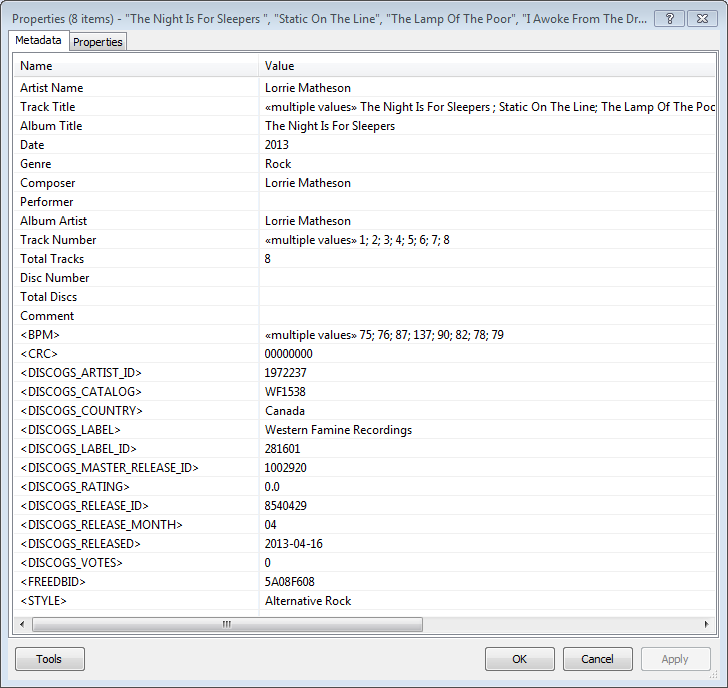
foobar - foo_discogs - resulting tags

Album’s properties when tagged with Discogs info

Installing & Configuration:

  1. Install the foo_discogs component
  2. Select any song on any playlist
  3. Right click the song and select Tagging
  4. From the sub-menu select Discogs
  5. Now select Configuration
  6. Change any settings needed.

Tagging Files:

  1. Select an entire album on a playlist
  2. Right click the album and select Tagging
  3. Select Discogs
  4. Select Write Tags…
  5. Click Search then select the correct match and click Next
  6. Confirm that the tracks match the files and click Write tags

Your audio files should now be tagged with additional Discogs metadata.

Open Release Page Button:

  1. Right click on Foobar’s Toolbar area and select “Customise Buttons…“
  2. In “Available Commands” navigate to and select [context] > Tagging > Discogs > View Release Page
  3. Change Icon and then click “OK“
  4. Select a song,  or album that has been tagged with Discogs metadata, and click the new custom button

References:

www.foobar2000.org/components/view/foo_discogs
hydrogenaud.io/index.php/topic,50523.0.html

Latest update:

github.com/ghDaYuYu/foo_discogs
bitbucket.org/fooDaYuyu/foo_discogs/downloads/

AcousticBrainz ~ Analyze Your Music


The AcousticBrainz project aims to crowd source acoustic information for all music in the world and to make it available to the public. This acoustic information describes the acoustic characteristics of music and includes low-level spectral information and information for genres, moods, keys, scales and much more. The goal of AcousticBrainz is to provide music technology researchers and open source hackers with a massive database of information about music. ~ AcousticBrainz

Blog
Downloads
FAQ
Github
Wiki

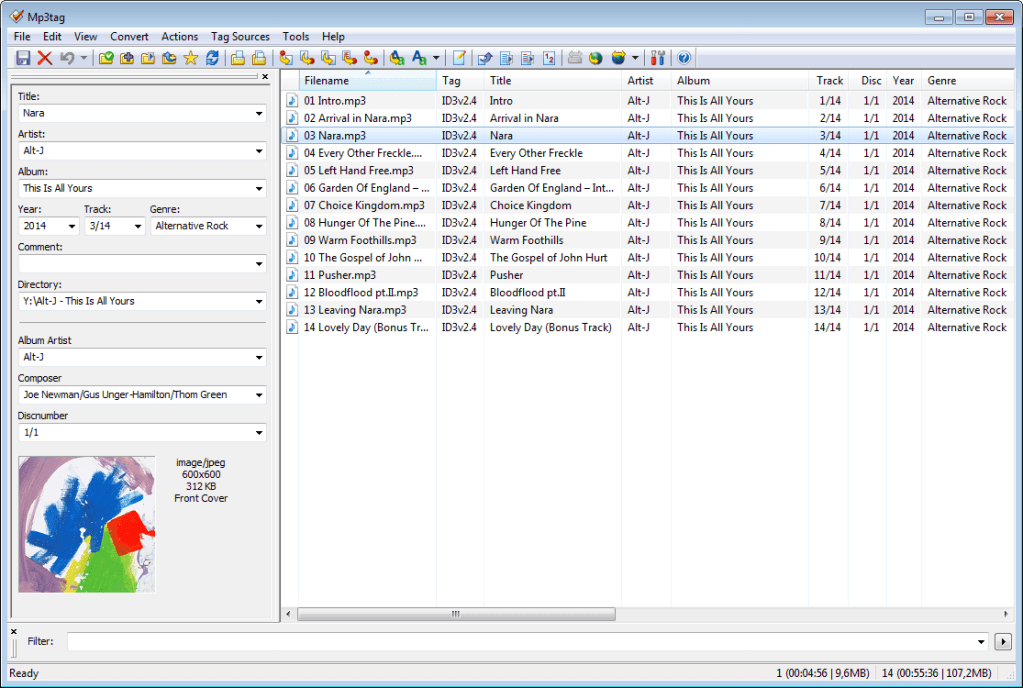
Mp3tag ~ Universal Tag Editor


Mp3tag is a powerful and easy-to-use tool to edit metadata of audio files.

It supports batch tag-editing of ID3v1, ID3v2.3, ID3v2.4, iTunes MP4, WMA, Vorbis Comments and APE Tags for multiple files at once covering a variety of audio formats.

Furthermore, it supports online database lookups from, e.g., Discogs, MusicBrainz or freedb, allowing you to automatically gather proper tags and download cover art for your music library.

You can rename files based on the tag information, replace characters or words in tags and filenames, import/export tag information, create playlists and more.

mp3tag-en

www.mp3tag.de
www.mp3tag.de/en/screenshots
community.mp3tag.de
twitter.com/mp3tag
hydrogenaud.io/index.php?topic=122049.0
en.wikipedia.org/wiki/Mp3tag
apps.apple.com/us/app/mp3tag/id1532597159
www.microsoft.com/en-us/p/mp3tag/9nn77tcq1nc8
www.portablefreeware.com/?id=1137
musicbrainz.org/doc/Mp3tag

MusicBrainz Picard ~ Tag Files With MusicBrainz Metadata


MusicBrainz Picard is a cross-platform (Linux, macOS, Windows) audio tagging application. It is the official MusicBrainz tagger.

Picard supports the majority of audio file formats, is capable of using audio fingerprints (AcoustIDs), performing CD lookups and disc ID submissions, and it has excellent Unicode support. Additionally, there are several plugins available that extend Picard’s features.

Features:

  • Multiple formats: Picard supports all popular music formats, including MP3, FLAC, OGG, M4A, WMA, WAV, and more.
  • AcoustID: Picard uses AcoustID audio fingerprints, allowing files to be identified by the actual music, even if they have no metadata.
  • Comprehensive database: Picard uses the open and community-maintained MusicBrainz database to provide accurate information about millions of music releases.
  • CD lookups: Picard can lookup entire music CDs with a click.
  • Plugin support: If you need a particular feature, you can choose from a selection of available plugins or write your own.
  • Scripting: A flexible and powerful, yet easy to learn, scripting language allows you to exactly specify how your music files will be named and how the tags will look like.
  • Cover Art: Picard can find and download the correct cover art for your albums.
  • Open Source: Picard is licensed under the GNU General Public License 2.0 or later, and is hosted on GitHub where it is actively developed.
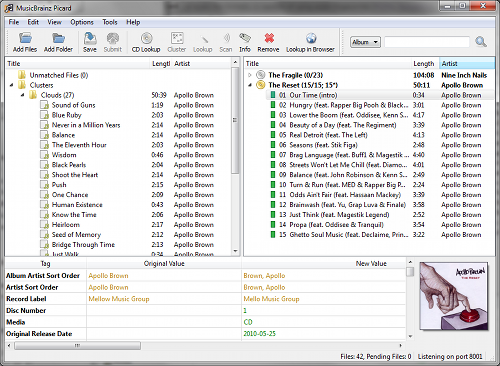
Picard GUI

picard.musicbrainz.org
picard.musicbrainz.org/downloads
picard.musicbrainz.org/plugins
picard.musicbrainz.org/docs/faq
picard.musicbrainz.org/quick-start
github.com/metabrainz/picard
en.wikipedia.org/wiki/MusicBrainz_Picard
Youtube: What is MusicBrainz Picard?

WMP Tag Plus ~ Extends WMP File Formats


WMP Tag Plus is a plug-in that integrates seamlessly into Windows Media Player to provide library and tagging support for additional music formats. These formats include FLAC, Ogg Vorbis, WavPack, Monkey’s Audio (.ape), Musepack and MPEG-4. Windows Media Player 11 or higher.

bmproductions.fixnum.org
hydrogenaud.io/index.php?topic=80263.0