Flacon ~ Unix Audio File Encoder


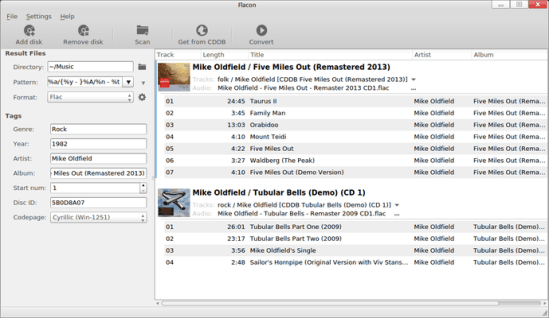
Flacon extracts individual tracks from one big audio file containing the entire album of music and saves them as separate audio files.

To do this, it uses information from the appropriate CUE file. Besides, Flacon makes it possible to conveniently revise or specify tags both for all tracks at once or for each tag separately.

  • Supported input formats: WAV, FLAC, APE, WavPack, True Audio (TTA).
  • Supported out formats: FLAC, WAV, WavPack, AAC, OGG or MP3.
  • ReplayGain analysis (album-gain and track-gain modes).
  • Multi-threaded conversion process.
  • Automatic character set detection for CUE files.
  • Generation of the pertrack CUE file in the output dir.

flacon-main-small

flacon.github.io

IDFree ~ Simple Windows Tag Editor


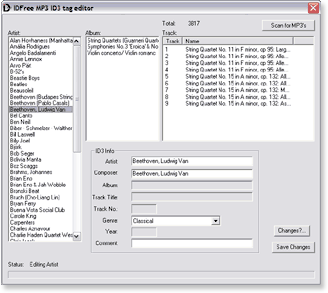
IDFree is a simple MP3 ID3 tag editor for Windows. It uses the excellent Open Source id3lib library to read and write these ID3 tags.

idfree

idfree.sourceforge.net

FixTag ~ Repair Inconsistent mp3 Meta-data


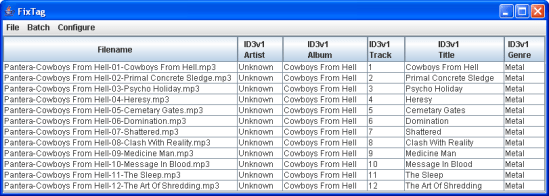
FixTag is a Java/Swing application that lets you edit the fields within MP3 ID3 tags.

fixtag_table_unknown

fixtag.sourceforge.net

foo_bpm ~ Foobar2000 & BPM


foo_bpm – A Foobar component for automatically analyzing the number of beats per minute in audio files.

Installing and using foo_bpm:

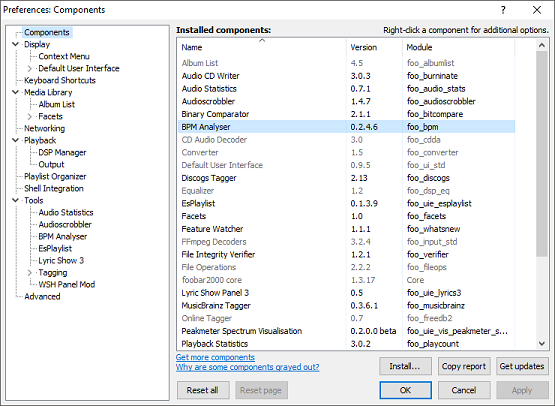
First download and install foo_bpm.fb2k-component.

BPM Installed
foo_bpm successfully installed

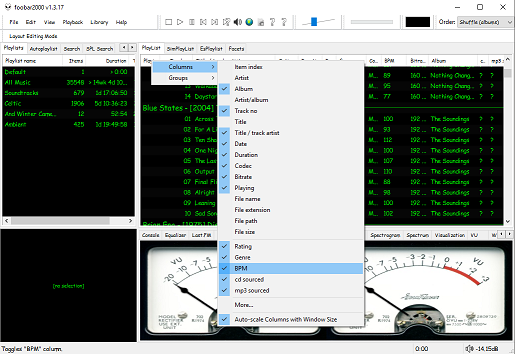
The second step is adding a new BPM playlist column to the DUI playlist viewer:

BPM Column
Right click the playlist header and select columns. Toggle the BPM column on.

The third step, add an Analyze BPM toolbar button:

  1. Right click on the metronome icon ico file shown below and download / save it locally
  2. Right click the Foobar toolbar
  3. Select the Customize button
  4. Select from Available Commands [context] > BPM Analyzer > Automatically analyze BPMs
  5. Click Add
  6. Click Change Icon and select the downloaded metronome.ico file
  7. Click OK
metronome.ico (right click and save this ico file locally)
BPM Analyser > Automatically analyse BPMs


The fourth and final step is to select and scan files:

Once the toolbar button is installed, songs can be selected then scanned. The songs will now be tagged with the %bpm% tag and can be selected or sorted by beats per minute as displayed in the playlist column.

Video: www.youtube.com/watch?v=Pg_wJH6TjcY

References:

www.foobar2000.org/components/view/foo_bpm
hydrogenaud.io/index.php/topic,77142.0
Updated Configuration
github.com/stengerh/foo_bpm
foobar.hyv.fi/?view=foo_bpm (latest version)

Kid3 ~ Cross-platform Audio Tagger


Kid3 audio tag editor can edit the tags of MP3, Ogg, FLAC, MPC & WMA files in an efficient way, convert between ID3v1 and ID3v2, set the tags of multiple files, generate tags from file names or vice versa and import from freedb, MusicBrainz and Discogs.

Features

  • Edit and convert between ID3v1.1, ID3v2.3 and ID3v2.4 tags of MP3 files
  • Supports MP3, Ogg/Vorbis, FLAC, MPC, MP4/AAC, MP2, Speex, TrueAudio, WavPack, WMA, WAV and AIFF files
  • Generate tags from filenames and file-, directorynames from tags
  • Mass-tagging of multiple files
  • Import from gnudb.orgMusicBrainz and Discogs
kid3

kid3.sourceforge.io
sourceforge.net/projects/kid3
en.wikipedia.org/wiki/Kid3

foo_playcount ~ Foobar2000 Playback Stats


You can extend Foobar2000 functionality by increasing the information the player maintains. Installing the foo_playcount component allows Foobar to both keep track of additional data, and adds the following user available fields:

  • Date and time a track was first played ~ %first_played%
  • Date and time a track was last played ~ %last_played%
  • The number of times a track has been played ~ %play_count%
  • Date and time a track was first added to the Media Library ~ %added%
  • Song rating ~ %rating%

Song Rating Playlist Display

The songs rating can now be displayed in a playlist viewer in two ways:

  • On a 1 to 5 scale with %rating%
  • Displayed as up to five stars, “★★★”, with %rating_stars%
  • Displayed as five stars, “★★★☆☆”, with %rating_stars_fixed%

Note: This component should be installed at the same time as Foobar2000, if your goal is to have a complete play count history.

Discussion
Download
Documentation
Display (Title) Formatting playlist viewer

gnudb.org ~ CD Metadata Database


An opensource alternative CDDB / FreeDB service.

gnudb.org ~ a new home for the freedb database

How to use gnudb.org:

  • Configure your CDDB or freedb-aware software to point to gnudb.gnudb.org as your CDDB / freedb-server.

All official gnudb servers are running cddbp at port 8880 and http at port 80

The path for http-access is /~cddb/cddb.cgi

Access a xmcd file directly when you know the genre and discid at:

http://www.gnudb.org/gnudb/genre/discid

Example ~ http://www.gnudb.org/gnudb/rock/390f1215

Source: gnudb.org CD database

Search By Artist, Album or Artist And Album:

www.gnudb.org/search.php

foo_discogs ~ Foobar2000 & Discogs


Greatly extend the information in your music files by using the foo_discogs component to tag albums with Discogs information. Once the additional Discogs release information is stored in the song tags, it’s possible to search for catalog numbers, secondary artists or studios, etc. You can now also create toolbar buttons which open the corresponding artist or release pages in Discogs, the artist’s own website or other links.

  • download Discogs album and artist artwork
  • retrieve more information than most taggers
  • goes that extra length to make sure retrieved data is correct and well formatted
  • flexible tag mapping allows you to write only what you want, where you want
  • use meta-data in tags to display Discogs artist / label / release web pages
    able to later update specified tags (useful in update ratings)
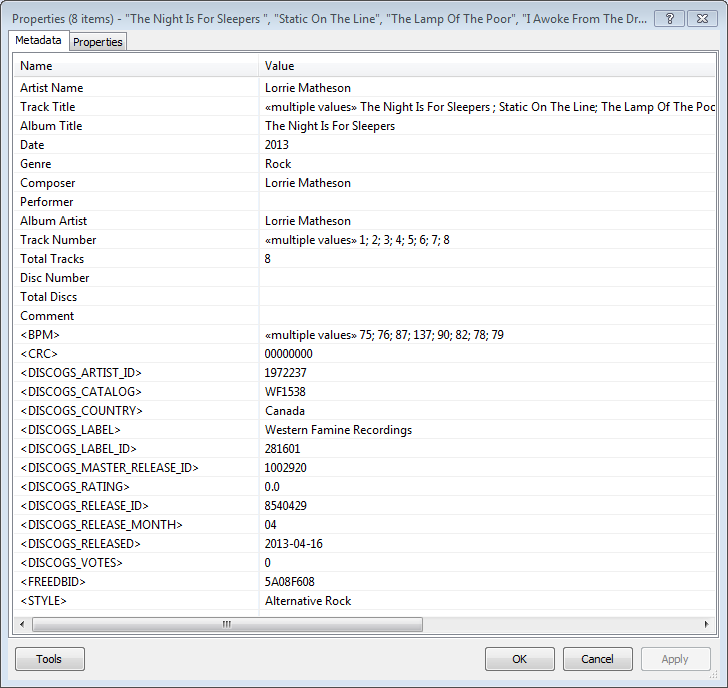
foobar - foo_discogs - resulting tags

Album’s properties when tagged with Discogs info

Installing & Configuration:

  1. Install the foo_discogs component
  2. Select any song on any playlist
  3. Right click the song and select Tagging
  4. From the sub-menu select Discogs
  5. Now select Configuration
  6. Change any settings needed.

Tagging Files:

  1. Select an entire album on a playlist
  2. Right click the album and select Tagging
  3. Select Discogs
  4. Select Write Tags…
  5. Click Search then select the correct match and click Next
  6. Confirm that the tracks match the files and click Write tags

Your audio files should now be tagged with additional Discogs metadata.

Open Release Page Button:

  1. Right click on Foobar’s Toolbar area and select “Customise Buttons…
  2. In “Available Commands” navigate to and select [context] > Tagging > Discogs > View Release Page
  3. Change Icon and then click “OK
  4. Select a song,  or album that has been tagged with Discogs metadata, and click the new custom button

References:

www.foobar2000.org/components/view/foo_discogs
hydrogenaud.io/index.php/topic,50523.0.html

Latest update:

github.com/ghDaYuYu/foo_discogs
bitbucket.org/fooDaYuyu/foo_discogs/downloads/

AcousticBrainz ~ Analyze Your Music


The AcousticBrainz project aims to crowd source acoustic information for all music in the world and to make it available to the public. This acoustic information describes the acoustic characteristics of music and includes low-level spectral information and information for genres, moods, keys, scales and much more. The goal of AcousticBrainz is to provide music technology researchers and open source hackers with a massive database of information about music. ~ AcousticBrainz

Blog
Downloads
FAQ
Github
Wiki

Mp3tag ~ Universal Tag Editor


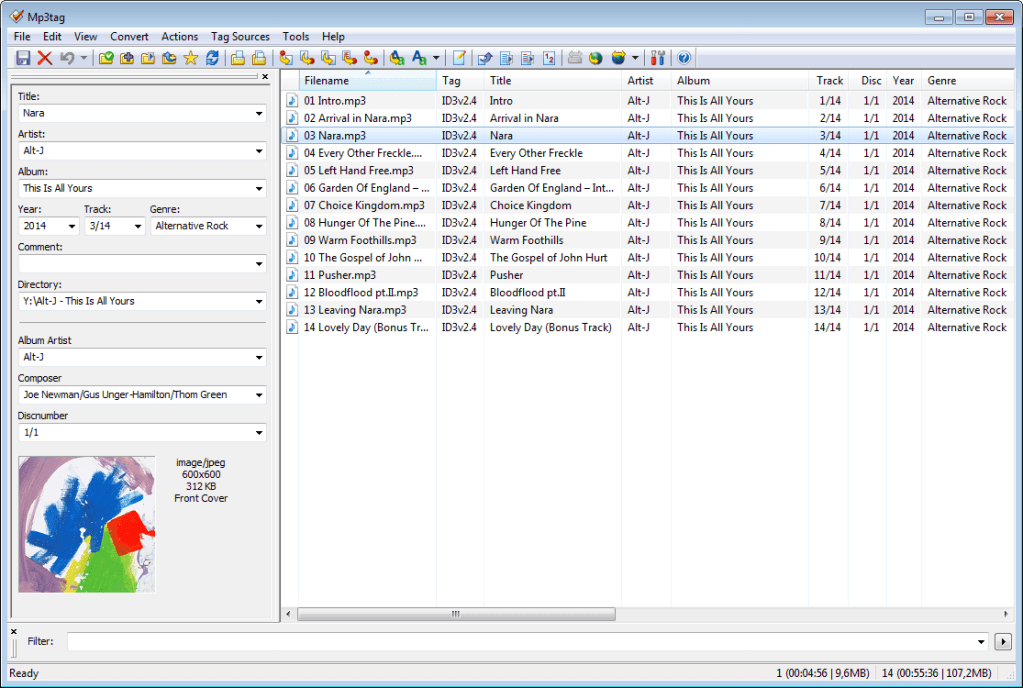
Mp3tag is a powerful and easy-to-use tool to edit metadata of audio files.

It supports batch tag-editing of ID3v1, ID3v2.3, ID3v2.4, iTunes MP4, WMA, Vorbis Comments and APE Tags for multiple files at once covering a variety of audio formats.

Furthermore, it supports online database lookups from, e.g., Discogs, MusicBrainz or freedb, allowing you to automatically gather proper tags and download cover art for your music library.

You can rename files based on the tag information, replace characters or words in tags and filenames, import/export tag information, create playlists and more.

mp3tag-en

www.mp3tag.de
www.mp3tag.de/en/screenshots
community.mp3tag.de
twitter.com/mp3tag
hydrogenaud.io/index.php?topic=122049.0
en.wikipedia.org/wiki/Mp3tag
apps.apple.com/us/app/mp3tag/id1532597159
www.microsoft.com/en-us/p/mp3tag/9nn77tcq1nc8
www.portablefreeware.com/?id=1137
musicbrainz.org/doc/Mp3tag

MusicBrainz Picard ~ Tag Audio Files With MusicBrainz Metadata


MusicBrainz Picard is a cross-platform (Linux, macOS, Windows) audio tagging application. It is the official MusicBrainz tagger.

Picard supports the majority of audio file formats, is capable of using audio fingerprints (AcoustIDs), performing CD lookups and disc ID submissions, and it has excellent Unicode support. Additionally, there are several plugins available that extend Picard’s features.

Features:

  • Multiple formats: Picard supports all popular music formats, including MP3, FLAC, OGG, M4A, WMA, WAV, and more.
  • AcoustID: Picard uses AcoustID audio fingerprints, allowing files to be identified by the actual music, even if they have no metadata.
  • Comprehensive database: Picard uses the open and community-maintained MusicBrainz database to provide accurate information about millions of music releases.
  • CD lookups: Picard can lookup entire music CDs with a click.
  • Plugin support: If you need a particular feature, you can choose from a selection of available plugins or write your own.
  • Scripting: A flexible and powerful, yet easy to learn, scripting language allows you to exactly specify how your music files will be named and how the tags will look like.
  • Cover Art: Picard can find and download the correct cover art for your albums.
  • Open Source: Picard is licensed under the GNU General Public License 2.0 or later, and is hosted on GitHub where it is actively developed.
Picard GUI

picard.musicbrainz.org
picard.musicbrainz.org/downloads
picard.musicbrainz.org/plugins
picard.musicbrainz.org/docs/faq
picard.musicbrainz.org/quick-start
github.com/metabrainz/picard
Youtube: What is MusicBrainz Picard?