Tagscanner ~ Tag Editor & Utility


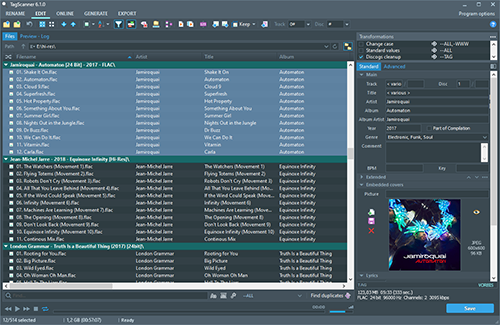
TagScanner is a powerful tool for organizing and managing your music collection. It can edit tags of most modern audio formats, supports ID3v1/v2, Vorbis comments, APEv2, WMA and MP4(iTunes) tags. You can rename files according to information from the tags, import tag information from filenames or other sources, perform any text replacement and transformations in tags and filenames. Also you may get album info and download covers via online databases like freedb, Discogs or MusicBrainz. You can create playlists in one click and export your collection to HTML, Excel or any user-defined format. Program has easy-to-use multilingual interface and built-in audio player.
Features:

  • Rename files based on the tag and file information
  • Powerful multiple files tag editor
  • Import album information and covers from online databases like Discogs or MusicBrainz
  • Generate tag information from file/foldernames
  • Tag fields formatting and rearrangement
  • Words replacement and case conversion from tags and filenames
  • Supports MP3, OGG, FLAC, WMA, MPEG-4, Opus, Musepack, Monkey’s Audio, AAC, OptimFROG, SPEEX, WavPack, TrueAudio, WAV, AIFF, Direct Stream Digital files
  • Supports ID3 1.0/1.1/2.2/2.3/2.4 tags, APE v1 and v2 tags, Vorbis Comments, WMA tags and MP4(iTunes) metadata
  • Supports for embedded lyrics and cover art
  • Resize cover art for portable devices on the fly
  • TAGs versions conversions
  • Quick playlists creation
  • Export information to HTML, XML CSV or any user-defined format
  • Full support for Unicode
  • Multi-language interface
  • Built-in audio player
tagscanner

www.xdlab.ru

foo_cuefixer ~ Foobar2000 Cue Sheet Filter


Simple component for foobar2000 to fix CUE/FLAC problems

Made in Ukraine
  • Removes duplicate song entries that appear when adding adirectory containing a .cue file that links to timestamps in a base .flac/.wav/.ape file.
  • Removes such duplicates also when adding tracks from media library.
  • Removes broken .cue files that point to missing files (.flac/.wav/.ape etc).

* Remove “*.CUE” from preferences>shell integration>exclude file types

github.com/RevenantX/foo_cuefixer

hydrogenaud.io/index.php/topic,117167.0
hydrogenaud.io/index.php?topic=118978.msg981682#msg981682

Soft Playlists ~ Foobar & Last.fm


Can create different Last.fm related playlists:

  • loved tracks of a single user, multiple users, friends or neighbours.
  • recent tracks of a single user, multiple users, friends or neighbours.
  • top tracks of a single user, multiple users, friends or neighbours over different periods.
  • top tracks of an artist.
  • top tracks of artists similar to an artist.
  • top tracks with certain tag.
  • tracks similar to a track.

Can also…

  • love, unlove, ban and unban a track on your Last.fm account.
  • add a track to a custom playlist on your Last.fm account.
  • save and load XSPF playlists (make playlists without hard paths). This makes it possible to easily share playlists with other people. Also when you restructure your library (change location of your music files), these playlists will continue to work.

www.foobar2000.org/components/view/foo_softplaylists
hydrogenaud.io/index.php?topic=76133.0

Integrating Last.fm with Foobar2000 Using Soft Playlists

Step 1: Install Soft Playlists
Begin by downloading the foo_softplaylists component from the foobar2000 website. Once downloaded, open foobar2000 and navigate to File → Preferences → Components → Install…, then select the downloaded .fb2k-component file. Restart foobar2000 to activate the plugin. This component enables you to generate dynamic playlists directly from your Last.fm data.

Step 2: Connect Your Last.fm Account
After installation, go to Preferences → Tools → Soft Playlists → Last.fm. Enter your Last.fm username and password to authorize the connection. Once you are logged in, the plugin can fetch your loved tracks, recent plays, top tracks, and tag-based data.

Step 3: Creating Loved Tracks Playlists
Soft Playlists can generate playlists of tracks in your library that are marked as loved on Last.fm. Simply create a new playlist, Open the Library Menu and choose the “Loved Tracks” option, and the plugin will match these tracks with your local files and create a new playlist. You can now play or sort these loved tracks directly from foobar2000.

Step 4: Generating Top Tracks Playlists
You can also create playlists based on top tracks from your Last.fm account, your friends, or neighbors. Select the “Top Tracks” option and filter by user, artist, or tag. This allows you to automatically build playlists of your most-played tracks, popular tracks by similar artists, or tracks labeled with specific moods or genres.

Step 5: Recent Tracks Playlists
Soft Playlists supports recent tracks queries from Last.fm. You can generate playlists of your most recently played tracks or recent tracks from other users. This is ideal for keeping up to date with current listening trends.

Additional Features:
Soft Playlists allows you to save sharable playlists in XSPF format, which keeps them portable and resilient to file location changes. The plugin also lets you love or unlove tracks directly from foobar2000, updating your Last.fm account automatically. This integration creates a seamless workflow between your local library and Last.fm.

Adding a toolbar button to love a track:

  1. Right click the Foobar2000 toolbar and select “Customize Buttons...
  2. In the Available Commands Panel, open “Context Menu” and then “Last.fm”
  3. Select "Last.fm Love Track” and click the “Add” button then click “Ok”
  4. Change the button icon to a Last.fm icon (.ico file)

Tips and Considerations
Soft Playlists is an older 32bit component. The plugin works best if most of your Last.fm scrobbled tracks are present in your local library. For more advanced integration, consider combining Soft Playlists with Spider Monkey Panel scripts to pull additional data, such as playcounts, tags, or charts.

foo_random_pools ~ Random Autoplaylists


Another type of Foobar2000’s playlists are randomly generated autoplaylists where songs, or groups of songs, are selected randomly from a pool of the same. By predefining a subset of a media library, “pools” of refined selections can be created and then drawn from.

foo_random_pools is a foobar2000 component for creating random playlist entries selected and grouped by various pool definitions.

www.foobar2000.org/components/view/foo_random_pools

Let’s say you want a playlist of random blues albums from your library.

  • First you’ll need to install the foo_random_pools component.
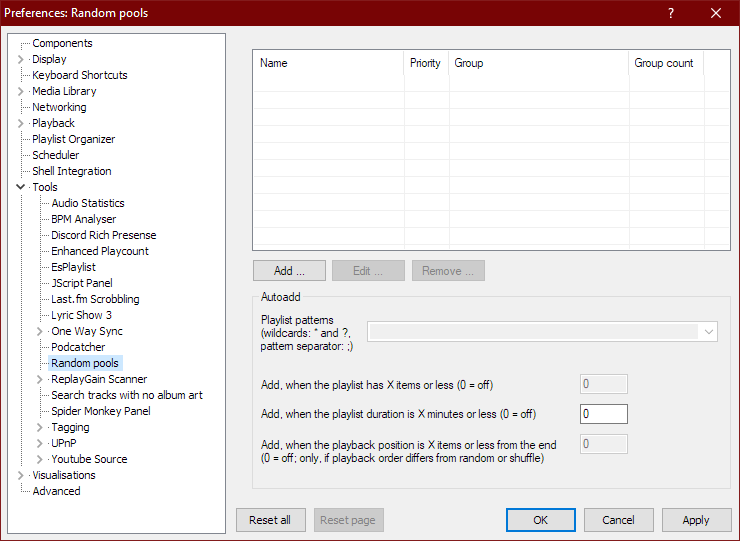
  • After you’ve installed foo_random_pools, you’ll need to set up a pool in the File > Preferences > Tools > Random pools sub-menu.File - Preferences - Tools - Random pools
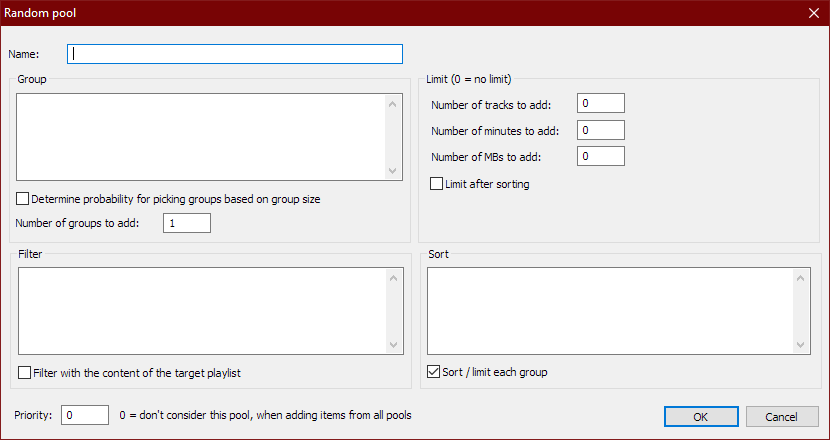
  • You’ll need to select the “Add …” button which brings up the Random pool criteria form.Preferences - Random Pools - Random Pool - blankFor example to make a pool of blues albums use the following criteria:
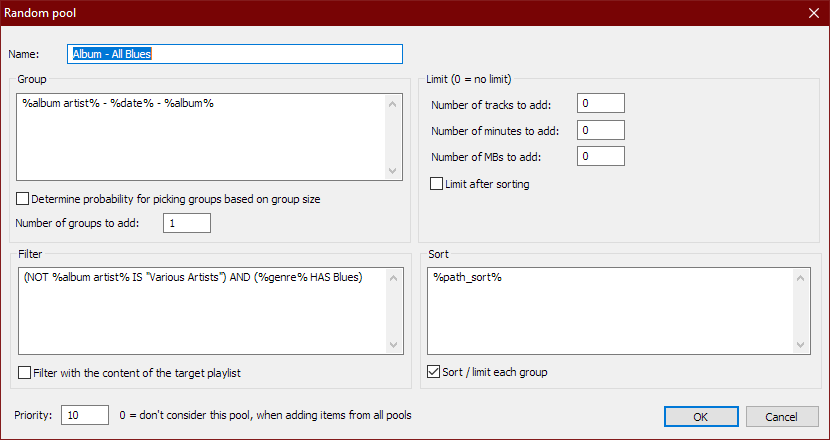
    Name: Album – All Blues
    Group: %album artist% – %date% – %album%
    Determine probability for picking groups …: Unchecked
    Number of groups to add: 1
    Filter: (NOT %album artist% IS “Various Artists”) AND (%genre% HAS Blues)
    Filter with the content of the target playlist: Unchecked
    Number of tracks to add: 0
    Number of minutes to add: 0
    Number of MBs to add: 0
    Limit after sorting: Unchecked
    Sort: %path%
    Sort / limit each group: Checked
    Priority: 10Preferences - Random Pools - Edit
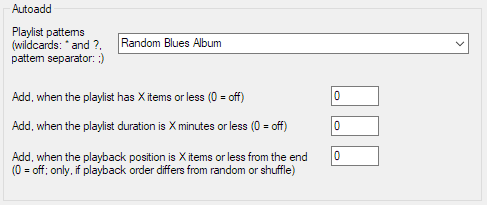
  • Now you have to link pools to a playlist by specifying a name in the Autoadd section’s Playlist patterns field of the Random pools preferences menu.File - Preferences - Tools - Random pools - Autoadd - Random Blues Album
  • Create a new playlist, File>New Playlist Ctrl+N, and name it “Random Blues Album” and then select and display it.
  • To add a random blues album to the playlist, select File > Random pools > Album – All Blues. Each time it’s selected, another random blues album will be added to the playlist.

PyKaraoke ~ Cross-platform Karaoke Player


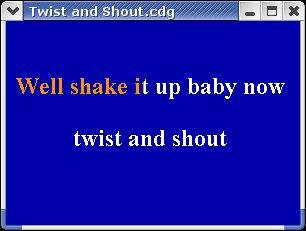
PyKaraoke is a free karaoke player for Linux, FreeBSD, NetBSD, Windows, OSX and GP2X.

You can use this program to play your collection of CDG, MIDI and MPEG karaoke songs. No songs are provided, you must obtain these from elsewhere.

Visit here to find out more about what a CDG or MP3+G file is. In short, CDG is the format of professional karaoke CDs. These CDs can be ripped to your hard disk, and turned into a .mp3 file together with a .cdg file. This player gives you the ability to play those mp3+cdg files.

PyKaraoke Features:

  • CDG (MP3+G, OGG+G, WAV+G) playback – Play standard CDG karaoke files
  • MIDI (.MID/.KAR) playback – Play MIDI format karaoke files
  • MPEG playback – Play karaoke songs and movies in MPEG format
  • Other formats – Play any other video formats by launching an external media player
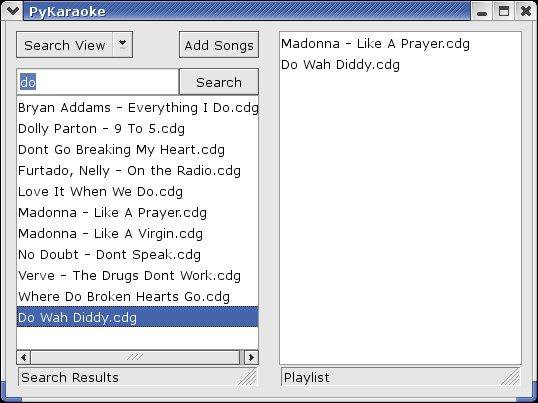
  • Playlist – Queue up songs, sit back and enjoy
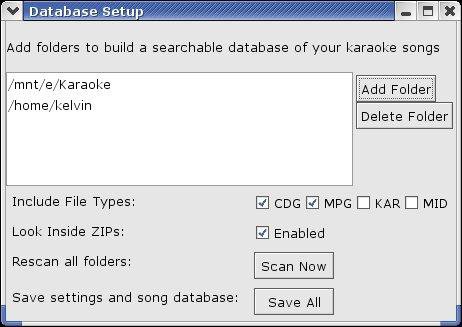
  • Searchable song database – Easily find your songs from the main screen
  • Search inside ZIP files – Play MP3+G/MIDI files wrapped in ZIP files
  • Cross-platform – Runs on Windows, Linux, BSD, OSX and GP2X
  • Mini Frontend – Additional mini-frontend for low res displays and handhelds
  • Export to MPEG – Convert CDG and KAR files to MPG files (command line only)

www.kibosh.org/pykaraoke
sourceforge.net/projects/pykaraoke

RompЯ ~ Browser Based Player


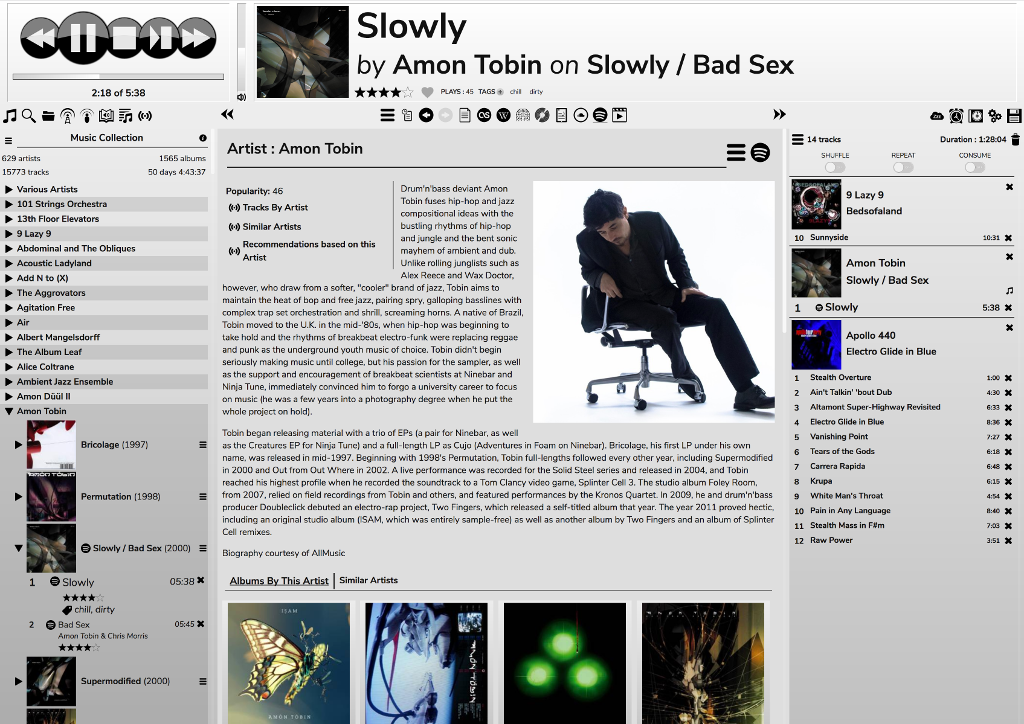
RompЯ is a music player with the emphasis on discovery – discovering more about the music you know, and discovering new music you don’t know yet. RompЯ is an interface that runs in a web browser on any device and controls a music player which can be on any other device. I recommend using Mopidy as the music player. When used with Mopidy and a Spotify Premium subscription RompЯ is a powerful Spotify client with many music discovery features.

Features:

  • Collectioniser sorts your music by artist and album
  • Directory browser
  • Search
  • Tagging and Rating of tracks
  • Spotify, Soundcloud, GMusic, etc support (with Mopidy),
  • Add tracks from Spotify, Soundcloud, etc to the collection on the fly
  • Web Radio support, automatic Spotify search for radio tracks you like
  • Podcast search and subscribe
  • Alarm Clock
  • Sleep Timer
  • Album Cover Art
  • Last.FM Scrobbling
  • Automatic on-the-fly playlist generation based on tags, ratings, popularity, your listening habits, etc
  • Get biographies of artists from various sources
  • Album and artist suggestions based on your listening habits
  • UI themes

rompr-1

fatg3erman.github.io/RompR
github.com/fatg3erman/RompR

AIMP ~ Full Featured Music Player


AIMP is a powerful free audio player for Windows OS that supports for local files, NAS, clouds and podcasts. Additionally, it includes powerful tools to operate with audio files.

Multi-format Playback:
.CDA, .AAC, .AC3, .APE, .DTS, .FLAC, .IT, .MIDI, .MO3, .MOD, .M4A, .M4B,
.MP1, .MP2, .MP3, .MPC, .MTM, .OFR, .OGG, .OPUS, .RMI, .S3M, .SPX, .TAK,
.TTA, .UMX, .WAV, .WMA, .WV, .XM, .DSF, .DFF, MKA, AA3, AT3, OMA, .WebM,
.MPEG-DASH (YouTube)

Features:

  • CUE Sheet support
  • Output support ~ DirectSound / ASIO / WASAPI / WASAPI Exclusive
  • 32-bit audio processing for the best quality!
  • Listen to internet-radio stations in OGG / WAV / MP3 / AAC / AAC+ formats
  • Capture stream to APE, FLAC, OGG, WAV, WV, WMA and MP3 formats
  • Capture stream as is for MP3 / AAC / AAC+ formats
  • Creating bookmarks and playback queue
  • Rating and auto-marks
  • Collecting statistics about tracks listening
  • Automatic calculations of rating and marks for listened tracks
  • Support for plugins ~ You can add new utilities or extend already existing ones
  • Build-in scrobbler / Last.fm, Libre.fm and ListenBrainz services are supported
  • Clouds / OneDrive, Google.Drive, DropBox, Облако@mail.ru, Яндекс.Диск and Custom WebDAV clouds are supported
  • Podcasts
  • Hot keys ~ Configure local and global hotkeys as you wish!
  • Multi-user mode support ~ Several users working on one computer? No problem!
  • Multi-language interface
  • Great functionality and user-friendly interface
  • Support for 4K and High DPI / Following scale factors are supported: 125%, 150%, 175%, 200%
  • Flexible program options
aimp

www.aimp.ru
aimp2.us

Icons:
aablab.deviantart.com/art/Aimp-3-anthracite-icons-260461145
www.deviantart.com/aablab/art/AIMP3-BW-Icons-190763277

Skins:
aablab.deviantart.com/art/AIMP-3-Skin-Editor-258029733
www.deviantart.com/ddkonstantinov/art/A-Graph-ver-1-0-294252760
www.deviantart.com/merydev/art/MetalikGlass-Light-for-AIMP3-258995954
www.deviantart.com/yamshikoff/art/Metro-for-AIMP3-v3-Final-279912238
www.deviantart.com/raidero1/art/ZiX-for-AIMP3-273232347
www.myaimp.com/skins
angelag.ucoz.ru

VU Meter Skins:
www.aimp.ru/forum/index.php?topic=52865.0

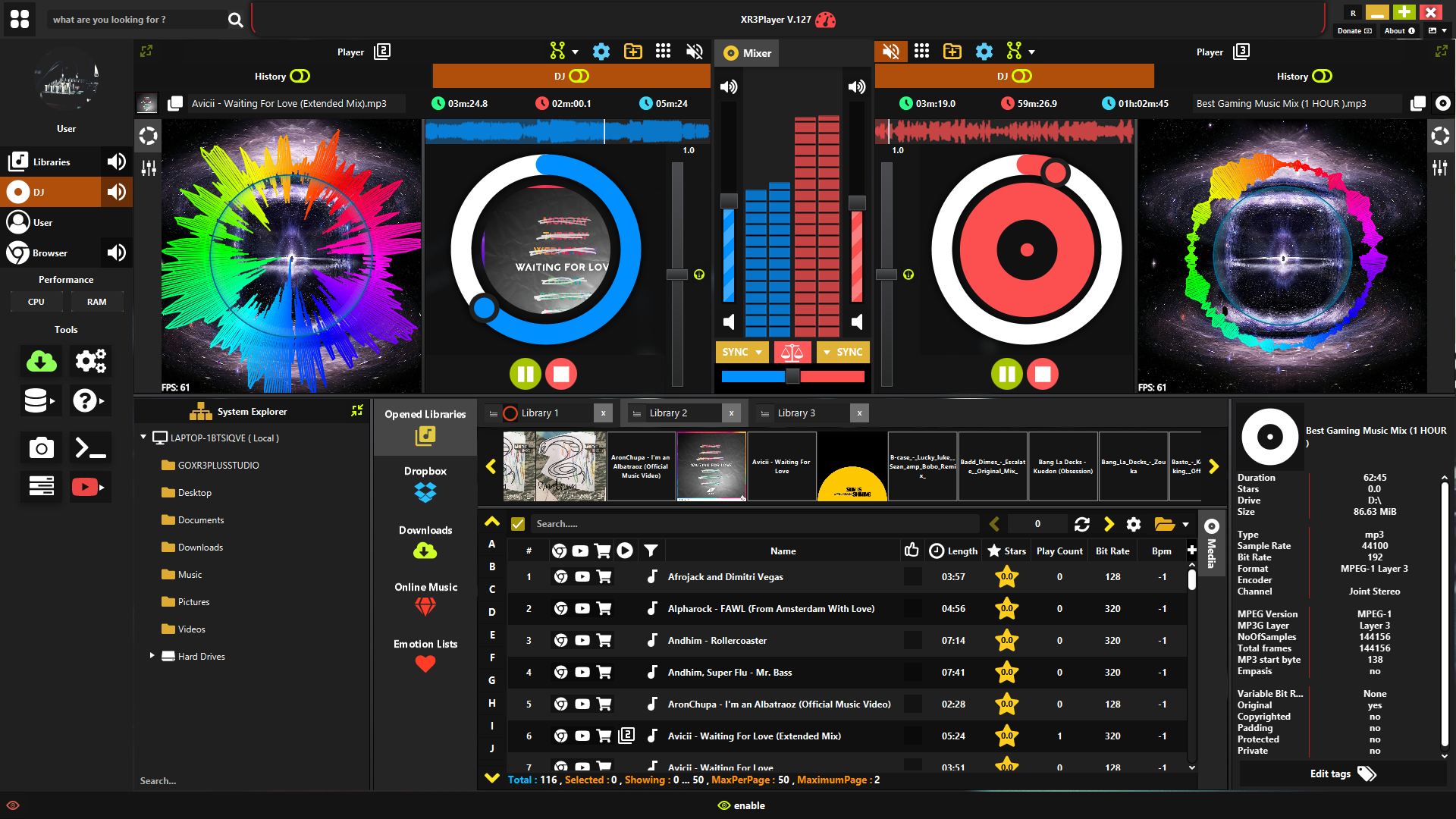
XR3Player ~ Advanced JavaFX Music Player


Powerful music player, multiple libraries, online music & visualizers.

  • Supports almost all audio formats through smart conversion to .mp3
  • Amazing audio spectrum visualizers
  • Audio amplitudes waveform
  • Chromium web browser
  • Full Dropbox access
  • Multiple user accounts
  • Configurable via multiple settings
  • Advanced tag editor
  • File organizer and explorer
  • Multiple libraries / playlists support
  • System monitor (CPU, RAM)
  • Audio effects and filters

github.com/goxr3plus/XR3Player

Stealth Player ~ No Distracting Interface


Stealth Player is a Windows music player without a GUI. You control it using global hotkeys. Stealth Player understands a lot of popular stream and tracker music formats. It also supports internet radio and playlists.

sourceforge.net/projects/stealthplayer

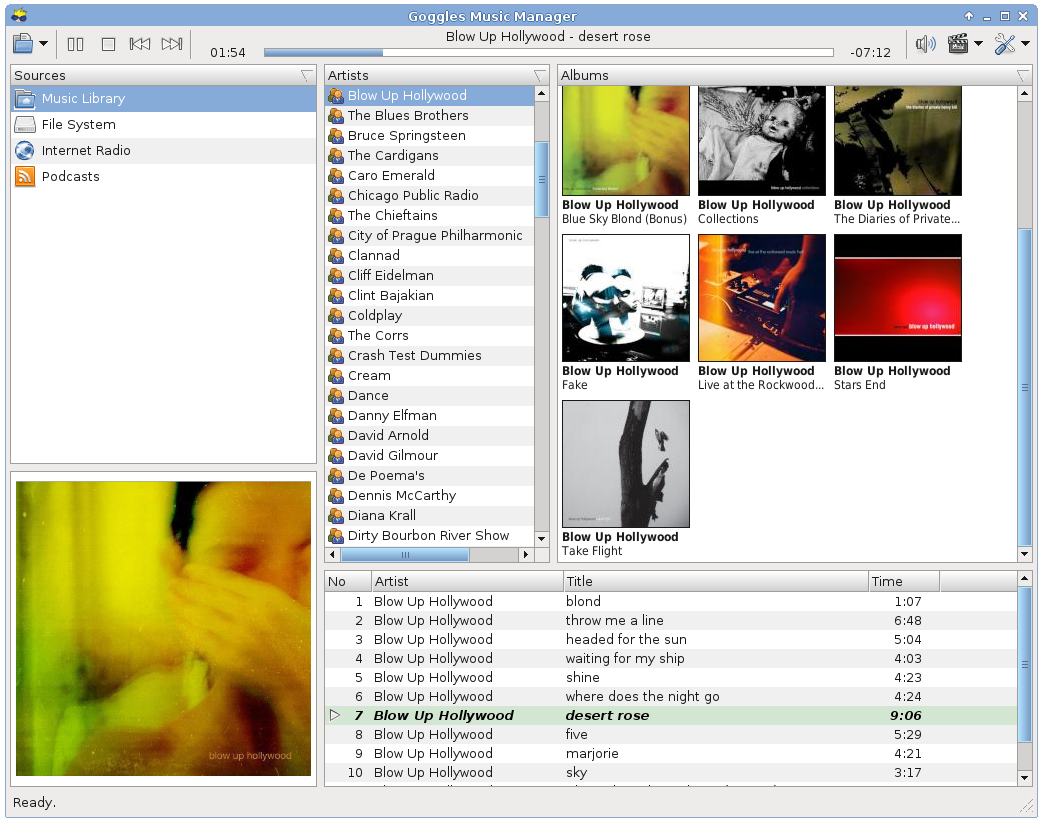
Goggles Music Manager ~ Linux Player


  • Fast and lightweight. Quick startup, no splash screen needed!
  • Supports Opus, Ogg Vorbis, FLAC, mp3 and mp4 (AAC and Apple Lossless)
  • Gapless playback and Replaygain support (Ogg Vorbis, Opus, FLAC and mp3 with APE tags).
  • Support for cover art embedded in tag or as separate file on disk.
  • Subscribe to Podcasts (rss) using the built in podcast manager.
  • Tag editing and powerful file renaming capability.
  • Filters / Smart Playlists
  • Smart sorting with user configurable leading word filter to prevent sorting on common words like the, a or an.
  • Support for playlists. Playlists may be played in a certain configurable order, or browsed through like the main music library.
  • Import / export music library and playlists to XSPF, PLS, M3U, Extended M3U or CSV.
  • Clipboard & DND (drag-and-drop) support to arrange playlists and dragging to and from Gnome / kde applications.
  • Clean and fast database backend using SQLite 3.
  • Written using FOX, one of the fastest GUI toolkits available.
  • Last.fm and libre.fm audio scrobbler support.
  • Translated in Czech, French, German, Hungarian, Portuguese, Russian and Spanish.

gogglesmm0.13.png

gogglesmm.dev

Nemp ~ Noch Ein mp3 Player


An intuitive mp3-player with many functions. It is portable and runs without installation – just download, unzip, run. Without permission, Nemp doesn’t fiddle with your mp3 files either, but leaves them as they are.

(“Noch ein mp3-Player” translates to “Yet another mp3-player”.)

Nemp

gausi.de/nemp-en
github.com/DanielGausi/Nemp

Strawberry ~ Cross-platform Music Player


Strawberry is a music player and music collection organizer. It is a fork of Clementine released in 2018 aimed at music collectors, enthusiasts and audiophiles. The name is inspired by the band Strawbs. It’s based on a heavily modified version of Clementine created in 2012 and 2013. Strawberry is written in C++ and Qt 5.

  • Play and organize music
  • Supports WAV, FLAC, WavPack, DSF, DSDIFF, Ogg Vorbis, Speex, MPC, TrueAudio, AIFF, MP4, MP3, ASF and Monkey’s Audio
  • Audio CD playback
  • Native desktop notifications
  • Playlists in multiple formats
  • Advanced audio output and device configuration for bit-perfect playback on Linux
  • Edit tags on music files
  • Fetch tags from MusicBrainz
  • Album cover art from Last.fm, MusicBrainz, Discogs, Tidal and Deezer
  • Song lyrics from AudD
  • Support for multiple backends
  • Audio analyzer
  • Audio equalizer
  • Transfer music to iPod, iPhone, MTP or other mass-storage USB player
  • Streaming support for Tidal, Qobuz and Subsonic
  • Scrobbler with support for Last.fm, Libre.fm and ListenBrainz
Strawberry Player User Interface

www.strawbs.org
github.com/jonaski/strawberry
github.com/strawberrymusicplayer
sourceforge.net/projects/strawberry-music-player.mirror
flathub.org/apps/org.strawberrymusicplayer.strawberry