Sunvox ~ Create Music & Add Synth Tracks


SunVox is a small, fast and powerful music sequencer with modular synthesizers. This application is addressed at all those who want to compose music everywhere they go.

Built-in synthesizers: FM; Generator; Sampler (supported formats: WAV, XI); SpectraVoice (FFT-based synth for analog-like pads); Kicker; Stereo Delay; Distortion; Echo; Filter; Vocal Filter; Flanger; LFO; Loop; Reverb.

Features and highlights:
  • Modular interface
  • Highly optimized synth algorithms
  • Flexible architecture: SunVox can working on various devices
  • Built-in synthesizers & effects
  • Analog Generator
  • DrumSynth with 120 unique synthetic drum sounds
  • FM synthesizer
  • MetaModule (use it to build your own synths/effects)

Windows download available sunvox.en.lo4d.com/windows
www.apksum.com/app/sunvox/nightradio.sunvox
play.google.com/store/apps/details?id=nightradio.sunvox
apps.apple.com/ca/app/sunvox/id324462544

CMT ~ Linux Computer Music Toolkit


The Computer Music Toolkit (CMT) is a collection of sixty five LADSPA plugins for use with software synthesis and recording packages on Linux.

www.ladspa.org/cmt

Calf Studio Gear ~ Free Your Sound!


You have the need for professional and state-of-the-art audio plug-ins – but don’t have thousands of bucks to spend on it? Then we believe you will love Calf Studio Gear! Focused on high-quality sound processing and a highly usable interface Calf Studio Gear is designed to give you a professional production environment for your open source operating system. Play your SF2 sample banks, create filthy organs, fatten your sounds with phasers, delays, reverbs and other FX, process your recordings with gates, compressors, deesser and finally master your stuff with multiband dynamics – for free! Calf Studio Gear is available exclusively for LINUX-based operating systems and runs as a stand-alone effect rack connectable through Jack sound server or as plug-ins in every audio host that is able to fire up LV2 compliant devices, e.g. the highly recommended Ardour Audio Workstation

calf-studio-gear.org
github.com/calf-studio-gear
en.wikipedia.org/wiki/Calf_Studio_Gear

TAL Reverb ~ Cross Platform Reverberation VSTs


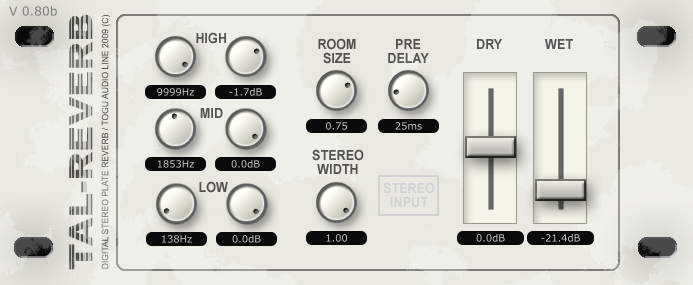
TAL Reverb-II is a super diffuse and lush reverb effect with a fast build up time. Ideal for ambient reverb sounds.

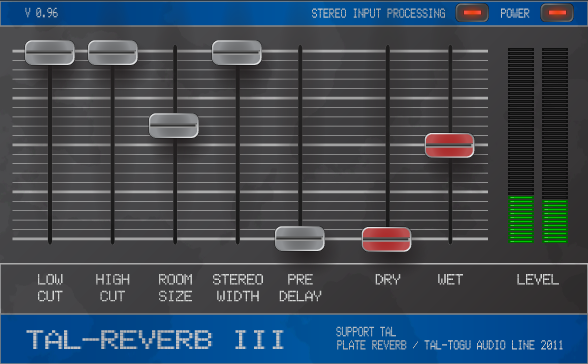
TAL-Reverb-III is an easy to use stereo reverb plugin. It’s popular because it’s very very diffuse sound 😉 It has an additional signal feedback path.

tal-software.com/products/tal-reverb

Transport ~ Transport Info Display


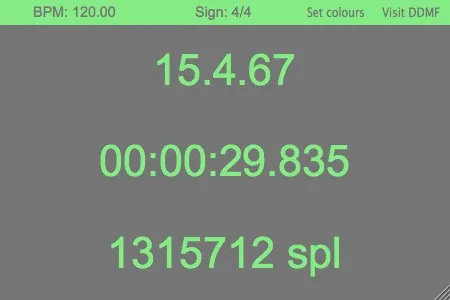
A handy little tool which provides all the information about measure, time, sample count etc that most hosts usually hide somewhere in a tiny little part of the screen. Transport is resizable and you can pick your own colours. Ideally, you’d drag it onto an external monitor in your 1000 square feet wooden studio and make it fullscreen so that your recording artists always stay oriented, but it works in smaller settings as well ;-). Made upon request by a DDMF user, we thought this gem is too good to not make it available for everybody. Transport is available as a 32 and 64 bit plugin in VST, RTAS, AAX (Win + Mac) and AU (Mac) format. MacOSX 10.6 is required.

ddmf.eu/freeware

OSD Lyrics ~ Linux On Screen Lyrics


Show synced lyrics with your favorite media player on Linux. OSD Lyrics is a desktop application to view lyrics compatible with various media players. It is not a plugin but a standalone program. OSD Lyrics shows lyrics on your desktop, in the style similar to KaraOK. It also provides another displaying style, in which lyrics scroll from bottom to top. OSD Lyrics can download lyrics from the network automatically.

github.com/osdlyrics

genius-spicetify ~ Spotify Lyrics


Fetch lyrics from Genius and Musixmatch right in Spotify’s desktop client.

github.com/khanhas/genius-spicetify

CP-GFX ~ Guitar Effect Processor


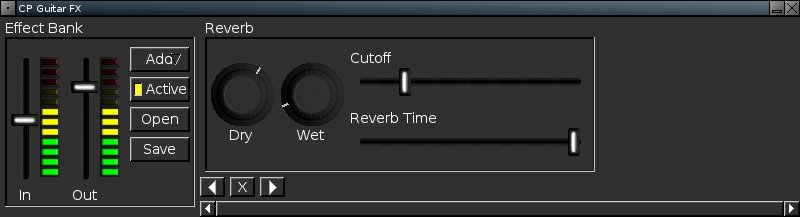
CP-GFX is simply a Cross Platform Guitar Effect Processor. The aim of the project is to create an extensible and easy to use program which is easy to port to different platforms and operating systems. Currently in development are both Linux x86 and Win32 builds.

For the Linux build the primary audio API in use is JACK, which allows CP-GFX to work along side and with other programs, such as Ardour, or any other software using JACK without any fuss or problems.

image of the CP-GFX user interface

cp-gfx.sourceforge.net
sourceforge.net/projects/cp-gfx

Bosca Ceoil ~ Multiplatform & Online Music Composition App


Easy to Use ~ A free and easy tool for creating music. Bosca is designed for beginners and takes less than five minutes to learn, and comes with a quick built in tutorial to walk you through everything, step by step.

Scales and Chords ~ Bosca supports lots of different scales and chords, so even if you’ve never composed music before, it’s really easy to get something that sounds good straight away.

Instruments ~ No messing around getting instruments to work! Bosca comes with over a hundred presets, including MIDI and Chiptune instruments.

It’s Free ~ Bosca Ceoil is completely free, and open sourced! Ready to make music? Try it right now in your browser: Online version

boscaceoil.net
github.com/TerryCavanagh/boscaceoil

LAoE ~ Multilayer Java Audio Editor


LAoE means Layer-based Audio Editor, and it is a rich featured graphical audio sample-editor, based on multi-layers, floating-point samples, volume-masks, variable selection-intensity, and many plugins suitable to manipulate sound, such as filtering, retouching, resampling, graphical spectrogram editing by brushes and rectangles, sample-curve editing by freehand-pen and spline and other interpolation curves, effects like reverb, echo, compress, expand, pitch-shift, time-stretch, and much more… And it is free of charge, under GPL license!

www.oli4.ch/laoe/home
sourceforge.net/projects/laoe

DrumGizmo ~ Multilayered Drum App & Plugin


DrumGizmo is an open source, multichannel, multilayered, cross-platform drum plugin and stand-alone application. It enables you to compose drums in midi and mix them with a multichannel approach. It is comparable to that of mixing a real drumkit that’s has been recorded with a multi mic setup.

Features:

  • Stand-alone, Lv2 and VSTi versions available
  • Open drumkit file format, allowing the community to create their own drumkits
  • Drum velocity, allowing for several different hit velocities for each drum
  • Multichannel output, making it possible to mix it just the way you would a real drumkit
  • Optional built-in humanizer, analyzing the midi notes, adjusting velocities on-the-fly
  • Stand-alone midi renderer, generating .wav files, 1 for each channel
  • Stand-alone midi input, making it possible to use DrumGizmo as a software sampler for an electronic drumkit

www.drumgizmo.org

CheeseTracker ~ Sampler & Sequencer


CheeseTracker is a software sampler and step-based sequencer. It allows a musician to turn single-note samples into instruments capable of covering three or four octaves (by playing the samples at different speeds, resulting in different pitches). In addition, it is possible to take a collection of samples that are recorded at different octaves, and combine them into a single “instrument,” allowing for even more octaves without sampling artifacts.

Using the Pattern Editor, it is possible to compose songs with these instruments that the computer plays automatically. The Pattern Editor allows the user to arrange samples in several independant channels, so that many samples can play simultaneously. These songs, and the samples which comprise their instruments, can be saved together in one-file archives called modules.

CheeseTracker imposes no limits on the length of the samples used. As a result, it can be used as a mixer as well as a sampler/sequencer. Effects such as reverb can be applied to each sample individually, eliminating the need for expensive pedals.

cheesetracker.sourceforge.net