foo_input_sacd ~ Foobar2000 Super Audio CD Decoder


Super Audio CD Decoder input plugin for foobar2000. Decoder is capable of playing back Super Audio CD ISO images, DSDIFF, DSF and DSD WavPack files. Direct DSD playback for compatible devices.

Separate DSD Processor/DSD Converter plugins for track extraction into DSD/DST encoded files.

sourceforge.net/projects/sacddecoder
Foobar2000:Components/Super_Audio_CD_Decoder_(foo_input_sacd)
Sony: How to install a Super Audio CD Decoder component

I’ve successfully followed these steps to get DSD (.dsf filetype) and SACD (.iso filetype) playing at high bit rate using foobar2000 on my S.M.S.L M500 DAC.

This has been adapted from “SECTION II” of this page, thanks to “sirblew” for the tip!

Introduction

DSD stands for Direct Stream Digital and it is a high-definition lossless audio format with a twist. PCM signal solutions (like FLAC, TTA or APE) measure a set of bits multiple times per second to capture the audio data, hence the 16/24-bit parameter. On the other hand, DSD uses only one bit but samples it 2.8 million times a second to capture the audio signal.

ASIO Output (Required)

Download and extract foo_out_asio – ASIO Output

Install the asio component:

  • File > Preferences > Components
  • Click Install.
  • Select “foo_out_asio.fb2k-component”.
  • Click OK, then OK again to restart Foobar2000.

Set the asio component as the output device:

  • File > Preferences > Playback > Output
  • Device: “ASIO : USB DAC ASIO” (or name of your device)

Optionally, disable all other devices:

  • File > Preferences > Playback > Output > Devices
  • (uncheck all but “ASIO : USB DAC ASIO”, for example)

SACD (ISO) Playback

Download and extract foo_input_sacd – Super Audio CD Decoder. This decoder is capable of playing back Super Audio CD ISO images, DSDIFF, DSF and DSD WavPack files.

Install DSD SACD component:

  • File > Preferences > Components
  • Click Install.
  • Select only “foo_input_sacd.fb2k-component”.
  • Click OK, then OK again to restart Foobar2000.

Set plugin for “PCM” as output mode:

  • File > Preferences >Tools > SACD
  • Output (per device)
    • Type: “DSD+PCM” (was PCM). Note: DSD+PCM will send a converted to PCM stream to Foobar so graphic add-ons like VU-meters, spectrographs and so on will work as they do when playing regular PCM files.
    • Samplerate: 384000 (was 44100)
  • Converter
    • DSD2PCM Mode: “Direct (64fp, 30kHz lowpass)” (was “Multistage (32fp)”). 30KHz low pass filtered means all DSD noise above that frequency is removed and does not reach the amp.
  • Input
    • Preferable Area: “Stereo” (was “None”). Only stereo tracks are displayed.
    •  Editable Tags (was unchecked).
    •  Store Tags With ISO (was unchecked). Stores tag info in the plugin folder.
    •  Linked 2CH/MCH Tags (was unchecked). Tags added to a SACD ISO will be shared between stereo and multichannel tracks.
  • Click OK

DSF Extraction (optional)

This can be useful if you open an ISO file and want to extract the contained files to DSF.

Download and extract foo_dsd_converter.

Install DSD Converter component:

  • File > Preferences > Components
  • Click Install.
  • Select only “foo_dsd_converter.fb2k-component”.
  • Click OK, then OK again to restart Foobar2000.

Ensure “Convert” menu item is enabled:

  • File > Preferences > Display > Context Menu
  • Ensure “Convert” (and child items) are checked.

Now right click a file in the playlist an choose “Convert > DSD Convert”.

  • Output format: DSF
  • Path:
  • Output style: “…” then choose file name: “nn. title” and close dialog.
  • Click “Convert”.

Foobar2000 DSD & SACD Support

Red Dot Forever ~ Simple MIDI Recorder


Red Dot Forever is an extremely simple program to record MIDI files. It has no advanced editing features — but if you just want to RECORD, listen back to what you PLAYed, and finally SAVE your recording to disk, then Red Dot Forever is all you need.

red dot

sourceforge.net/projects/reddot

Swami ~ MIDI Music Composition


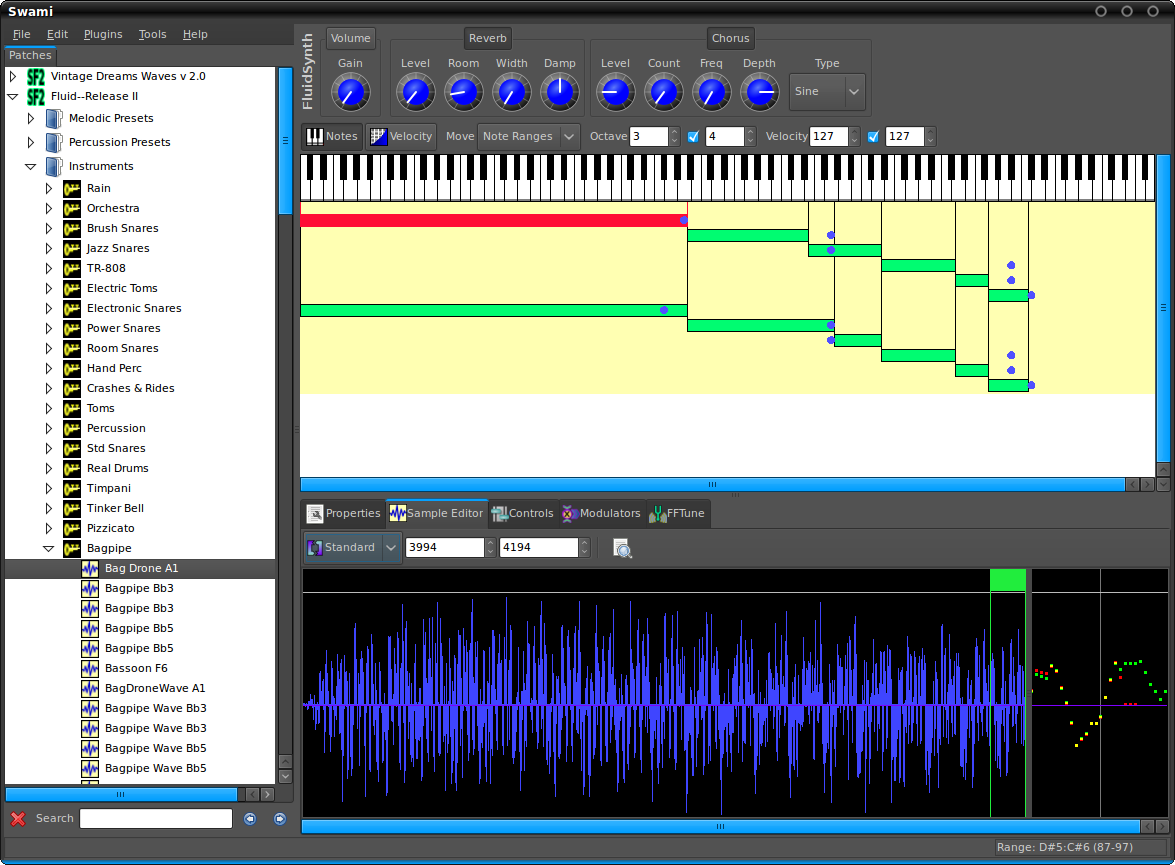
Project SWAMI, Sampled Waveforms And Musical Instruments, is a collection of free software for editing, managing and playing musical instruments for MIDI music composition. Current focus is primarily the SoundFont format, which is an open file format for digital audio “sample” based instruments.

Swami-2_0

www.swamiproject.org
sourceforge.net/projects/swami

foo_tfsandbox ~ Foobar2000 Title Formatting


This component provides an editor for title formatting code [mainly targeted at title formatting beginners]. The editor includes syntax highlighting, a preview of the selected fragment of the code and a view of the code structure. The idea behind the component is to allow users to explore title formatting scripts by exposing aspects which are normally hidden on the user interface of foobar2000 and its components.

www.foobar2000.org/components/view/foo_tfsandbox
github.com/stengerh/foo_tfsandbox
Hydrogenaudio Topic

Lossless Audio Checker ~ Truly Lossless Or Not


Internet music dealers currently sell “CD-Quality” tracks, or even better (“Studio-Master”), thanks to lossless audio coding formats (FLAC, ALAC). However, a lossless format does not guarantee that the audio content is what it seems to be. The audio signal may have been upscaled (increasing the resolution), upsampled (increasing the sampling rate) or even transcoded from a lossy to a lossless format. Lossless Audio Checker analyzes lossless audio tracks and detects upscaling, upsampling and transcoding.

losslessaudiochecker.com

foo_youtube ~ Foobar2000 & Youtube


Watch music videos and video playlists using Foobar2000

  • This component adds the possibility of playing Youtube, Vimeo and Dailymotion clips directly via their URL.
  • In addition to single clip URLs it supports clip feeds (i.e. playlists, channels etc.) from Youtube and Dailymotion.
  • Single clips and feeds can be added using File menu commands Add location and Add multiple URL(s).
  • Component has several UI elements, both DUI and CUI are supported. There are element for searching on Youtube within the program, for video playback and elements for various technical info about clips and component workflow. All elements are listed under Youtube Source group in UI configuration windows.
  • In addition to UI elements it has several popup windows with similar functionality.
  • For Lyric Show Panel 3 it provides an additional lyric source.
  • Clip thumbnails are exposed as album art to the program.
  • Single clip can be turned into album with multiple tracks.

fy.3dyd.com
www.foobar2000.org/components/view/foo_youtube

Install component then install these dependencies:

Installing madVR:

  1. Download madVR zip archive
  2. Extract contents to a new folder
  3. Move folder to “C:\Program Files” (you need to be an admin)
  4. Right click install.bat and select “Run as administrator”

If it works it will say “Install Successful”

Additional Resources:
wiki.mikejung.biz/MadVR#LAV_Filters

Bluemindo ~ Simple GPL Audio Player


Bluemindo is a really simple yet powerful audio player in Python/PyGTK, using Gstreamer. It’s a free (as in freedom) software, released under GPLv3, only.

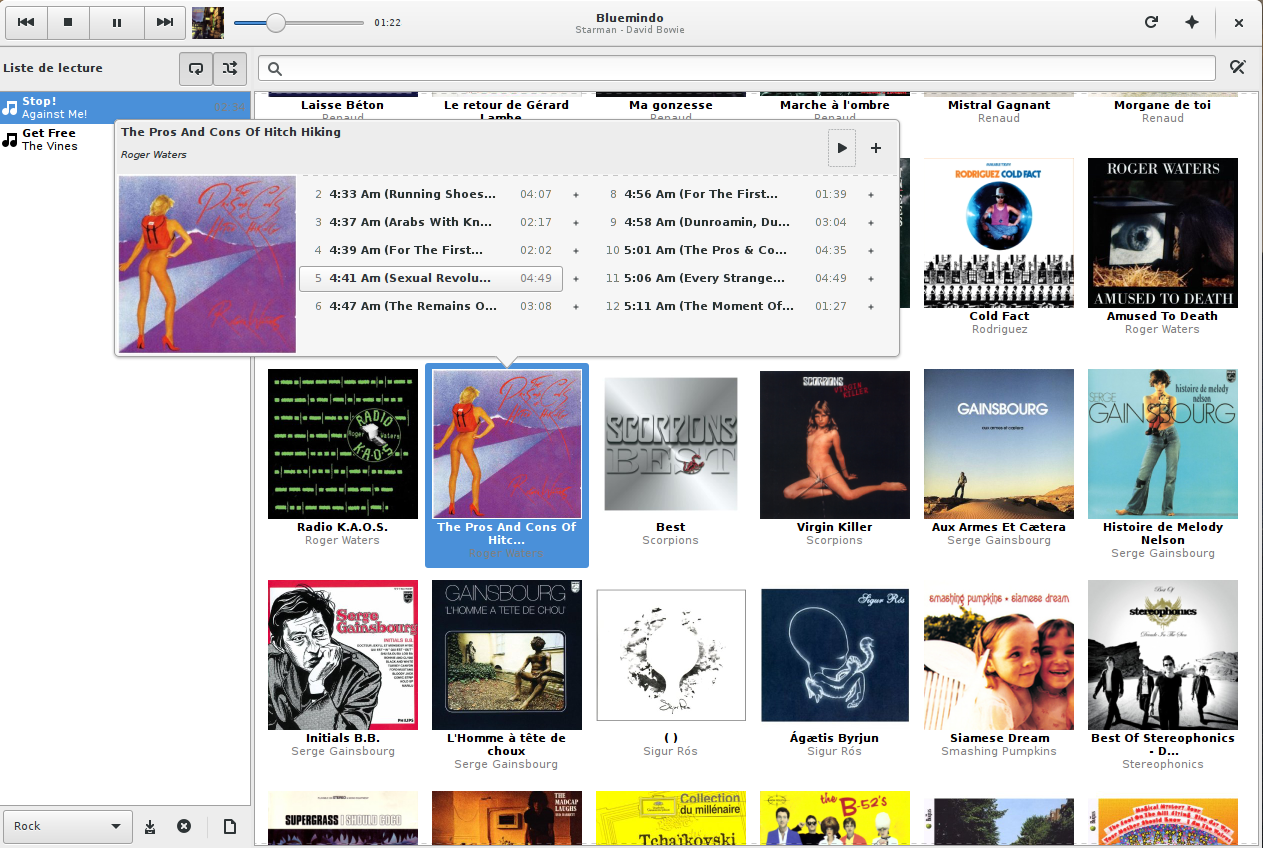
Bluemindo’s user interface consists of a main view of all your digitized album discs, which is searchable and filterable. The playback mode is gapless and support ReplayGain (it can also automatically choose to switch between Album and Track modes, depending on the kind of music that’s being played). Last but not least, it brings playlist (automatic and user-made), MPRIS/MediaPlayer2 support and lyrics/artwork downloading.

bluemindo-ui

bluemindo.codingteam.net
http://codingteam.net/project/bluemindo

foo_random_pools ~ Random Autoplaylists


Another type of Foobar2000’s playlists are randomly generated autoplaylists where songs, or groups of songs, are selected randomly from a pool of the same. By predefining a subset of a media library, “pools” of refined selections can be created and then drawn from.

foo_random_pools is a foobar2000 component for creating random playlist entries selected and grouped by various pool definitions.

www.foobar2000.org/components/view/foo_random_pools

Let’s say you want a playlist of random blues albums from your library.

  • First you’ll need to install the foo_random_pools component.
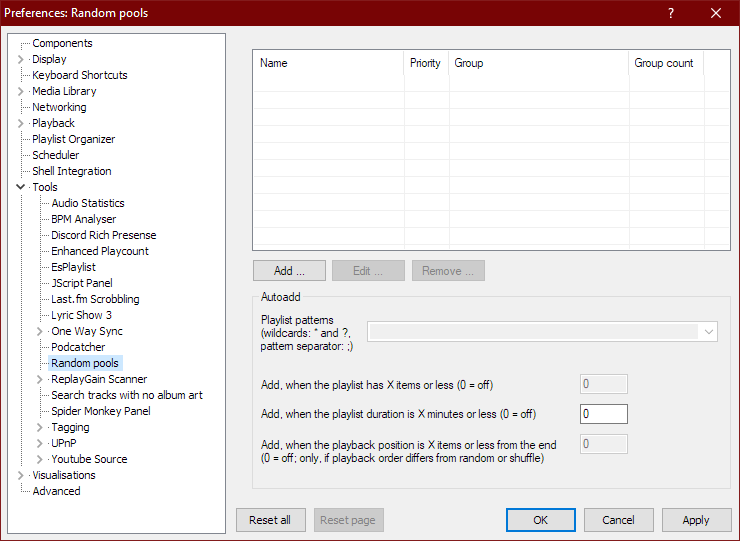
  • After you’ve installed foo_random_pools, you’ll need to set up a pool in the File > Preferences > Tools > Random pools sub-menu.File - Preferences - Tools - Random pools
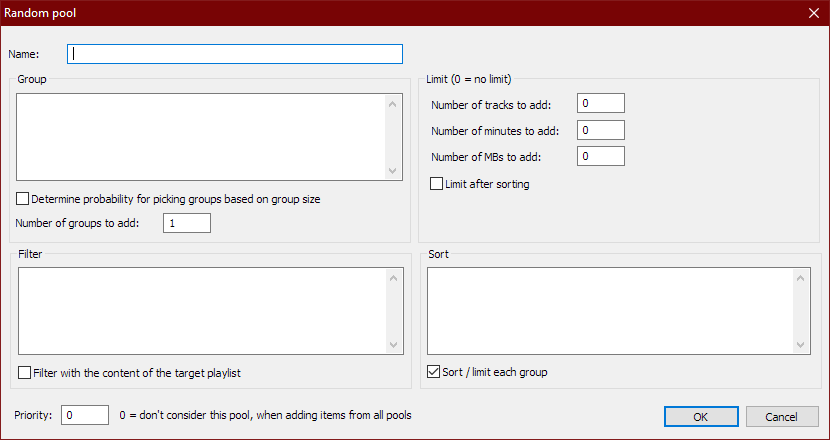
  • You’ll need to select the “Add …” button which brings up the Random pool criteria form.Preferences - Random Pools - Random Pool - blankFor example to make a pool of blues albums use the following criteria:
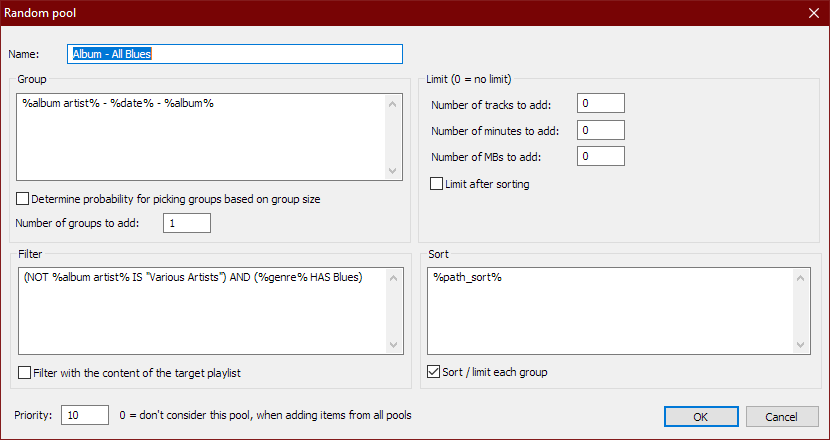
    Name: Album – All Blues
    Group: %album artist% – %date% – %album%
    Determine probability for picking groups …: Unchecked
    Number of groups to add: 1
    Filter: (NOT %album artist% IS “Various Artists”) AND (%genre% HAS Blues)
    Filter with the content of the target playlist: Unchecked
    Number of tracks to add: 0
    Number of minutes to add: 0
    Number of MBs to add: 0
    Limit after sorting: Unchecked
    Sort: %path%
    Sort / limit each group: Checked
    Priority: 10Preferences - Random Pools - Edit
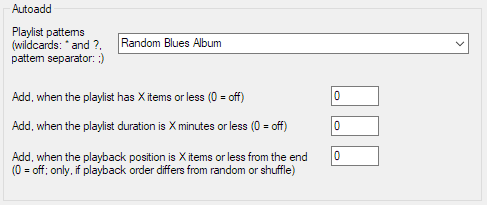
  • Now you have to link pools to a playlist by specifying a name in the Autoadd section’s Playlist patterns field of the Random pools preferences menu.File - Preferences - Tools - Random pools - Autoadd - Random Blues Album
  • Create a new playlist, File>New Playlist Ctrl+N, and name it “Random Blues Album” and then select and display it.
  • To add a random blues album to the playlist, select File > Random pools > Album – All Blues. Each time it’s selected, another random blues album will be added to the playlist.

ScorchCrafter ~ Guitar FX DAW Plugins


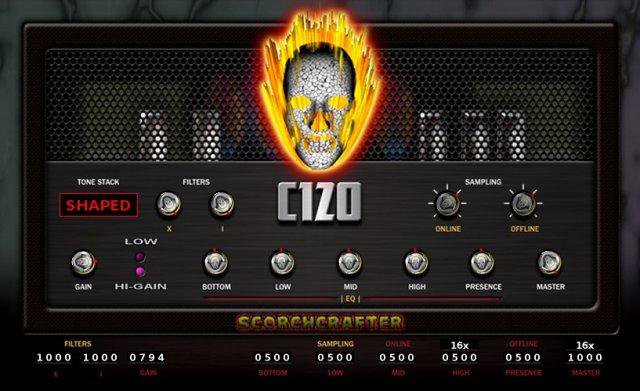
A group of audio DAW plug-ins targeting Windows (VST), Mac (VST/AU), and Linux, mostly for guitar amplifier simulation, with the C-120 being the flagship product (which started off long ago as a closed-source VST). Open source, mostly under GPL.

Features:

  • Up to 128-bit (internal) Multi-Stage Guitar Amplifier Layered Distortion, also runs in 64 and 32 bit modes
  • Native Mac and Linux ports coming soon
  • Advanced maths for tube-like guitar amplifier distortion, doesn’t use cheap waveshaping
  • Designed with dynamic response that changes according to the input level – Much more than just a basic “sample in, sample out”
  • Up to 12x Internal Oversampling, separate controls for live/online and off-line render
  • Multi-Band EQ – low, mid, high, contour, presence
  • Built-in custom convolution-based cab-mic effect, works with almost any sample rate and/or audio buffer size
  • New version of C120 has less clutter in GUI, separate page for advanced features
  • No commercial bloat!
  • GPL license, but just for the plug-in itself
  • Any rendered/processed audio is YOURS (any license you want)!
  • Hand-Coded in C++, pre-fab code or “wizards” were NOT used to build this!
  • Primarily built with MinGW-w64 and Code::Blocks IDE
  • NEW Jykwrakker plugin also features custom stereo reverb FX you won’t find elsewhere.
  • NEW Source code available under zlib license (long overdue)
scorchcrafter

sourceforge.net/projects/scorchcrafter

SimpleTAG ~ Massive Audio File Tagger


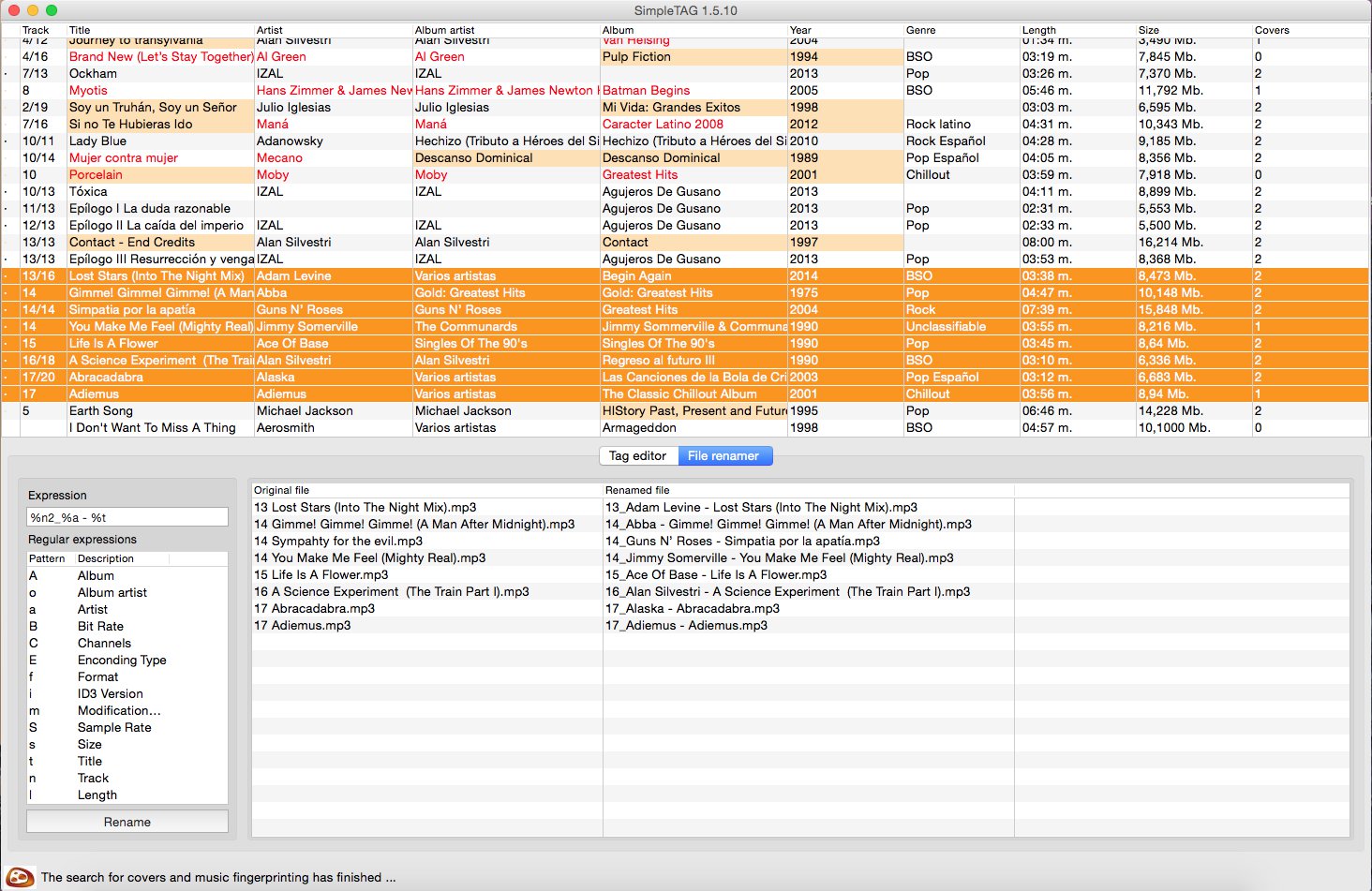
SimpleTag is a cross-platform desktop tool, which allows to update the labels of all your music before incorporating it into a musical library or cloud service.

Nowadays, the amount of music we have in our equipment is large, it is no longer possible to manage with the traditional system of filenames and directories. The most convenient way is to use the concept of libraries that handle the big market music players: iTunes, Amarok, Windows Media Player, Google Music, … etc.

The labels of music files contains all the information on artist, album, genre, title, lyrics … etc, associated with a song. This information is used by music players to manage their libraries. A good labeling enhances the user experience.

Do you want your music in the cloud? Then before, you have to check the tag information is correct before incorporating. If you do not, you will be unable to locate many of your songs.

Features:

  • Complete file information from audio fingerprint (AcoustID database). This uses the service provided by AcoustId (http://acoustid.org). One colors simple system gives you information about your search results
  • Locate the covers of your songs by the artist/album the song. The location of the cover image, uses Google image services. It also incorporates images that are in the directory you’re processing, treating them as potential cover images.
  • Allows mass renaming music files on disk, based on the tag information. If in addition to either your tagged songs, you want the file names follow a pattern that identifies them, you can use this feature.
  • Supports MP3, Ogg/Vorbis formats
  • Mass-tagging of multiple files
  • Auto enumerate the selected songs. In many cases, the songs do not have track numbers. With this feature, you can set the sequence numbers for all the songs on an album.

simpletag

sourceforge.net/projects/simpletag

Protoplug ~ Scriptable Audio Plugins


Create audio plugins on-the-fly with LuaJIT.

Protoplug is a VST/AU plugin that lets you load and edit Lua scripts as audio effects and instruments. The scripts can process audio and MIDI, display their own interface, and use external libraries. Transform any music software into a live coding environment!

Cross-platform: builds for Windows, Mac OS X and Linux. This means that all protoplug scripts are compatible with these platforms and can be loaded into a huge amount of audio software (glory to JUCE).

Fast: Use the speed of LuaJIT, and perform DSP tasks as efficiently as old school C implementations.

Free and open source: Want a new feature? Add it yourself. The source is MIT-licensed and available on Github.

protoplug_example_5-6

www.osar.fr/protoplug
github.com/pac-dev/protoplug

ISSE ~ Interactive Source Separation Editor


In applications such as audio denoising, music transcription, music remixing, and audio-based forensics, it is desirable to decompose a single-channel recording into its respective sources. To perform such tasks, we present a new software tool to perform source separation by painting on time-frequency visualizations of sound. Initial results shows the software can achieve state-of-the-art separation results compared to prior work.

Features:

  • Source separation
  • Denoising
  • Painting
  • Interaction

http://sourceforge.net/projects/isse