ABC/HR is an audio comparison tool that allows users to self-conduct double-blind listening tests of digital audio codecs.
https://sourceforge.net/projects/abchr/

ABC/HR is an audio comparison tool that allows users to self-conduct double-blind listening tests of digital audio codecs.
https://sourceforge.net/projects/abchr/

Shairport Sync is an AirPlay audio player – it plays audio streamed from iTunes, iOS, Apple TV and macOS devices and AirPlay sources such as Quicktime Player and ForkedDaapd, among others.
Audio played by a Shairport Sync-powered device stays synchronised with the source and hence with similar devices playing the same source. In this way, synchronised multi-room audio is possible for players that support it, such as iTunes and the macOS Music app.
Shairport Sync runs on Linux, FreeBSD and OpenBSD. It does not support AirPlay video or photo streaming.
github.com/mikebrady/shairport-sync
github.com/mikebrady/shairport-sync/wiki

Sayonara is a small, clear and fast audio player for Linux written in C++, supported by the Qt framework. It uses GStreamer as audio backend. Sayonara is open source and uses the GPLv3 license. One of Sayonara’s goals is intuitive and easy usability. Currently, it is only available for Linux and BSD. Although Sayonara can be considered as a lightweight player, it has a lot of features in order to organize even big music collections. In contrast to the heavyweight players, the main focus of Sayonara is performance, low CPU usage and low memory consumption. Sayonara is a great alternative to players like Rhythmbox, Clementine or Amarok. Those who miss Winamp for Linux should give Sayonara a try.
Managing your library: You can manage your library by artists, albums, genres or file paths. Sayonara contains a sophisticated tag editor helping you to keep your collection clean. You can hold multiple playlists simultaneously, save/rename/delete or export them to common playlist file formats. With the multi library feature you can manage multiple directories as stand-alone libraries and copy and move tracks from one to another. There are even more complex library plugins like Soundcloud or SomaFM support.
Directory view: Some people don’t have a perfect tagged library and are more interested in the directory structure of their libraries. Sayonara provides various features to access and edit your music in the directory view.
Plugins: In addition, there are some useful plugins helping to enhance your comfort while listening. Some interesting plugins are the equalizer, a speed/pitch control, a crossfader, bookmarks for tracks and a broadcasting function.
Webstreams and Podcasts: You can record all tracks streamed from the internet. Your saved tracks automatically tagged, of course. When listening to ordinary webstreams, a history of all played tracks can be displayed. If webstreams or podcasts contain some chapter information, Sayonara also uses this information in order to provide fast jumping within these tracks.

sayonara-player.com
en.wikipedia.org/wiki/Sayonara_Player

Ecasound is a software package designed for multitrack audio processing. It can be used for simple tasks like audio playback, recording and format conversions, as well as for multitrack effect processing, mixing, recording and signal recycling. Ecasound supports a wide range of audio inputs, outputs and effect algorithms. Effects and audio objects can be combined in various ways, and their parameters can be controlled by operator objects like oscillators and MIDI-CCs. A versatile console mode user-interface is included in the package.
The primary platform for running Ecasound is GNU/Linux. Ecasound can also be run on many UNIX-derived systems such as FreeBSD, Mac OS X and Solaris. Limited support for Windows is available through Cygwin.

Radio Tray is an online radio streaming player that runs on a Linux system tray. Its goal is to have the minimum interface possible, making it very straightforward to use. Radio Tray is not a full featured music player, there are plenty of excellent music players already. However, there was a need for a simple application with minimal interface just to listen to online radios. And that’s the sole purpose of Radio Tray.
Features:
- plays most media formats (based on gstreamer libraries)
- drag & drop bookmarks support
- easy to use
- supports PLS playlist format (Shoutcast/Icecast)
- supports M3U playlist format
- supports ASX, WAX and WVX playlist format
- extensible by plugins
Radiotray-NG: An Internet radio player for Linux (updated fork)
github.com/ebruck/radiotray-ng

ReZound aims to be a stable, open source, and graphical audio file editor primarily for, but not limited to, the Linux operating system.
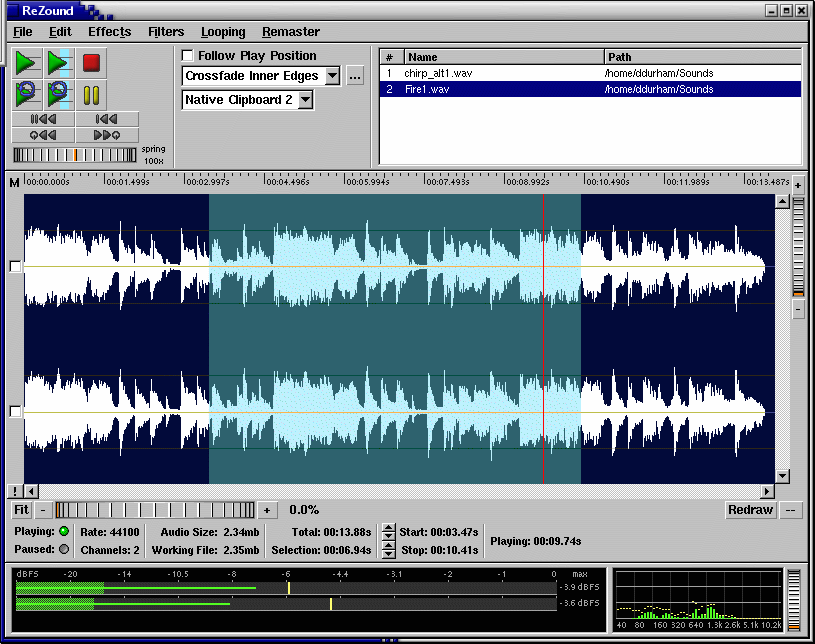
rezound.sourceforge.net
sourceforge.net/projects/rezound
github.com/ddurham2/rezound

The Network Audio System is a network transparent, client/server audio transport system.
Features:
- Device-independent audio over the network
- Lots of audio file and data formats
- Can store sounds in server for rapid replay
- Extensive mixing, separating, and manipulation of audio data
- Simultaneous use of audio devices by multiple applications
- Used by a growing number of ISVs
- Small size
- Free! No obnoxious licensing terms
www.radscan.com/nas
sourceforge.net/projects/nas

Cdrdao records audio or data CD-Rs in disk-at-once (DAO) mode based on a textual description of the CD contents.
Advantages of Disk-At-Once (DAO) Recording:
Recording in disk-at-once mode writes the complete disc, i.e. lead-in, one or more tracks and lead-out, in a single step. The commonly used track-at-once (TAO) mode writes each track independently which requires link blocks between two tracks. Older CD-recorder models forced a two second pause (pre-gap) between two tracks whereas newer models allow adjusting of the pause length in TAO mode reducing the number of link blocks to a minimal amount. However, with TAO it is generally not possible to define the data that is written in pre-gaps. But exactly this feature makes audio CD recording interesting, e.g. by creating hidden bonus tracks or track intros in pre-gaps like it is common habit on commercial CDs. Finally, DAO recording is the only way to write data to the unused R-W sub-channels for e.g. CD-G or CD-TEXT.
Features:
- Full control over length and contents of pre-gaps (pause areas between tracks). Pre-gaps may be completely omitted, e.g. for dividing live recordings into tracks.
- Control over sub-channel data like:
- catalog number
- copy, pre-emphasis, 2-/4-channel flags
- ISRC code
- index marks
- Support for exact audio, data and mixed mode CD copying.
- Support for R-W sub-channel writing.
- Tracks may be composed of different audio files supporting non destructive cut.
- Accepts WAVE and raw audio files.
- CD-TEXT reading and writing with drives that support it.
- CDDB access to automatically create CD-TEXT data.
- Support for on-the-fly copying.
cdrdao.sourceforge.net
github.com/cdrdao
wiki.hydrogenaud.io/index.php?title=Cdrdao
en.wikipedia.org/wiki/Cdrdao
Frontend (GUI):
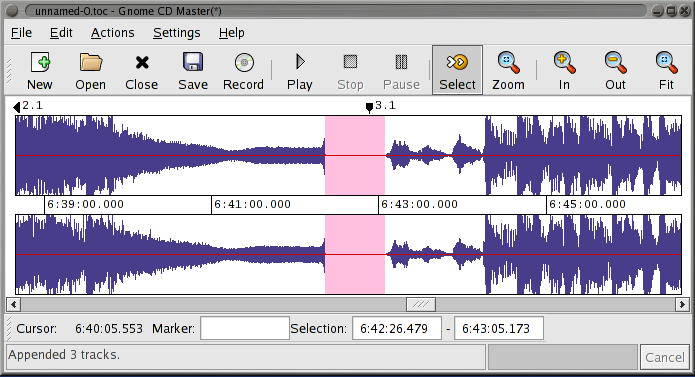
cdrdao.sourceforge.net/gcdmaster

DarkIce records audio from an audio interface (e.g. sound card), encodes it and sends it to a streaming server.
DarkIce can record from:
DarkIce can encode in the following formats:
DarkIce can send the encoded stream to the following streaming servers:
www.darkice.org
sourceforge.net/projects/darkice

jack-keyboard is a virtual MIDI keyboard – a program that allows you to send JACK MIDI events ( 😉 play using your PC keyboard). It’s BSD-licensed. User interface is GTK-based.

sourceforge.net/projects/jack-keyboard

fmedia is a fast media player/recorder/converter for Windows, macOS, Linux and FreeBSD. It provides smooth playback and recording even if devices are very slow. It’s highly customizable and can be easily extended with additional plugins. Its low CPU & memory consumption saves energy when running on a notebook’s battery.
Play or convert audio files, record new audio tracks from microphone, save songs from Internet radio, and much more! fmedia is free and open-source project, and you can use it as a standalone application or as a library for your own software.
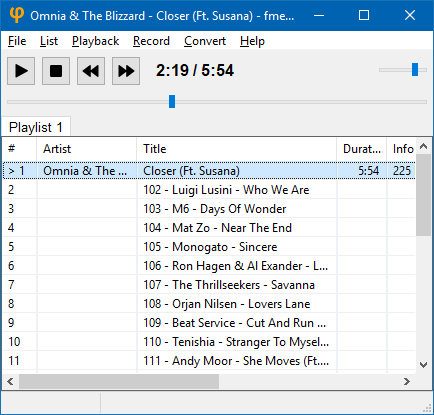
stsaz.github.io/fmedia
github.com/stsaz/fmedia

UADE is a music player for UNIX platforms that plays music formats used on the Amiga computer.


