Works with Columns UI and Default UI.


Foobar component which displays information about currently played track via Discord Rich Presence.
github.com/TheQwertiest/foo_discord_rich
hydrogenaud.io/index.php/topic,116860.0.html
Alternative:
github.com/ultrasn0w/foo_drpc
if($stricmp($right(%filename_ext%,3),iso),Super Audio CD - 2.8MHz,%codec% - $ifgreater(%samplerate%,1000000,$insert($div(%samplerate%,100000),'.',$sub($len($div(%samplerate%,100000)),1)) MHz,$ifgreater($mod(%samplerate%,1000),0,$insert($div(%samplerate%,100),'.',$sub($len($div(%samplerate%,100)),1)) kHz,$div(%samplerate%,1000) kHz)) - %bitrate% kbps)

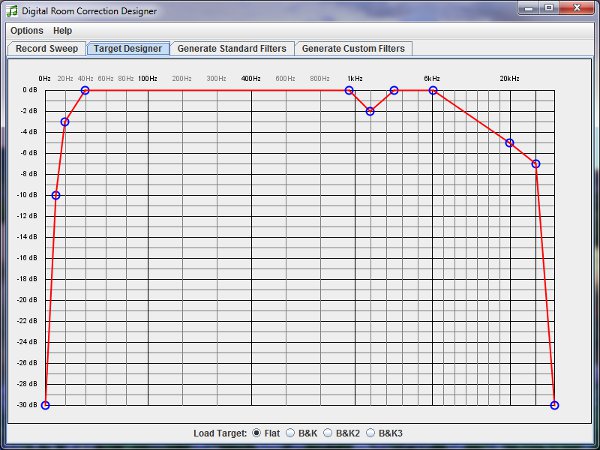
Digital Room Correction Designer was created to ease the process of creating and loading room correction filters for use with two channel stereo systems. DRC Designer includes Denis Sbragion’s DRC for creating room correction filters, John Pavel’s Convolver VST for playing music through the filters, and Simple Automated IR Measuring Tool by Denis Sbragion and Edward Wildgoose for creating the impulse response files needed by DRC.
www.alanjordan.org/DRCDesigner
Foobar2000 Setup

Dolby Headphone technology gives you the sound of a 5.1 surround system through any pair of headphones.
It accurately models the surround sound listening experience of a properly set up and calibrated 5.1-channel speaker system, making it ideal for personal and portable surround listening.
This component wraps the functionality of a Dolby Headphone engine DLL (typically DOLBYHPH.DLL bundled with some software DVD players) to be used under Foobar2000. After installation you must configure the plugin pointing out the location of that DLL in your system and restart foobar2000. Amplification is provided by the Dolby Headphone engine itself.
Additional resources:
ww.head-fi.org/threads/5-1-headphone-experience-foobar-configuration-for-all-stereo-music-files.447089/
www.head-fi.org/threads/foobar2000-dolby-headphone-config-comment-discuss.555263/
www.dlldownloader.com/dolbyhph-dll/

Extracts bass from the source signal using a linear phase low-pass filter and sends it to the LFE channel.
Features:
- fast fir processing
- adjustable filter shapes
- delay control
- mono, stereo, 3.0, 4.0, 5.0 input support
foobar2000.org/components/view/foo_dsp_subwoofer
HA Forum Topic
Linear phase is a property of a filter, where the phase response of the filter is a linear function of frequency. The result is that all frequency components of the input signal are shifted in time (usually delayed) by the same constant amount (the slope of the linear function), which is referred to as the group delay. And consequently, there is no phase distortion due to the time delay of frequencies relative to one another.
~ en.wikipedia.org/wiki/Linear_phase

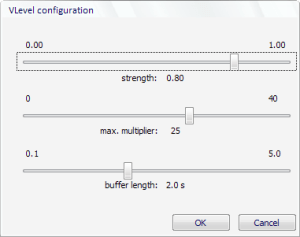
VLevel keeps your music from making you jump out of your seat, and it keeps you from having to fiddle with the volume constantly. It’s different from other dynamic compressors because it looks ahead. You can think of VLevel as someone who knows your music by heart, and turns the volume up during quiet passages, but smoothly turns it back down when he knows a loud part is coming. It’s great for making CDs to listen to in your car, or to play background music on your computer.
vlevel.sourceforge.net
HydrogenAudio Topic
HydrogenAudio Wiki

There is an updated version here.
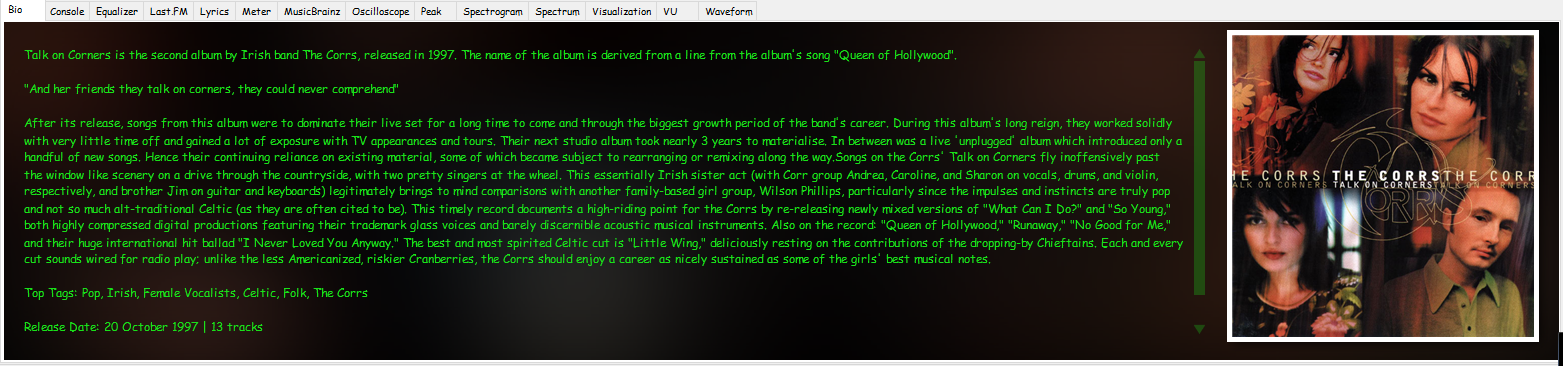
Adding scripts is one method used to extend Foobar’s abilities. Not only are there quite a few existing useful scripts, new custom scripts can be written. One great script is the Biography script which displays biography and rating information from both AllMusic and Last.FM
 Script Panel:
hydrogenaud.io/index.php/topic,112914.msg929674

foo_bpm – A Foobar component for automatically analyzing the number of beats per minute in audio files.
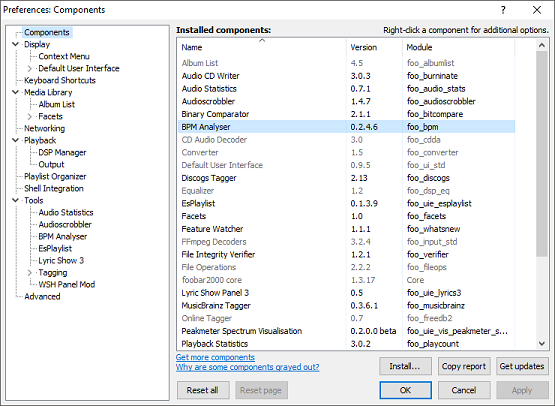
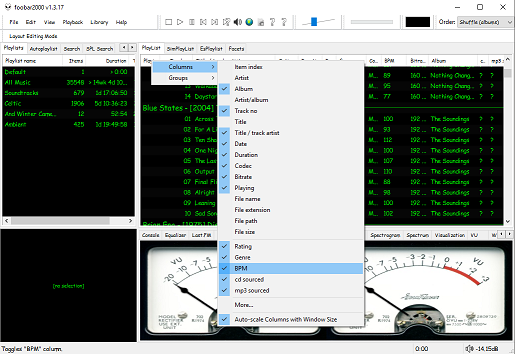
Change Icon and select the downloaded metronome.ico fileOK

Once the toolbar button is installed, songs can be selected then scanned. The songs will now be tagged with the %bpm% tag and can be selected or sorted by beats per minute as displayed in the playlist column.
www.foobar2000.org/components/view/foo_bpm
hydrogenaud.io/index.php/topic,77142.0
Updated Configuration
github.com/stengerh/foo_bpm
foobar.hyv.fi/?view=foo_bpm (latest version)

D.I.Y. Audio Heaven:
Compressing DSD files with Wavpack 5
Hydrogen Audio:
How to properly pack DSF files into WavPack?
DSD, WavPack and Foobar SACD Decoder
I’ve successfully followed these steps to get DSD (.dsf filetype) and SACD (.iso filetype) playing at high bit rate using foobar2000 on my S.M.S.L M500 DAC.
gist.github.com/milnak/c3b4148e574fa7828cc7d24e46d6dbe9

Enhance the appearance and functionality of Foobar2000 by adding a visual waveform representation of the currently playing audio track, which can be used to navigate to any point in the image of the track by clicking there.
Waveform Seekbar is a UI element for both the Default UI and Columns UI that provides seekbar functionality (seeking, position indicator) on top of a pretty image of the waveform of the currently playing song, drawn using either Direct3D 9.0c or Direct2D 1.0.

Foobar Waveform Seekbar in action
Topic ~ Hydrogen Audio
Download ~ Hydrogen Audio
Documentation ~ Hydrogen Audio
Source code ~ GitHub
Waveform Minibar ~ CUI Only
Installing a foobar component
Waveform ~ Wikipedia

Playlists, or named lists of songs, are an essential aspect of Foobar2000. Whenever you add a song to Foobar, you are adding it to one of Foobar’s playlists. Foobar allows you to create and maintain different playlists, which are just entitled lists of your audio tracks (files). The playlists link to audio files in a ‘many to one’ relationship; that is, there can be many tracks on different playlists that reference the same audio track. Foobar can import and exports playlists in a variety of formats; and stores its own playlists as .fpl files. (This is different from adding a song to your Foobar2000 Library).
Playlists can be created manually by adding individual songs, or automatically by specifying a set of conditions in a query with the result displayed as an “Autoplaylist”. Manually created playlists are static, they don’t change unless you change them; Autoplaylists are dynamic, that is the results may change whenever the Autoplaylist is queried.
Playlists created manually can be edited directly, while Autoplaylists are edited by modifying the query. However, you can save the results of an Autoplaylist as a new static, and therefore editable, playlist.
by genre from the Albumlist view selectorCreate AutoplaylistYou will now have a new Autoplaylist listed on the playlist manager tab with the name of the genre you selected. Playlists created this way are called an Album List branch.
Search tab%path% HAS replace this with the actual path in the search field...Create AutoplaylistBuilding Autoplaylist queries ~ Foobar2000: Query Syntax
Formatting playlist contents ~ Title Formatting Introduction
Adding Playlist Headers ~ Playlist Grouping Schemes


 The Audio File