Bitfake was originally created to detect fake .FLAC files through spectral analysis. It has since grown into a multipurpose CLI tool for handling music more easily and efficiently.
One common problem was that getting a track’s metadata required long ffprobe commands with messy output. Converting music with ffmpeg was also repetitive. The command itself is easy to remember, but writing scripts to convert entire directories felt inefficient and slow. This project now performs metadata and conversion tasks directly through linked libraries (TagLib/libsndfile/libav*).
Features:
Get metadata
Get ReplayGain info (useful for music players)
Spectral analysis on 44.1 kHz .FLAC files (higher sample rates may be misrepresented, so be careful)
Lossy diagnosis (banding score)
File Conversion + VBR Support (Works for outputs like .wav, .flac, .ogg, .mp3, .aac, .opus)
Tagging metadata (Works for single files, but not directories yet)
Calculating ReplayGain and applying it to files (Works for track replay gain iterating through directories, album replay gain is a bit funky?)
Directory Conversion (works for all previously mentioned formats!)
CoverArt+ (Brings along cover art among all conversions!)
Organizing Files by album! (Give a dir of random music, and bitfake will organize it – ty to uncognic)
Directory Tagging (YAY!)
Album folder renaming from tags (Artist – Album (Year))
caudec is a command-line utility that transcodes (converts) audio files from one format (codec) to another, among other things.
It leverages multi-core CPUs and runs multiple processes concurrently (one per file and per codec, and more than one thread per codec when it supports it). The objective is to hog the CPU as much and as long as possible. One strategy is to sort input files by size, so that the largest files potentially get more threads towards the end of the job.
Supported output formats / codecs: all of the above, as well as LossyWAV / LossyFLAC, MP3, AAC (.m4a), Ogg Vorbis, Opus.
Supported platforms: macOS, Linux.
Transcoding to several different codecs at once is possible. In that case, decoding of input files is done only once.
Metadata is preserved (as much as possible) from one codec to another.
Artwork can be embedded into each file, and / or copied to the output directory. It can be done selectively (e.g. embed and / or copy one image for lossless files, and another image for lossy files).
Audio can be resampled (e.g. 48kHz to 44.1kHz) and downmixed (e.g. 6 channels to stereo). A profile can be provided to set a maximum value for the number of channels, bit depth and sampling rate. When a profile is provided, the source will only be altered after decoding and before encoding, if some metric of the source is above the given profile.
Multiprocess ReplayGain scanner for FLAC, WavPack, MP3, Ogg Vorbis, Opus.
Ability to hard link lossy files to a different directory when encoding to WavPack Hybrid. The point is to have two libraries that takes the storage of just one, with a lossy collection that has its own root directory and that’s easy to drag and drop to a device such as a smartphone or a Digital Audio Player (DAP).
Ability to touch files and album directories using metadata to reflect the music’s release date and duration (see example below).
foo_truepeak is a ITU-R BS.1770-5 compliant True Peak scanner. It can also scan ReplayGain, Loudness Range (LRA), Dynamic Range (DR), show the amount of clipping samples and report the position of highest peak.
For users primarily concerned with playback quality and simplicity, foo_truepeak can replace foobar2000’s ReplayGain and DR scanners. It uses modern loudness standards, detects true peaks and can write all relevant tags in a single pass. While its ReplayGain and DR values may not exactly match legacy scanners, they are more appropriate for real-world playback on modern systems.
In foobar2000, open File → Preferences → Components.
Click Install…, select the foo_truepeak.fb2k-component file.
Restart foobar2000 when prompted.
2. Disabling legacy scanners (optional but recommended)
To avoid confusion or duplicate workflows:
Don’t try removing the ReplayGain scanner as it’s built in.
You can uninstall foo_dr_meter and or foo_dynamic_meter.
This keeps foo_truepeak as your single analysis tool.
3. Open foo_truepeak preferences
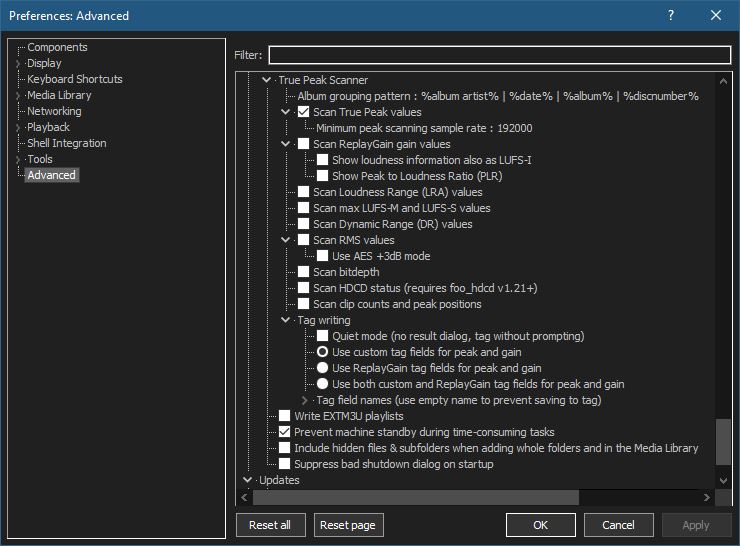
Go to File → Preferences → Advanced →Tools → True Peak Scanner
4. Ensure the following is enabled
✔ Scan True Peak Values
True peak scanning accounts for inter-sample peaks created during digital-to-analog conversion, ensuring that peak levels reflect what a real DAC actually outputs, not just what is stored in the file.
5. Enable ReplayGain scanning
✔ Scan ReplayGain values
Notes:
Gains are derived from EBU R128 loudness, but written as ReplayGain tags.
Peaks are true peaks, not simple sample peaks.
Playback normalization works normally in foobar2000.
6. Enable Dynamic Range scanning
✔ Scan Dynamic Range (DR) values
Notes:
These values are analytical, not official TT DR Meter values.
They are suitable for comparison within your library, not for DR Database submissions.
7. Choose tag writing behavior
✔ Use ReplayGain tag fields for peak and gain
8. Run a True Peak scan
Select a track, tracks or albums in a playlist.
Right-click → True Peak Scan.
You can also create custom buttons on the toolbar for Album or Track scans.
For most users the latest version of Foobar2000 32-bit is adequate. Users with very large music libraries may need to install the 64-bit version. The latest Foobar2000 installers are available on the official downloads page: www.foobar2000.org/download
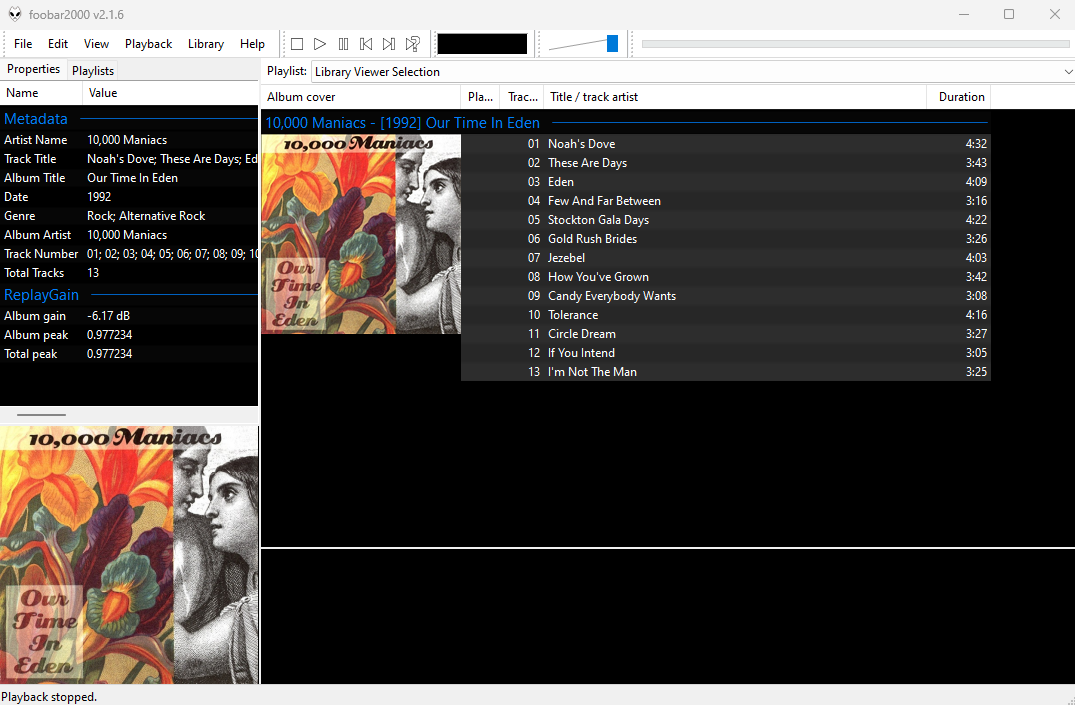
After downloading, installing Foobar2000 and starting Foobar2000, you will see the main Default User Interface, commonly referred to as the DUI.
The first step is to populate Foobar2000’s Media Library.
Select Preferences > Media Library > Add...
and navigate to your Music folder. Once Foobar2000 has scanned all the subfolders and files, it will continue to monitor for any additions, deletions or revisions
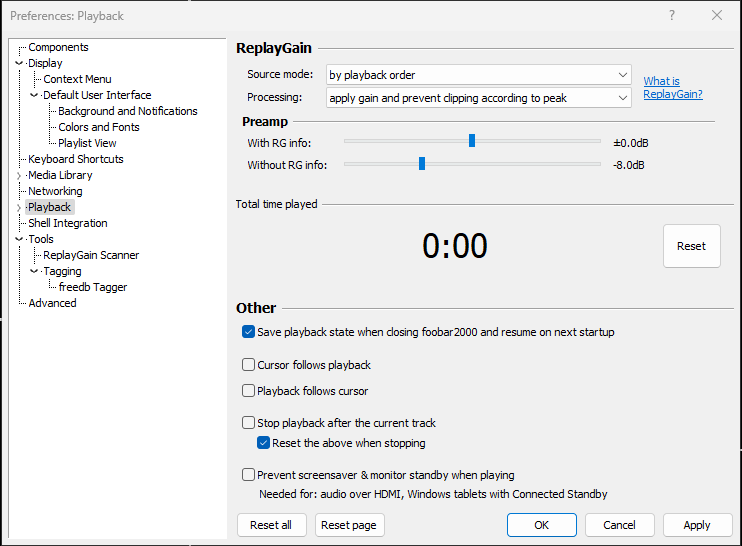
Change Processing to ‘apply gain and prevent clipping according to peak‘
Adjust the ‘Without RG info‘ slider to -8.0 dB
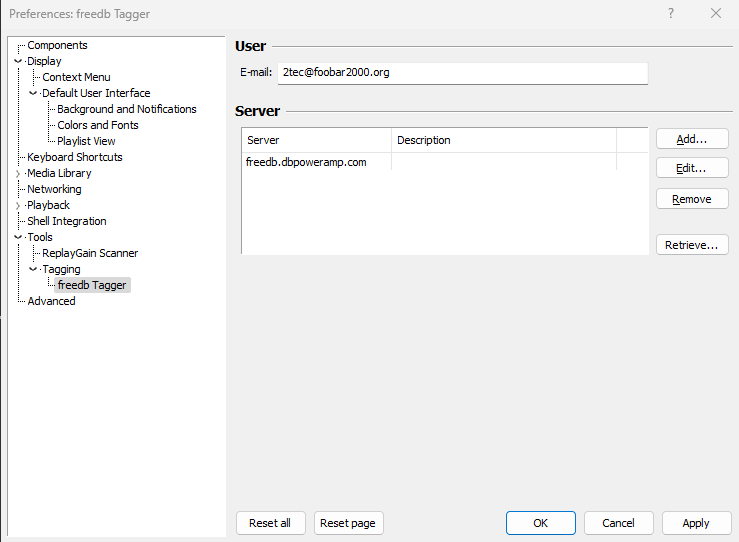
The last initial step is to set your own individual freedb address.
At this point you should see your music and it should play without issue.
This covers the very basics. The next steps will be to add additional components, more configuration and how to use Foobar2000 to accomplish day to day tasks.
Zoog is a Rust library that consists of functionality that can be used to determine the loudness of an Ogg Opus file and also to rewrite that file with new internal gain information as well as loudness-related comment tags. It also has functionality for purely manipulating comment tags of both Ogg Opus and Ogg Vorbis files.
Zoog currently contains two tools, opusgain and zoogcomment. opusgain can be used to:
set the output gain value located in the Opus binary header inside Opus files so that the file plays at the loudness of the original encoded audio, or of that consistent with the ReplayGain or EBU R 128 standards.
write the Opus comment tags used by some music players to decide what volume to play an Opus-encoded audio file at.
It is intended to solve the “Opus plays too quietly” problem.
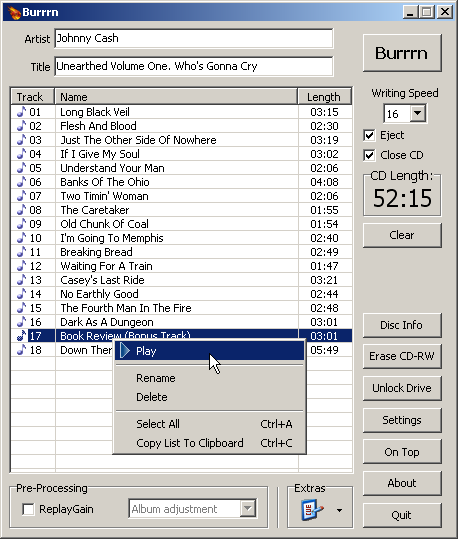
Burrrn is a little tool for creating audio CDs with CD-Text from various audio files. Supported formats are: wav, mp3, mpc, ogg, aac, mp4, ape, flac, ofr, wv, tta, m3u, pls and fpl playlists and cue sheets. You can also burn EAC’s noncompliant image + cue sheets! Burrrn can read all types of tags from all these formats (including ape tags in mp3). Burrrn uses cdrdao.exe for burning.
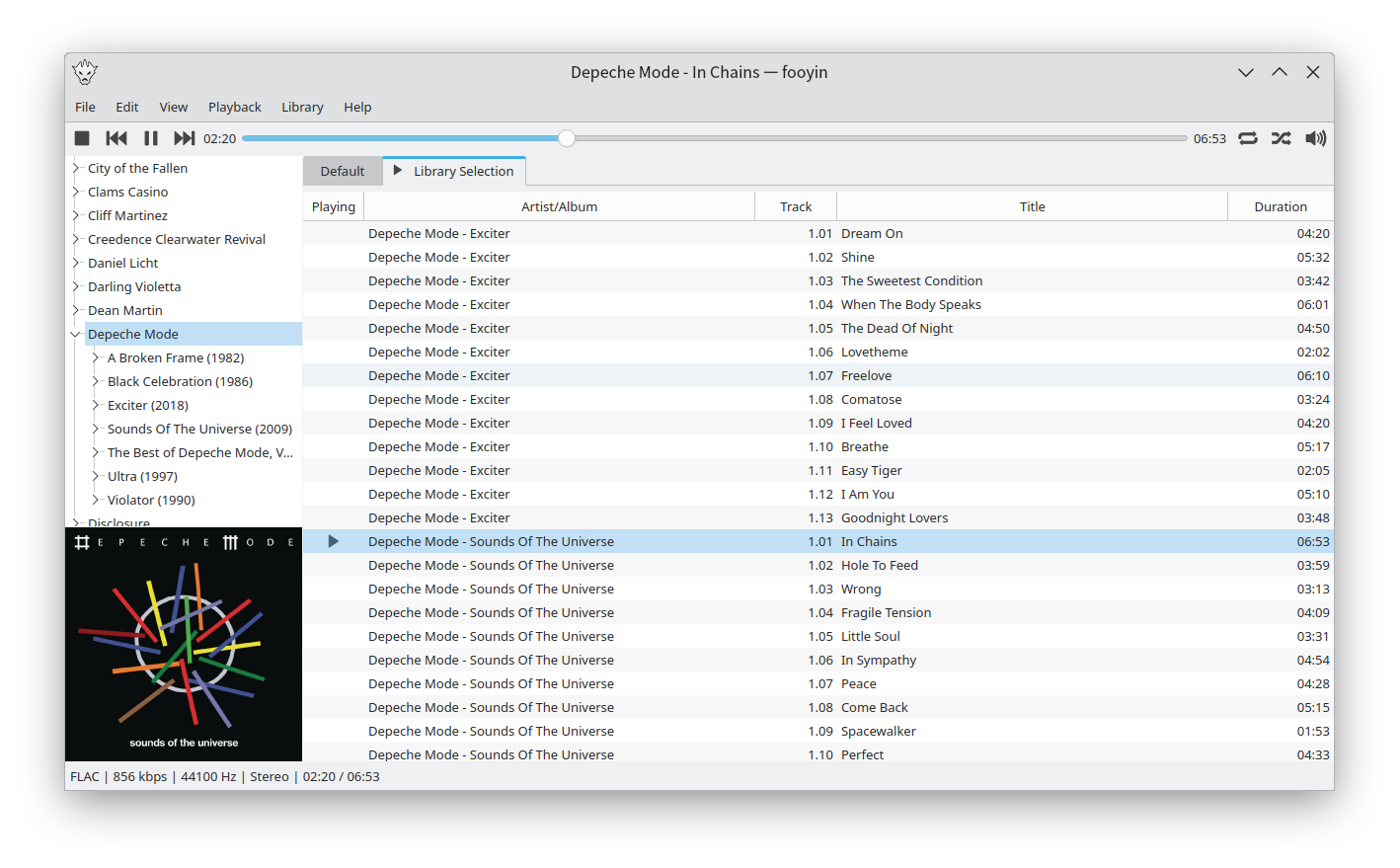
Fooyin is a customisable music player for Linux. Fooyin features a layout editing mode in which the entire user interface can be customised, starting from a blank state or a default layout. FooScript takes this further by extending the customisation to individual widgets themselves.
I wrote this because I wanted a command line tool that could add album art to (and save from) mp3 files, compute replaygain and save them as ID3 tags (readable by Winamp, etc).
Features:
Write (all) Text, URL and Picture frame tags, with description.
Compute replay-gain values and set them as ID3v2.3 tags.
Apply and Undo volume gain (as mp3gain).
Extract pictures from mp3 files.
Inspect ID3 v1.1, v2.3, and v2.4 tags.
Inspect detailed info on mp3 files, including lametag data.
Muine is an innovative music player, featuring a simple, intuitive interface. It is designed to allow users to easily construct a playlist from albums and/or single songs. Its goal is to be simply a music player, not to become a robust music management application. This doesn’t mean Muine has no features! Some feature highlights:
Ogg/Vorbis, FLAC, AAC and MP3 music playback support
Automatic album cover fetching via MusicBrainz and Amazon
Support for embedded album images in ID3v2 tags
ReplayGain support
Support for multiple artist and performer tags per song
Plugin support
Translations into many languages
Muine is targeted at the GNOME desktop and uses GTK+ for the interface. Most of the code is written in C#, with some additions/bindings/glue in plain C. Muine was originally written by Jorn Baayen, but now maintained mostly by others.
WaveGain is an application of the ReplayGain algorithms to standard PCM wave files. Calculated gain adjustments are applied directly to the audio data, instead of just writing metadata as traditionally done for other formats like MP3, FLAC and Ogg Vorbis. The replaygain values can also be added as metadata in a custom RIFF chunk named ‘gain’. This could theoretically allow WAV files to have same lossless functionality as other formats where audio data is not altered. But since no current players are aware of this “standard”, the metadata is used only by WaveGain for the “–undo-gain” feature, which is lossy.
FiiO Music App is designed to maximize the experience of music lovers. Download the FiiO Music app today to start your journey to rediscover your music!
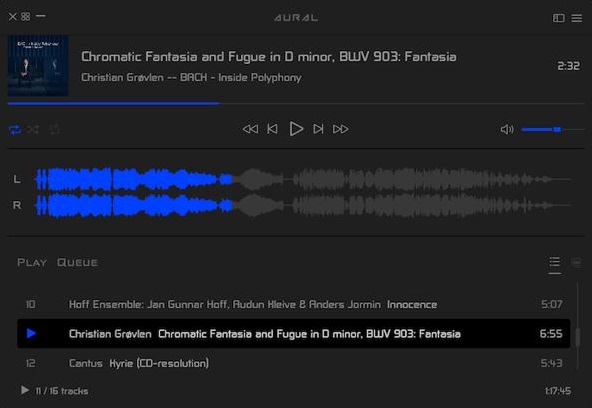
Aural Player is an audio player for macOS. Inspired by the classic Winamp player for Windows, it is designed to be to-the-point, easy to use, and customizable, with support for a wide variety of popular audio formats and some sound tuning capabilities for audio enthusiasts.












 The Audio File