Aural Probe ~ Sample Library Tool


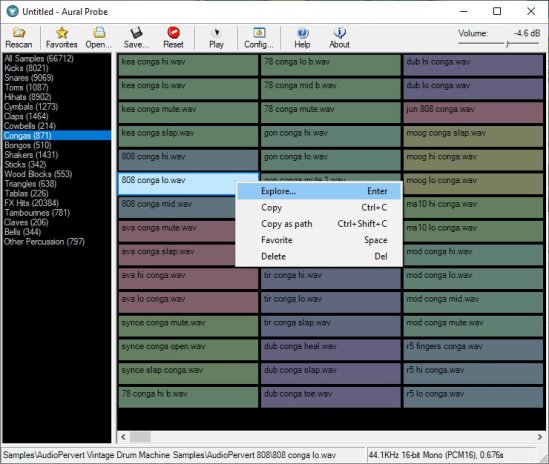
Aural Probe is a sample librarian tool for computer musicians / audio engineers. Automatically and non-destructively index your disorganised sample collection from a list of folders into categories (kick, snare, hihats etc.) based on folder/filename wildcard matches. Easily audition samples, load/save favourites, and drag-and-drop straight into your sequencer.

Features:

  • Categorize your huge sample collections (20GB+) without moving a single file
    Create categories based on file/folder keyword matches (eg. Kick category = “bd”, “kick”, “bassdrum”) or regular expressions
  • Quickly audition through samples with arrow keys or mouse
  • Filter samples by file type (WAV, AIFF, FLAC, MP3, WMA, OGG)
  • Full drag-and-drop support (simply drag a sample from Aural Probe into your sequencer/sampler, just like Windows Explorer)
  • Mark favorites, filter by favorites, load/save favorite lists
  • Automatic rescan and categorization of samples on changed categories or sample folder layout
  • See details about highlighted sample in status bar
  • ‘Always on top’ mode to make frequent dragging of samples into other windows easier
  • Right-click a sample for frequently used shortcuts (Explore, Copy, Copy Shortcut, Favorite, Delete)
  • 100% read-only – does not move/modify your samples, just indexes them
    Minimize to system tray

Aural Probe

sourceforge.net/projects/auralprobe

Cheeze Machine 2 ~ Virtual String Instrument


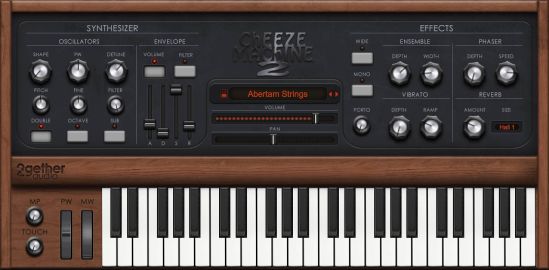
Back by popular demand comes a remastered version of the extremely popular Cheeze Machine virtual instrument by Big Tick Audio. An extra cheesy, extra saucy string box in the style of the original vintage string machines. Cheeze Machine 2 includes an expanded oscillator section, convolution reverb, a vintage ensemble chorus, and 64 bit compatibility for VST, AU, AAX and standalone applications.

CheeseMachine2

www.2getheraudio.com/instruments/cheeze-machine-2

Window Media Player ~ ASIO Plugin


ASIOWmpPlg is a Windows Media Player plugin that plays incoming audio through a user-selectable ASIO device. The Windows Media Center application is also supported.

sourceforge.net/projects/asiowmpplg

foo_AdvancedControls ~ Foobar2000 Advanced Controls


Control all the playback functions of Foobar2000 from icons on the Taskbar Notification Area. Using an area only two tray icons wide, you have the playback functions, and the volume or the seek bar, as well as a context menu.

A popup balloon (which can be disabled) appears each time a new song begins, to provide fully customizable information about the song that is playing.

The Delete Current File function deletes the file that is currently playing. It always asks for confirmation and puts the file into the recycle bin if possible, so you won’t delete files without intending to.

The extra functions introduced by this component can also be mapped to a shortcut key.

www.niversoft.com/products/fac
www.foobar2000.org/components/view/foo_advancedcontrols
Wiki

Skywave Linux ~ Global Online Listening


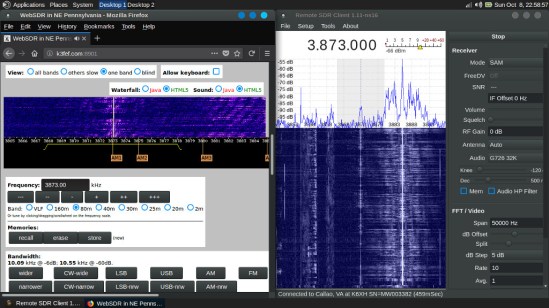
Skywave Linux is a 64 bit live system providing installed and configured software for accessing software defined radio servers locally and on the internet. With this operating system, a person may tune shortwave broadcasts, amateur radio, aeronautical, maritime, or other signals received at remote servers around the world.

SDR software is configured for popular devices, such as the RTL-SDR dongles, Softrocks, Hermes, and other radios.

Skywave Linux is a 64 bit system built over Ubuntu Linux, and may be installed on a bootable USB stick, SD card, DVD, or hard drive.

Features:

  • WebSDR, OpenWebRX radio servers accessible via internet browser.
  • HPSDR servers accessible via QtRadio
  • HPSDR hardware also via cudaSDR
  • RTL-SDR plug-and-play functionality via CubicSDR, Gqrx, and QtRadio
  • RTL-SDR ADS-B tracking and mapping via Dump1090
  • RTL-SDR RDS decoding via Gqrx and Redsea
  • SDRPlay, Airspy radio hardware is supported.
  • LADSPA audio plugins for EQ/Compression/Limiting
  • WSJT -X / WSPR-X weak signal digimode software
  • Weather Satellite Decoding via WXtoImg
  • Satellite tracking with Gpredict
  • Trunked Radio System Reception with SDRTrunk
  • Radio firmware & data management with CHIRP
  • Kodi Media Center for conventional internet streaming

skywavelinux-007

skywavelinux.com
sourceforge.net/projects/skywavelinux

2BusControl ~ Crossplatform Balance Plugin


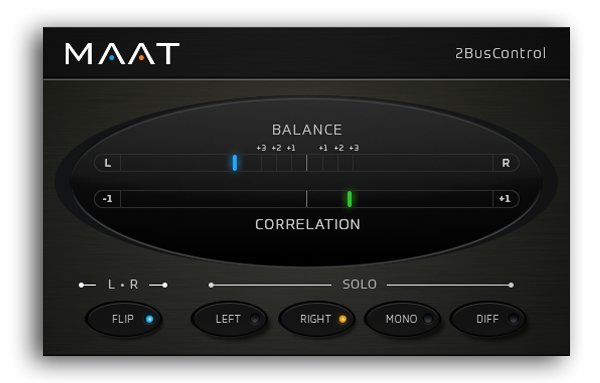
A universal L/R plus MONO/DIFF monitor control and Balance / Correlation metering plug-in for stereo bus masters.

2BusControl

www.maat.digital/2buscontrol

foo_logitech_lcd ~ Foobar2000 & Logitech LCDs


A component to display visualisations and track information on a variety of Logitech LCD screens.

Features:

  • Support for monochrome LCDs (G13, G15, G510 & Z-10)
  • Support for colour LCDs (G19)
  • 11 different visualisations (4 spectrum analysers, 4 oscilloscopes, 3 VU meters)
  • Track info display
  • Massively customisable

www.foobar2000.org/components/view/foo_logitech_lcd

foo_vis_shpeck ~ Foobar MilkDrop Visualizations


The foo_vis_shpeck component runs Winamp visualization plugins in a stand-alone window, a Columns UI panel or Default UI element.

Documentation
Download
Hydrogen Audio Topic
Download Winamp

Shpeck enables Foobar2000 to display dynamic graphics that react to the beat. It’s possible to toggle between fullscreen and windowed modes.

Install the foo_vis_shpeck plugin, combined with Winamp’s MilkDrop visualizations.

  1. Download and install Winamp (or at least the folder structure for the plugins)
  2. Download and install foo_vis_shpeck
  3. Download some visualizations
  4. Uncompress visualizations and copy to System > Program Files > Winamp > Plugins
  5. Create a new foobar DUI panel or tab and add the new UI element Playback Visualisation > Shpeck
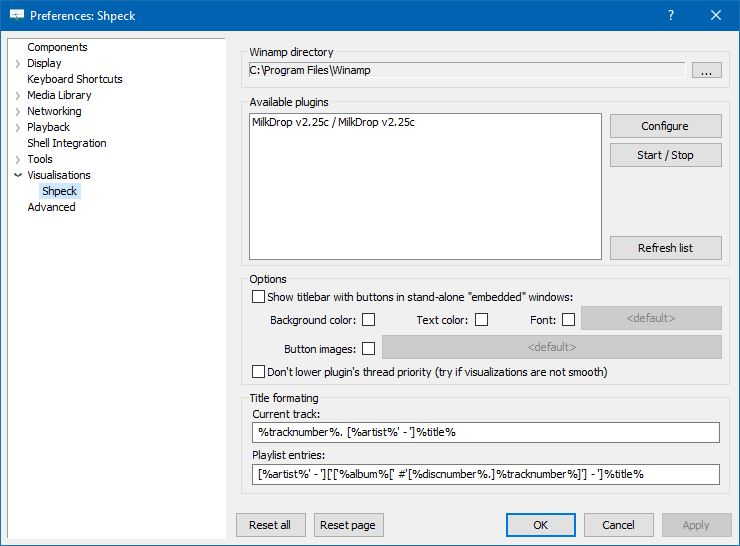
  6. Configure the plugin at Preferences > Visualisations > Shpeck
  7. Configure visualizations
Preferences: Shpeck

Resources:
www.foobar2000.org/components/view/foo_vis_shpeck
www.winamparchive.org
archive.org/details/tucows_193563_Winamp
www.mediafire.com/download/8hxarja92q9q99c/foobar2000-milkdrop-2.25c.7z
forums.winamp.com/forum/winamp/winamp-discussion/4615655-winamp-5-9-2-released

Guides:
Milkdrop in Foobar on Windows 8 ~ vault-tec.info/post/51743506694/milkdrop-in-foobar2000-on-windows-8

Additional Presets:
sourceforge.net/projects/mdpresetpack/
www.thefreewindows.com/21777/download-free-milkdrop2-50000-presets-megapack/
archive.org/details/Milkdrop252kPresetCollection.7z

… some archives from this milkdrop contest thread on Winamp forum and put everything into a single archive. Some of the presets are nice and quite original, but most of them are variations. The ones that seemed nice to me I copied and added exclamation mark to their names. ~ hydrogenaud.io/index.php/topic,59388.msg914054.html#msg914054

RYM ~ Rate Your Music


RYM is a community-built music and film database where you can rate, review, catalog and discover new music and films as well as participate in contributing to the database itself.

rateyourmusic.com
rateyourmusic.com/lists

foo_scrobble ~ Foobar2000 & Last.fm


The term scrobbling is defined as the process of finding, processing, and distributing information related to people, music, and other data.

foo_scrobble is a component that scrobbles to last.fm.

The old foo_audioscrobbler component is unmaintained and has various issues.

This replacement:

  • Uses the current token-based submission API. You authorize the component with last.fm instead of entering your login credentials.
  • Manages the scrobble cache automatically. There is no need to manually submit the cache.
  • Handles intermittent network outages or reconnects well. No “waiting for handshake” issue.

Installation and setup:

  1. Obtain a Last.FM account www.last.fm/join
  2. Download and install the latest release of foo_scrobble.fb2k-component
  3. Navigate to File>Preferences>Tools>Last.fm Scrobbling
  4. Click the Request Authorization button.
  5. A Last.FM pre-authorization page will pop up.
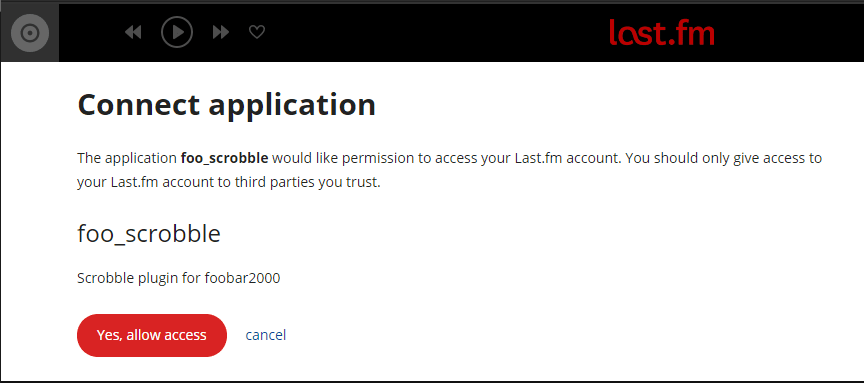
  6. Click Yes, allow access to complete the authorization at Last.FM
  7. The Preferences: Last.fm Scrobbling page button should now display Complete Authorization. You must click the button one last time. It will then display Clear Authorization.
last.fm sign up
Last.FM Pre-authorization Screen
Preferences: Last.fm Scrobbling – Clear authorization
References:

www.foobar2000.org/components/view/foo_scrobble
hydrogenaud.io/index.php?topic=114979.0
github.com/gix/foo_scrobble
github.com/gix/foo_scrobble/releases
en.wikipedia.org/wiki/Last.fm

Automatic Volume Mixer ~ Windows Utility


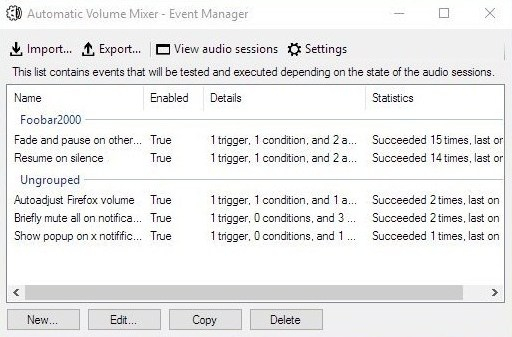
Automatic Volume Mixer is a tool that allows automatization of Windows Volume Mixer based on user rules. You can open the Volume Mixer by right-clicking on the speaker icon in the system tray and selecting Open Volume Mixer. This application is an automatic version of that applet.

Common usage examples:

  • Pausing your audio player (e.g. foobar2000) whenever any other application makes a noise, and resuming playback once the noise is gone. This enables you to keep your audio player running in the background at all times.
  • Briefly muting all applications while a notification is playing.
  • Forcing application’s volume to a set level.
  • Automatically lowering volume during night.
  • Launching processes / popups when some application makes noise.

Features:

  • Detect volume levels of applications and act on that information.
  • Fully configurable rules for detection, filtering, and executing actions.
  • Ability to automatically adjust audio levels of applications.


Automatic Volume Mixer

github.com/Klocman/Automatic-Volume-Mixer
sourceforge.net/projects/automatic-volume-mixer