
Table of Contents
- Introduction: What Title Formatting Is
- Why Title Formatting Exists
- Where You Use Title Formatting
- Core Concepts You Need to Know
- Plain Text in Title Formatting
- Fields (Metadata Tags)
- Combining Plain Text and Fields
- Handling Missing Information
- Using Conditional Logic with $if()
- Practical Examples
- Useful Built-In Fields
- Things Beginners Can Ignore
- Starter Setup for New Users
- Final Notes
Introduction: What Title Formatting Is
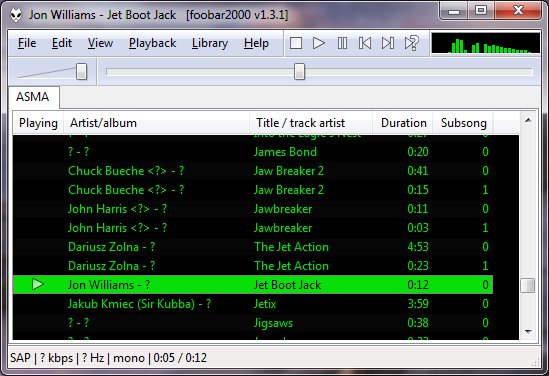
Title formatting in foobar2000 is a system that allows you to control how information about your music is displayed in the interface. It doesn’t modify the audio files themselves or change tags — it only affects how metadata and other information is shown in playlists, status bar, or window title.
Think of it like a template language: you define a pattern for text, and foobar2000 fills in the fields with actual track information. For example, you can make the playlist display tracks as:
Artist - Track Title (Album)
Why Title Formatting Exists
Music files contain metadata such as:
- Artist
- Album
- Track title
- Track number
- Year
- Duration
Different users want to display this information differently. Title formatting lets you:
- Decide which information to display
- Choose the order of information
- Add separators, labels, or punctuation
- Optionally display certain information only when it exists
For example, you might want to show the album only if it exists. Title formatting makes that possible.
Where To Use Title Formatting
You typically use title formatting in three main places:
- Playlist columns — to customize how each column displays track info.
- Status bar — to show the “Now Playing” track in a readable format.
- Window title — to display the currently playing track in the foobar2000 window or taskbar.
Core Concepts You Need to Know
There are three core concepts that beginners must understand:
- Plain Text: Text you type exactly as it should appear.
- Fields: Metadata values from the audio files (e.g.,
%artist%,%title%). - Conditional Logic: Optional logic to handle missing fields or customize output dynamically.
Plain Text in Title Formatting
Any normal text you type is displayed exactly as written. This is useful for labels, punctuation, or separators:
Now Playing:
You can combine plain text with fields to make output more readable:
Now Playing: %artist% - %title%
This will display something like:
Now Playing: Radiohead - Paranoid Android
Fields (Metadata Tags)
Fields are placeholders that pull metadata from your music files. They are written inside percent signs:
%artist%
Some common fields include:
| Field | Meaning |
|---|---|
| %artist% | Track artist |
| %album% | Album name |
| %title% | Track title |
| %tracknumber% | Track number |
| %date% | Year or release date |
| %length% | Track duration |
Example combining fields:
%artist% - %title%
Output:
Radiohead - Paranoid Android
Combining Plain Text and Fields
You can mix plain text with fields to create more structured output. For example:
%artist% – %title% (%album%)
Output:
Radiohead – Paranoid Android (OK Computer)
Handling Missing Information
If a field does not exist in the file, foobar2000 simply displays nothing. For example, if %composer% is missing:
%composer%
The output will be blank. To prevent blank parentheses or awkward spacing, you can use conditional logic.
Using Conditional Logic with $if()
The $if() function allows you to display text only when a field has a value:
$if(condition,then,else)
Example:
%artist% - %title%$if(%album%, (%album%),)
This will display the album in parentheses only if %album% exists. Otherwise, it leaves that part empty.
Practical Examples
Playlist Column
%artist% - %title%
Status Bar
Now Playing: %artist% – %title%
Window Title
%artist% – %title% | foobar2000
Useful Built-In Fields
These fields are always available and do not require files to be tagged:
| Field | Meaning |
|---|---|
| %filename% | File name |
| %path% | Full file path |
| %codec% | Audio codec |
| %bitrate% | Bitrate |
| %samplerate% | Sample rate |
Things Beginners Can Ignore
- Nested functions
- Math expressions
- String replacement logic
- Legacy syntax
- Advanced grouping
Starter Setup for New Users
For someone just installing foobar2000, start with these basic formats:
%artist% - %title%
Now Playing: %artist% – %title%$if(%album%, (%album%),)
%artist% – %title%
Final Notes
%field%is the most important concept$if()handles missing or optional data elegantly- Some data and fields depend upon components being installed
foo_tfsandbox
A good place to start is by installing foo_tfsandbox, this component allows you to experiment with title formatting expressions and fields before you implement them.
Title Formatting Fields:
$info(referenced_offset) ~ shows time in format mm:ss:ff where ff are CD frames. For the first track it will show nothing instead of 00:00:00
hydrogenaud.io/index.php?topic=118733.msg979344
Title Formatting Examples:
Name | Pattern | Alignment
Display Dynamic Range:
Album DR: $if2(%album dynamic range%,–) | Track DR: $if2(%dynamic range%,–)
Bits (bit depth) | $ifequal([%__bitspersample%],0,16,%__bitspersample%) | Left
$if($or($stricmp(%codec%,DTS),$stricmp($cut(%codec%,3),DCA)),$if($info(bitspersample),$ifequal(%samplerate%,96000,$ifgreater(%bitrate%,1537,DTS-HD,DTS 96/$info(bitspersample)),DTS-HD),DTS),%codec% [%codec_profile%])
Release Date (earliest):
hydrogenaud.io/index.php/topic,125532.0
$max(%DATE%,$min($year(%DATE%),$year(%DISCOGS_RELEASED%),$year(%DISCOG_MASTER_RELEASE_DATE%)))
References:
Title_Formatting_Introduction
Title Formatting Reference
Titleformat Examples
Titleformat_Album_List






 The Audio File