BeatRoot is an interactive beat tracking and visualisation system.
code.soundsoftware.ac.uk/projects/beatroot
www.eecs.qmul.ac.uk/~simond/beatroot
en.wikipedia.org/wiki/BeatRoot
BeatRoot is an interactive beat tracking and visualisation system.
code.soundsoftware.ac.uk/projects/beatroot
www.eecs.qmul.ac.uk/~simond/beatroot
en.wikipedia.org/wiki/BeatRoot
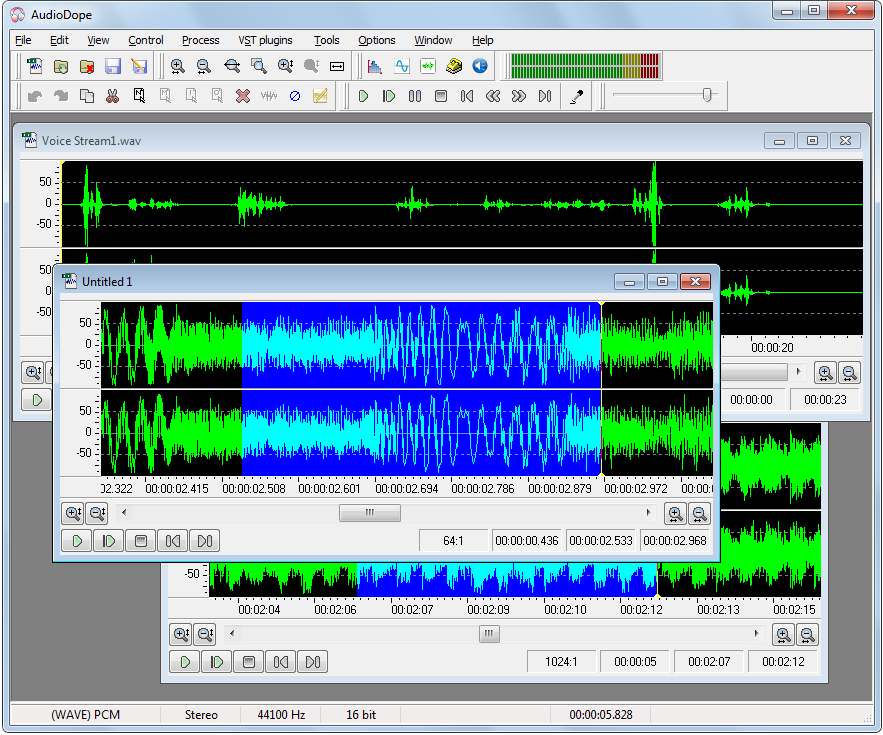
Audiodope is an audio editor. You can load and listen to music files of various formats such as wave, MP3, WMA, etc. You can also edit part or the whole stream with functions like copy, cut, paste, insert and delete. You may modify any part of the stream by applying audio effects and synthesize sound files.

A constrained VBR (CVBR) version of the publicly available open-source lossless audio coder FLAC.
FLAC, being a mathematically lossless audio codec, inevitably creates VBR streams as compressed files. Depending on the «difficulty» of coding each segment of the audio signal, the instantaneous coding bit-rate can be quite high. However, one can observe that, during passages of high FLAC bit-rate, the coded audio also exhibits the greatest ability of psychoacoustic masking. FSLAC exploits this property to limit the maximum instantaneous bit-rate of the compressed file. It does so by detecting the difficult audio blocks (by measuring their predictability via linear-prediction error energy calculations) and requantizing each of the detected blocks to a lower bit-depth, thereby reducing the bit-rate needed for lossless coding of that block. To prevent the quantization error from becoming audible (or visible in a spectrogram), simple adaptive noise shaping is used.
This approach is similar to the one used by LossyWAV, but differs in two important aspects. First, FSLAC is not a stand-alone pre-processor but instead is coupled with a FLAC encoder and, hence, directly creates FLAC compatible compressed files. Second, FSLAC only alters the high-bit-rate audio segments, not (almost) all parts of the audio input as LossyWAV does. The coded audio, therefore, remains perceptually lossless. In addition, it is worth noting that, due to its simplicity, FSLAC encoding is very fast. All of these features make FSLAC attractive for audio production and archival applications.
www.ecodis.de/audio.htm#fslac
hydrogenaud.io/index.php?topic=122390
musiCutter is mp3 and ogg vorbis joiner / cutter (without need to decode and reencode)
Features:

WildMIDI is a simple software MIDI player which has a core software synthesizer (softsynth) library that can be used with other applications.
www.mindwerks.net/projects/wildmidi
github.com/Mindwerks/wildmidi
Tom’s Audio Processing plugins is a selection of LADSPA plugins for audio engineering on the Linux platform. Intended for use in a professional DAW environment such as Ardour, it includes high quality reverberation, echo, eq, limiter & more.
tomscii.sig7.se/tap-plugins/index
sourceforge.net/projects/tap-plugins
github.com/tomszilagyi/tap-plugins
User interface front end supporting famous MP3Gain engine which analyzes and losslessly adjusts MP3 files to a specified target volume. A complete re-creation (made in QT5) of the original MP3Gain GUI, however it can be run on more platforms.

The plug-in is an easy to use distance “pan-pot” based on several psycho-acoustic models. The idea is to give mixing engineer a reliable tool which allows him to manipulate the “depth” of several sound source in a straight forward and convincing manner.
Several models can be combined:
All models can be turned on and off to taste. Distance modulation options extend the creative possibilities even further. Units can be switched from metric (meters) to imperial (inches).

This software can be used to search scales & chords from a large and expandable database (XML). Thanks to the jmusic project (jmusic.sourceforge.io), this is also possible to generate music starting from these scales & chords and export the result to MIDI file.

Starting from Windows Vista, you are allowed to change the sound volume of every application separately, and after you exit from the application, the last settings are saved in the Registry under:
HKEY_CURRENT_USER\Software\Microsoft\InternetExplorer\LowRegistry\Audio\PolicyConfig\PropertyStore
So the next time you run the application, your last settings are used. This tool displays your current audio settings of every application on your system, and allows you to easily change the setting of multiple applications at once. You can change the mute/unmute status, the sound volume level, and the right/left audio balance of the application.