Windows Media Player Plus! is a free plug-in for Windows Media Player that adds various user interface and playback enhancements.
Features:
Tag Editor Plus: an alternative for Windows Media Player’s Advanced Tag Editor (screenshot). Tag Editor Plus works on Windows Media Player 12 too, where the original Advanced Tag Editor has been removed.
Global hotkeys, allowing you to control Windows Media Player from within any running application.
Party Shuffle: a dynamic playlist that automatically gets filled with randomly picked songs. Of course, you can still add songs yourself, and reorder/remove songs, just like with a normal playlist. Very useful while throwing a party, as a DJ aid, or just for casual listening.
Real ‘find as you type’ in the media library: you can simply start typing to search, without having to click on the Search field first.
Disc number (‘set’) support in the media library: shows disc numbers in the Track number column and makes Windows Media Player use the disc numbers for sorting the tracks of an album (screenshot).
Access the standard Explorer right-click menu of a media file directly from within Windows Media Player (screenshot).
Restore last active playlist, media item, and playback position at Windows Media Player startup.
Show currently playing media in Windows Media Player’s title bar (screenshot).
Advanced playback options: Stop after current and Close after current, to automatically stop playback or close Windows Media Player when the current media has ended (screenshot).
Let Windows Media Player play/pause when you press the space bar.
Disable group headers in the Library Pane (screenshot).
Enhanced and configurable replacement of the Windows Live Messenger Music plug-in (What I’m Listening To) (screenshot).
Show currently playing media in Skype’s mood message.
Access the properties/settings of any Windows Media Player plug-in from within the main menu (Tools – Plug-in properties), without having to go to Options first (screenshot).
Bring back the “Find in library” right-click option of older versions of Windows Media Player to Windows Media Player 12.
“Play next” option when right-clicking a media item in Windows Media Player 11’s library (Windows Media Player 12 already has this by default).
Quickly re-enable all plug-ins after a Windows Media Player crash (screenshot).
Windows Media Player Plus! supports Windows Media Player 12 on all recent releases of Windows.
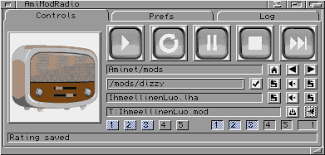
A program to automatically download, extract, and play modules from Aminet.
Did you know that, as of today (2015/06/02), there are more than 20,000 packages in the mods directory on Aminet? Yes! That’s more than 20,000 modules to play and enjoy! So, why not have a program that could automatically download one module at-a-time, extract it, and play it? This is the purpose of AmiModRadio.
Essentially, after starting MultiPlayer or HippoPlayer (only at this time), AmiModRadio connects to the player via ARexx and Aminet via FTP, then it downloads randomly a LHA file in the mods directories, extracts its content, and asks the player to play it. 🙂
Features:
Connects by FTP to Aminet
Uses XAD library to unarchive files containing modules
CD-Text is an extension of the audio CD standard that allows you to store additional information on an audio CD, such as album name, album artist and track info. Many audio players like Winamp and RealPlayer can read CD-Text but Windows Media Player has never supported it. Until now, because the WMPCDText plug-in allows Windows Media Player to read CD-Text.
WMPCDText provides an option to automatically read CD-Text from unrecognized audio CDs. Alternatively, you can right-click on a CD track in Windows Media Player’s Now Playing mode while a CD is playing, and select Read CD-Text.
WMPCDText especially comes in handy when using Windows Media Player for playing home-made audio CDs. Before WMPCDText, you would have to insert all the track information of such a CD manually into Windows Media Player. Now, just make sure that the CD-Text information is burned onto the CD, play the burned CD with Windows Media Player, and WMPCDText will automatically read the track information from the CD itself and insert it into the Media Library.
Benihora is a Rust library and VST Plugin that generates voice based on a vocal tract model. This is a Rust port of Pink Trombone developed by Neil Thapen with some customizations.
flac2mp3 is a perl script that will search for flac files within
a directory hierarchy and convert them all to mp3 format, creating a
matching directory structure in the process.
This is a python script for transcoding flac files into mp3 files keeping covers, tags, and directory structure. It is multithreaded and creates as much thread as the number of cores on the host. The flac tags will be added to the mp3 files ut8 encoded, and if a cover.jpg file is found in the flac files directory it will be added to the mp3.
The mp3 generated will be itunes compliant (accents, covers) and encoded with lame command :
elpAudio – A simple audio player using FMOD, that supports custom WinAmp themes, music files (.mp3, .midi, .wav, .ogg, .flac, .opus), tracker music (.mod, .xm, .s3m, .it) and other sound types (.wasd, .etm, .mus).








 The Audio File