
DSP Loudspeaker-Room correction filter wizard; transfer function modeling and equalization by fixed-pole parallel filters. Algorithm ported to Python by Mason A. Green, based on the work of Dr. Balazs Bank: home.mit.bme.hu/~bank/parfilt
PORC now includes mixed-phase compensation.
Tag Archives: DRC

Cavern ~ Object-based Audio Engine & CODEC
Cavern is a fully adaptive object-based audio rendering engine and (up)mixer without limitations for home, cinema, and stage use. Audio transcoding and self-calibration libraries built on the Cavern engine are also available. This repository also features a Unity plugin and a standalone converter called Cavernize.
Cavern goes beyond fixed-channel audio systems by rendering any number of audio “objects” in three-dimensional space, tailored to the listener’s speaker arrangement or headphone output. It is also supported by a standalone conversion tool, Cavernize, which allows users to convert spatial mixes into conventional channel-based PCM formats while maintaining positional accuracy.
Key Features and Capabilities:
Object-Based Rendering
Cavern supports an unrestricted number of audio objects and output channels. This allows precise spatial placement and movement of sounds in 3D space, independent of specific channel layouts.
Codec and Container Support
The engine and its companion tools support a wide range of codecs and containers, including those commonly used for immersive audio delivery. Traditional formats such as WAV and common multimedia containers are also supported.
Calibration and Room Correction
Cavern includes tools for self-calibration and room equalization. These can flatten frequency response, compensate for acoustic irregularities, and help unify tonal characteristics across speakers.
Headphone Virtualization
Through HRTF-based processing, Cavern enables spatial rendering over stereo headphones. This simulates direction, distance, and spatial cues to reproduce the effect of multichannel speaker setups in a binaural listening environment.
Real-Time Up-Mixing
Legacy stereo or multichannel content can be up-mixed into fully rendered 3D scenes. This provides an immersive experience even when the source was not originally produced as object-based audio.
Integration with Game Engines
Cavern offers integration with Unity, enabling developers to incorporate real-time positional audio into games, simulations, and interactive media.
Use Cases
Home Cinema and Media Playback
Cavern can render object-based audio tracks for users who do not have commercial hardware processors. It allows accurate spatial playback through both speakers and headphones.
Headphone-Focused Listening
The binaural virtualization system benefits users who rely on headphones for movies, music, gaming, or general media consumption.
Game and VR Development
Developers can use Cavern inside Unity to produce dynamic, spatially accurate audio scenes in interactive applications.
Archiving and Conversion
Cavernize converts object-based audio into standard PCM or channel-based formats, preserving positional intent while enabling playback on conventional systems.
Speaker Optimization
Its calibration tools provide a software-based approach to room correction and multi-speaker alignment without requiring dedicated hardware processors.
Limitations and Considerations
- Some supporting utilities are not fully open-source and may be distributed under separate licensing terms.
- Spatial rendering benefits depend on input quality; poor-quality stereo sources will not yield true immersive results.
- Speaker hardware, room acoustics, and HRTF compatibility affect the perceived accuracy of spatialization.
- Integrating Cavern into custom software projects requires familiarity with its API and spatial-audio concepts.
Why Cavern Matters
Cavern stands out by making advanced spatial-audio technology accessible without requiring specialized hardware or proprietary processors. By combining open-source rendering, a flexible object-based architecture, codec support, calibration tools, and developer integration, it provides a versatile platform for enthusiasts, researchers, and media creators.
For users interested in experimenting with immersive audio workflows, whether for home cinema, headphone listening, archiving, or game development, Cavern offers a free, comprehensive and adaptable approach.
References:
- VoidXH / Cavern – GitHub repository
- Cavern documentation website
- Cavern package listing on NuGet
cavern.sbence.hu/cavern
github.com/VoidXH/Cavern
github.com/VoidXH/HRTF
cavern.sbence.hu/cavern/doc
cavern.sbence.hu/cavern/downloads
www.nuget.org/packages/Cavern
en.wikipedia.org/wiki/Digital_room_correction#Cavern_QuickEQ
Share this:

BruteFIR ~ Unix Multi-Channel Convolution
BruteFIR is a software convolution engine, a program for applying long FIR filters to multi-channel digital audio, either offline or in real-time. Its basic operation is specified through a configuration file, and filters, attenuation and delay can be changed in runtime through a simple command line interface. The FIR filter algorithm used is an optimized frequency domain algorithm, partly implemented in hand-coded assembler, thus throughput is extremely high. In real-time, a standard computer can typically run more than 10 channels with more than 60000 filter taps each.
Through its highly modular design, things like adaptive filtering, signal generators and sample I/O are easily added, extended and modified, without the need to alter the program itself.
torger.se/anders/brutefir
Share this:

BrutefirDRC ~ Add DRC/Loudness To LogitechMediaServer (LMS)
A plugin to use BruteFIR software convolution engine with Slim Devices SqueezeCenter clients for Digital Room Correction. Provides transparent automatic switching of filters for different sample rates. Filter creation can be done with DRC, Audiolense, Acourate or other DRC software.
An optional loudness correction using the digital volume control can be applied. The loudness features uses SoX loudness that is based on the ISO 226 curves.Features:
sourceforge.net/projects/brutefirdrc
- On the fly digital room correction for LogitechMediaServer (formerly SqueezeBoxServer)
- Automatic selection of filter for samplerate
- Loudness correction via digial volume control using ISO 226
- Resampling of filter for samplerate if none exists
- Gapless playback
- removal of silence in music
- Application of ReplayGain with and without loss of bit depth/resolution
Share this:

Align ~ DRC Speaker Alignment Utility
In 5 clicks, DRC for (almost) dummies
Simple, fast and effective software to measure and calculate the amplitude and phase correction and “align” speakers. This software also allows you to measure speakers to adjust them and/or to find the best placement in the room.
Note: DRC stands for Digital Room Correction
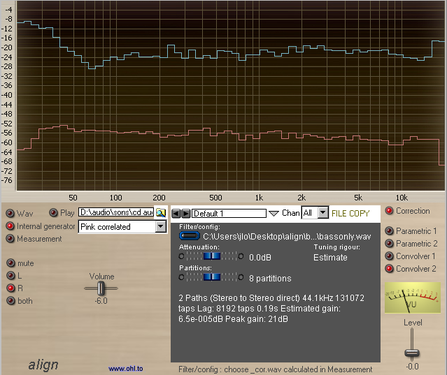
www.ohl.to/about-audio/audio-softwares/align
www.ohl.to/about-audio/audio-softwares/align2
Share this:

Daphile ~ Client Server Audio System
The Daphile is the heart of a digital music system. Its primary focus is in storage and playback of your digital music library. It enables the best possible audio quality and future-proof flexibility by providing plug&play support for USB connected digital-to-analog converters (DAC). You can easily setup a multi-zone system just by connecting another USB DAC for each zone.
Features:
- Headless music server OS
- Bitperfect and gapless playback
- Extensive audio format support
- Native DSD playback up to DSD512
- PCM resolutions up to 384kHz/24bit
- High quality audio resampling including PCM to DSD conversion
- Convolution filtering for DRC and equalizer
- “Play from RAM” to minimize CPU load and disk activity during playback
- Automatic audio device configuration with multiplayer support
- CD ripping with AccurateRip™ verification, automatic metadata tagging and cover art
- Supports external file servers as music source
- Easy configuration and installation through the web interface
- WiFi hotspot support (if compatible hardware exists)
- Software update via web interface
- Network-attached storage (NAS) service
- Whole system included in about 200MB ISO-file
Daphile is based on the open source Squeezebox Server, Squeezelite and Linux.
Since Daphile is used and configured completely via the web interface the user is not required to have any Linux skills.

Share this:

exhale ~ MPEG-4 Audio Encoder
exhale, which is an acronym for “Ecodis eXtended High-efficiency And Low-complexity Encoder”, is a lightweight library and application to encode uncompressed WAVE-format audio files into MPEG-4 format files complying with the ISO/IEC 23003-3 (MPEG-D) Unified Speech and Audio Coding (USAC, also known as Extended High-Efficiency AAC) standard. In addition, exhale writes program peak-level and loudness data into the generated MPEG-4 files according to the ISO/IEC 23003-4, Dynamic Range Control (DRC) specification for use by decoders providing DRC. exhale currently makes use of all frequency-domain (FD) coding tools in the scale factor based MDCT processing path, except for predictive joint stereo, which is still being integrated. Its objective is high quality mono, stereo, and multichannel coding at medium and high bit rates, so the lower-rate USAC coding tools (ACELP, TCX, Enhanced SBR and MPEG Surround with Unified Stereo coding) won’t be integrated.
gitlab.com/ecodis/exhale
hydrogenaud.io/index.php?topic=118888
Share this:

HOLMImpulse ~ Frequency & Impulse-response Measurement
- Measure Impulse-response
- Measure Phase-response
- Measure Frequency-response
- Measure Harmonic Distortion (THD)
- Make bandwidth limited measurements with no phase-errors
- Compare measurements
- Import Frequency-response & Impulse-response
- Export Frequency-responses & Impulse-responses
- Use open formats for saved files (zip, wav/flac, txt)

www.diyaudio.com/community/threads/holmimpulse-measuring-frequency-impulse-response
Resources:
- www.diyaudio.com/community/threads/holmimpulse-measuring-frequency-impulse-response.144984/page-61#post-7549045
- web.archive.org/web/20180707023302/http://holmacoustics.com/holmimpulse.php
- rephase.org/dl/Holm
Note: It appears this software is no longer available from the original source.
Share this:

Volumio ~ Headless Audiophile Player
Volumio is an headless audiophile music player, designed to play music with the highest possible fidelity. Volumio runs on most embedded devices (Raspberry Pi, UDOO, Odroid, Cubieboard, Beaglebone, Pine64, Allo Sparky…) and on any ordinary PC (x86).
Volumio is a free and open source Linux distribution, designed and fine-tuned exclusively for music playback. It runs on a variety of devices, typically small and inexpensive computers like the Raspberry PI, but also on low power PCs, notebooks or thin clients.
By flashing (installing) Volumio on any of these platforms, it will then become an headless audiophile music player. Headless means that the only way to control it will be with another mobile phone, computer or tablet.
This is made possible by Volumio’s User Interface: a web applications that runs on any device with a browser, and that allows for an easy and intuitive control of your playback sessions. All communications between the web app and Volumio will happen through your home network.
Share this:

DRC Designer ~ Optimize Audio Rooms
Digital Room Correction Designer was created to ease the process of creating and loading room correction filters for use with two channel stereo systems. DRC Designer includes Denis Sbragion’s DRC for creating room correction filters, John Pavel’s Convolver VST for playing music through the filters, and Simple Automated IR Measuring Tool by Denis Sbragion and Edward Wildgoose for creating the impulse response files needed by DRC.
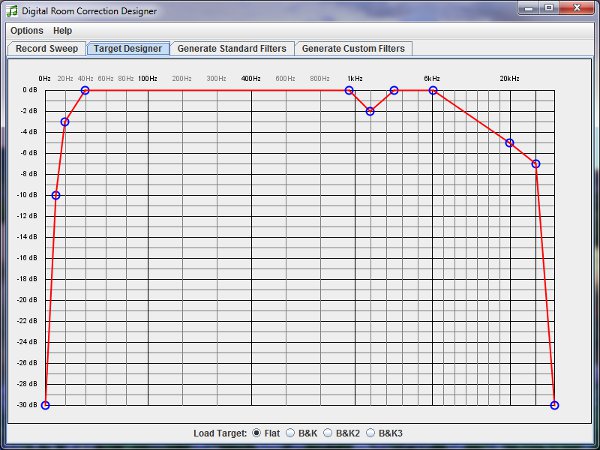
www.alanjordan.org/DRCDesigner
Foobar2000 Setup
Share this:

rePhase ~ Loudspeaker Phase Linearization
rePhase is a FIR generation tool for building fully linear-phase active crossovers with arbitrary slopes.
It also let you manually compensate for the phase shifts of your loudspeakers and existing crossovers, be it active or passive.
Once generated, the FIR can be applied using any hardware (openDRC, miniSHARC, Najda, …) or software (foobar, convolver, JRiver, …), stereo or multi-way convolution engine.
sourceforge.net/projects/rephase
Additional resources:
Equalizer APO, REW and Rephase WOW! ~ diyAudio
en.wikipedia.org/wiki/Digital_room_correction
Share this:

Equalizer APO ~ A Windows System Equalizer
Equalizer APO is a parametric / graphic equalizer for Windows. It is implemented as an Audio Processing Object (APO) for the system effect infrastructure introduced with Windows Vista.
Features:
- virtually unlimited number of filters
- works on any number of channels
- very low latency, which makes it suited for interactive applications
- low CPU usage
- modular graphical user interface
- VST plugin support
- integrates into Voicemeeter (www.voicemeeter.com)
Equalizer APO is best used in conjunction with Room EQ Wizard (www.roomeqwizard.com ), because it can read its filter text file format.
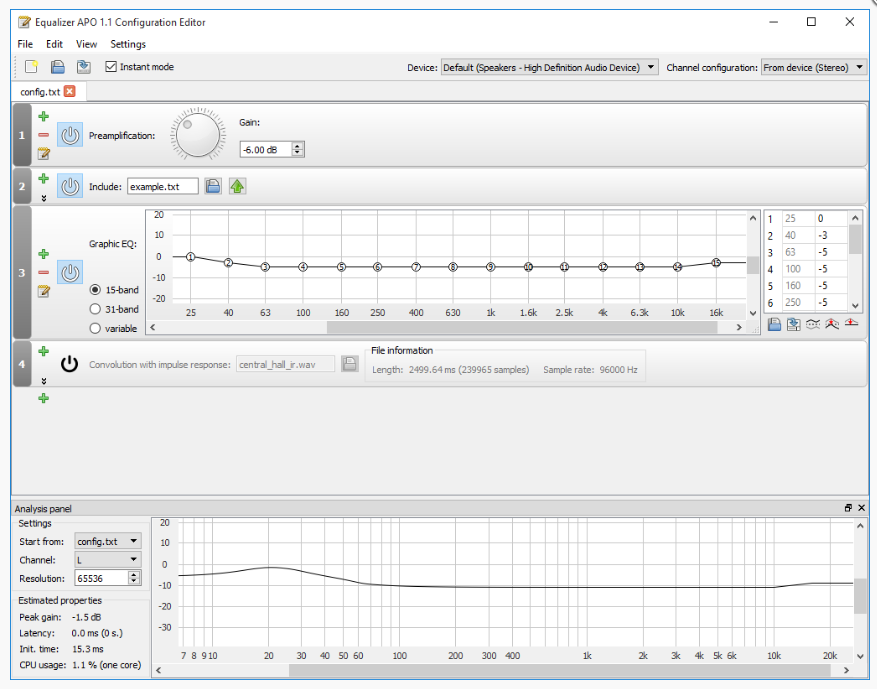
sourceforge.net/projects/equalizerapo
Discussion
Documentation
Downloads
User Interfaces:
Peace Equalizer
EQ APO GUI
mega-switcher
Resources:
Room Equalization Tutorial
Equalizer APO issues solver

 The Audio File