Foobar2000 ~ Output Components


Listing of specialized output components that extend Foobar2000 in order to interface directly with system hardware or software output devices. Some of these are already installed by default and the remainder should be installed as needed.

By default foobar2000 uses the Windows Audio Session API (WASAPI) output in shared mode on modern versions (v1.6 and later). This means foobar2000 sends audio through the standard Windows audio stack using WASAPI unless you explicitly select another output (like WASAPI exclusive, ASIO with a plugin, or other output components).

The built in outputs and all installed output components can be selected from in the Preferences: Playback > Output > Device submenu.

Official output components:

Alternative output components:

Displaying Output Information:

foo_outinfo allows foobar2000 to display the actual specifications of the audio being played and the output device information using titleformatting.

foobar.hyv.fi/?view=foo_outinfo

ASIOhrp Utility:

hydrogenaud.io/index.php?topic=97127.msg978428#msg978428

Exclusive output modes:

Exclusive mode (in the context of foobar2000 and Windows audio) means that the player takes sole control of the audio device, bypassing the Windows system mixer for the duration of playback.

Here is what that entails, factually and practically:

What happens in exclusive mode
  • The audio device is locked to foobar2000 while playback is active.
  • No other application can play sound through that device at the same time.
  • Audio data is sent directly to the driver via WASAPI Exclusive (or ASIO), without Windows resampling or mixing.
  • The device switches to the exact sample rate and bit depth of the track being played, if the driver supports it.
How this differs from shared mode
  • In shared mode, Windows mixes audio from multiple applications and resamples everything to the format set in Windows Sound → Device Properties → Advanced.
  • In exclusive mode, Windows’ mixer is bypassed entirely, so there is no system-level resampling, mixing, or volume processing.
Technical implications
  • Enables bit-perfect playback, assuming no DSPs or volume scaling are active in foobar2000.
  • Prevents interference from system sounds, notifications, or browser audio.
  • Reduces latency and avoids format conversions imposed by the OS mixer.
Trade-offs and limitations
  • System sounds and other apps will be silent while exclusive playback is active.
  • If an application already has exclusive control, foobar2000 cannot start playback on that device.
  • Some USB DACs and Bluetooth devices have limited or unstable exclusive support, depending on drivers.
  • Exclusive mode does not improve audio quality if the DAC or downstream hardware already resamples internally.
In foobar2000 specifically
  • Exclusive mode is available via:
    • WASAPI (event or push) [exclusive]
    • ASIO (with the ASIO support component installed)
  • Selected in:
    Preferences → Playback → Output → Device
When exclusive mode makes sense
  • You want guaranteed bit-perfect output.
  • You use a dedicated DAC and do not want system sounds mixed in.
  • You frequently play material at multiple sample rates and want automatic hardware switching.
When it is unnecessary
  • Bluetooth audio (which is always lossy and resampled regardless).
  • Casual listening.
  • Systems where all audio is already set to the correct fixed format.

Resources:

wiki.hydrogenaud.io/index.php?title=Foobar2000:Components/WASAPI_output_support_(foo_out_wasapi)
wiki.hydrogenaud.io/index.php?title=Foobar2000%3aPreferences:Output#Output_Device
Foobar2000 ~ How To Install A Component
en.wikipedia.org/wiki/Audio_Stream_Input/Output (ASIO)
en.wikipedia.org/wiki/Universal_Plug_and_Play (UPNP)
en.wikipedia.org/wiki/Windows_legacy_audio_components#Kernel_Streaming

WineASIO ~ ASIO To JACK Driver For WINE


WineASIO provides an ASIO to JACK driver for WINE. ASIO is the most common Windows low-latency drivers, so it is commonly used in audio workstation programs.

github.com/jhernberg/wineasio
sourceforge.net/projects/wineasio

ASIO2WASAPI ~ ASIO To WASAPI


This project is a hardware-independent ASIO driver for Windows Vista or higher. It provides a translation layer between Steinberg ASIO protocol and Windows’ native low-level audio API (WASAPI).

sourceforge.net/projects/asio2wasapi

AIMP ~ Full Featured Music Player


AIMP is a powerful free audio player for Windows OS that supports for local files, NAS, clouds and podcasts. Additionally, it includes powerful tools to operate with audio files.

Multi-format Playback:
.CDA, .AAC, .AC3, .APE, .DTS, .FLAC, .IT, .MIDI, .MO3, .MOD, .M4A, .M4B,
.MP1, .MP2, .MP3, .MPC, .MTM, .OFR, .OGG, .OPUS, .RMI, .S3M, .SPX, .TAK,
.TTA, .UMX, .WAV, .WMA, .WV, .XM, .DSF, .DFF, MKA, AA3, AT3, OMA, .WebM,
.MPEG-DASH (YouTube)

Features:

  • CUE Sheet support
  • Output support ~ DirectSound / ASIO / WASAPI / WASAPI Exclusive
  • 32-bit audio processing for the best quality!
  • Listen to internet-radio stations in OGG / WAV / MP3 / AAC / AAC+ formats
  • Capture stream to APE, FLAC, OGG, WAV, WV, WMA and MP3 formats
  • Capture stream as is for MP3 / AAC / AAC+ formats
  • Creating bookmarks and playback queue
  • Rating and auto-marks
  • Collecting statistics about tracks listening
  • Automatic calculations of rating and marks for listened tracks
  • Support for plugins ~ You can add new utilities or extend already existing ones
  • Build-in scrobbler / Last.fm, Libre.fm and ListenBrainz services are supported
  • Clouds / OneDrive, Google.Drive, DropBox, Облако@mail.ru, Яндекс.Диск and Custom WebDAV clouds are supported
  • Podcasts
  • Hot keys ~ Configure local and global hotkeys as you wish!
  • Multi-user mode support ~ Several users working on one computer? No problem!
  • Multi-language interface
  • Great functionality and user-friendly interface
  • Support for 4K and High DPI / Following scale factors are supported: 125%, 150%, 175%, 200%
  • Flexible program options
aimp

www.aimp.ru
aimp2.us

Icons:
aablab.deviantart.com/art/Aimp-3-anthracite-icons-260461145
www.deviantart.com/aablab/art/AIMP3-BW-Icons-190763277

Skins:
aablab.deviantart.com/art/AIMP-3-Skin-Editor-258029733
www.deviantart.com/ddkonstantinov/art/A-Graph-ver-1-0-294252760
www.deviantart.com/merydev/art/MetalikGlass-Light-for-AIMP3-258995954
www.deviantart.com/yamshikoff/art/Metro-for-AIMP3-v3-Final-279912238
www.deviantart.com/raidero1/art/ZiX-for-AIMP3-273232347
www.myaimp.com/skins
angelag.ucoz.ru

VU Meter Skins:
www.aimp.ru/forum/index.php?topic=52865.0

Wavosaur ~ Audio Editor With VST Support


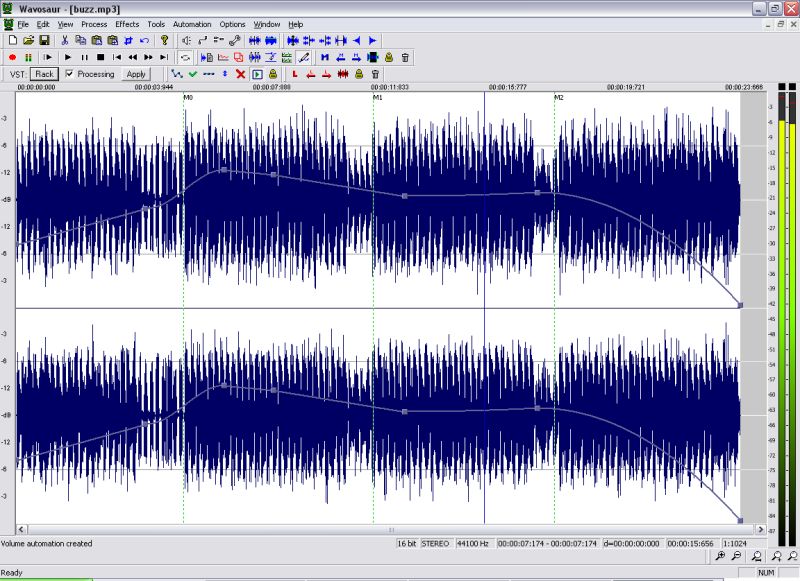
Wavosaur is a cool free sound editor, audio editor, wav editor software for editing, processing and recording sounds, wav and mp3 files. Wavosaur has all the features necessary in order to edit audio (cut, copy, paste, etc.) produce music loops, analyze, record, and batch convert.

Wavosaur supports VST plugins, ASIO driver, multichannel wav files, real time effect processing.

The program has no installer and doesn’t write in the registry. Use it as a free mp3 editor, for mastering, sound design. The Wavosaur freeware audio editor works on Windows 98, Windows XP and Windows Vista.

wavosaur-main-view

www.wavosaur.com