Mp3tag ~ Universal Tag Editor


Mp3tag is a powerful and easy-to-use tool to edit metadata of audio files.

It supports batch tag-editing of ID3v1, ID3v2.3, ID3v2.4, iTunes MP4, WMA, Vorbis Comments and APE Tags for multiple files at once covering a variety of audio formats.

Furthermore, it supports online database lookups from, e.g., Discogs, MusicBrainz or freedb, allowing you to automatically gather proper tags and download cover art for your music library.

You can rename files based on the tag information, replace characters or words in tags and filenames, import/export tag information, create playlists and more.
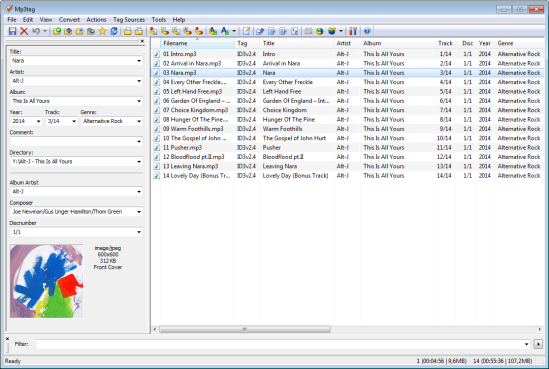
mp3tag-en

www.mp3tag.de
www.mp3tag.de/en/screenshots
community.mp3tag.de
twitter.com/mp3tag
hydrogenaud.io/index.php?topic=122049.0
en.wikipedia.org/wiki/Mp3tag
apps.apple.com/us/app/mp3tag/id1532597159
www.microsoft.com/en-us/p/mp3tag/9nn77tcq1nc8
www.portablefreeware.com/?id=1137
musicbrainz.org/doc/Mp3tag

freedb.org ~ Metadata Lookup Service


Sadly, this service was terminated as of March 2020, apparently due to corporate indifference.

freedb was a free CD and music database service to look up textual metadata about music, audio or data CDs. This was done by a client which queried the freedb database. As a result, the client displayed the artist, CD title, track list and some additional information. Clients are for example CD players, CD rippers and CD burning software.

www.freedb.org
en.wikipedia.org/wiki/Freedb

Alternative CDDB servers:

  • freedb.dbpoweramp.com – defunct link
  • gnudb.org

Resources:

Foobar2000 ~ How To Install A Component


Add-on components greatly extend the appearance and functionality of Foobar2000.

  1. Open the Foobar Preferences dialog (File | Preferences or press CTRL+P)
  2. Go to the Components page  (click components at the top of the list)
  3. Click the “Install…” button and select the component archive (zip) file, or drag the component’s file to the Installed components list box.
  4. Press “OK“, you will be prompted to restart foobar2000 in order to load the newly installed component.
  5. If the component has a visual element, you’ll need to add the component to the DUI (Default User Interface) now. Toggle View\Layout\Enable Layout Editing Mode and then add a new panel or tab. Right click the new panel or tab area and select “Add New UI Element …“, then select the new component from the list. You may need to adjust borders to fit. Exit layout mode.
foobar - preferences - components - install

Foobar2000: How to install a component

Additional Resources:

List Of Foobar Components

New Feature Monitor ~ foo_whatsnew

Convolver ~ A Convolution Plugin


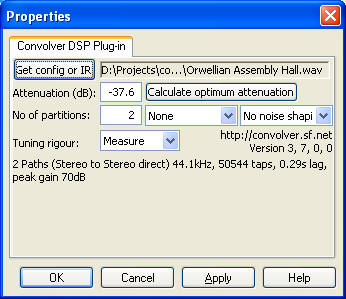
Convolver is an open source, high performance Windows application for applying finite impulse response (FIR) filters to multi-channel digital audio in the form of

Convolver will take a set of FIR filter files (sound files) and convolve them with sound paths mixed from the input channels, mixing the results into a set of specified output channels.

convolver

convolver.sourceforge.net
Download
Documentation

DRC ~ Digital Room Correction Filter Generator


DRC is a program used to generate correction filters for acoustic compensation of HiFi and audio systems in general, including listening room compensation. DRC generates just the FIR correction filters, which can be used with a real time or offline convolver to provide real time or offline correction. DRC doesn’t provide convolution features, and provides only some simplified, although really accurate, measuring tools.

drc-fir.sourceforge.net
sourceforge.net/projects/drc-fir/files/
Documentation
Wikipedia

Foobar2000 ~ DADA Automatic Song Rating


Date and duration adjusted (DADA) auto-rating algorithm for foobar2000

The DADA Auto-Rating algorithm (DAR) automatically rates music according to a variety of statistics collected by foobar2000’s official “playback statistics” plugin.

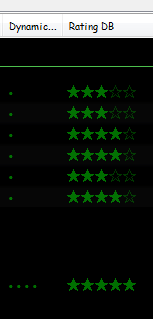
If done well, an auto-rating algorithm will simply tell you what your favorite (and conversely, least favorite) music is, and the rating will be derived from and reflect actual listening behavior. This is quite different from manual ratings (e.g. 1 – 5 stars set by the user), since there’s very often a disparity between what we’d like ourselves to like, and what we actually like. For those interested in uncovering their actual musical tastes, a good auto-rating formula can be quite illuminating.

Foobar - Ratings and DAR - cropped

www.giantpygmy.net/studio/?post=dada-music-auto-rating-algorithm-foobar2000
Hydrogen Audio Discussion

LAME ~ Free & Open mp3 Encoder


LAME is used to encode / compress audio data into the lossy MP3 file format. It’s a high quality MPEG Audio Layer III (MP3) encoder, licensed under the LGPL.

LAME Downloads ~ Rarewares
LAME Recommended Settings – HA Wiki
LAME Libraries – RareWares
LAME Source Code ~ Sourceforge
lame3995o ~ A fork of LAME (alternative version)
LameVST ~ LAME compression as a VST effect
Wikipedia ~ LAME info
WinLAME ~ Windows front-end (GUI)
wxlame ~ Windows front-end (GUI)
lame-ios ~ LAME For IOS

www.esm.rochester.edu/ears/docs/lame/switchs
svn.code.sf.net/p/lame/svn/trunk/lame/USAGE

Winamp ~ Popular Extensible Music Player


Winamp — It really whips the llama’s ass!

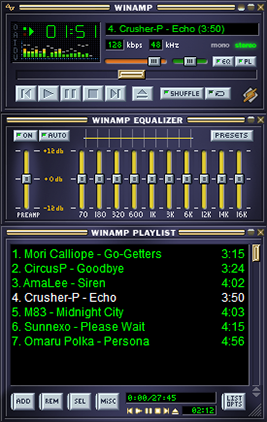
The classic alternative to Window Media Player. Winamp is a cross platform, extensible, free and skinnable media player with a large community and a long past. Development has stopped, but may start again, meanwhile, the development community has largely moved to Foobar2000.

(Update) October 2018

A leaked version of Winamp 5.8 recently spread over the Internet. Consequently, we have decided to make this new version available to you, revised by us.

www.winamp.com
forums.winamp.com/showthread.php?t=374929#download
en.wikipedia.org/wiki/Winamp
archive.org/details/winamp274
www.winamparchive.org
skins.webamp.org
Webamp ~ Winamp As A Webpage
www.mywinamp.com

A collection legacy resources for Winamp, including the best skins, plugins and visualizations and make them available to download freely.

winampheritage.com

MilkDrop ~ Audio Visualization Plugin


MilkDrop is a music visualizer – a “plug-in” or extension to Winamp or Foobar2000 music players. As you listen your music in Winamp, MilkDrop takes you flying through the actual sound waves you’re hearing, and uses beat detection to trigger myriad psychedelic effects, creating a rich visual journey through sound. MilkDrop can also be driven by a live audio feed (microphone or line-in).

www.geisswerks.com/milkdrop
sourceforge.net/projects/milkdrop2
en.wikipedia.org/wiki/MilkDrop

MusicBrainz Picard ~ Tag Audio Files With MusicBrainz Metadata


MusicBrainz Picard is a cross-platform (Linux, macOS, Windows) audio tagging application. It is the official MusicBrainz tagger.

Picard supports the majority of audio file formats, is capable of using audio fingerprints (AcoustIDs), performing CD lookups and disc ID submissions, and it has excellent Unicode support. Additionally, there are several plugins available that extend Picard’s features.

Features:

  • Multiple formats: Picard supports all popular music formats, including MP3, FLAC, OGG, M4A, WMA, WAV, and more.
  • AcoustID: Picard uses AcoustID audio fingerprints, allowing files to be identified by the actual music, even if they have no metadata.
  • Comprehensive database: Picard uses the open and community-maintained MusicBrainz database to provide accurate information about millions of music releases.
  • CD lookups: Picard can lookup entire music CDs with a click.
  • Plugin support: If you need a particular feature, you can choose from a selection of available plugins or write your own.
  • Scripting: A flexible and powerful, yet easy to learn, scripting language allows you to exactly specify how your music files will be named and how the tags will look like.
  • Cover Art: Picard can find and download the correct cover art for your albums.
  • Open Source: Picard is licensed under the GNU General Public License 2.0 or later, and is hosted on GitHub where it is actively developed.
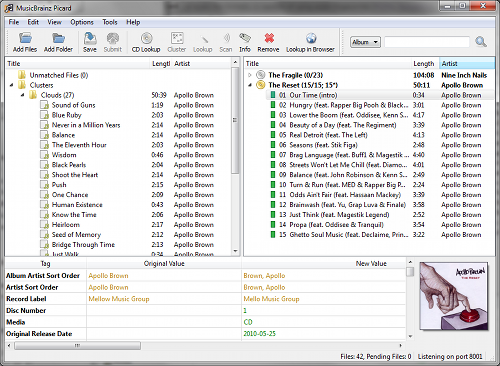
Picard GUI

picard.musicbrainz.org
picard.musicbrainz.org/downloads
picard.musicbrainz.org/plugins
picard.musicbrainz.org/docs/faq
picard.musicbrainz.org/quick-start
github.com/metabrainz/picard
Youtube: What is MusicBrainz Picard?

CUERipper ~ Open Source PC CD Ripper


CUERipper is an utility for extracting digital audio from CDs, and an open-source alternative to EAC. It has a lot fewer configuration options, so it’s somewhat easier to use, and is included in the CUETools package.

Supports AccurateRip, CTDB, freeDB and MusicBrainz

cuetools.net/wiki/CUERipper
cuetools.net/wiki/CUETools_Download
cuetools.net/wiki/Category:CUERipper_Guides
www.hydrogenaud.io/forums/index.php?showtopic=66233

CUETools ~ Lossless Audio / CUE Sheet Conversion


The goal is to make sure the album image is preserved accurately. A lossless disc image must be lossless not only in preserving contents of the audio tracks, but also in preserving gaps and CUE sheet contents. Many applications lose vital information upon conversion, and don’t support all possible CUE sheet styles.

Supports AccurateRip

cuetools.net
Download
CueTools Database