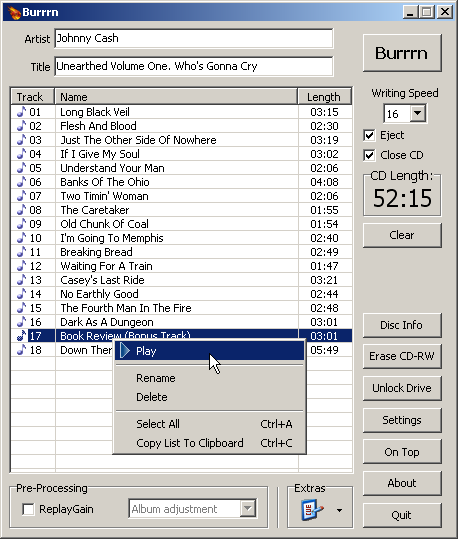
Burrrn is a little tool for creating audio CDs with CD-Text from various audio files. Supported formats are: wav, mp3, mpc, ogg, aac, mp4, ape, flac, ofr, wv, tta, m3u, pls and fpl playlists and cue sheets. You can also burn EAC’s noncompliant image + cue sheets! Burrrn can read all types of tags from all these formats (including ape tags in mp3). Burrrn uses cdrdao.exe for burning.
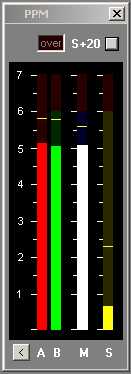
Under-reads very short peaks slightly like a traditional BBC PPM. Fallback ballistics are accurately modelled but the attack time (eg the BBC spec of 2.5dB down for a 10ms burst of 5Khz) is only approximate. Very short peaks such as 1.5ms register -4dB instead of -9dB as per spec. The fallback time from 1 to 7 is in line with BBC specifications, 2.5 to 3 seconds. You may prefer a faster fallback, especially as there are the peak markers, so the fallback time can be adjusted by means of an arbitrary value entered on the options page. A value of 2 corresponds to the BBC PPM spec. Values up to 10 speed up the decay.
Mono matrix can be set to M = (A+B) – 3dB or 6dB. Traditionally the BBC have used M3, though M6 is increasingly used. Channels can be labelled L & R or A & B. Displays Left, Right, Mono (sum) and Stereo (difference) simultaneously.
The peak markers can be set to hold the peak. Click on the window to reset.
There is also a 20dB button. This increases the gain of of the Stereo difference indication by 20dB (10 times). M, L & R are not affected.
The colour of each bar can be set to any colour from the options screen. By default all bars are green but it possible to have, for example, red and green for A and B.
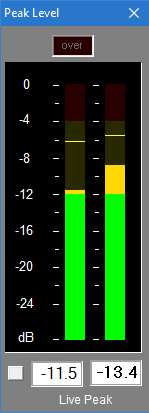
With 0.1dB resolution readout, ideal for accurate steady state measurements or for reading peaks however short.
For Windows XP, Vista, 7 or above. Requires WDM drivers, does not support ASIO.
The button to the left of the readout switches the digital readout to follow the maximum peak markers or the instantaneous ‘live’ peaks. In conjunction with the peak hold feature this enables transient peaks to be read accurately.
Zero is referenced to Full Scale Digital, although this can be modified with the calibration adjustment to provide some headroom as required.
Sample rate can be set to match recording if necessary.
Infinite peak hold setting if required, even across program restarts. Reset by double-clicking meter display.
If you need to run multiple meters monitoring more than one source there is a Multi-Channel Level Meter for up to 24 channels.
Audiophile Linux is the operating system optimized for high quality digital audio reproduction. Created by audiophiles for people who share the same dream. To have their system a bit more better. AP-Linux is easily installed, user friendly, and absolutely free. Install it like any other GNU/Linux distribution and enjoy the music playback. Audiophile Linux comes with everything you need for playing your audio and video files.
Audiophile Linux Features:
System and memory optimized for quality audio
Custom Real-Time kernel
Latency under 5ms
DSD support
Lightweight window manager
Pre installed audio and video programs
Lightweight OS, free of unnecessary daemons and services
DISTRHO Ildaeil is mini-plugin host working as a plugin, allowing one-to-one plugin format reusage. The idea is to load it as a plugin inside your DAW and then the other “real” plugin inside Ildaeil. This allows, for example, a VST3 host to load LV2 plugins and vice-versa.
The Ildaeil name comes from the korean 일대일, which means “one to one”.
Features:
The current formats Ildaeil can work as are:
JACK/Standalone
CLAP
LV2
VST2
VST3
And it can load the following plugin formats:
Internal (from Carla)
LADSPA
DSSI
LV2
VST2
VST3
CLAP
JSFX
With a few extra formats through the “Load from file…” action:
Audio files (through internal audio file player, synced to transport)
MIDI files (through internal MIDI file player, synced to transport)
Axone.jar is a utility allowing you to view all the information available in an MP3 file. This is not to be misunderstood: all the possible information. In the tag version 2 (ID3V2), the information is subdivided into frames and there are many more frames declared than frames actually displayed by MP3 players. Well Axone.jar knows how to display them all, without exceptions and whatever the version!
Very classic frames such as title, album, artist, year, genre, track and comment.
Other frames displayed by only some MP3 players.
the image(s).
the composer.
the text of the song.
volume control (itunes)
The frames that are hidden from you (not necessarily with bad intentions).
Undeclared frames, not understood and therefore clearly hidden from all MP3 players.
The other frames usually not used.
Other data
The Lyrics and TAG+ tags, which are completely obsolete, may remain forgotten in certain files. If they are present, Axone.jar displays them.
When the software reads an MP3 file to display the current tag, it does a summary check of the audio data. It gives you the classic information on bitrate, sampling frequency, duration, etc.; but also if it finds excess or erroneous data. Excess data can be a sign of corrupted audio data, or of data intentionally hidden if the file was purchased on a merchant site (or if you did P2P). At this level, it is important to understand that the audio decoder is robust in the sense that data that is incomprehensible to it is simply skipped. It is therefore very easy to hide data between audio data, without risking disturbing MP3 players.
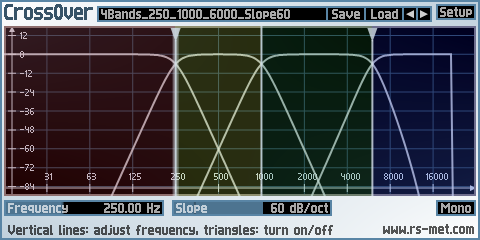
CrossOver is a plugin to split an incoming signal into several (at most 4) frequency ranges. It can be used to build your own multiband effects within a modular (sub)host environment. By using only 2 bands, you can also create bass-effects. These are effects which keep the low frequency range dry and affect only the high frequency range. The band-splitting is done by complementary pairs of Linkwitz-Riley lowpass/highpass filters, the slope of which is adjustable between 12 and 96 dB/oct. For configurations with more than 2 output bands, the signal is first split into 2 bands (low and high) and then the low or high or both bands is/are split further, thus the splitting is done in a hierarchical manner.
foo_vis_milk2 is a port for foobar2000 of Winamp’s MilkDrop 2 music visualizer. It additionally migrates rendering from its original DirectX 9 to DirectX 11.
MilkDrop 2 takes you flying through visualizations of the soundwaves you’re hearing. It uses beat detection to trigger myriad psychedelic effects, creating a rich visual journey through sound.
Features:
Uses DirectX 11 for rendering.
Uses updated libraries.
vis_milk2 has been upgraded to use more modern C++ alongside DirectX 11. Deprecated or insecure functions have been rewritten and most unused functionality removed.
Configurable through foobar2000 preferences instead of INI files.
Supports the Default User Interface (Default UI) only.
Tested on foobar2000 v2.1.2 (x86 32-bit and x86 64-bit) and Microsoft Windows 11 (Build 22621).
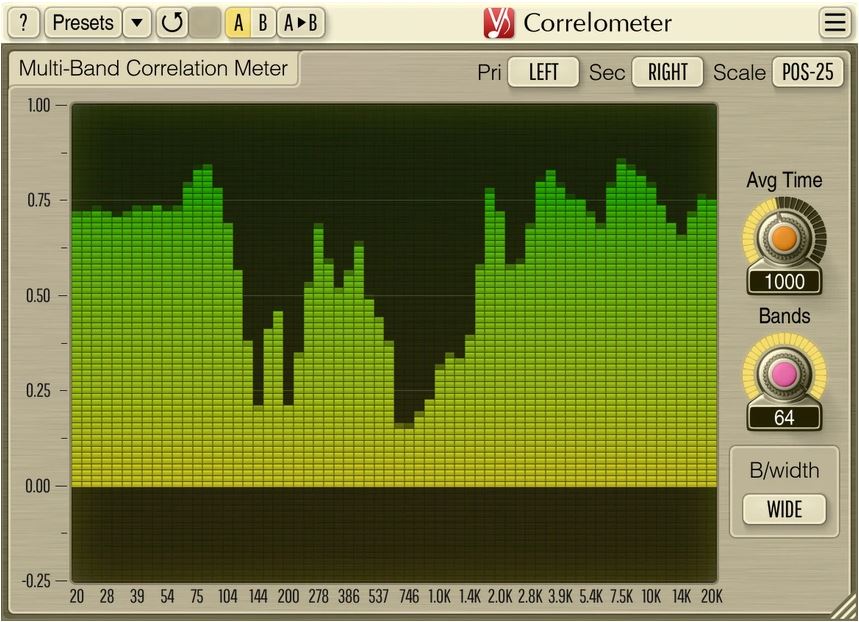
Correlometer is an analog-style stereo multi-band correlation meter.
Multi-band correlation meter is an advanced way to check for presence of out-of-phase elements in the mix. Broadband correlation metering reports overall phase issues and may misrepresent problems present in select spectral bands, while multi-band correlation meter easily highlights problems present in mid to high frequencies that are not easily heard by ear, but may still reduce clarity of the mix. Another application of multi-band correlation metering is phase- and time-aligning of channels and tracks, especially bass and bass-drum pairs, guitar mic and D.I. source pairs, two-microphone stereo recordings, etc.
Correlometer can display 4 to 64 individual spectral bands, with adjustable band quality factor that controls the degree of band’s selectivity. Averaging time of correlation estimator can be adjusted. Correlometer supports side-chain inputs for easy correlation estimation between separate audio tracks.










 The Audio File