Hya.Wave ~ Online Audio Editor


Hya.Wave is a basic online audio editor that allows you to edit audio from any web browser. Hya.Wave allows you to edit web samples, features real-time FX, load and store in the cloud, undo/redo, audio wave exploration and cut, paste & crops.

hya.io/wave
wav.hya.io/#/fx (old site)
www.facebook.com/hya.io
twitter.com/hya_io
Hya Wave Online Audio Editor Quick Tips with Kyle

Mkchromecast ~ Linux & Mac Casting


This is a program to cast your macOS audio, or Linux audio to your Google Cast devices or Sonos speakers. It can also cast video files.

It is written for Python3, and it can stream via  node.js,parec (Linux), ffmpeg, or avconvMkchromecast is capable of using lossy and lossless audio formats provided that ffmpeg, avconv (Linux), or parec (Linux) are installed. It also supports Multi-room group playback, and 24-bit/96kHz high audio resolution. Additionally, a system tray menu is available.

mkchromecast.com
github.com/muammar/mkchromecast

WaveShop ~ Windows Audio Editor


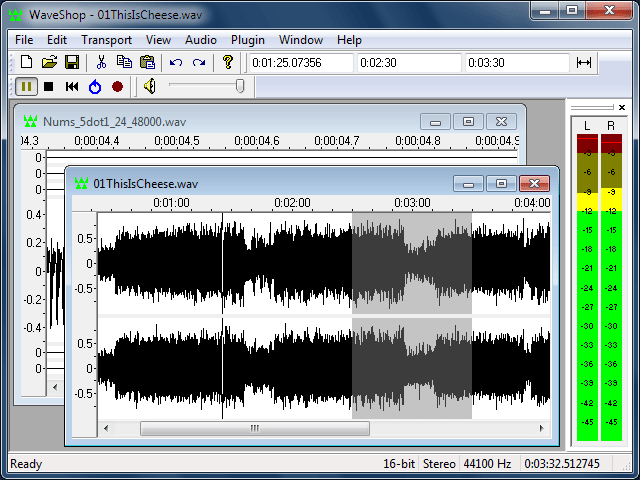
WaveShop is a free, open-source audio editor for Windows XP/Vista/7/8 32-bit and 64-bit. WaveShop is fast, lightweight, and bit-perfect, meaning samples aren’t altered unless they need to be. Editing a portion of an audio file only affects that portion; the rest of the file is untouched. Blocks of audio can be cut and pasted without changing their contents at all. This is especially useful for patching a finished master without corrupting its dither. Waveshop’s features include peak, RMS and spectral analysis, normalizing, fading, sample rate conversion, audio generation, plug-ins, and more, all with unlimited undo and comprehensive help.

waveshop-main-window

waveshop.sourceforge.net/
sourceforge.net/projects/waveshop/

YTMP3 ~ YouTube To mp3


By using our converter you can easily convert YouTube videos to mp3 (audio) or mp4 (video) files and download them for free – this service works for computers, tablets and mobile devices.

The videos are always converted in the highest available quality. Please note that we can only convert videos up to a length of 2 hours – the limitation is necessary, so the conversion of any video will not take more than a couple of minutes.

ytmp3.cc

aTunes ~ Cross Platform Audio Player


aTunes is a powerful, full-featured, cross-platform player and manager, with support for online radios, podcasts and CD ripping.

www.atunes.org
en.wikipedia.org/wiki/ATunes

Project Audio For GitHub


This website tracks events happening across GitHub and converts them to music notes based on certain parameters.

There are three types of sounds(bell, string pluck and string swell) based on four types of events(PushEvent, PullRequestEvent, IssuesEvent and IssueCommentEvent). Bells represent PushEvents, string plucks represent IssuesEvents and IssueCommentEvents whereas string swells represent PullRequestEvents.

  • Events can be filtered by organization or repository.
  • Can be downloaded for Linux or Mac.

github.audio/
github.com/debugger22/github-audio

FoxTunes ~ Modular Audio Player


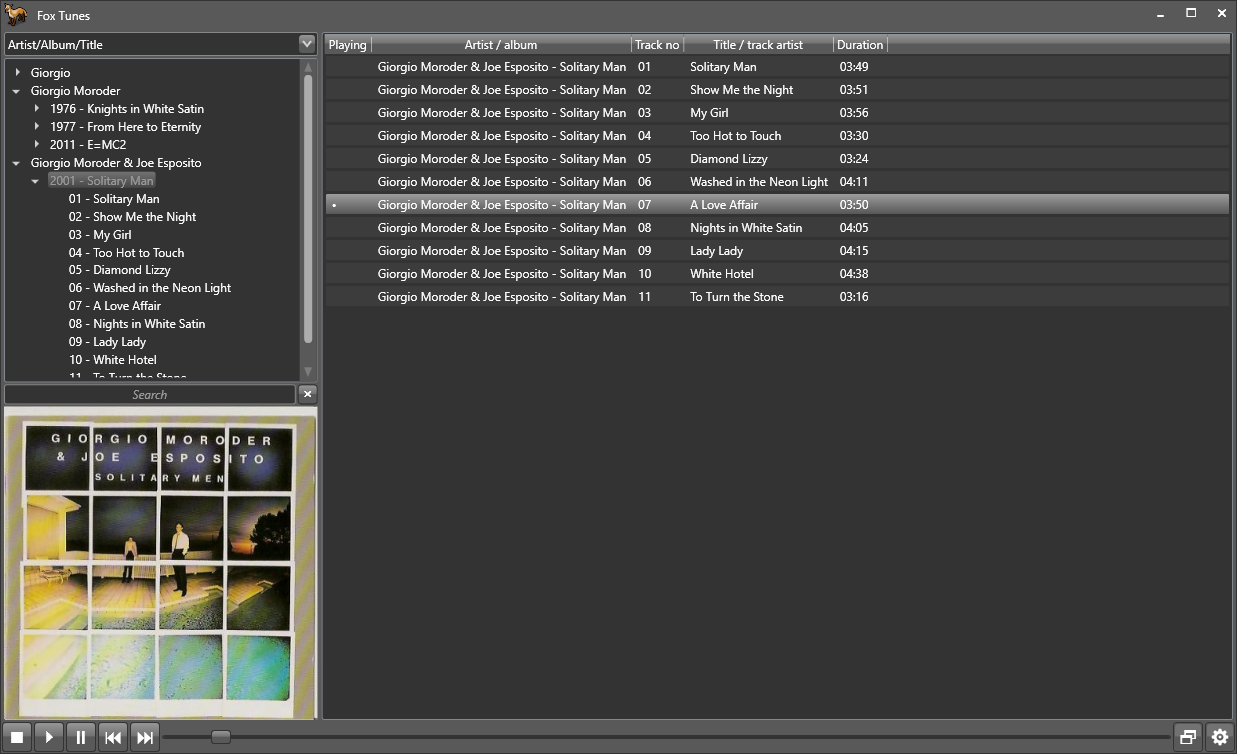
A modular Linux / Windows XP music player using the BASS library.

FoxTunes

github.com/aidan-g/FoxTunes

Guayadeque ~ Linux Music Player


Guayadeque is a music management program designed for all music enthusiasts. It is Full Featured Linux media player that can easily manage large collections and uses the Gstreamer media framework. Post Development.

github.com/anonbeat/guayadeque
codeberg.org/thothix/guayadeque
en.wikipedia.org/wiki/Guayadeque_Music_Player

Background Music ~ macOS Audio Utility


  • Automatically pauses your music player when other audio starts playing and unpauses it afterwards
  • Per-application volume, boost quiet apps
  • Record system audio

github.com/kyleneideck/BackgroundMusic
awesomeopensource.com/project/kyleneideck/BackgroundMusic

Snapcast ~ Synchronous Audio Player


Snapcast is a multi-room client-server audio player, where all clients are time synchronized with the server to play perfectly synced audio. It’s not a standalone player, but an extension that turns your existing audio player into a Sonos-like multi-room solution. The server’s audio input is a named pipe /tmp/snapfifo. All data that is fed into this file will be send to the connected clients. One of the most generic ways to use Snapcast is in conjunction with the music player daemon (MPD) or Mopidy, which can be configured to use a named pipe as audio output.

github.com/badaix/snapcast

WavPack ~ Hybrid Lossless Audio Compression


WavPack is a completely open audio compression format providing lossless, high-quality lossy, and a unique hybrid compression mode. For version 5.0.0, several new file formats and lossless DSD audio compression were added, making WavPack a universal audio archiving solution.

In the default lossless mode WavPack acts just like a WinZip compressor for audio files. However, unlike MP3 or WMA encoding which can affect the sound quality, not a single bit of the original information is lost, so there’s no chance of degradation. This makes lossless mode ideal for archiving audio material or any other situation where quality is paramount. The compression ratio depends on the source material, but generally is between 30% and 70%.

The hybrid mode provides all the advantages of lossless compression with an additional bonus. Instead of creating a single file, this mode creates both a relatively small, high-quality lossy file that can be used all by itself, and a “correction” file that (when combined with the lossy file) provides full lossless restoration. For some users this means never having to choose between lossless and lossy compression!

WavPack employs only well known, public domain techniques (i.e., linear prediction with LMS adaptation, Elias and Golomb codes) in its implementation. Methods and algorithms that have ever been patented (e.g., arithmetic coding, LZW compression) are specifically avoided. This ensures that WavPack encoders and decoders will remain open and royalty-free.

www.wavpack.com
github.com/dbry/WavPack
en.wikipedia.org/wiki/WavPack

mlYou ~ Music Library Utilities Suite


This is a collection of tools to help you manage, maintain, and optimize your own music library for a better experience.

It makes growing and maintaining a music collection of any size easier by automating necessary (but tedious) processes.

The tools currently aim to assist with music organizing and tagging, and playlist management.

Cross-Platform Compatible – Works and tested under Linux (Ubuntu) and Windows. Mac untested but expected to work similar to linux.

github.com/nwrobel/mlYou#playlist-root-path-fixing