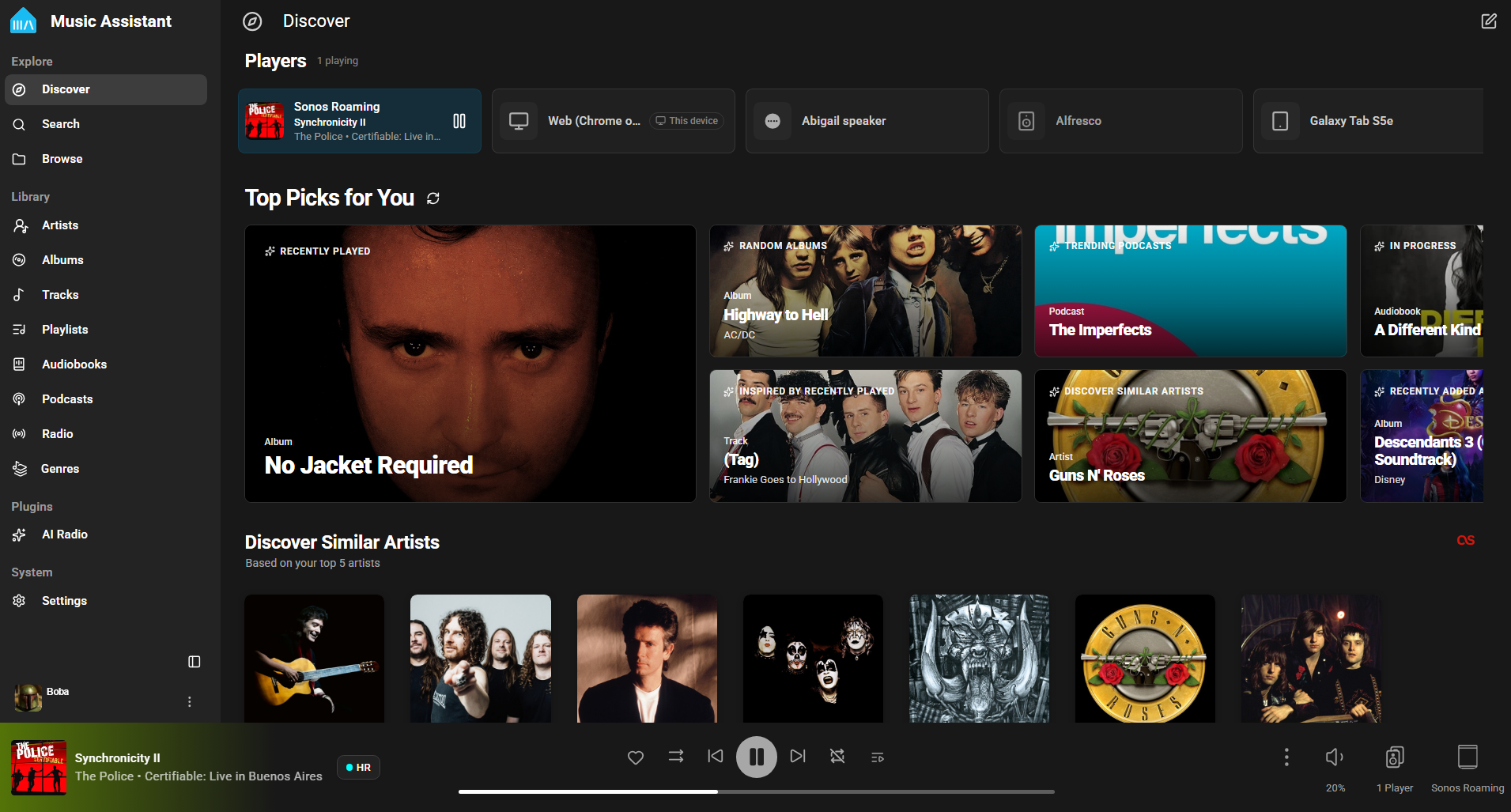
Music Assistant is a free, opensource media library manager that connects to your streaming services and a wide range of connected speakers. The server is the beating heart, the core of Music Assistant and must run on an always-on device like a Raspberry Pi, a NAS or an Intel NUC or alike.
Lidarr is a music collection manager for Usenet and BitTorrent users. It can monitor multiple RSS feeds for new tracks from your favorite artists and will grab, sort and rename them. It can also be configured to automatically upgrade the quality of files already downloaded when a better quality format becomes available.
Major Features Include:
Support for major platforms: Windows, Linux, macOS, Raspberry Pi, etc.
Automatically detects new tracks.
Can scan your existing library and download any missing tracks.
Can watch for better quality of the tracks you already have and do an automatic upgrade.
Automatic failed download handling will try another release if one fails
Manual search so you can pick any release or to see why a release was not downloaded automatically
Fully configurable track renaming
Full integration with SABnzbd and NZBGet
Full integration with Kodi, Plex (notification, library update, metadata)
Full support for specials and multi-album releases
mStream is a self-hosted music server. Self-hosting means you run the server software on a computer you own. mStream is lightweight and can be run on old hardware and boards like the Raspberry Pi.
Why host your own?
Own your music. No ads, and nothing gets removed from your library.
Quality. Stream FLAC and lossless files uncompressed.
Privacy. Streaming services log your listening habits. Your server never snitches on you.
Good for artists. Buy music directly and the money goes to them.
Wax is a program for cataloging and playing a collection of music recordings. Wax is able to rip CDs and import downloads so that you can create a sound archive complete with metadata.
Wax is fundamentally different from existing music managers in two important ways. First, the fundamental unit for recordings is a “work”, not a track. A work is usually a collection of tracks. It can encapsulate whatever tracks you choose. In pop music, a work can be an album. For symphonic music, a work can be a single symphony, even when the tracks come from a CD with more than one symphony. For operas, a work can be a single opera even when the tracks come from multiple CDs. Music collectors usually think in terms of works, so a music manager that supports the concept makes operation more natural.
The other distinguishing characteristic of Wax is that genres are fundamental to the organization of a collection rather than a mere attribute of a track. Wax recognizes that the ideal way to catalog works varies by genre. For example, symphonic works can be cataloged by composer, work, conductor whereas shows can be cataloged by show, composer, lyricist. By organizing collections around genres, Wax supports an operation sequence that is natural for music lovers: first select the genre, then the work, and finally the tracks.
RTL Utility is a tool for measuring the Round Trip Latency of your Digital Audio Workstation (DAW) and audio interface. The utility is used for low latency performance testing by system builders, reviewers, device manufacturers and at dawbench.com.
When your DAW sends data to your audio interface for playback, it doesn’t send a continuous stream of data one bit at a time. What it does is fill up a section of RAM called a buffer and sends that in a single message when it is ready. Before sending the next message it has to fill the buffer again. This wait time introduces a latency, or delay, between something happening in your DAW and when you actually hear it.
While you are recording, the audio interface buffers and sends data to your DAW in a similar fashion. This introduces latency into your recordings.
If you send a signal from your DAW, out through the audio interface and back in via a loopback patch, then there will be a round trip latency which is the sum of the output and input delays. This is the RTL.
Phoniebox is a contactless jukebox for the Raspberry Pi, playing audio files, playlists, podcasts, web streams and Spotify triggered by RFID cards. All plug and play via USB, no soldering iron needed. It also features GPIO buttons control support.
The MuPiBox is an easy-to-use music player. Local music files, Spotify and streams from the Internet can be played. Operation via touchscreen is child’s play for young and old…
Features:
Music box for young and old
Touch display
easy to use (no access to the shell necessary!)
Update function
Spotify – album, playlists (premium account is required)
Local music – MP3, Flac, WAV, WMA
Generate local playlists at the touch of a button
Streams / radio via internet
Simple administration via display
Advanced administration via web interface
Easy installation (without shell access)
Automatic power off
Display timeout
Resume function
Read aloud collection/artist and album (Google TTS)
own sorting by radio play, music, playlist and radio
automatic offline / online switching depending on availability
Simple user interface
Cover ad
Add additional WiFi hotspots on the go
Construction of an individual housing (3D printing)
Tested hardware list
Slim OS (dietPi)
Few file accesses – logs etc. in RAM to protect the SD card