caudec ~ Multiprocess Audio Converter


caudec is a command-line utility that transcodes (converts) audio files from one format (codec) to another, among other things.

It leverages multi-core CPUs and runs multiple processes concurrently (one per file and per codec, and more than one thread per codec when it supports it). The objective is to hog the CPU as much and as long as possible. One strategy is to sort input files by size, so that the largest files potentially get more threads towards the end of the job.

Features:

  • Supported input formats / codecs: WAV, AIFF, CAF, FLAC, WavPack, Monkey’s Audio, ALAC.
  • Supported output formats / codecs: all of the above, as well as LossyWAV / LossyFLAC, MP3, AAC (.m4a), Ogg Vorbis, Opus.
  • Supported platforms: macOS, Linux.
  • Transcoding to several different codecs at once is possible. In that case, decoding of input files is done only once.
  • Metadata is preserved (as much as possible) from one codec to another.
  • Artwork can be embedded into each file, and / or copied to the output directory. It can be done selectively (e.g. embed and / or copy one image for lossless files, and another image for lossy files).
  • Audio can be resampled (e.g. 48kHz to 44.1kHz) and downmixed (e.g. 6 channels to stereo). A profile can be provided to set a maximum value for the number of channels, bit depth and sampling rate. When a profile is provided, the source will only be altered after decoding and before encoding, if some metric of the source is above the given profile.
  • Multiprocess ReplayGain scanner for FLAC, WavPack, MP3, Ogg Vorbis, Opus.
  • Ability to hard link lossy files to a different directory when encoding to WavPack Hybrid. The point is to have two libraries that takes the storage of just one, with a lossy collection that has its own root directory and that’s easy to drag and drop to a device such as a smartphone or a Digital Audio Player (DAP).
  • Ability to touch files and album directories using metadata to reflect the music’s release date and duration (see example below).

github.com/gcocatre/caudec

CUE/WAV Extract Utility


This is an utility for batch extraction of individual tracks from .CUE/.WAV audio disk images, which for instance, are created by Exact Audio Copy software.

While PC users still have other methods of playing tracks from CUE files (by e.g. using Foobar2000, or mounting the image via Daemon Tools), Mac OS X users’ choice is limited, so therefore this utility was written.

The utility is built using Trolltech/Nokia Qt, and those, who would like to rebuild it from the source code – will require this library.

This software is in a public domain and thus can be used or modified for any purpose.

www.yohng.com/software/cuewavextract

RTL Utility ~ Measure Round Trip Latency


RTL Utility is a tool for measuring the Round Trip Latency of your Digital Audio Workstation (DAW) and audio interface. The utility is used for low latency performance testing by system builders, reviewers, device manufacturers and at dawbench.com.

When your DAW sends data to your audio interface for playback, it doesn’t send a continuous stream of data one bit at a time. What it does is fill up a section of RAM called a buffer and sends that in a single message when it is ready. Before sending the next message it has to fill the buffer again. This wait time introduces a latency, or delay, between something happening in your DAW and when you actually hear it.

While you are recording, the audio interface buffers and sends data to your DAW in a similar fashion. This introduces latency into your recordings.

If you send a signal from your DAW, out through the audio interface and back in via a loopback patch, then there will be a round trip latency which is the sum of the output and input delays. This is the RTL.

oblique-audio.com/rtl-utility

MusicSync ~ Synchronize Music Libraries


MusicSync is a cross-platform tool that synchronizes your music library between devices and drives with advanced settings.

You can use it through CLI, that makes easy to sync you library with only a click using a script, or through GUI, that is more user-friendly. Here there are two examples:

python musicsync D:/Music sdcard/Music --adb --min-rating 4.5 --output-format opus --output-bitrate 128k
python musicsync D:/Music sdcard/Music --adb --min-rating 3 --min-year 2020 --output-format opus --output-bitrate

github.com/serpest/MusicSync
hydrogenaud.io/index.php?topic=121169.0

audiovolumesyncer ~ Sync Output Device Volumes


Use this application to sync the volume of several audio playback devices.

sourceforge.net/projects/audiovolumesyncer

CueListTool ~ Swiss Army Knife For Cue Lists & Cue Sheets


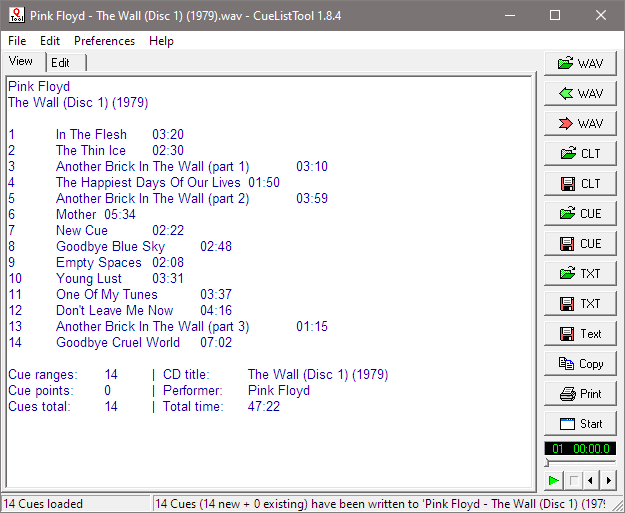
This utility allows you, among other things, to read, edit, and write back the cue lists embedded in WAV files by audio editing programs such as Adobe Audition. Cue lists can be saved as small text files and shared with other users.

www.stefanbion.de/cuelisttool

LosslessSwitcher ~ Mac Sample Rate Utility


LosslessSwitcher switches your current audio device’s sample rate to match the currently playing lossless song on your Apple Music app, automatically.

Let’s say if the next song that you are playing, is a Hi-Res Lossless track with a sample rate of 192kHz, LosslessSwitcher will switch your device to that sample rate as soon as possible.

The opposite happens, when the next track happens to have a lower sample rate.

github.com/vincentneo/LosslessSwitcher

Quiet on the Set ~ Windows Volume Limiter


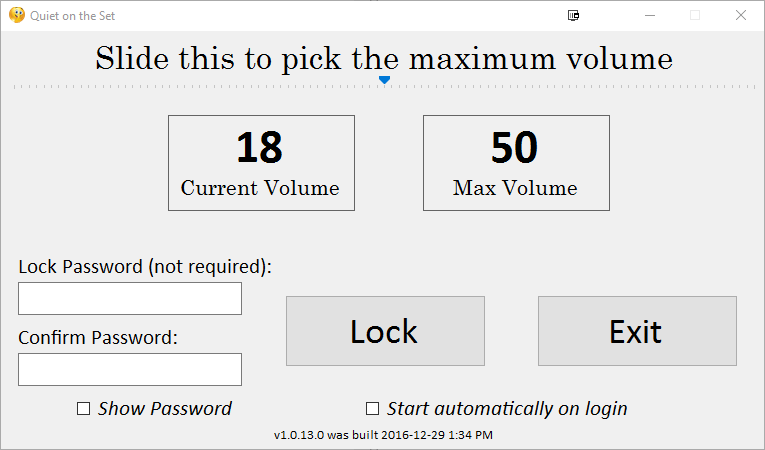
Prevent someone from turning up the volume on a Windows machine beyond a maximum volume.

This is a very simple Windows Forms application that lets you set a maximum value on for your volume, and then lock the setting so that a user cannot change the volume.

Disclaimer: This app is primarily geared toward young/special needs children. The “lock” provides a basic level of control, but it could be easily bypassed by someone with technical knowledge.

github.com/troylar/quiet-on-the-set

MKVToolNix ~ Matroska Tools For Linux / Unix & Windows


With these tools one can get information about (via mkvinfo) Matroska files, extract tracks/data from (via mkvextract) Matroska files and create (via mkvmerge) Matroska files from other media files. Matroska is a new multimedia file format aiming to become THE new container format for the future. You can find more information about it and its underlying technology, the Extensible Binary Meta Language (EBML), at www.matroska.org

mkvtoolnix.download/index