gnudb.org ~ CD Metadata Database


An opensource alternative CDDB / FreeDB service.

gnudb.org ~ a new home for the freedb database

How to use gnudb.org:

  • Configure your CDDB or freedb-aware software to point to gnudb.gnudb.org as your CDDB / freedb-server.

All official gnudb servers are running cddbp at port 8880 and http at port 80

The path for http-access is /~cddb/cddb.cgi

Access a xmcd file directly when you know the genre and discid at:

http://www.gnudb.org/gnudb/genre/discid

Example ~ http://www.gnudb.org/gnudb/rock/390f1215

Source: gnudb.org CD database

Search By Artist, Album or Artist And Album:

www.gnudb.org/search.php

Balanced Versus Unbalanced Audio Interconnects


Clearly, the available literature prescribes balanced interconnection as the absolute best way to interconnect audio equipment. The use of entirely balanced interconnection with both ends of the shield connected to chassis ground at the point of entry provides the best available performance.

Source: Grounding and Shielding Audio Devices

foo_discogs ~ Foobar2000 & Discogs


Greatly extend the information in your music files by using the foo_discogs component to tag albums with Discogs information. Once the additional Discogs release information is stored in the song tags, it’s possible to search for catalog numbers, secondary artists or studios, etc. You can now also create toolbar buttons which open the corresponding artist or release pages in Discogs, the artist’s own website or other links.

  • download Discogs album and artist artwork
  • retrieve more information than most taggers
  • goes that extra length to make sure retrieved data is correct and well formatted
  • flexible tag mapping allows you to write only what you want, where you want
  • use meta-data in tags to display Discogs artist / label / release web pages
    able to later update specified tags (useful in update ratings)
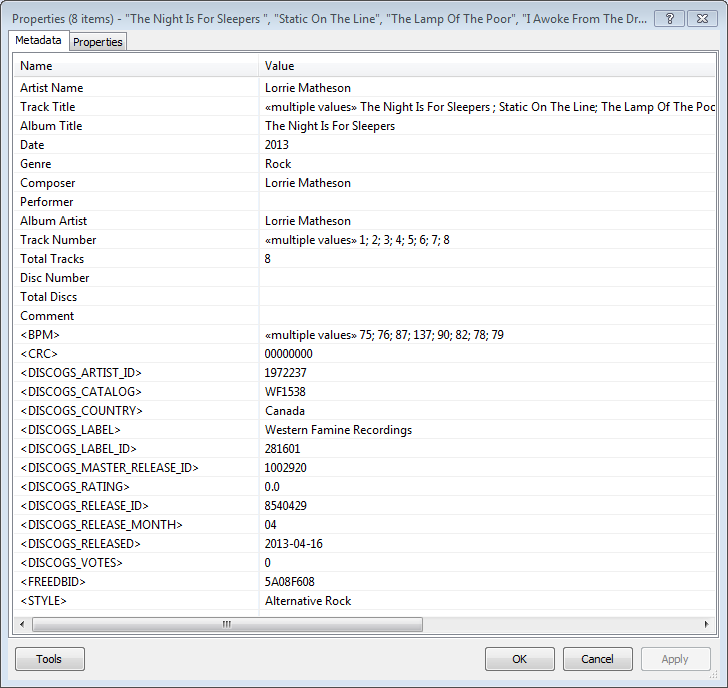
foobar - foo_discogs - resulting tags

Album’s properties when tagged with Discogs info

Installing & Configuration:

  1. Install the foo_discogs component
  2. Select any song on any playlist
  3. Right click the song and select Tagging
  4. From the sub-menu select Discogs
  5. Now select Configuration
  6. Change any settings needed.

Tagging Files:

  1. Select an entire album on a playlist
  2. Right click the album and select Tagging
  3. Select Discogs
  4. Select Write Tags…
  5. Click Search then select the correct match and click Next
  6. Confirm that the tracks match the files and click Write tags

Your audio files should now be tagged with additional Discogs metadata.

Open Release Page Button:

  1. Right click on Foobar’s Toolbar area and select “Customise Buttons…
  2. In “Available Commands” navigate to and select [context] > Tagging > Discogs > View Release Page
  3. Change Icon and then click “OK
  4. Select a song,  or album that has been tagged with Discogs metadata, and click the new custom button

References:

www.foobar2000.org/components/view/foo_discogs
hydrogenaud.io/index.php/topic,50523.0.html

Latest update:

github.com/ghDaYuYu/foo_discogs
bitbucket.org/fooDaYuyu/foo_discogs/downloads/

Recommended Audio Forums


General:

Hardware:

diyAudio

Headphones:

Head-Fi

AcousticBrainz ~ Analyze Your Music


The AcousticBrainz project aims to crowd source acoustic information for all music in the world and to make it available to the public. This acoustic information describes the acoustic characteristics of music and includes low-level spectral information and information for genres, moods, keys, scales and much more. The goal of AcousticBrainz is to provide music technology researchers and open source hackers with a massive database of information about music. ~ AcousticBrainz

Blog
Downloads
FAQ
Github
Wiki

Best Dynamic Microphones Of All Time: The Top 6 List


Looking for some good dynamic mics to add to your locker? Well in this post, I reveal 6 of the greatest ones in music history. ~ Best Dynamic Microphones of all time: The Top 6 List

RareWares ~ Freeware Audio Archive


Providing hard-to-find pieces of software since 2001

Repository of open audio CODECs, compiled LAME binaries and freeware utilities.

http://rarewares.org

freedb.org ~ Metadata Lookup Service


Sadly, this service was terminated as of March 2020, apparently due to corporate indifference.

freedb was a free CD and music database service to look up textual metadata about music, audio or data CDs. This was done by a client which queried the freedb database. As a result, the client displayed the artist, CD title, track list and some additional information. Clients are for example CD players, CD rippers and CD burning software.

www.freedb.org
en.wikipedia.org/wiki/Freedb

Alternative CDDB servers:

  • freedb.dbpoweramp.com – defunct link
  • gnudb.org

Resources:

Discogs ~ Music Database & Marketplace


Discover the largest music database and marketplace in the world. Buy and sell vinyl, CDs and more with collectors from around the globe. Catalog and complete your collection.

www.discogs.com
Discogs Index
Discogs Lists
r/discogs
Ogger Club

Python API ~ github.com/joalla/discogs_client

VirusTotal ~ Online Security Scanner


Please check new websites and scan any downloaded files before you install new software. VirusTotal is a free service that analyzes suspicious files and URLs and facilitates the quick detection of viruses, worms, trojans, and all kinds of malware.

VirusTotal is a website, originally developed by Hispasec, that provides free checking of files for viruses. It uses 55 different antivirus products and 61 online scan engines[2][3] to check for viruses that the user’s own antivirus solution may have missed, or to verify against any false positives.[4] Files up to 128 MB can be uploaded to the website or sent via email ~ Wikipedia

mp3 Diags ~ Diagnose & Repair mp3s


MP3 Diags is a GUI-based application that allows end-users to identify issues with their MP3 files, fix some of the issues and make other changes, like adding track information. It also lets you “look inside” an MP3 file.

mp3diags

mp3diags.sourceforge.net