
Pitch-shift audio from Spotify, Apple Music, browsers, and more, from the menu bar. No BlackHole or virtual cables. Free and open-source.
Category Archives: Open Source

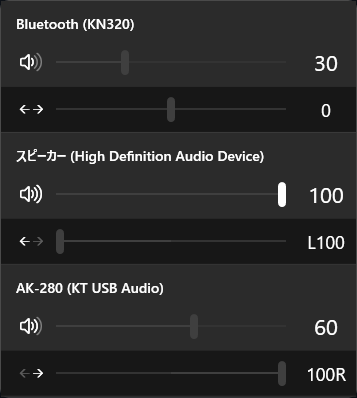
OmniPans ~ Panning & Volume Control
A utility to control volume / pan for all audio devices on Windows.
github.com/SatsukiAnakawa/OmniPans
Share this:

foobar2000 ~ Duration & Subsong Manager
A foobar2000 component that lets you override the length of any track, hide individual subsongs from the Media Library, and read playback time at millisecond precision.
Language: English | 中文
Features:
Duration Manager — custom track length
- Set a custom length for any track via the context menu “Set custom duration”.
- Manage all overrides in Preferences → Tools → Duration & Subsong Manager → Duration Manager (search, edit, delete).
- Overrides are matched by file content hash + subsong index, so they survive file moves/renames.
- During playback the track is automatically truncated to the custom length (jumps to the next track when reached).
Subsong Manager — hide subsongs
- For multi-subsong files, choose exactly which subsongs are visible in the autoplaylists.
- Configure include/exclude ranges (e.g.
1-3,5,7) or checkbox in Preferences → Tools → Duration & Subsong Manager → Subsong Manager.- Note: this filters the Media Library query at runtime, so changes take effect after a restart.
High-Precision Timer (UI element)
- An auxiliary UI element for the Duration Manager that shows playback position and track length in millisecond precision:
[HH:]MM:SS.mmm.- Add it via the layout editor like any other UI element (“High-Precision Timer”).
Compatibility
- foobar2000 v2.0 or newer, Windows, 32-bit and 64-bit.
- Built against the foobar2000 SDK (2025-03-07).
github.com/M3MEMonster/Duration_and_Subsong_Manager
Share this:

24seven.fm Covers ~ Radio Cover Art
Cover-art for the 24seven.fm family of internet radio stations — Streaming Soundtracks, 1980s.FM, Adagio.FM, Death.FM, and Entranced.FM. A shared, host-agnostic C++ engine drives three Windows front-ends plus a cross-platform core library:
| Component | Directory | Output | Build system |
|---|---|---|---|
| Desktop viewer | desktop/ | 24sevenfm_covers.exe(x64, self-contained) | MSBuild (.vcxproj / .sln) |
| Winamp plugin | winamp/ | gen_24sevenfm_covers.dll(x86 / 32-bit) | CMake |
| foobar2000 component | foobar2000/foo_24sevenfm_covers/ | foo_24sevenfm_covers.dll(x64) | MSBuild ( .vcxproj) |
| Core library | lib/ | coverfetch static lib (cross-platform) | CMake |
All three front-ends share the same Direct2D renderer (shared/d2d_*.cpp), the cover engine (shared/cover_engine.* — cover preload, crossfade/flip transitions, remaining-time countdown), the options page (shared/options_*), and the networking/parse library (lib/). The library alone (lib/) is portable C++11 and already cross-compiles for Android/iOS.
github.com/pke/24sevenfm_covers
Share this:

Dynamic Audio Normalizer ~ Advanced Normalization
Dynamic Audio Normalizer is a library for advanced audio normalization purposes. It applies a certain amount of gain to the input audio in order to bring its peak magnitude to a target level (e.g. 0 dBFS). However, in contrast to more “simple” normalization algorithms, the Dynamic Audio Normalizer dynamically re-adjusts the gain factor to the input audio. This allows for applying extra gain to the “quiet” sections of the audio while avoiding distortions or clipping the “loud” sections. In other words: The Dynamic Audio Normalizer will “even out” the volume of quiet and loud sections, in the sense that the volume of each section is brought to the same target level. Note, however, that the Dynamic Audio Normalizer achieves this goal without applying “dynamic range compressing”. It will retain 100% of the dynamic range within each “local” region of the audio file.
The Dynamic Audio Normalizer is available as a small standalone command-line utility and also as an effect in the SoX audio processor as well as in the FFmpeg audio/video converter. Furthermore, it can be integrated into your favorite DAW (digital audio workstation), as a VST plug-in, or into your favorite media player, as a Winamp plug-in. Last but not least, the “core” library can be integrated into custom applications easily, thanks to a straightforward API (application programming interface).
github.com/lordmulder/DynamicAudioNormalizer
Share this:

WMAEncodeRS ~ CLI WMA Windows Encoder
A command-line Windows Media Audio encoder for Windows — a Rust port of lvqcl’s WMAEncode, extended to also emit xWMA (the RIFF format used by XAudio2 in games, à la Microsoft’s xWMAEncode). It turns WAV / raw PCM into fully-working .wma or .xwma using the built-in Windows Media Format runtime (wmvcore.dll) — the same encoder Windows itself uses — so output is maximally compatible and DRM-free. It is bidirectional: a .wma input is decoded back to WAV.
WAV/PCM -> WMA via the built-in Windows Media Format SDK (wmvcore). Supports WMA Standard, Professional, Lossless, and Voice in CBR / VBR / two-pass modes, with tagging, raw-PCM input, stdin input, stdout piping, and .xwma output.
Highlights:
- Memory-safe at the boundary. All
unsafeis confined tosrc/encoder.rsandsrc/xwma.rs(the COM/FFI boundary); the crate root sets#![deny(unsafe_code)], so every other module is compiler-guaranteed unsafe-free. (Calling the Windows Media SDK requiresunsafe; it can only be isolated and audited, not removed.) - Bug fixes vs. the original C++: tag strings include the UTF-16 NUL terminator (
WMT_TYPE_STRINGlength); 64-bit WAV offset/seek (two-pass on files > 2 GB); broken-pipe-safe stdout (--print-formats | headwon’t panic). - xWMA output with an accurate
dpdsseek table (total length exact; seek points sub-millisecond), validated by round-tripping through Microsoft’sxwmaencode.exe. - Unicode-safe. Non-ASCII filenames and tags (incl. CJK) are handled without panic or mojibake; the console output code page is set to UTF-8 at startup.
- Bidirectional. Encodes WAV→WMA/xWMA and decodes WMA→WAV and xWMA→WAV.
github.com/MSIVST/WMAEncodeRS#wmaencoders
Resources:
github.com/misgender/WMAEncode
Share this:

sonoscli ~ Sonos Command Line Interface
sonoscliis a modern Go CLI to control Sonos speakers over your local network (UPnP/SOAP).Features:
- Reliable discovery: SSDP + topology (
ZoneGroupTopology.GetZoneGroupState) with subnet scan fallback.- Coordinator-aware control: target any room; commands go to the group coordinator automatically.
- Playback controls: play/pause/stop/next/prev, plus
play-uri,linein, andtv.- Grouping: inspect groups, join/unjoin, party mode, dissolve groups, and solo a room.
- Queue: list/play/remove/clear queue entries.
- Favorites: list and play Sonos Favorites by index or title.
- Scenes: save/apply presets (grouping + per-room volume/mute).
- Spotify:
- Enqueue/play Spotify share links or canonical URIs (no Spotify credentials required).
- Search Spotify via SMAPI (Sonos Music API; uses your linked service in Sonos).
- Optional Spotify Web API search (client credentials) if you want it.
- YouTube handoff: resolve a YouTube URL with
yt-dlpand hand the direct audio stream to Sonos.- Smart URL streaming:
play-urlruns a short-lived local MP3 proxy for YouTube, YouTube Music playlists, podcasts, radio streams, SoundCloud-style pages, and other URLs.- Live events:
watchsubscribes to AVTransport + RenderingControl and prints changes.- Scriptable output:
--format plain|json|tsvplus--debugtracing.
This is not an official Sonos project.
github.com/steipete/sonoscli
sourceforge.net/projects/sonoscli.mirror
Share this:

foobar2000 ~ foo_filename_editor
Advanced file renamer component for foobar2000 media player. This plugin helps you rename your physical audio files on your hard drive based on their metadata tags, while ensuring a seamless, smart, and fully automated workflow.
Key Features:
- Smart Track Number Padding: Automatically scans all selected tracks. If the album contains 100 or more tracks, it pads numbers to 3 digits (
001,002), otherwise it defaults to 2 digits (01,02) dynamically.- Intelligent Compilation (Various Artists) Detection: Automatically checks
%album artist%and%artist%tags. If it detects a compilation, it seamlessly applies your custom VA formatting template.- Advanced Case Conversion: Supports Title Case, Smart Title Case (keeps short words like a, an, the, and, with lowercase), Sentence case, ALL CAPS, and lowercase.
- Roman Numerals Preservation: Intelligently detects standalone Roman numerals (e.g.,
Part iii) and forces them to uppercase (Part III) across all case conversion modes (except lowercase). Includes protection against false positives (words like MIX, DIV).- Extended Unicode & Ligature Support: Works perfectly with Windows native APIs, preserving and processing complex characters like
æ,œ,ß, and language-specific diacritics.- Safe Formatting Menu: Quick insertion menu for popular tags and safely escaped syntax characters like
'(',')','[',']', and single/double quotes (','').- Seamless Playlist Synchronization & Reload: Automatically replaces dead file links in all open playlists with the newly renamed paths. Instantly reloads file tags and durations in the background—no broken links, no manual reloading required!
- Robust Error Handling: If a file cannot be renamed (e.g., if it is locked or currently playing), the plugin bypasses it without crashing and provides a detailed summary report of successful and failed files.
- Persistent Settings: Remembers your custom single/VA templates, history list, checkboxes status, and even your preferred window column widths between sessions.
🎵 M3U/M3U8 Playlist Generation (v1.1)
The plugin now includes built-in support for generating playlist files automatically during the renaming process:
- Save M3U Checkbox: Automatically creates a playlist file in the top-level directory of your processed files.
- Custom Naming Templates: Use standard foobar2000 title formatting syntax (like
%album%or%artist% - %album%) to dynamically name your playlist file.- EXTINF Metadata: Optional toggle to write standard
#EXTM3Uand#EXTINFheaders containing track durations and formatted titles (%artist% - %title%).- Smart Conflict Resolution & Overwrite Toggle: Prevents accidental loss of data. If overwrite is disabled, the plugin safely creates incremented filenames like
Playlist (1).m3u.- UTF-8 Compatibility: Playlists are written with a proper UTF-8 BOM, ensuring seamless support for non-ASCII characters, symbols, and ligatures.
github.com/VadimLevo/foo_filename_editor
Share this:

Discogs MCP ~ Discogs Remote MCP Server
A remote Model Context Protocol&nb sp;server for Discogs, hosted on Cloudflare Workers. Two things it’s good at:
- Finding the best-sounding pressing of an album — surveys every version of a master release, scores each on community ratings, collector demand, format quality, and audiophile markers (MFSL, half-speed masters, renowned mastering engineers, Japanese pressings…), and returns a ranked comparison.
- Mood & taste based recommendations — mood-aware search of your own collection (“mellow Sunday morning”), catalog discovery ranked against your taste profile, and cross-user discovery that mines other collectors’ public collections.
Authorization is browser-based Discogs OAuth: connect an MCP client to the server URL and you’ll be redirected to Discogs to log in. Access is Read-only, the server never modifies your collection.
github.com/WOIII-me/Discogs-MCP
discogs-mcp.woiii.workers.dev/
References:
modelcontextprotocol.io/docs/getting-started/intro
www.macrometa.com/articles/what-are-cloudflare-workers
Resources:
github.com/cswkim/discogs-mcp-server
Share this:

Omniphony ~ 3D & Multichannel Audio
Real-time spatial / object-based audio rendering engine (VBAP + binaural) for multichannel and 3D audio — speakers or headphones.
Omniphony decodes object-based audio, works out where every sound should come from, and drives your real speakers with VBAP — live, with a 3D scene showing each object move and everything streamed over OSC. Nothing’s a black box: formats load as runtime bridges, and the part that decides which speaker gets what is a backend you can rewrite in a single file.
- Write your own panner in one file — it shows up in the UI on its own.
- No formats baked in — decoders load at runtime as bridges.
- PipeWire on Linux, ASIO on Windows, or raw float straight to a file or pipe.
omniphony.mgth.fr
github.com/mgth/Omniphony
mpv with the ad_orender Spatial decoder — Spatial object rendering via liborender (Omniphony)
References:
Resources:
aur.archlinux.org/packages/orender
github.com/harletty/harletty-bridge/tree/main
Share this:

SuperLAME ~ Multithreaded MP3 Encoder
A multithreaded MP3 encoder built on LAME, using Robert Kausch’s SuperFast technique to run many
libmp3lameinstances in parallel and reassemble a single bit-reservoir-correct MP3 — roughly 8× faster than stock single-threaded LAME at the same quality.It is also a small but fairly complete MP3 codec: encode, decode, wide input format support, high-quality resampling, and ID3 tagging.
github.com/MSIVST/SuperLAME
hydrogenaudio.org/index.php/topic,129699.0
References:
lame.sourceforge.io
github.com/enzo1982/superfast
en.wikipedia.org/wiki/ID3
en.wikipedia.org/wiki/MP3
Share this:

Double File Scanner ~ WinXP Thru Win10 Scanning
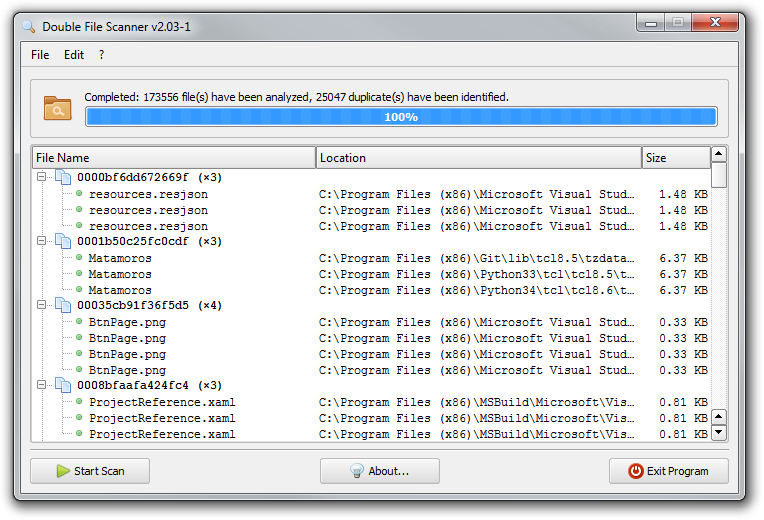
The purpose of this tool is scanning the selected directory or directories for duplicate files, i.e. files with identical content. Duplicate files are identified by first calculating the SHA-1 digest of each file and then looking for values that appear more than once. In particular, files with identical content are guaranteed to have the same SHA-1 digest, while files with differing content will have different SHA-1 values with very high certainty.
All computed SHA-1 values are stored in a hash table, so collisions are found quickly and we do NOT need to compare every digest to every other one. Also, the files are processed concurrently in multiple “worker” threads in order to parallelize and speed-up the SHA-1 computations on multi-core processors. On our test machine it took ~15 minutes to analyse all the ~260,000 files on the system drive (~63.5 GB). During this operation ~44,000 duplicates were found.
Once the scan is completed, the program provides commands to review, rename or delete the duplicate files manually. Alternatively, the “automatic clean-up” wizard may be invoked in order to remove ALL redundant files at a single blow. Optionally, the list of duplicates can be exported to the XML or INI format.
github.com/lordmulder/DoubleFilerScanner


