24seven.fm Covers ~ Radio Cover Art


Cover-art for the 24seven.fm family of internet radio stations — Streaming Soundtracks, 1980s.FM, Adagio.FM, Death.FM, and Entranced.FM. A shared, host-agnostic C++ engine drives three Windows front-ends plus a cross-platform core library:

ComponentDirectoryOutputBuild system
Desktop viewerdesktop/24sevenfm_covers.exe
(x64, self-contained)
MSBuild (.vcxproj / .sln)
Winamp pluginwinamp/gen_24sevenfm_covers.dll
(x86 / 32-bit)
CMake
foobar2000 componentfoobar2000/foo_24sevenfm_covers/foo_24sevenfm_covers.dll
(x64)
MSBuild
(.vcxproj)
Core librarylib/coverfetch static lib (cross-platform)CMake

All three front-ends share the same Direct2D renderer (shared/d2d_*.cpp), the cover engine (shared/cover_engine.* — cover preload, crossfade/flip transitions, remaining-time countdown), the options page (shared/options_*), and the networking/parse library (lib/). The library alone (lib/) is portable C++11 and already cross-compiles for Android/iOS.

github.com/pke/24sevenfm_covers

Dynamic Audio Normalizer ~ Advanced Normalization


Dynamic Audio Normalizer is a library for advanced audio normalization purposes. It applies a certain amount of gain to the input audio in order to bring its peak magnitude to a target level (e.g. 0 dBFS). However, in contrast to more “simple” normalization algorithms, the Dynamic Audio Normalizer dynamically re-adjusts the gain factor to the input audio. This allows for applying extra gain to the “quiet” sections of the audio while avoiding distortions or clipping the “loud” sections. In other words: The Dynamic Audio Normalizer will “even out” the volume of quiet and loud sections, in the sense that the volume of each section is brought to the same target level. Note, however, that the Dynamic Audio Normalizer achieves this goal without applying “dynamic range compressing”. It will retain 100% of the dynamic range within each “local” region of the audio file.

The Dynamic Audio Normalizer is available as a small standalone command-line utility and also as an effect in the SoX audio processor as well as in the FFmpeg audio/video converter. Furthermore, it can be integrated into your favorite DAW (digital audio workstation), as a VST plug-in, or into your favorite media player, as a Winamp plug-in. Last but not least, the “core” library can be integrated into custom applications easily, thanks to a straightforward API (application programming interface).

github.com/lordmulder/DynamicAudioNormalizer

WMAEncodeRS ~ CLI WMA Windows Encoder


A command-line Windows Media Audio encoder for Windows — a Rust port of lvqcl’s WMAEncode, extended to also emit xWMA (the RIFF format used by XAudio2 in games, à la Microsoft’s xWMAEncode). It turns WAV / raw PCM into fully-working .wma or .xwma using the built-in Windows Media Format runtime (wmvcore.dll) — the same encoder Windows itself uses — so output is maximally compatible and DRM-free. It is bidirectional: a .wma input is decoded back to WAV.

WAV/PCM -> WMA via the built-in Windows Media Format SDK (wmvcore). Supports WMA Standard, Professional, Lossless, and Voice in CBR / VBR / two-pass modes, with tagging, raw-PCM input, stdin input, stdout piping, and .xwma output.

Highlights:

  • Memory-safe at the boundary. All unsafe is confined to src/encoder.rs and src/xwma.rs (the COM/FFI boundary); the crate root sets #![deny(unsafe_code)], so every other module is compiler-guaranteed unsafe-free. (Calling the Windows Media SDK requires unsafe; it can only be isolated and audited, not removed.)
  • Bug fixes vs. the original C++: tag strings include the UTF-16 NUL terminator (WMT_TYPE_STRING length); 64-bit WAV offset/seek (two-pass on files > 2 GB); broken-pipe-safe stdout (--print-formats | head won’t panic).
  • xWMA output with an accurate dpds seek table (total length exact; seek points sub-millisecond), validated by round-tripping through Microsoft’s xwmaencode.exe.
  • Unicode-safe. Non-ASCII filenames and tags (incl. CJK) are handled without panic or mojibake; the console output code page is set to UTF-8 at startup.
  • Bidirectional. Encodes WAV→WMA/xWMA and decodes WMA→WAV and xWMA→WAV.

github.com/MSIVST/WMAEncodeRS#wmaencoders

Resources:

github.com/misgender/WMAEncode

sonoscli ~ Sonos Command Line Interface


sonoscli is a modern Go CLI to control Sonos speakers over your local network (UPnP/SOAP).

Features:

  • Reliable discovery: SSDP + topology (ZoneGroupTopology.GetZoneGroupState) with subnet scan fallback.
  • Coordinator-aware control: target any room; commands go to the group coordinator automatically.
  • Playback controls: play/pause/stop/next/prev, plus play-uri, linein, and tv.
  • Grouping: inspect groups, join/unjoin, party mode, dissolve groups, and solo a room.
  • Queue: list/play/remove/clear queue entries.
  • Favorites: list and play Sonos Favorites by index or title.
  • Scenes: save/apply presets (grouping + per-room volume/mute).
  • Spotify:
    • Enqueue/play Spotify share links or canonical URIs (no Spotify credentials required).
    • Search Spotify via SMAPI (Sonos Music API; uses your linked service in Sonos).
    • Optional Spotify Web API search (client credentials) if you want it.
  • YouTube handoff: resolve a YouTube URL with yt-dlp and hand the direct audio stream to Sonos.
  • Smart URL streaming: play-url runs a short-lived local MP3 proxy for YouTube, YouTube Music playlists, podcasts, radio streams, SoundCloud-style pages, and other URLs.
  • Live events: watch subscribes to AVTransport + RenderingControl and prints changes.
  • Scriptable output: --format plain|json|tsv plus --debug tracing.

This is not an official Sonos project.

github.com/steipete/sonoscli
sourceforge.net/projects/sonoscli.mirror

Discogs MCP ~ Discogs Remote MCP Server


A remote  Model Context Protocol&nb sp;server for Discogs, hosted on Cloudflare Workers. Two things it’s good at:

  1. Finding the best-sounding pressing of an album  — surveys every version of a master release, scores each on community ratings, collector demand, format quality, and audiophile markers (MFSL, half-speed masters, renowned mastering engineers, Japanese pressings…), and returns a ranked comparison.
  2. Mood & taste based recommendations  — mood-aware search of your own collection (“mellow Sunday morning”), catalog discovery ranked against your taste profile, and cross-user discovery that mines other collectors’ public collections.

Authorization is browser-based Discogs OAuth: connect an MCP client to the server URL and you’ll be redirected to Discogs to log in. Access is Read-only, the server never modifies your collection.

github.com/WOIII-me/Discogs-MCP
discogs-mcp.woiii.workers.dev/

References:

modelcontextprotocol.io/docs/getting-started/intro
www.macrometa.com/articles/what-are-cloudflare-workers

Resources:

github.com/cswkim/discogs-mcp-server

delayson ~ Vintage Tape Delay Plugin


Dive into DelaySon, a meticulously crafted plugin that captures the soulful warmth and organic character of vintage tape delay units. Its carefully designed emulation delivers an authentic analog sound, inspired by the timeless charm of classic echo machines.

Its intuitive interface and versatile controls make it simple to achieve stunning results, from subtle tape warmth to intricate rhythmic echoes, with unmatched precision and musicality.

sonimus.com/products/delayson

MP3Gain Express ~ MP3Gain For MacOS


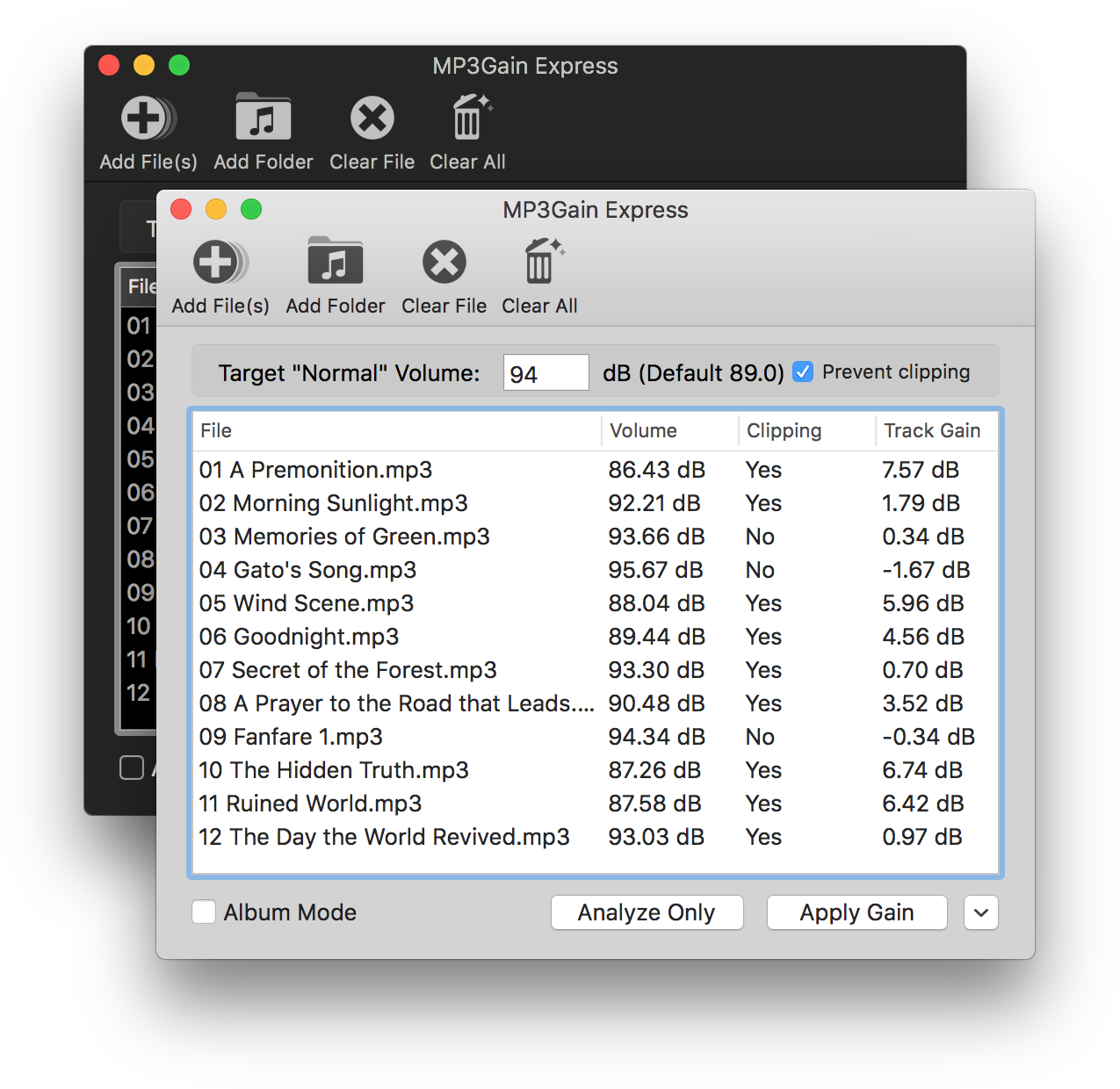
MP3Gain Express is a port of MP3Gain and AACGain to macOS. It allows you to analyze or apply volume gain to a list of MP3 or AAC files. Anyone who has used the Windows UI for MP3Gain should find this one familiar, as it was designed to look similar to that version.

It’s easy to use. Simply select the files you want to increase or decrease the volume of, enter the desired loudness, and click Apply Gain to update your files.

mp3gain express user interface

projects.sappharad.com/mp3gain
github.com/Sappharad/mp3gainOSX

Omniphony ~ 3D & Multichannel Audio


Real-time spatial / object-based audio rendering engine (VBAP + binaural) for multichannel and 3D audio — speakers or headphones.

Omniphony decodes object-based audio, works out where every sound should come from, and drives your real speakers with VBAP — live, with a 3D scene showing each object move and everything streamed over OSC. Nothing’s a black box: formats load as runtime bridges, and the part that decides which speaker gets what is a backend you can rewrite in a single file.

  • Write your own panner in one file — it shows up in the UI on its own.
  • No formats baked in — decoders load at runtime as bridges.
  • PipeWire on Linux, ASIO on Windows, or raw float straight to a file or pipe.

omniphony.mgth.fr
github.com/mgth/Omniphony

mpv with the ad_orender Spatial decoder — Spatial object rendering via liborender (Omniphony)

github.com/mgth/mpv-omniphony

References:

www.audiosciencereview.com/forum/index.php?threads/omniphony-high-performance-spatial-audio-engine-with-mpv-integration

Resources:

aur.archlinux.org/packages/orender
github.com/harletty/harletty-bridge/tree/main

SuperLAME ~ Multithreaded MP3 Encoder


A multithreaded MP3 encoder built on LAME, using Robert Kausch’s SuperFast technique to run many libmp3lame instances in parallel and reassemble a single bit-reservoir-correct MP3 — roughly 8× faster than stock single-threaded LAME at the same quality.

It is also a small but fairly complete MP3 codec: encode, decode, wide input format support, high-quality resampling, and ID3 tagging.

github.com/MSIVST/SuperLAME
hydrogenaudio.org/index.php/topic,129699.0

References:

lame.sourceforge.io
github.com/enzo1982/superfast
en.wikipedia.org/wiki/ID3
en.wikipedia.org/wiki/MP3

Tutti ~ macOS Audio Controller


A macOS menu bar utility that plays the same audio through any number of output devices at once.

macOS gives you a volume slider, a device list, and a tiny speaker glyph — and that’s it. You can’t play to two speakers at once, can’t set a different volume per app, can’t EQ one app without touching the rest. Tutti is the control center that fills the gap: one panel for every output, every app, and every level — riding Apple’s own audio frameworks, with nothing installed into your system.

github.com/BarryBarrywu/tutti

foobar2000 ~ foo_musical_key


foo_musical_key is a foobar2000 component that detects the musical key of selected tracks with libkeyfinder or by ear via a MIDI piano keyboard interface, writes the result to foobar2000’s metadata database, and can write the key tag back into the source audio file.

The component adds a Musical Key Analyser context-menu group and ships as a standard .fb2k-component package for foobar2000 users.

Features:

  • Detect musical keys automatically for one or many selected tracks (libkeyfinder).
  • Detect the key of a single track manually by playing notes on your keyboard (MIDI out, Windows default GS synth).
  • Run automatic analysis in a background worker with foobar2000 progress UI.
  • Write detected keys to foobar2000’s metadata DB without touching the file.
  • Write the key tag from the DB into the audio file on disk (separate action).
  • Choose one of three output notations:
    • Standard (C, Am, Dbm)
    • Camelot (8B, 8A)
    • Open Key (1d, 1m)
  • Configurable tag name (default: Initial Key).
  • Build x86 and x64 binaries and package them into one .fb2k-component.

github.com/PEERSOFTdev/foo_musical_key
hydrogenaudio.org/index.php/topic,129518.0.

Fender Studio ~ Record, Jam & Create


Record, jam, and capture your creativity whenever and wherever it strikes. Packed with authentic Fender tones, Fender Studio is fast, fun, and free for guitar players and music creators of all types.

fender.com/pages/fender-studio-app