A small browser-based ear-training tool for practicing pitch, intonation, and frequency recognition using the Web Audio API.
440lab.com
github.com/qwell/440-lab

A small browser-based ear-training tool for practicing pitch, intonation, and frequency recognition using the Web Audio API.
440lab.com
github.com/qwell/440-lab

Pitch Playground is a free, ad-free collection of simple tools for musical tuning, rhythm, pitch, and intonation ear training.
Tuning and reference pitches
Use the tuner to check the pitch of a note with your microphone, or play reference tones to practice matching and tuning by ear. The reference pitch is adjustable, so you are not limited to A440.
Pitch and intonation ear training
Practice hearing small differences in pitch and recognizing whether a note is sharp or flat. The exercises are intended to develop pitch discrimination and a more accurate sense of intonation without requiring perfect pitch.
Metronome and rhythm practice
Use the metronome for a steady beat while practicing, choose from common simple, compound, and odd meters, or tap a tempo to set the BPM by feel.
Simple by design
Pitch Playground is designed to be a small, straightforward set of music practice tools: open it, choose a tab, and start practicing. Works well on desktop and mobile.
Free forever
Pitch Playground will always remain free, ad-free, and without in-app purchases. To run this site locally, download and unzip the latest release, which can be hosted on a webserver like nginx or by directly opening index.html.
p.jeltz.org
github.com/qwell/pitch-playground

What is it? And a WARNING!
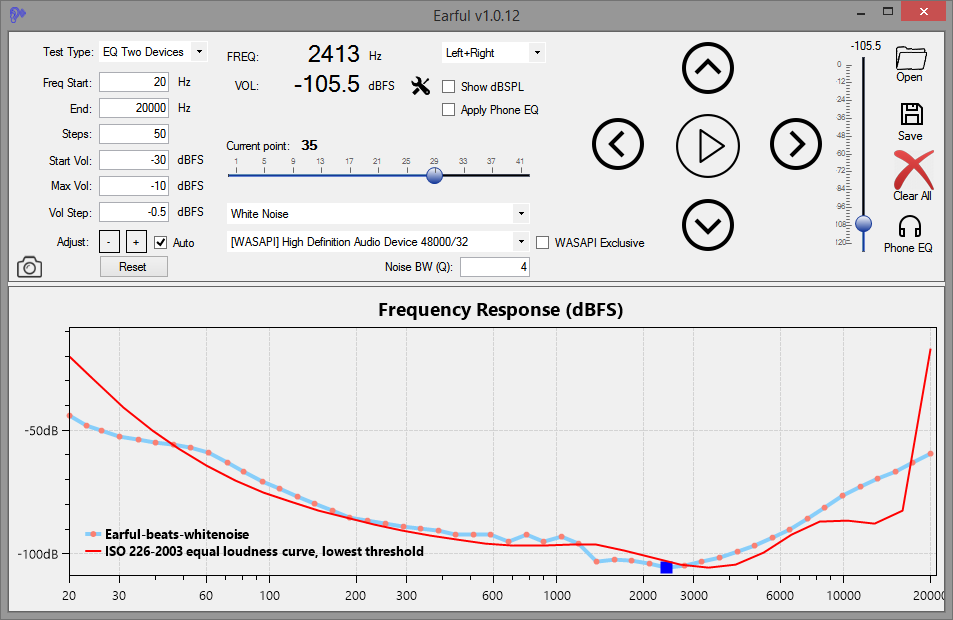
Earful is an app designed to measure and evaluate the lower threshold of hearing across a frequency spectrum. It is designed to run on Windows and support ASIO, WASAPI, and Direct Sound audio devices. Use with headphones is recommended for greater accuracy and noise elimination.
In addition, with version .10, Earful now supports two other types of tests:
- Equal-loudness testing using the same device and 1kHz reference tone
- Two devices equal-loudness testing, using a reference device, such as speakers, and a test devices, such as headphones
The app is free to use, but to use it, you must agree to do so AT YOUR OWN RISK ONLY. Make sure that the volume settings are set such that any loud sounds played through your system will not damage your equipment or your hearing! This is important. Set the frequency range in Earful correctly, and also specify the maximum volume setting at a low number to avoid surprises (default is -20dBFS).
Use is entirely at your own risk.

Test your musical skills in 6 minutes!
While working at the music and neuroimaging lab at Beth Israel/Harvard Medical School in Boston, I developed a quick online way to screen for the tonedeafness. It actually turned out to be a pretty good test to check for overall pitch perception ability. The test is purposefully made very hard, so excellent musicians rarely score above 80% correct. Give it a try!


