Ritmolux ~ Real-time Music Visualizer


A lightweight, real-time music visualizer built around one shared Rust core that turns a stream of PCM audio samples into GPU-rendered visuals. Two frontends consume that core:

  • Standalone app (Windows, macOS and Linux) — pure Rust (winit + wgpu), fed by the OS’s system-audio capture.
  • foobar2000 plugin (Windows-first) — a thin C++ shim over the core’s C ABI, fed by foobar’s own visualisation_stream (no loopback needed on that path).

The core is source-agnostic: it takes interleaved/mono PCM frames and does not care whether they came from loopback capture or foobar. That single abstraction is what lets one visual codebase serve both frontends.

ritmolux visualization

github.com/IgorKonovalov/Ritmolux
igorkonovalov.github.io/Ritmolux/gallery

foo_filename_editor ~ Advanced File Renamer


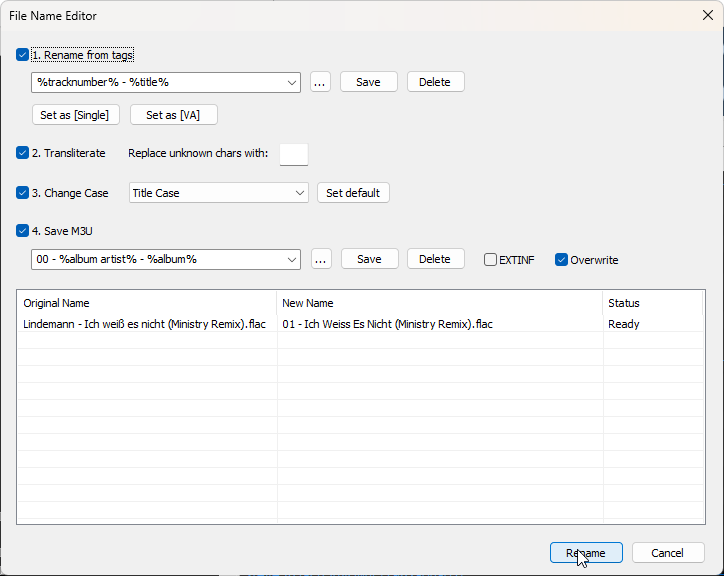
Advanced file renamer component for foobar2000 media player. This plugin helps you rename your physical audio files on your hard drive based on their metadata tags, while ensuring a seamless, smart, and fully automated workflow.

Key Features:

  • Smart Track Number Padding: Automatically scans all selected tracks. If the album contains 100 or more tracks, it pads numbers to 3 digits (001, 002), otherwise it defaults to 2 digits (01, 02) dynamically.
  • Intelligent Compilation (Various Artists) Detection: Automatically checks %album artist% and %artist% tags. If it detects a compilation, it seamlessly applies your custom VA formatting template.
  • Advanced Case Conversion: Supports Title Case, Smart Title Case (keeps short words like a, an, the, and, with lowercase), Sentence case, ALL CAPS, and lowercase.
  • Roman Numerals Preservation: Intelligently detects standalone Roman numerals (e.g., Part iii) and forces them to uppercase (Part III) across all case conversion modes (except lowercase). Includes protection against false positives (words like MIX, DIV).
  • Extended Unicode & Ligature Support: Works perfectly with Windows native APIs, preserving and processing complex characters like æ, œ, ß, and language-specific diacritics.
  • Safe Formatting Menu: Quick insertion menu for popular tags and safely escaped syntax characters like '(', ')', '[', ']', and single/double quotes (', '').
  • Seamless Playlist Synchronization & Reload: Automatically replaces dead file links in all open playlists with the newly renamed paths. Instantly reloads file tags and durations in the background—no broken links, no manual reloading required!
  • Robust Error Handling: If a file cannot be renamed (e.g., if it is locked or currently playing), the plugin bypasses it without crashing and provides a detailed summary report of successful and failed files.
  • Persistent Settings: Remembers your custom single/VA templates, history list, checkboxes status, and even your preferred window column widths between sessions.

M3U/M3U8 Playlist Generation (v1.1)

The plugin now includes built-in support for generating playlist files automatically during the renaming process:

  • Save M3U Checkbox: Automatically creates a playlist file in the top-level directory of your processed files.
  • Custom Naming Templates: Use standard foobar2000 title formatting syntax (like %album% or %artist% - %album%) to dynamically name your playlist file.
  • EXTINF Metadata: Optional toggle to write standard #EXTM3U and #EXTINF headers containing track durations and formatted titles (%artist% - %title%).
  • Smart Conflict Resolution & Overwrite Toggle: Prevents accidental loss of data. If overwrite is disabled, the plugin safely creates incremented filenames like Playlist (1).m3u.
  • UTF-8 Compatibility: Playlists are written with a proper UTF-8 BOM, ensuring seamless support for non-ASCII characters, symbols, and ligatures.
foo_filename_editor configuration panel

github.com/VadimLevo/foo_filename_editor

foo_gdrive_stream ~ Google Drive Streaming


foobar2000 v2 x64 component for exposing a configured Google Drive folder as a playlist/feed item, similar to source components such as YouTube Source.

Playback prioritizes stability: the component downloads a selected Drive file to a local cache on first playback, then delegates decoding to foobar2000’s normal input components using the cached local file.

Features:

  • Google OAuth desktop flow with system browser, localhost redirect, and PKCE.
  • OAuth token saved under the foobar2000 profile and protected with Windows DPAPI when available.
  • Preferences page for OAuth client JSON, Drive folder ID/URL, cache directory, cache size limit, and saved token removal.
  • Recursive file listing from Google Drive files.list, limited to downloadable audio-looking blob files.
  • Playlist insertion using gdrive://<fileId>/<encoded filename>.
  • Playlist/feed track support using gdrive://folder/<folderId>/<encoded name>.
  • File menu integration under File > Google Drive Stream, including folder URL/ID loading into a new playlist.
  • Front cover artwork support from image files in the same Drive folder, preferring names such as cover, folder, front, album, or artwork.
  • Artwork inheritance for nested folders, Album/cover.jpg can apply to tracks under Album/Disc 1.
  • Context menu expansion of a selected folder feed into its current Drive audio files.
  • Context menu refresh that replaces the already-expanded gdrive:// file tracks immediately after the folder feed.
  • First-play cache download through Drive files.get?alt=media.

github.com/shirafukayayoi/foo_gdrive_stream

foo_dsp_speaker_range ~ Speaker Range Cropping


foo_dsp_speaker_range is a foobar2000 DSP component for Windows x64. It adds Speaker Range Crop, a configurable Linkwitz-Riley 4th-order high-pass/low-pass filter intended to limit playback to a loudspeaker’s reproducible range.

The filter sections use Vicanek matched (decramped) coefficients instead of bilinear-transform designs, so the magnitude response stays close to the analog Linkwitz-Riley prototype near Nyquist. In practice this means a 20 kHz low-pass stays active and tracks the intended response at 44.1 kHz, where bilinear/RBJ-style low-pass biquads cramp toward their forced null at Nyquist. The DSP uses causal IIR filters with no lookahead and reports zero processing latency to foobar2000. Reference: M. Vicanek, “Matched Second Order Digital Filters” (2016), vicanek.de/articles/BiquadFits.pdf.

github.com/kidoz/foo-dsp-speaker-range

footilla ~ foobar2000 Title Formatting Library


A reusable Win32 text input control for foobar2000 title-format expressions, built as footilla.lib. Ships a Footilla-maintained copy of the Scintilla editing engine used by SciTE, with Footilla’s own title-format container lexer, completion catalog and call tips. The engine’s object files are included in the library: no Scintilla DLL, Lexilla DLL, SciTE executable, WTL runtime or foobar2000 SDK is required.

github.com/foxx1337/footilla

foo_rubato ~ Foobar2000 Rubato BPM Analyzer


Detects the tempo of a track and which of Tango, Vals, Milonga it is – or none of the three – from the audio alone, without reading the genre tag.

The two answers are linked. The tempo a dancer taps is not a property of the audio by itself: a tango is tapped on the beat, a vals once per 3/4 bar, a milonga once per 2/4 bar, a reggae on the quarter note – under the skank rather than on it. So the rhythm is settled first and the tempo reported on the level that rhythm implies. Measured against 3,692 hand-tapped tracks the estimate lands within 2 BPM of the tap 88.7% of the time, which is about as close as the same person tapping the same track twice; rhythm classification is 93.6% accurate. docs/tango-analysis.md has the method and the full numbers, and docs/cortina-genres.md covers the cortina genres that were measured and left alone.

Originally written by Michael Balzer+Holger Stenger as BPM Analyser, but bpmcore engine was completely rewritten.

github.com/shaforostoff/foo_rubato
hydrogenaudio.org/index.php/topic,129923.0

References:

en.wikipedia.org/wiki/Tempo_rubato

foo_artwork ~ Foobar2000 Advanced Album Art Display


A high-performance, feature-rich artwork display component for foobar2000 v2 (x64 and 32-bit). It provides intelligent, multi-tiered artwork discovery and acoustic audio recognition for local tracks, internet radio streams, and YouTube playback. It seamlessly supports both Default User Interface (DUI) and Columns UI (CUI).

Artwork Discovery & Retrieval:

  • Local Artwork Search: Automatically searches for artwork files and embedded tags configured in foobar2000 (Preferences > Display > Album Art).
  • Online Commercial Search APIs: Automatically queries Deezer, iTunes, Last.fm, MusicBrainz (Cover Art Archive), and Discogs when local artwork is missing.
  • Customizable API Priority: Reorder and enable/disable individual API services via an intuitive 5-position priority chain.
  • In-Stream Broadcast Artwork Extraction: Parses dynamic in-stream cover links from $info(cover_url), COVER_URL, ARTWORK_URL, icy-cover-url, song.art, and XML/JSON broadcast streams (e.g. Radio Paradise, Cidade FM).
  • YouTube Video Thumbnail Retrieval: Automatically extracts 11-character video IDs from YouTube links and plugin protocols (youtube.com, youtu.be, 3dyd://, fy://, fy+https://), querying commercial music APIs first and falling back to high-resolution video thumbnails (maxresdefault.jpg / hqdefault.jpg).
  • Interactive Provider Rejection: Reject mismatched artwork on-the-fly via shortcut or menu command (View > Artwork Display > Reject Artwork & Search Next Provider). Evicts the bad cache file, blacklists the provider for the active track, and queries the next provider in the fallback chain.
  • Universal Format Support: High-performance decoding for .png, .jpg / .jpeg, .webp (via Windows Imaging Component), .gif, and .bmp.

Internet Radio & Streaming Intelligence:

  • ACRCloud Acoustic Audio Recognition: Local 16 kHz PCM stream sampling and RIFF WAV payload generation to identify untagged radio streams and music tracks via acoustic fingerprinting.
  • Multi-Account ACRCloud Failover: Configure Primary and Secondary credentials with automatic, seamless failover when the Primary account exhausts its monthly quota (Error 3001).
  • Windows DPAPI Credential Security: ACRCloud Access Keys and Secrets are securely encrypted on disk using the Windows Data Protection API (CryptProtectData), eliminating plaintext exposure in .cfg files.
  • CoverSync Stream Latency Compensation: Asynchronous cue delay compensation (?coversync=±N) synchronizes artwork and metadata transitions on radio streams where the audio buffer lags behind metadata changes.
  • External Now-Playing Stream APIs: Automated polling and auto-probing for AzuraCast (/api/nowplaying) and RadioReg (api.radioreg.net) JSON endpoints, supporting live listener counts, cue timings, and HLS streams.
  • m-TAGS & URL Modifiers: Full support for .tags files (reading target stream URLs from the @ metadata tag) and URL query flags (?forceacr, ?coversync, ?inverted, ?rejectstationcovers, ?ext_api_autoprobe, ?bypass).

Dynamic Title Formatting Variables:

  • Canonical API Metadata Publication: Commercial search APIs (Deezer, iTunes, Last.fm, Discogs) and ACRCloud extract authoritative metadata directly into foobar2000 title formatting variables (%foo_artwork_artist%, %foo_artwork_title%, %foo_artwork_album%), replacing messy stream tags.
  • Dynamic Track Timing: Real-time duration (%foo_artwork_length%), elapsed time (%foo_artwork_playback_time%), and countdown remaining (%foo_artwork_playback_remaining%) calculated for both local audio files and live radio streams.
  • Live Stream Diagnostics: Real-time status string (%foo_artwork_status%) reporting query stages, stream connection progress, CoverSync countdowns, and image dimensions with payload size (e.g. Art 1200x1200 342 KB from Deezer).
  • Live Listener Counts: Real-time listener statistics (%foo_artwork_listeners%) from AzuraCast and RadioReg broadcasts.

Advanced Metadata Sanitization:

  • 4-Stage Stream Metadata Sanitizer: Cleans noisy stream metadata by stripping broadcast slogans, stream headers, URLs, timestamps, track numbers, and media noise while protecting band names containing &, and, or slashes (Mumford & Sons, Earth, Wind & Fire, AC/DC).
  • Accented UTF-8 Title Casing: Normalizes all-caps and all-lowercase stream metadata into Title Case with full support for accented characters across Portuguese, Spanish, French, and Italian without CP1252 character corruption.
  • Non-Latin Script Preservation: Conservative sanitization rules protect Cyrillic, Greek, and other non-Latin alphabets from accidental bracket stripping or character truncation.
  • Dedicated Noise Words Blacklist: User-configurable blacklist page backed by an auto-reloaded text file (foo_artwork_data\blacklist.txt).

Caching & Storage Architecture:

  • Persistent Disk Metadata Caching (.meta Sidecars): Remote API metadata is cached on disk alongside image binaries (<hash>.meta alongside <hash>.cache), ensuring instant warm track replays in under 1ms with zero network overhead.
  • Automatic 1 GB Disk Cache Limit: Intelligent background LRU (Least Recently Used) cache eviction automatically keeps the cache under 1 GB, pruning old entries down to 900 MB when needed.
  • Single-File Cache Mode (current.cache): Overwrites a single cache file (current.cache) for external skin scripts and panels (e.g. JScript Panel 3 Thumbs) that monitor a folder for the currently playing track’s artwork.
  • Cache Freshness Verification: Automatically verifies whether local artwork or file tags were updated after the cache was generated, refreshing stale cache entries automatically.

User Interface & Interactivity:

  • Dark Mode Support: Full native theme integration with foobar2000 dark mode across all UI elements and dialogs.
  • Dual UI Support: Native panel integration for both Default UI (DUI) and Columns UI (CUI).
  • Popup Artwork Viewer: Double-click any artwork panel to launch an interactive viewer with window memory, a toggle between “Fit to window” and “Show original size”, mouse-drag panning for oversized images, and a “Save Image…” button.
  • foo_artgrab Integration: Automatic hover overlay displaying a download arrow icon in the bottom-left corner when foo_artgrab.dll is installed, launching the art grabber gallery in one click.
  • On-Screen Display (OSD) & Infobar: Optional Infobar in DUI displaying artist, album, and track title; configurable OSD overlay showing the artwork provider source.

github.com/jame25/foo_artwork
hydrogenaudio.org/index.php/topic,128111.0

foo_spectrum_compare ~ Multispectrogram Comparison


A vertical multitrack spectrum comparison panel component designed for foobar2000, suitable for the default UI (DUI).

Features:

Configuration persistence: Panel settings are serialized using the .fth format.

Floating panel: Supports use as an independent floating panel, which can be opened through the main menu “View” (hold Shift to show hidden menu items).

Vertical multi-track comparison: Select multiple audio tracks and divide them vertically into equal sections. Up to 4 audio tracks can be compared simultaneously to show frequency characteristics.

Background thread analysis: Each audio track is decoded and analyzed in an independent thread, without blocking the UI. Analysis begins immediately upon selection, with loading in seconds.

Spek-style color schemes: 3 built-in color palettes—Spectrum (Spek’s classic rainbow), SoX, and Mono (monochrome).

Frequency axis labeling: The left side displays a linear frequency scale of 0–22 kHz, which can be toggled in the right-click menu.

Timeline markings: The bottom displays time scales at 20-second intervals, which can be toggled in the right-click menu.

Custom title format: Supports foobar2000 titleformat syntax for custom track tags, displayed by default %title% | %codec% | %bitrate% kbps[ | $info(bitspersample) bit] | %samplerate% Hz | $info(channels) CH | %path%. Right-click to edit the format and press Enter to confirm; the spectrum will not be reloaded.

DPI-aware: Correctly scales on high-resolution screens such as 4K, with spacing, fonts, and axes all adapting automatically.

Double-buffered rendering: The overall image is output with double buffering, resulting in flicker-free switching between songs.

Bilingual interface: The right-click menu supports one-click switching between Chinese and English, and the language setting is persistent with the panel configuration.

foo_spectrum_compare display

github.com/a1waysbeta/foo_spectrum_compare

foo_klyrics ~ Advanced foobar2000 Lyrics Display


foobar2000 visual lyrics components: inset panel, transparent desktop lyrics, Windows taskbar lyrics. The lyrics are sourced from local .lrc /.ttml and the preference “in use”. The factory first uses the NetEase Cloud / Kugou/QQ verbatim community script, and then LRCLIB, Kugou, QQ, and NetEase Cloud verbatim sources; embedded lyrics, amlldb TTML, and YouTube subtitles are available sources by default. Sources that are not added will not be searched. Supports standard LRC, Enhanced LRC (word<>-for-line time), and Apple / AMLL lyrics TTML (right-click to select Zhuyin, translation, and romanization); karaoke with word stamps can be cut to the current word according to the character shape.

github.com/hehelp/klyrics
hydrogenaudio.org/index.php/topic,129863.0

foo_localize ~ foobar2000 Multilingual Support


foo_localize adds multilingual support to foobar2000 using external JSON language packs. It allows the foobar2000 interface to be translated without modifying the player itself.

github.com/hehelp/foo_localize

Why Use It?

foobar2000 has traditionally been an English-language application. foo_localize removes that limitation by translating much of the user interface, including:

  • Main and context menus
  • Preferences and dialogs
  • Window titles
  • Playlist and library columns
  • Windows static resources

It also provides support for JScript and Spider Monkey Panel scripts and an API for component developers. The component currently includes language packs for:

  • Chinese (Traditional & Simplified)
  • French
  • German
  • Japanese
  • Russian
  • Spanish

An English template is included for creating additional languages.

Requirements:

  • foobar2000 2.0 or later
  • Windows 10/11 or macOS 11+
  • Windows 32 or 64-bit
  • foobar2000 1.x is not supported.

Installation:

Download the appropriate version from the project’s Releases page and install it as a normal foobar2000 component.

Download foo_localize

Using foo_localize

  • View → Dynamic Multilingual Engine
  • Enable the engine and select a language.

Additional options are available under:

File → Preferences → Display → Dynamic Multilingual Engine

Menus, dialogs and playlist/library localization can be enabled separately. Windows users can also enable Static Resource Translation. Language changes take effect without restarting foobar2000.

foo_localize only translates the interface. Track titles, artist names, album names, filenames, paths and other user data are not changed.

A More Accessible foobar2000

Localization has been a long-standing gap in foobar2000. foo_localize provides a practical solution without requiring separate localized versions of the player.

For users who prefer to work in another language, it makes foobar2000 considerably more accessible, and for the foobar2000 ecosystem, it provides a common foundation for multilingual components and scripts.


foo_podcast ~ Foobar Podcasts Panel


A native foobar2000 input plugin providing a podcast subscription library.

Features:

  • A dockable “Podcasts” panel (View > Podcasts) listing every subscribed channel as a tree, with episodes nested underneath each channel.
  • Add a single podcast by its RSS/Atom feed URL.
  • Import subscriptions from an OPML file, and export the current subscription list to OPML.
  • Play any episode directly (double-click, or right-click > Play) — episodes stream straight from their original URL through foobar2000’s built-in HTTP input, no extra tools required.
  • Mark episodes as listened / unlistened; unlistened counts show next to each channel.
  • Sort episodes within each channel by newest first, oldest first, or by name.
  • Refresh a single podcast or all subscriptions at once.

github.com/zetmar-collab/foo_podcast

foobar2000 ~ foo_bookbar


Bookbar is a DSP component for foobar2000 (32-bit and 64-bit), designed for listening to audiobooks, podcasts and spoken-word recordings. It lets you smoothly change playback tempo, pitch and “tape speed”, and optionally enhances the sound (loudness leveling and speech intelligibility). The configuration window is fully accessible to screen readers (NVDA, JAWS).

Bookbar is a port of the Winamp plugin Bookamp to foobar2000.

github.com/michaldziwisz/bookbar
hydrogenaudio.org/index.php/topic,129790.0