
Understanding MD5 Modes
foo_audiomd5 is a foobar2000 component that calculates MD5 checksums of audio content using FFmpeg. It offers two modes:
- Compressed-audio MD5 (default): Calculates a checksum from the compressed audio data, excluding metadata. Use this mode to identify matching encoded audio independently of tags and artwork.
- PCM-based MD5: An advanced option that calculates checksums from decoded PCM samples for supported lossless formats. Use this mode to identify matching audio across different lossless encodings, such as FLAC and ALAC.
Unlike format-specific integrity checks, foo_audiomd5 provides a common checksum field for use across supported audio formats. This makes it useful for cross-format audio comparison, library-wide deduplication and verification through foobar2000 queries or external tools. For FLAC files, it complements rather than replaces the format’s built-in integrity checks.
Configuring the Plugin
Open Preferences > Advanced > Tools > Audio MD5.
- FFmpeg bin path: Specify the location of
ffmpeg.exe. Recent versions accept either the containing directory or the full executable path. - PCM checksum: Enable the advanced option to calculate checksums from decoded PCM data for supported lossless formats.
- Quiet mode: Enable this to write tags without prompts during batch processing.
- Checksum tag field: The destination field is configurable. Confirm its name before creating foobar2000 columns or queries.
Running a Scan
- Select the files you want to process in foobar2000.
- Confirm the FFmpeg path and select the appropriate checksum mode.
- Enable quiet mode if desired.
- Start the scan and review the results dialog.
- Check for errors and confirm that the checksum tags have been written.
The results dialog supports sorting and context-menu actions. Version 0.7 also added scan-duration estimates.
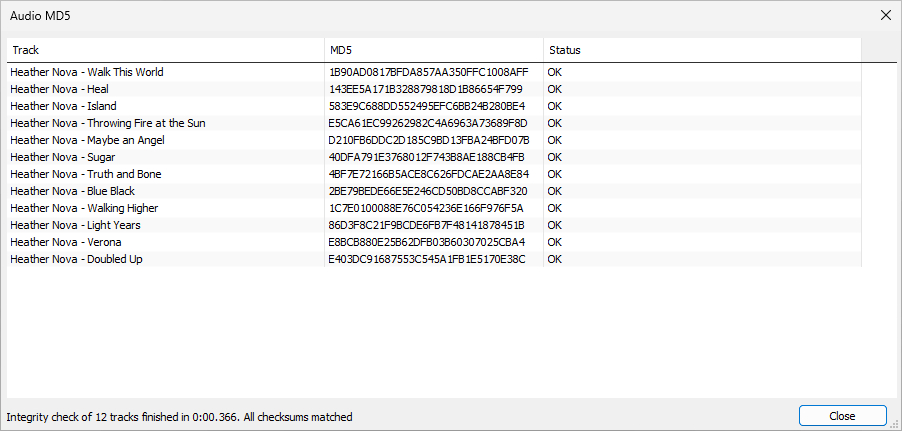
Existing checksums: By default, the component skips tracks that already contain the configured checksum tag. To recalculate them, use the separate, hidden-by-default forced-rescan context-menu command. This is important when changing checksum modes.
Best Practices:
- Confirm the correct checksum mode before beginning a library-wide scan.
- When changing modes, force a rescan of files with existing checksums.
- Keep the checksum field consistent across your library and document the method used.
- Use separate file-level checksums when you need to track changes to tags, artwork or other file contents.
Advanced Techniques
Recalculating an existing library: If your library already contains compressed-audio checksums and you want to adopt PCM-based checksums, configure PCM mode and use the forced-rescan command. Otherwise, existing values may be left unchanged because the default scan skips tagged files.
Verifying results across formats: Select equivalent lossless files in different formats, calculate their PCM checksums and compare the resulting tag values. Matching values provide a convenient way to identify identical decoded audio.
Using decoder integrity verification: Version 0.7 added support for decoder integrity verifiers when calculating PCM checksums. Where supported, this lets the component use the decoder’s integrity-verification facilities as part of the process.
Large-library processing: The component supports multithreaded scanning. For very large collections, process manageable batches and review the results before continuing. Multiple foobar2000 instances are not necessary for normal operation.
Component: www.foobar2000.org/components/view/foo_audiomd5
Reference: en.wikipedia.org/wiki/MD5


