PaulStretch ~ Paul’s Extreme Sound Stretch


This is a program for stretching audio. It is suitable only for extreme sound stretching of the audio (like 50x) and for applying special effects by “spectral smoothing” the sounds. It can transform any sound / music to a texture. The program is Open-Source and it’s released under the version 2 of the General Public License. You can download the source code for Linux or the Windows binaries.

hypermammut.sourceforge.net/paulstretch

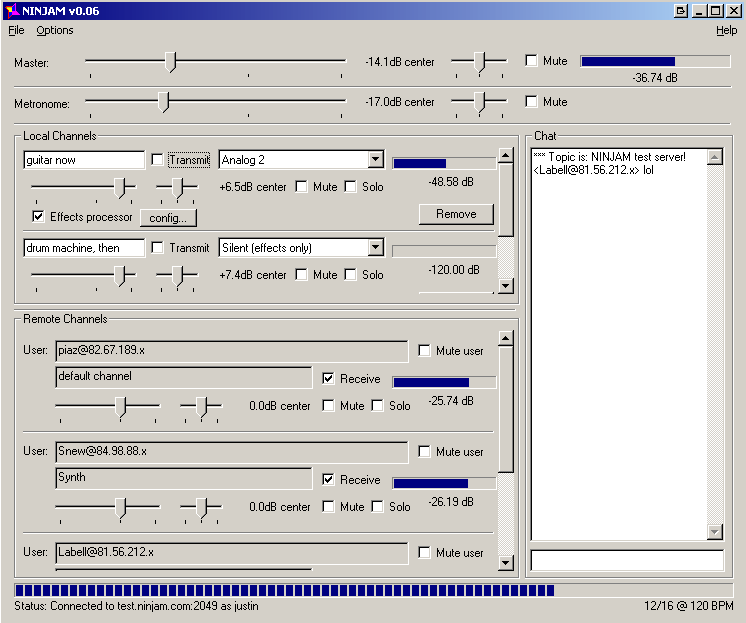
NINJAM ~ Host An Internet Jam


NINJAM is open source (GPL) software which allows people to make real music together via the Internet. Every participant can hear every other participant. Each user can also tweak their personal mix to their liking. NINJAM is cross-platform, with clients available for Mac OSX, Linux and Windows. REAPER (our digital audio workstation software for Windows and Mac) also includes NINJAM support (ReaNINJAM plug-in).

ninjam_win32

www.cockos.com/ninjam
autosong.ninjam.com/server-list
github.com/justinfrankel/ninjam
en.wikipedia.org/wiki/Ninjam

MP3Packer ~ Shrink Or Change MP3s CBR & VBR


MP3packer is a program which can rearrange the data within an MP3 to fulfill specific goals. By default, the program generates the smallest MP3 possible (with the least padding). However, many people also use it to turn VBR files into CBR for use with players which don’t support VBR.

It can save space by storing frame data in the smallest possible frame. Usually MP3s are already stored in the most efficient way possible. However, for high-bitrate CBR files (like -b 320) there can be a lot of wasted space. ~ HydrogenAudio

wiki.hydrogenaud.io/index.php?title=MP3packer

Resources:

mp3packer_v2.04.zip ~ This is an unchanged archival copy of the original MP3packer 2.04 distribution. MP3packer is free software released under the GNU GPL. Sadly, the original author’s download site is no longer reliably available.

CreateM3U ~ m3u Playlist Creator


Drag & drop files or folders to create .m3u playlists. For each folder, a single .m3u file is created named after that folder. It will not replace already existing playlists of that name. The generated playlists do not contain EXTM3U information because a simple .m3u is nothing more than a text file with a list of file names per line. The initial tool for this task for me was a batch file. 😉

As the generated playlists only include filenames without any path, and they are located with the media files, they can be moved together with the files, as an example, for portable mp3 player usage.

createm3u

lostfound.raum108.de/create_m3u

Continue reading →