
Register for instant alerts to get notifications when any release is listed on Discogs for less than or equal to your set price, and greater than or equal to your desired condition.
Tag Archives: Discogs

Albunack ~ Discogs / MusicBrainz Integration & Metasearch
Albunack provides artist discographies by combining two of the largest music information databases MusicBrainz and Discogs.
Albunack shows you MusicBrainz releases and if they are already linked to a Discogs release; suggests potential new links and lists additional Discogs releases. As well as providing comprehensive discographies for artists, Albunack makes it easy for you to contribute to the MusicBrainz database yourself by using the Link, Custom Link and Import features.
Share this:

Tagscanner ~ Tag Editor & Utility
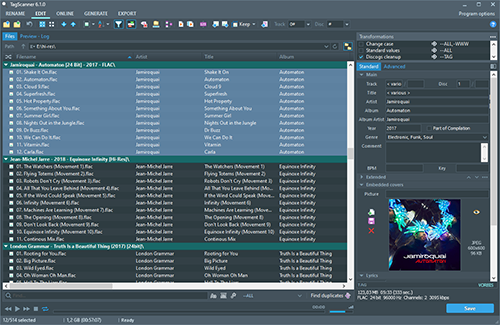
TagScanner is a powerful tool for organizing and managing your music collection. It can edit tags of most modern audio formats, supports ID3v1/v2, Vorbis comments, APEv2, WMA and MP4(iTunes) tags. You can rename files according to information from the tags, import tag information from filenames or other sources, perform any text replacement and transformations in tags and filenames. Also you may get album info and download covers via online databases like freedb, Discogs or MusicBrainz. You can create playlists in one click and export your collection to HTML, Excel or any user-defined format. Program has easy-to-use multilingual interface and built-in audio player.
Features:
- Rename files based on the tag and file information
- Powerful multiple files tag editor
- Import album information and covers from online databases like Discogs or MusicBrainz
- Generate tag information from file/foldernames
- Tag fields formatting and rearrangement
- Words replacement and case conversion from tags and filenames
- Supports MP3, OGG, FLAC, WMA, MPEG-4, Opus, Musepack, Monkey’s Audio, AAC, OptimFROG, SPEEX, WavPack, TrueAudio, WAV, AIFF, Direct Stream Digital files
- Supports ID3 1.0/1.1/2.2/2.3/2.4 tags, APE v1 and v2 tags, Vorbis Comments, WMA tags and MP4(iTunes) metadata
- Supports for embedded lyrics and cover art
- Resize cover art for portable devices on the fly
- TAGs versions conversions
- Quick playlists creation
- Export information to HTML, XML CSV or any user-defined format
- Full support for Unicode
- Multi-language interface
- Built-in audio player
Share this:

Nuclear ~ Stream From Free Sources
A modern music player focused on streaming from free sources.
Features:
- Searching for and playing music from YouTube (including integration with playlists), Jamendo, and SoundCloud
- Searching for albums (powered by Last.fm and Discogs), album view, automatic song lookup based on artist and track name (in progress, can be dodgy sometimes)
- Song queue, which can be exported as a playlist
- Loading saved playlists (stored in json files)
- Scrobbling to last.fm (along with updating the ‘now playing’ status)
- Newest releases with reviews – tracks and albums
- Browsing by genre
- Radio mode (automatically queue similar tracks)
- Unlimited downloads (powered by youtube)
- Realtime lyrics
- Browsing by popularity
- List of favorite tracks
- Listen from local library

nuclear.js.org
github.com/nukeop/nuclear
Share this:

puddletag ~ GNU \ Linux Audio Tag Editor
puddletag is an audio tag editor (primarily created) for GNU/Linux similar to the Windows program, Mp3tag. Unlike most taggers for GNU/Linux, it uses a spreadsheet-like layout so that all the tags you want to edit by hand are visible and easily editable.
The usual tag editor features are supported like extracting tag information from filenames, renaming files based on their tags by using patterns and basic tag editing.
Then there are Functions, which can do things like replace text, trim it, do case conversions, etc. Actions can automate repetitive tasks. Doing web lookups using Amazon (including cover art), Discogs (does cover art too!), FreeDB and MusicBrainz is also supported. There’s quite a bit more, but I’ve reached my comma quota.
Supported formats: ID3v1, ID3v2 (mp3), MP4 (mp4, m4a, etc.), Vorbis Comments (ogg, flac), Musepack (mpc), Monkey’s Audio (.ape) and WavPack (wv).

Share this:

DiscogsToSpotify ~ Playlists From Collections
Both Discogs and Spotify offer a Web API for Third Party Applications like this one. After logging in with your Spotify account, you will be asked to provide a Discogs username. Using the Web APIs, we will query the public collection of the given user and try our best to match each release from the collection to an album on Spotify. The result will be stored for you inside a newly created playlist in your Spotify account.
Share this:

Discogs Enhancer ~ Chrome Browser Extension
Discogs Enhancer is a free, open source extension that adds extra features to both Discogs.com and Chrome.
You can block sellers, use a dark theme, see price comparisons, get feedback notifications, convert foreign currencies, search Discogs and other online record shops with any highlighted text, improve tracklist readability, customize lots of Marketplace aspects, and more!
Every feature is optional so you can choose only the features you want to use.
Share this:

Discogs ~ Website Clientside Scripting
Automatically sorting Discogs master release pages by country:
- First download and install Tampermonkey from https://tampermonkey.net/
- Once it’s installed, open the extension menu and click “Create new script”
- Paste the Javascript code below into the editor and click File > Save
(replace everything that’s there with this code)
// ==UserScript==
// @name         Discogs Master Release Default Sort By Country
// @namespace    https://www.discogs-enhancer.com
// @version      0.1
// @description  Set MR release link to include custom filters by default
// @author       Matthew Salcido (discogs.enhancer@gmail.com)
// @match        https://www.discogs.com/*
// @grant        none
// ==/UserScript==
(function() {
    'use strict';
    const links = [...document.querySelectorAll('a')];
    links.forEach(link => {
        if (link.href.includes('/master/')) {
         link.href += '?sort=country&sort_order=';
        }
    });
})();
Share this:

Ogger Club ~ Extend Discogs Functionality
Ogger for Discogs is a web system which uses the Discogs API in order to provide advanced functionality for the Discogs community. The Ogger Club is the place where you can take advantage of all the system’s features.
The goal of the project is not to replace your Discogs experience, but to extend it with new features that have been requested over time and are yet to be available on Discogs.
ogger.club
Discogs Discussion
Discogs Group
Share this:

EAC & CTDB ~ Verify Your Rips
This plugin verifies your rips against CTDB database, and submits new CDs to it.
It can also serve as a metadata plugin, providing access to MusicBrainz, Discogs and FreeDB metadata via CTDB. CTDB replicates Musicbrainz database hourly, Discogs and FreeDB – monthly. In addition to direct discid search, it supports the same fuzzy search algorithm as Musicbrainz, and also uses it for Discogs and FreeDB data, increasing the chance that correct metadata will be found.

cue.tools/wiki/CTDB_EAC_Plugin
db.cue.tools/ui/ (Database Interface)
Share this:

Kid3 ~ Cross-platform Audio Tagger
Kid3 audio tag editor can edit the tags of MP3, Ogg, FLAC, MPC & WMA files in an efficient way, convert between ID3v1 and ID3v2, set the tags of multiple files, generate tags from file names or vice versa and import from freedb, MusicBrainz and Discogs.
Features
- Edit and convert between ID3v1.1, ID3v2.3 and ID3v2.4 tags of MP3 files
- Supports MP3, Ogg/Vorbis, FLAC, MPC, MP4/AAC, MP2, Speex, TrueAudio, WavPack, WMA, WAV and AIFF files
- Generate tags from filenames and file-, directorynames from tags
- Mass-tagging of multiple files
- Import from gnudb.org, MusicBrainz and Discogs

kid3.sourceforge.io
sourceforge.net/projects/kid3
en.wikipedia.org/wiki/Kid3
Share this:

beets ~ The Music Geek’s Media Organizer
The purpose of beets is to get your music collection right once and for all. It catalogs your collection, automatically improving its metadata as it goes using the MusicBrainz database. Then it provides a bouquet of tools for manipulating and accessing your music.
Because beets is designed as a library, it can do almost anything you can imagine for your music collection. Via plugins, beets becomes a panacea:
- Fetch or calculate all the metadata you could possibly need: album art, lyrics, genres, tempos, ReplayGain levels, or acoustic fingerprints.
- Get metadata from MusicBrainz, Discogs or Beatport. Or guess metadata using songs’ filenames or their acoustic fingerprints.
- Transcode audio to any format you like.
- Check your library for duplicate tracks and albums or for albums that are missing tracks
- Browse your music library graphically through a Web browser and play it in any browser that supports HTML5 Audio and lots more.

 The Audio File